Python Fundamentals — Install, venv, and Tooling
Overview
Python is a language many DevOps teams use for automation: inventory scripts, Application Programming Interface (API) clients, Continuous Integration (CI) helpers, and small tools that wrap kubectl, Terraform, or cloud CLIs. Before you write useful scripts, you need three things: a supported interpreter (the python program), an isolated virtual environment (venv) so project packages do not fight with system packages, and a habit of pinning dependencies so the same pip install works on your laptop and in CI.
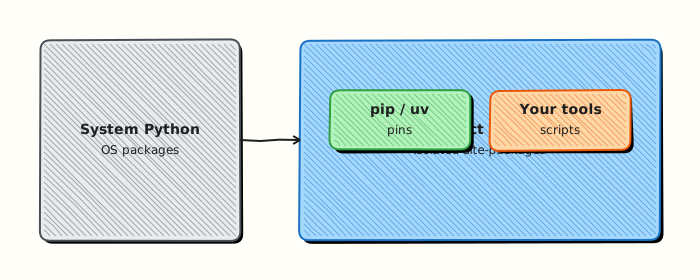
A virtual environment is a project-local folder (often named .venv) with its own python and pip. When you activate it, your shell uses that folder’s tools. Packages you install stay inside the project. That is how you avoid “it works on my machine” when a teammate has a different global Python. In this tutorial you will check the Python version, create a venv under ~/rebash-python/lab01, install a tiny package, freeze a requirements.txt snippet, and run a hello script.
On cloud virtual machines (VMs), jump servers, and CI runners, people often share one image. If everyone installs packages into the system Python, upgrades break other jobs. Production practice is: one venv (or container) per project, pin versions in requirements.txt or a lock file, and never commit secrets into the environment. Tools such as uv and Poetry can speed installs and lock files; pip plus venv is the baseline every engineer should know first.
This is Tutorial 1 in Module 1: Fundamentals of the REBASH Academy Python for DevOps Engineers series. It is written for DevOps, Cloud, Platform, and Site Reliability Engineering (SRE) learners. By the end you will have a reproducible project folder you can reuse for every later lab.
Prerequisites
- Linux Fundamentals
- Shell Scripting
- A Linux host, Windows Subsystem for Linux (WSL2), or practice VM where you can create directories and install packages
- Python 3.11 or newer available as
python3(academy labs work on 3.11–3.13)
Learning Objectives
By the end of this tutorial, you will be able to:
- Explain why DevOps teams isolate projects with a virtual environment
- Verify Python 3.11+ with
python3 -Vand record the interpreter path - Create, activate, and deactivate a project
.venv - Install a package with
pipand freeze arequirements.txtsnippet - Run a small hello script using the venv interpreter
Architecture
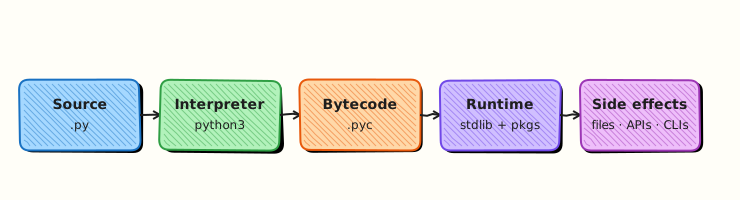
Python tooling sits between your shell and your scripts. The interpreter runs code. The venv points PATH at a project-local bin/ (or Scripts/ on Windows). pip installs packages into that environment only.
Theory
What it is
Python is an interpreted language: you write .py files; the interpreter reads them and runs them. CPython is the usual implementation on Linux. A virtual environment is created with python3 -m venv .venv. After source .venv/bin/activate, which python should show a path under your project.
pip is the package installer that ships with the venv. uv is a fast alternative that can create venvs and install packages. Poetry manages both dependencies and packaging for larger apps. Start with venv + pip; add uv or Poetry when the team standardises on them.
Why it matters
CI jobs and shared VMs break when one person upgrades a global package another job needs. A venv keeps each project’s dependency tree separate. Pinning versions (requests==2.32.3) means a rebuild next month is closer to what you tested. Cloud images may ship an older system Python; your project can still use 3.11+ from deadsnakes, pyenv, or a container — as long as the lab documents which binary you call.
How it works
- Check —
python3 -V,command -v python3. - Create venv —
python3 -m venv .venvinside the project folder. - Activate —
source .venv/bin/activate(Linux/macOS/WSL). - Upgrade pip —
python -m pip install --upgrade pip(optional but common). - Install —
python -m pip install package==version. - Freeze —
python -m pip freeze > requirements.txt(or hand-pin a small file). - Run —
python hello.pyor.venv/bin/python hello.pywithout activating.
Prefer python -m pip over bare pip so you always install into the same interpreter you are about to run.
Key concepts and comparisons
| Tool | Role | Prefer when |
|---|---|---|
venv | Isolate site-packages | Every project and lab |
pip | Install from PyPI | Small tools, CI with a freeze file |
uv | Fast install / sync | Teams that already use Astral tooling |
| Poetry | Deps + package metadata | Libraries and apps with pyproject.toml |
| Pattern | Prefer when | Avoid when |
|---|---|---|
Project .venv | Local and CI with a known Python | Committing .venv into git |
Pinned requirements.txt | Reproducible CI | Unpinned pip install requests forever |
System apt install python3-foo | OS utilities | Mixing with your app’s PyPI stack |
Common pitfalls
- Running
pip installwithout activating the venv (packages go to the wrong Python). - Committing
.venv/to git (large and machine-specific). - Using
sudo pip(can damage the system Python). - Assuming
pythonis Python 3 — on some hostspythonis missing or means Python 2; preferpython3until the venv is active. - Freezing everything including editable local paths without documenting them for teammates.
Hands-on Lab
Objective
Create ~/rebash-python/lab01 with a Python 3.11+ venv, install a tiny package, write a hello script, freeze a requirements snippet, and save proof files for a change ticket.
Prerequisites
python33.11+ and thevenvmodule (python3 -m venv --help)- Shell with
bash(or compatible) - Outbound network to install one package from PyPI (or use offline wheel if your site requires it)
Lab environment
Workspace: ~/rebash-python/lab01
mkdir -p ~/rebash-python/lab01 && cd ~/rebash-python/lab01
set -euo pipefail
python3 -V | tee python-version.txt
command -v python3 | tee python-path.txt
python3 -c 'import sys; assert sys.version_info >= (3, 11), sys.version'
Expected output
python-version.txt shows Python 3.11 or newer; the assert exits 0.
Real-world scenario
Your team is starting a small inventory helper for a practice Ubuntu VM. Platform asks every automation repo to use a project venv, pin dependencies, and prove python -V in CI. You set up the baseline folder and a hello script so later modules can reuse the same layout.
Step-by-step tasks
Task 1 – Create and activate the virtual environment
cd ~/rebash-python/lab01
set -euo pipefail

python3 -m venv .venv
# shellcheck disable=SC1091
source .venv/bin/activate

python -V | tee venv-python-version.txt
command -v python | tee venv-python-path.txt
test -x .venv/bin/python
grep -F '.venv' venv-python-path.txt
Expected output
venv-python-path.txt contains .venv; versions match a 3.11+ interpreter.
Task 2 – Install a package and freeze requirements
cd ~/rebash-python/lab01
set -euo pipefail
# shellcheck disable=SC1091
source .venv/bin/activate

python -m pip install --upgrade pip
python -m pip install 'rich==13.9.4'
python -m pip freeze | tee requirements-full.txt
grep -E '^rich==' requirements-full.txt | tee requirements.txt
test -s requirements.txt
Expected output
requirements.txt contains a line like rich==13.9.4.
Task 3 – Write and run a hello script
cd ~/rebash-python/lab01
set -euo pipefail
# shellcheck disable=SC1091
source .venv/bin/activate
Create hello.py:
"""Minimal DevOps hello — proves the venv interpreter runs project code."""
from __future__ import annotations

import sys
from pathlib import Path

from rich import print as rprint


def main() -> int:
    root = Path(__file__).resolve().parent
    rprint(f"[green]Hello from REBASH Python lab01[/green]")
    rprint(f"Python: {sys.version.split()[0]}")
    rprint(f"Executable: {sys.executable}")
    rprint(f"Project: {root}")
    return 0


if __name__ == "__main__":
    raise SystemExit(main())
Run:
python hello.py | tee hello-output.txt
grep -F 'Hello from REBASH' hello-output.txt
grep -F '.venv' hello-output.txt

tar -czf lab01-evidence.tgz \
  python-version.txt python-path.txt \
  venv-python-version.txt venv-python-path.txt \
  requirements.txt hello.py hello-output.txt
ls -l lab01-evidence.tgz | tee evidence-ls.txt
Expected output
hello-output.txt shows the greeting and a .venv executable path; lab01-evidence.tgz is non-empty.
Validation steps
-
~/rebash-python/lab01/.venv/bin/pythonexists and is executable -
python -Vinside the venv is 3.11+ -
requirements.txtpinsrich -
python hello.pyprints the greeting -
lab01-evidence.tgzexists
Common errors and fixes
| Error | Cause | Fix |
|---|---|---|
ensurepip is not available | Minimal Python without venv/ensurepip | Install python3-venv (Debian/Ubuntu) or use a full Python build |
No module named pip | Broken venv bootstrap | Recreate venv; python -m ensurepip --upgrade |
rich not found at runtime | Forgot to activate venv | source .venv/bin/activate or call .venv/bin/python |
Permission denied under /usr | Used sudo pip | Never use sudo for project pip; use the venv |
| Assert failed on version | Python older than 3.11 | Install 3.11+ and point python3 at it |
Challenge exercise
Add check_env.py that exits 0 only if (1) sys.prefix contains .venv, (2) rich imports, and (3) Path("requirements.txt").read_text() contains rich==. Run it with .venv/bin/python check_env.py and save stdout to check-env-output.txt. Keep the script in the lab folder as your stretch artefact.
Learning outcomes
- Created an isolated project venv with Python 3.11+
- Installed and pinned a dependency with pip
- Ran a project script with the venv interpreter
- Packed evidence suitable for a ticket or interview demo
Cleanup
cd ~/rebash-python/lab01
set -euo pipefail
deactivate 2>/dev/null || true
# Keep evidence; remove the venv if you need disk space:
# rm -rf .venv
# Optional full wipe of generated text (keeps scripts if you want):
# rm -f *.txt lab01-evidence.tgz
Validation
- Lab finished under
~/rebash-python/lab01/with evidence files - You can explain why a venv beats global
pip install - You prefer
python -m pipover barepip - You know not to commit
.venv/into git
Code Walkthrough
In real DevOps repos, Python setup usually follows this order:
- Check the interpreter —
python3 -Vand document the minimum in README - Create
.venvonce per clone — or recreate in CI from scratch - Install from a pin file —
pip install -r requirements.txt - Run with the venv binary — especially in non-interactive CI
- Prove isolation —
which python/sys.executablein logs
Later modules assume this layout. Packaging with pyproject.toml comes in Module 23.
Security Considerations
- Do not run
sudo pip installon shared hosts - Treat
requirements.txtas code — review new packages before merge - Never put API tokens or passwords into venv files or freeze output you commit
- Prefer hash-checking (
pip install --require-hashes) in high-assurance CI when your pipeline supports it - Keep CI runners ephemeral so a compromised package cannot linger on a shared disk
Common Mistakes
Installing with system pip while the venv is inactive
Packages land in the wrong environment and CI cannot reproduce them. Fix: activate the venv or call .venv/bin/python -m pip install ….
Committing the .venv directory
Binaries are large and not portable across operating systems. Fix: add .venv/ to .gitignore; commit only pin files and source.
Using unpinned pip install requests in production CI
A breaking upstream release can fail the pipeline overnight. Fix: pin versions and regenerate pins in a deliberate upgrade pull request.
Assuming python always means Python 3
Some images have no python command. Fix: use python3 to create the venv; after activation, python is safe inside that shell.
Best Practices
- One venv per project; name it
.venvso editors auto-detect it - Document Python minimum version in README (
requires-python >= 3.11) - Prefer
python -m pipandpython -m venv - Keep a short hand-maintained pin list for tiny tools; use a lock tool for larger apps
- In CI, create a fresh venv every job instead of caching a dirty environment
Troubleshooting
| Symptom | Likely cause | Fix |
|---|---|---|
python3: command not found | Python not installed | Install from distro packages or pyenv |
| Wrong package version at runtime | Multiple Pythons on PATH | Activate venv; check sys.executable |
externally-managed-environment | PEP 668 on system Python | Use a venv; do not force --break-system-packages for labs |
| Slow installs on CI | Cold cache | Cache the pip download dir, not a dirty venv |
| Editor uses wrong interpreter | IDE not pointed at .venv | Select .venv/bin/python in VS Code / PyCharm |
Summary
Module 1 gives you a known Python, a project venv, and a pinned install habit. That baseline stops dependency chaos before you write real automation. Next, learn variables, types, and safe input/output in Python Basics — Types and I/O.
Interview Questions
1. Why do DevOps teams use a virtual environment instead of installing packages with system pip?
Reveal answer
A venv keeps each project’s packages separate from the operating system Python and from other projects. On shared VMs and CI runners, global installs cause version conflicts and hard-to-reproduce failures. Interviewers want to hear isolation, reproducibility, and “do not use sudo pip”.
2. What is the difference between python3 -m venv .venv and activating that environment?
Reveal answer
Creating the venv only builds the folder with a private python and pip. Activation changes your shell PATH so python and pip resolve inside .venv. You can skip activation by calling .venv/bin/python directly — common in CI scripts.
3. Why prefer python -m pip install over pip install?
Reveal answer
python -m pip runs pip for that exact interpreter. A bare pip on PATH might belong to another Python. This avoids “installed the package but import still fails”.
4. What should you commit to git from a Python tooling setup, and what should you ignore?
Reveal answer
Commit source, requirements.txt (or lock files), and docs. Ignore .venv/, __pycache__/, and local secret files. The venv is rebuilt from pins on each machine.
5. How would you prove in a ticket that CI used the project venv?
Reveal answer
Log python -V, sys.executable (or which python), and show the path contains the project .venv. Optionally print pip freeze for the job. Evidence beats “we activated it, trust me”.
6. When would you choose uv or Poetry instead of plain pip + venv?
Reveal answer
Choose uv for speed and simple lock/sync workflows. Choose Poetry when the project is a real package with rich metadata and scripts. For small ops scripts, pip + venv remains clear and portable. Match the team standard rather than inventing a third tool alone.
7. A colleague’s script works locally but CI fails with ModuleNotFoundError. What do you check first?
Reveal answer
Confirm CI creates/activates the same venv (or installs from the same pin file), that the dependency is listed, and that CI invokes the venv’s python. Also check the working directory and that the module name matches the package name. Compare sys.path / pip freeze between laptop and CI.
8. What risk does pip install without a version pin create in production automation?
Reveal answer
Upstream can publish a breaking release at any time. Unpinned installs make yesterday’s green pipeline fail today. Pin versions, upgrade in a controlled pull request, and run tests before merging.
Related Tutorials
- Python for DevOps Engineers – Overview
- Linux Fundamentals (prerequisite)
- Python Basics — Types and I/O (next)
- Shell Scripting (related)
References
- venv — Creation of virtual environments — Python documentation
- pip user guide — PyPA
- Installing Python Modules — Python documentation
- Track index: Python for DevOps Engineers