Security for DevOps Python
Overview
Ops scripts often hold more power than application code: cloud credentials, deploy hooks, and shell access on build agents. Security for DevOps Python means treating every CLI as a privileged program — validate inputs, keep secrets out of source and logs, call subprocesses safely, and scan dependencies when tools are available.
In this tutorial you will practise three controls that show up in real reviews: a secret-scanning check that fails when an Application Programming Interface (API) key pattern appears in a file, safe subprocess usage with a list of arguments (never shell=True for untrusted input), and an optional run of bandit or pip-audit when installed. You will keep evidence files for a change ticket.
On Continuous Integration (CI) runners and jump servers, a leaked token or a shell-injection bug becomes a full environment compromise. Teams that skip scanning learn about leaks from public Git history or cloud billing alerts. You do not need every security scanner for the lab to pass — you do need proof that unsafe patterns are caught.
This is Tutorial 25 in Module 25: Security of the REBASH Academy Python for Cloud & DevOps Engineers series. It is written for DevOps, platform, SRE, and DevSecOps engineers. By the end you will have a working security evidence pack under ~/rebash-python/lab25.
Prerequisites
- Production Engineering Patterns
- Configuration Management and Secrets (helpful)
- Python 3.10+ on a practice machine
- Optional:
banditand/orpip-auditviapip(lab continues if they are missing) - Do not use real production secrets in this lab
Learning Objectives
By the end of this tutorial, you will be able to:
- Explain secret-handling rules for CLIs and CI (env vars, not source)
- Detect a fake API key pattern in a file and fail the check
- Run an external command with
subprocesslist arguments (notshell=True) - Run
banditorpip-auditwhen available, or record a clear skip - Package security evidence suitable for a change ticket
Architecture
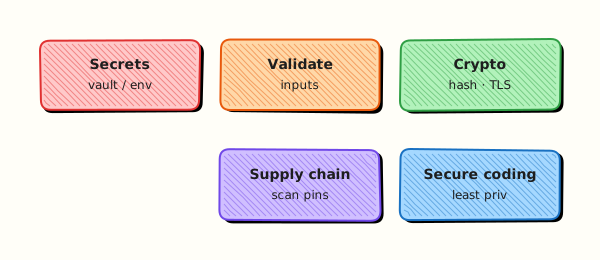
Security controls sit around your automation: secrets enter from the environment or a vault, scanners inspect code and dependencies, and subprocess calls stay on a safe path without a shell.
Theory
What it is
Secret management means credentials live in the environment, a vault, or a cloud Identity and Access Management (IAM) role — not in Git. Input validation rejects dangerous paths and unexpected characters before you use them. Secure subprocess means subprocess.run(["cmd", arg], ...) with a list, so the operating system does not interpret shell metacharacters. Dependency scanning (pip-audit, and static tools like bandit) finds known vulnerable packages and risky code patterns.
import subprocess
# Safe: argv list — no shell metacharacter interpretation
subprocess.run(["python3", "-c", "print(40+2)"], check=True)
Why it matters
A DevOps script with shell=True and a filename from a ticket can become command injection. A hard-coded key in a sample file often reaches the main branch. Unpinned dependencies pull known Common Vulnerabilities and Exposures (CVEs). Security reviews ask for evidence: scanner output, a failing secret check, and a note that shell=True is not used for untrusted data.
How it works
- Secrets — read
os.environ["NAME"]; never commit.envwith real values; never log secret values. - Scan text — regular expression for common key shapes (lab uses a fake
REBASH_API_KEY=pattern). - Subprocess — always prefer list args; set
check=Truewhen failure must abort; capture output deliberately. - Optional tools — if
bandit/pip-auditexist, run them and save logs; if not, writeSKIPPEDwith reason. - Evidence — keep stdout/stderr and exit codes for the ticket.
import re
from pathlib import Path

API_KEY_RE = re.compile(r"REBASH_API_KEY\s*=\s*['\"]?[A-Za-z0-9_\-]{16,}")

def scan_file(path: Path) -> list[str]:
    text = path.read_text(encoding="utf-8", errors="replace")
    return [f"{path}:{i}: secret-like pattern" for i, line in enumerate(text.splitlines(), 1) if API_KEY_RE.search(line)]
Hashing passwords needs a password KDF (for example hashlib.scrypt or a dedicated library). Integrity of files can use SHA-256. Do not “encrypt” secrets by Base64 — that is encoding, not encryption.
Key concepts and comparisons
| Control | Prefer | Avoid |
|---|---|---|
| Secrets | Env / vault / OIDC | Keys in source or world-readable files |
| Subprocess | List argv | shell=True with user input |
| HTTP clients | TLS verify on | verify=False “just for now” |
| Dependencies | Pin + audit in CI | Latest unpinned on every run |
| Tool | Role |
|---|---|
| Custom secret grep / scanner | Catch keys before commit |
bandit | Static risky patterns in Python |
pip-audit | Known vulnerable packages |
Common pitfalls
- Using
shell=Truebecause a one-liner was faster to type. - Committing “temporary” keys and rotating them weeks later.
- Logging
Authorizationheaders at DEBUG in production. - Disabling TLS verification to silence certificate errors.
- Assuming “private repo” means secrets are safe forever.
Hands-on Lab
Objective
Under ~/rebash-python/lab25, build a secret scanner that fails on a planted fake key, demonstrate safe subprocess list-args, run optional bandit/pip-audit, and save an evidence archive.
Prerequisites
- Python 3.10+
- Network only if you choose to
pip installscanners (optional) - Practice folder only — no production credentials
Lab environment
Workspace: ~/rebash-python/lab25
mkdir -p ~/rebash-python/lab25 && cd ~/rebash-python/lab25
set -euo pipefail
python3 --version | tee python-version.txt
Expected output
python-version.txt exists and shows Python 3.10+.
Real-world scenario
Before a platform team merges a new deploy helper, security asks for three proofs: (1) a secret scan that would have caught a committed key, (2) confirmation that shell commands use argv lists, and (3) a dependency or static scan log — or an explicit skip if tools are not on the agent yet. You produce that pack on a practice machine.
Step-by-step tasks
Task 1 – Secret scanner (fail on API key pattern)
Plant a fake key in a sample file, then build a scanner that exits non-zero when the pattern matches. Clean sample must pass.
Create samples/clean_config.txt:
Create samples/leaky_config.txt:
endpoint=https://example.invalid/api
REBASH_API_KEY=AKIA_TRAINING_ONLY_FAKEKEY99
timeout_seconds=10
Create secret_scan.py:
"""Fail if a REBASH_API_KEY-like secret appears in scanned files."""
from __future__ import annotations

import argparse
import re
import sys
from pathlib import Path

API_KEY_RE = re.compile(
    r"REBASH_API_KEY\s*=\s*['\"]?[A-Za-z0-9_\-]{16,}"
)


def scan_path(path: Path) -> list[str]:
    findings: list[str] = []
    if path.is_dir():
        files = sorted(p for p in path.rglob("*") if p.is_file())
    else:
        files = [path]
    for file_path in files:
        text = file_path.read_text(encoding="utf-8", errors="replace")
        for lineno, line in enumerate(text.splitlines(), 1):
            if API_KEY_RE.search(line):
                findings.append(f"{file_path}:{lineno}: secret-like API key pattern")
    return findings


def main(argv: list[str] | None = None) -> int:
    parser = argparse.ArgumentParser(description="REBASH lab25 secret scan")
    parser.add_argument("path", type=Path)
    args = parser.parse_args(argv)
    findings = scan_path(args.path)
    if findings:
        print("RESULT=fail")
        for item in findings:
            print(item)
        return 1
    print("RESULT=ok findings=0")
    return 0


if __name__ == "__main__":
    raise SystemExit(main())
Run:
cd ~/rebash-python/lab25
set -euo pipefail

mkdir -p samples
python3 secret_scan.py samples/clean_config.txt | tee scan-clean.stdout
grep -F 'RESULT=ok' scan-clean.stdout

set +e
python3 secret_scan.py samples/leaky_config.txt >scan-leaky.stdout 2>scan-leaky.stderr
rc=$?
set -e
test "$rc" -ne 0
grep -F 'RESULT=fail' scan-leaky.stdout
grep -F 'secret-like' scan-leaky.stdout
Expected output
clean scan prints RESULT=ok; leaky scan exits non-zero with RESULT=fail.
Task 2 – Safe subprocess (list args, not shell=True)
Create safe_subprocess_demo.py:
"""Demonstrate argv-list subprocess (no shell=True)."""
from __future__ import annotations

import subprocess
import sys


def run_safe(expr: str) -> str:
    # Intentionally NOT shell=True — args are a list.
    completed = subprocess.run(
        [sys.executable, "-c", expr],
        check=True,
        capture_output=True,
        text=True,
    )
    return completed.stdout.strip()


def main() -> int:
    out = run_safe("print(40+2)")
    print(f"safe_output={out}")
    # Document the anti-pattern for training (never enable for untrusted input):
    print("policy=shell_True_forbidden_for_untrusted_input")
    print("RESULT=ok")
    return 0


if __name__ == "__main__":
    raise SystemExit(main())
Run:
cd ~/rebash-python/lab25
set -euo pipefail
python3 safe_subprocess_demo.py | tee safe-subprocess.stdout
grep -F 'safe_output=42' safe-subprocess.stdout
grep -F 'RESULT=ok' safe-subprocess.stdout
# Prove source does not use shell=True
grep -F 'shell=True' safe_subprocess_demo.py && exit 1 || true
grep -F 'subprocess.run' safe_subprocess_demo.py
Expected output
safe_output=42 and RESULT=ok; source has no shell=True.
Task 3 – Optional bandit / pip-audit and evidence pack
cd ~/rebash-python/lab25
set -euo pipefail

# Tiny requirements file for pip-audit demo (stdlib-only project still OK)
printf 'requests==2.32.3\n' > requirements-lab.txt

{
  echo "=== bandit ==="
  if command -v bandit >/dev/null 2>&1; then
    bandit -r . -f txt -x ./samples | tee bandit.txt
    echo "BANDIT=ran" | tee bandit-status.txt
  elif python3 -c "import bandit" 2>/dev/null; then
    python3 -m bandit -r . -f txt -x ./samples | tee bandit.txt
    echo "BANDIT=ran" | tee bandit-status.txt
  else
    echo "BANDIT=skipped reason=not_installed" | tee bandit-status.txt
    echo "Install later with: python3 -m pip install bandit" | tee bandit.txt
  fi

  echo "=== pip-audit ==="
  if command -v pip-audit >/dev/null 2>&1; then
    pip-audit -r requirements-lab.txt | tee pip-audit.txt || true
    echo "PIP_AUDIT=ran" | tee pip-audit-status.txt
  elif python3 -m pip_audit --help >/dev/null 2>&1; then
    python3 -m pip_audit -r requirements-lab.txt | tee pip-audit.txt || true
    echo "PIP_AUDIT=ran" | tee pip-audit-status.txt
  else
    echo "PIP_AUDIT=skipped reason=not_installed" | tee pip-audit-status.txt
    echo "Install later with: python3 -m pip install pip-audit" | tee pip-audit.txt
  fi
} 2>&1 | tee scanners-combined.txt

grep -E 'BANDIT=(ran|skipped)' bandit-status.txt
grep -E 'PIP_AUDIT=(ran|skipped)' pip-audit-status.txt

tar -czf lab25-evidence.tgz \
  python-version.txt secret_scan.py safe_subprocess_demo.py \
  samples/clean_config.txt samples/leaky_config.txt \
  scan-clean.stdout scan-leaky.stdout \
  safe-subprocess.stdout \
  bandit.txt bandit-status.txt pip-audit.txt pip-audit-status.txt \
  requirements-lab.txt scanners-combined.txt
ls -l lab25-evidence.tgz | tee evidence-ls.txt
Expected output
status files say ran or skipped; lab25-evidence.tgz is non-empty. Missing scanners is OK.
Validation steps
- Clean secret scan returns
RESULT=ok - Leaky sample returns non-zero and
RESULT=fail - Safe subprocess demo prints
safe_output=42withoutshell=Truein source -
bandit-status.txtandpip-audit-status.txtexist (ranorskipped) -
lab25-evidence.tgzexists under~/rebash-python/lab25
Common errors and fixes
| Error | Cause | Fix |
|---|---|---|
| Leaky scan passes | Pattern too strict / file path wrong | Scan samples/leaky_config.txt; keep REBASH_API_KEY= line |
bandit: command not found | Not installed | Expected — status must be skipped |
pip-audit needs network | Offline agent | Skip or install in a networked venv; record skip |
| False sense of safety | Only scanned samples/ | Point CI at the whole repo later |
| Real key by mistake | Copied from work | Rotate immediately; use only fake lab keys |
Challenge exercise
Extend secret_scan.py with a --allowlist file of path substrings to ignore (for example samples/leaky_config.txt during a teaching demo). Prove that scanning samples/ with an allowlist entry for the leaky file returns RESULT=ok, and without the allowlist still fails. Do not weaken the default (no allowlist) path.
Learning outcomes
- Secret pattern scan with fail-closed behaviour
- Safe subprocess list-args demo with evidence
- Optional bandit/pip-audit or honest skip status
- Evidence archive for security review
Cleanup
cd ~/rebash-python/lab25
set -euo pipefail
# Remove the intentional leaky sample when finished practising:
# rm -f samples/leaky_config.txt
rm -rf __pycache__
Validation
- Lab finished under
~/rebash-python/lab25/with evidence archive - You can explain why
shell=Trueis dangerous with untrusted input - You know where secrets should live (env/vault/IAM) vs must not live (Git)
- You can describe what bandit and pip-audit each check
Code Walkthrough
Secure DevOps Python usually follows this order:
- Inventory secrets — what the tool needs; prefer IAM/OIDC over static keys
- Fail closed on leaks — scanners in pre-commit and CI
- Safe process boundaries — list argv, timeouts, least privilege user
- Validate inputs — paths, URLs, enums; reject
../surprises - Record evidence — scanner logs and skip reasons, not screenshots only
Security Considerations
- Never commit real API keys — the lab key is fake and marked training-only
- Rotate any credential that might have been pasted into a ticket or chat
- Prefer short-lived cloud credentials over long-lived access keys
- Keep TLS verification enabled on HTTP clients
- Limit who can read CI logs that might accidentally print secrets
Common Mistakes
Using shell=True with ticket or filename input
Metacharacters become command injection. Fix: pass a list to subprocess.run / Popen and avoid the shell.
Disabling secret scan for one file forever
Exceptions become permanent holes. Fix: time-boxed allowlists with owners; delete leaky files.
Base64 as encryption
Encoding is reversible without a key. Fix: use a real vault or platform secret store.
Logging full exception objects that include headers
Tokens appear in log aggregators. Fix: redact; log status codes and request IDs only.
Best Practices
- Run secret scanning on every merge request
- Pin dependencies and audit them in CI (
pip-auditor equivalent) - Use static analysis (
bandit) on automation repos - Document required env vars in README without example secret values
- Separate human credentials from machine/deploy roles
Troubleshooting
| Symptom | Likely cause | Fix |
|---|---|---|
| Scanner misses key | Pattern does not match format | Extend regex carefully; add tests |
| Too many false positives | Pattern too broad | Anchor on known prefixes; allowlist tests only |
| pip-audit fails offline | Needs advisory download | Cache advisories or skip with reason in air-gapped labs |
| bandit flags lab demo | Teaching sample | Exclude samples/ or document finding |
| Secret in Git history | Committed earlier | Rotate key; purge history with team process |
Summary
Secure DevOps Python means secrets out of Git, fail-closed scanning, safe subprocess lists, and honest supply-chain checks. Next, learn offline-first AI assistants for ops in AI for DevOps — OpenAI, MCP, and LangChain.
Interview Questions
1. Why is subprocess with a list safer than shell=True for untrusted input?
Reveal answer
With a list, the operating system starts the program and passes arguments without asking a shell to parse the string. With shell=True, characters such as ;, |, and backticks can run extra commands. Untrusted filenames or ticket fields must never go through a shell.
2. Where should a deploy CLI load its cloud token from, and what must never appear in the repository?
Reveal answer
Load tokens from the environment, a vault, or cloud OIDC/IAM roles injected at runtime. Never store real tokens in source, sample configs, or unit-test fixtures that ship in the wheel. Document variable names in the README, not values.
3. What is the difference between bandit and pip-audit?
Reveal answer
bandit is a static analyser for Python source (risky calls, common anti-patterns). pip-audit checks installed or declared packages against known vulnerability databases. You usually want both: code risks and dependency CVEs are different classes of problem.
4. How would you prove to a security reviewer that a secret cannot land in the main branch unnoticed?
Reveal answer
Show a failing CI job (or local scanner) when a fake key is planted, the scanner config in the pipeline, and that the clean tree passes. Attach logs. Mention pre-commit hooks as defence in depth, and key rotation if anything leaked historically.
5. A junior disabled TLS verification (verify=False) to fix a corporate proxy error. What do you do?
Reveal answer
Treat it as a security defect. Install the corporate Certificate Authority (CA) in the trust store, or configure the correct bundle path. Do not ship verify=False. If a temporary lab exception exists, keep it out of production branches and document the risk.
6. What should happen when a secret scanner finds a match in CI?
Reveal answer
The pipeline must fail closed (non-zero exit), block merge, and alert the author. Rotate the credential if it was real, remove it from history as needed, and add a regression test. Do not mark the job green with a warning-only policy for secrets.
7. How do hashing for passwords and hashing for file integrity differ?
Reveal answer
Password hashing needs a slow, salted password-based key derivation function resistant to brute force. File integrity often uses a fast cryptographic hash such as SHA-256 to detect changes. Reusing a fast hash alone for passwords is a common mistake interviewers listen for.
Related Tutorials
- Python for Cloud & DevOps – Overview
- Production Engineering Patterns (previous)
- AI for DevOps — OpenAI, MCP, and LangChain (next)
- Configuration Management and Secrets
- Linux Automation — subprocess and psutil
References
- subprocess — Subprocess management — Python docs
- Bandit documentation — PyCQA
- pip-audit — PyPI
- OWASP Secrets Management Cheat Sheet
- Track index: Python for Cloud & DevOps Engineers