Packaging — pyproject.toml and Wheels
Overview
PYTHONPATH=. works in labs. Teams need pip install (or uv) of an internal wheel. Modern packaging centres on pyproject.toml (PEP 621) plus a build backend such as setuptools or hatchling. A wheel is the built install artefact; a source distribution (sdist) ships source for rebuilds.
DevOps tools leave the practice folder when colleagues run a stable CLI name from a private index. Packaging gives versioned releases, dependency declarations, and [project.scripts] entry points. Without it you copy files and hope the path is set.
This is Tutorial 23 in Module 23: Packaging of the REBASH Academy Python for Cloud & DevOps Engineers series. It is written for DevOps, Platform, and Site Reliability Engineering (SRE) engineers. By the end you will build a wheel under ~/rebash-python/lab23, install it into a clean venv, and run the entry point — then continue to Production Engineering Patterns.
Prerequisites
- Testing with pytest
- Modules, Packages, and Dependencies
- CLI Applications — argparse, Click, and Typer
- Python 3.10+ with pip
Learning Objectives
By the end of this tutorial, you will be able to:
- Author a minimal
pyproject.tomlwith project metadata - Declare
requires-pythonand dependencies - Define a console script entry point
- Build a wheel with
python -m build(or pip wheel) - Install the wheel into a clean venv and run the CLI
- Explain versioning and private index publishing at a high level
Architecture
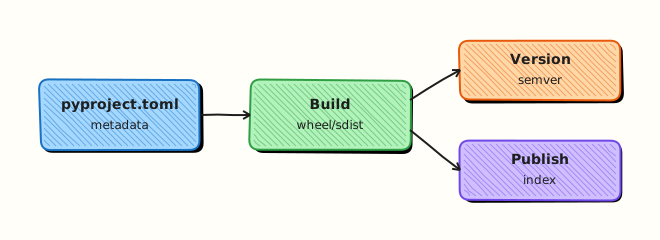
Source plus pyproject.toml goes through a build backend to produce dist/*.whl. Users install the wheel into an environment and get a console script on PATH.
Theory
What it is
Packaging turns a folder of modules into an installable distribution: metadata, dependencies, and entry-point console scripts. pyproject.toml is the standard place for that metadata. A wheel installs quickly for pure Python; an sdist is the source archive.
Why it matters
Internal indexes (Artifactory, CodeArtifact, GitHub Packages) become the team’s store for automation CLIs. CI images pin a version (rebash-invcheck==0.1.0) instead of cloning random branches. Clear packaging also makes security scanning and licence checks possible on artefacts.
How it works
[project]— name, version,requires-python, dependencies.[project.scripts]— maps a command tomodule:function.[build-system]— names the build backend (setuptools, hatchling, …).- Build —
python -m buildwritesdist/*.whland often an sdist. - Install & verify — clean venv,
pip install dist/*.whl, run the console script.
[project]
name = "rebash-invcheck"
version = "0.1.0"
requires-python = ">=3.10"
dependencies = []

[project.scripts]
rebash-invcheck = "rebash_invcheck.cli:main"

[build-system]
requires = ["setuptools>=68"]
build-backend = "setuptools.build_meta"
Key concepts and comparisons
| Artefact | Contents | Use |
|---|---|---|
| sdist | Source + metadata | Rebuild on exotic platforms |
| wheel | Built package | Fast, preferred installs |
| Dependency style | When |
|---|---|
Ranges (>=x,<y) | Libraries others import |
| Exact pins / lockfile | Apps and deploy images |
| Optional extras | Heavy optional features |
Version with SemVer-style MAJOR.MINOR.PATCH. Automate from git later (setuptools_scm) once the basics are solid.
Common pitfalls
- Forgetting
[project.scripts]so the CLI never appears onPATH. - Shipping secrets or huge fixtures inside package data.
- Publishing
0.0.0repeatedly without tags — consumers cannot pin. - Mixing editable installs and system Python until imports resolve wrongly.
- Using an untrusted private index without Transport Layer Security (TLS) verification.
Hands-on Lab
Objective
Under ~/rebash-python/lab23, create a small installable package with pyproject.toml, build a wheel, install it into a fresh venv, and run the console entry point successfully.
Prerequisites
- Python 3.10+
- Network enough to pip-install
build(or usepip wheelwith setuptools)
Lab environment
Workspace: ~/rebash-python/lab23
mkdir -p ~/rebash-python/lab23 && cd ~/rebash-python/lab23
set -euo pipefail
python3 --version | tee python-version.txt
Expected output
python-version.txt shows Python 3.10+.
Real-world scenario
Your inventory classifier from the pytest tutorial needs to ship to other teams. They should run pip install from an internal wheel and call rebash-invcheck — not clone your home directory. You package it, build a wheel, and prove the entry point in a clean virtual environment for the release checklist.
Step-by-step tasks
Task 1 – Package layout and pyproject.toml
Create src/rebash_invcheck/__init__.py:
Create src/rebash_invcheck/cli.py:
from __future__ import annotations

import argparse
import json
import sys
from pathlib import Path


def classify(status: str) -> str:
    value = status.lower().strip()
    if value in {"up", "healthy", "ok"}:
        return "healthy"
    if value in {"down", "unhealthy", "failed"}:
        return "unhealthy"
    return "unknown"


def main(argv: list[str] | None = None) -> int:
    parser = argparse.ArgumentParser(prog="rebash-invcheck")
    parser.add_argument("inventory", type=Path, help="JSON list of hosts with status")
    args = parser.parse_args(argv)
    data = json.loads(args.inventory.read_text(encoding="utf-8"))
    if not isinstance(data, list):
        print("inventory must be a JSON list", file=sys.stderr)
        return 2
    summary = {"healthy": 0, "unhealthy": 0, "unknown": 0}
    for item in data:
        summary[classify(str(item.get("status", "")))] += 1
    print(json.dumps(summary))
    return 0


if __name__ == "__main__":
    raise SystemExit(main())
Create pyproject.toml:
[build-system]
requires = ["setuptools>=68", "wheel"]
build-backend = "setuptools.build_meta"

[project]
name = "rebash-invcheck"
version = "0.1.0"
description = "REBASH lab inventory checker CLI"
readme = "README.md"
requires-python = ">=3.10"
dependencies = []

[project.scripts]
rebash-invcheck = "rebash_invcheck.cli:main"

[tool.setuptools.packages.find]
where = ["src"]
Create README.md:
Create hosts.json:
Run:
Expected output
src/rebash_invcheck/cli.py and pyproject.toml exist.
Task 2 – Build the wheel
cd ~/rebash-python/lab23
set -euo pipefail

python3 -m venv .build-venv
# shellcheck disable=SC1091
source .build-venv/bin/activate
python -m pip install -q --upgrade pip build
python -m build --wheel | tee build-log.txt
ls -l dist/*.whl | tee wheel-ls.txt
test -f dist/rebash_invcheck-0.1.0-py3-none-any.whl || ls dist/*.whl | grep -q rebash_invcheck
deactivate
Expected output
dist/ contains a rebash_invcheck-0.1.0-*.whl file; build-log.txt shows a successful build.
If build cannot be installed, fall back:
cd ~/rebash-python/lab23
set -euo pipefail
python3 -m venv .build-venv
# shellcheck disable=SC1091
source .build-venv/bin/activate
python -m pip install -q --upgrade pip setuptools wheel
python -m pip wheel . -w dist --no-deps | tee build-log.txt
ls -l dist/*.whl | tee wheel-ls.txt
deactivate
Task 3 – Install into a clean venv and run entry point
cd ~/rebash-python/lab23
set -euo pipefail

python3 -m venv .run-venv
# shellcheck disable=SC1091
source .run-venv/bin/activate
python -m pip install -q --upgrade pip
WHEEL="$(ls dist/rebash_invcheck-0.1.0-*.whl | head -n 1)"
test -n "$WHEEL"
python -m pip install -q "$WHEEL"
command -v rebash-invcheck | tee entrypoint-path.txt
rebash-invcheck hosts.json | tee cli-out.txt
python - << 'PY'
import json
from pathlib import Path
assert json.loads(Path("cli-out.txt").read_text(encoding="utf-8")) == {
    "healthy": 1,
    "unhealthy": 1,
    "unknown": 0,
}
print("entrypoint_ok")
PY
deactivate

tar -czf packaging-lab-evidence.tgz \
  python-version.txt build-log.txt wheel-ls.txt \
  entrypoint-path.txt cli-out.txt pyproject.toml hosts.json README.md
ls -l packaging-lab-evidence.tgz | tee evidence-ls.txt
test -s packaging-lab-evidence.tgz
Expected output
cli-out.txt is {"healthy": 1, "unhealthy": 1, "unknown": 0}; entry point resolves inside .run-venv.
Validation steps
-
pyproject.tomldeclares[project.scripts]forrebash-invcheck - A wheel exists under
dist/ - Clean
.run-venvcan import/run withoutPYTHONPATH=. -
rebash-invcheck hosts.jsonprints the expected JSON summary - Evidence archive exists under
~/rebash-python/lab23
Common errors and fixes
| Error | Cause | Fix |
|---|---|---|
No module named build | Plugin missing | pip install build in .build-venv, or use pip wheel fallback |
| Package not found after install | Wrong package layout | Ensure src/rebash_invcheck and [tool.setuptools.packages.find] where = ["src"] |
rebash-invcheck: command not found | Entry point typo / wrong venv | Check module:function; activate .run-venv |
| Wheel name differs slightly | Platform tag | ls dist/*.whl and install the actual filename |
| Readme required error | Missing README | Keep the small README.md from Task 1 |
Challenge exercise
Add a pyproject.toml optional extra [project.optional-dependencies] dev = ["pytest>=8"], install rebash-invcheck[dev] into a third venv, and add a tiny tests/test_cli.py that calls main(["hosts.json"]) asserting return code 0. Keep the wheel install path working without extras for production images.
Learning outcomes
- Authored PEP 621 metadata and a console script
- Built a wheel with the modern build frontend
- Verified install in a clean venv
- Can explain why wheels beat ad-hoc
PYTHONPATHfor teams
Cleanup
cd ~/rebash-python/lab23
set -euo pipefail
rm -rf .build-venv .run-venv build *.egg-info src/*.egg-info
# Keep dist/ and evidence if you want them; otherwise:
# rm -rf dist packaging-lab-evidence.tgz
Validation
- Lab finished under
~/rebash-python/lab23/with a working entry point - You can explain sdist vs wheel
- You know why private indexes need TLS and access control
- You can describe the next step: production resilience patterns
Code Walkthrough
Production packaging usually follows this order:
- src layout — keep tests and labs outside the installed package
- Pin metadata — version, requires-python, scripts
- Build in CI — reproducible wheel artefact
- Install into clean env — prove the entry point
- Publish to private index — tag releases; scan artefacts
Least privilege for publish tokens; never bake secrets into wheels.
Security Considerations
- Do not ship
.env, private keys, or cloud credentials in package data - Verify TLS when installing from private indexes
- Scope publish tokens to one repository with short lifetime
- Pin versions in production images for reproducible builds
- Review entry points — a malicious script name on PATH is a supply-chain risk
Common Mistakes
Forgetting [project.scripts]
Users install the package but have no CLI. Fix: map command = "package.module:function" and reinstall the wheel.
Editable install confusion on servers
pip install -e on a laptop path breaks when the path disappears. Fix: production images install the wheel, not editable source.
Shipping secrets inside the wheel
Anyone who installs the package can unpack it. Fix: load secrets at runtime from the environment or a vault.
Reusing version 0.0.0 forever
Consumers cannot pin or roll back. Fix: SemVer on each release; automate from git tags when ready.
Best Practices
- Prefer src layout for tools you publish
- Build wheels in CI and attach them to releases
- Document private index URL in the README
- Keep runtime dependencies minimal for ops CLIs
- Test install in a clean venv on every release tag
Troubleshooting
| Symptom | Likely cause | Fix |
|---|---|---|
| Package not found | Wrong where / package name | Fix setuptools package find; check import name vs distribution name |
| Script missing | Entry point typo | Check module:function; reinstall wheel |
| Wrong Python | requires-python | Build/install with a supported interpreter |
README.md missing error | Metadata requires readme | Add README or remove readme key |
| Conflicting install | System site-packages bleed | Use a fresh venv (python -m venv) |
Summary
pyproject.toml is the packaging source of truth; wheels install cleanly in CI and servers; console scripts expose CLIs. This lab built, installed, and ran rebash-invcheck from a wheel. Next, harden runtime behaviour in Production Engineering Patterns.
Interview Questions
1. What problem does a wheel solve compared with setting PYTHONPATH?
Reveal answer
A wheel is a versioned, installable artefact with metadata and entry points. Colleagues and CI images run pip install and get a stable CLI on PATH. PYTHONPATH=. is fine for local experiments but does not scale for shared tools, dependency declaration, or artefact scanning.
2. What is the difference between a distribution name and an import package name?
Reveal answer
The distribution name (in pyproject.toml / PyPI) may use hyphens (rebash-invcheck). The import package uses underscores (rebash_invcheck). Entry points reference the import path. Confusing the two causes “installed but cannot import” tickets.
3. Why use a src layout for packaging?
Reveal answer
src layout prevents accidentally importing the working tree instead of the installed package during tests. It forces you to install (editable or wheel) so tests match what users get. It is a common best practice for libraries and CLIs you publish.
4. How would you publish this CLI for an internal-only team?
Reveal answer
Build the wheel in CI, push to a private index (Artifactory, CodeArtifact, GitHub Packages) over TLS, restrict who can publish, and document the index URL. Pin versions in deployment images. Do not require every engineer to clone the source repo for routine use.
5. What should never be included inside a wheel?
Reveal answer
Secrets, production kubeconfigs, huge binary datasets, and credentials files. Load secrets at runtime. Keep package data minimal and intentional.
6. How do console script entry points work?
Reveal answer
[project.scripts] maps a command name to module:function. On install, pip creates a small wrapper on PATH that imports the function and calls it. Typos in the module path produce “command not found” or import errors after install — always verify in a clean venv.
7. When are dependency ranges better than exact pins?
Reveal answer
Ranges suit libraries that others import, so they can coexist. Exact pins / lockfiles suit applications and deploy images where reproducibility matters more than flexibility. Ops CLIs shipped as apps often pin in the image even if the library metadata uses modest ranges.
8. How does packaging relate to the next production-engineering work?
Reveal answer
Packaging gets the tool installed consistently; production patterns (retries, metrics, health checks) keep it reliable at runtime. Interviewers like hearing both: ship a wheel, then add resilience and observability — not a random script on a jump server.
Related Tutorials
- Python for Cloud & DevOps – Overview
- Testing with pytest (previous)
- Production Engineering Patterns (next)
- Modules, Packages, and Dependencies
- CLI Applications — argparse, Click, and Typer