Control Flow — Conditionals and Loops
Overview
Automation is mostly decisions and repetition. Should this host be patched? Is disk usage above a threshold? For each row in an inventory file, do work — unless the row is a comment. In Python, conditionals (if / elif / else) choose a path. Loops (for, while) repeat work. break leaves a loop early; continue skips to the next item; pass is an intentional empty block.
This tutorial builds an inventory filter: read host rows, skip junk lines, classify environments, and stop early when a limit is reached. That is the same shape as “scan nodes until you find three unhealthy ones” in real SRE work. You will also see match (Python 3.10+) as a clean alternative for multi-way string branches.
Deep nesting is hard to test and hard to review. Prefer flat checks, early continue, and small loops with asserts. Functions in Module 4 will turn these patterns into reusable pieces; here you focus on clear control flow with proof.
This is Tutorial 3 in Module 3: Control Flow of the REBASH Academy Python for DevOps Engineers series.
Prerequisites
- Python Basics — Types and I/O
- Comfortable creating a venv under
~/rebash-python/
Learning Objectives
By the end of this tutorial, you will be able to:
- Write
if/elif/elsebranches for ops classification - Loop with
forover inventories and withwhilefor retries/limits - Use
break,continue, andpassintentionally - Apply
matchfor simple multi-way string routing (3.10+) - Assert filter results so CI can prove the logic
Architecture
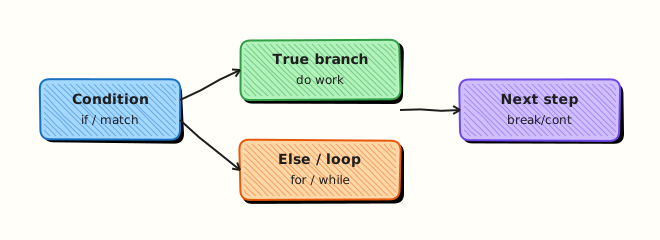
Control flow sits between input data and actions. Conditions gate work; loops walk collections; break/continue shape early exit and skip rules.
Theory
What it is
if load > 90:
    state = "critical"
elif load > 70:
    state = "warn"
else:
    state = "ok"

for host in hosts:
    if host.startswith("#"):
        continue
    # process host
A for loop walks an iterable (list, file lines, range). A while loop repeats while a condition stays true — useful for retries with a counter. match compares a subject against patterns (good for status strings).
Why it matters
Inventory scripts that forget to skip comments will try to SSH to # bastion. Loops without a limit can hammer an API forever. Missing elif order bugs classify critical as warn when thresholds are checked the wrong way. Clear control flow is how you keep automation predictable.
How it works
- Branch — evaluate booleans; first matching
if/elifwins. - Iterate —
for item in iterable:. - Skip —
continuejumps to the next iteration. - Stop —
breakleaves the nearest loop. - Placeholder —
passkeeps a block syntactically valid while you stub logic. - Retry style —
while attempts < max_attempts:with a counter (avoid barewhile Truewithout a guard).
attempts = 0
while attempts < 3:
    attempts += 1
    if try_connect():
        break
else:
    # while-else runs if loop did not break
    raise RuntimeError("connect failed")
Key concepts and comparisons
| Construct | Use for | Avoid for |
|---|---|---|
if/elif/else | Thresholds, flags | Deep 6-level nesting |
for | Known collections / lines | Busy-wait polling |
while | Retries with a counter | Infinite loops without backoff |
match | Multi-way string/status routing | Complex object graphs (keep patterns simple) |
break/continue | Early stop / skip noise | Replacing clear functions entirely |
| Pattern | Prefer when | Avoid when |
|---|---|---|
Early continue | Filtering inventory rows | Hiding important skips without comments |
| Guard clauses | Flat readable scripts | Nesting every check in else |
while + max attempts | Network retries | Unlimited while True in CI |
Common pitfalls
- Checking wide thresholds before narrow ones (
> 70before> 90). - Forgetting
continueon comment/blank lines. - Using
for+ growing a list when a later comprehension (Module 5) would be clearer — still fine to learn loops first. - Relying on
while Truewithoutbreakconditions. - Empty
except/ empty blocks withoutpasswhere a stub is intended (syntax error).
Hands-on Lab
Objective
Build filter_inventory.py under ~/rebash-python/lab03 that filters a sample inventory with if/elif, for/while, break/continue, and writes asserted outputs.
Prerequisites
- Python 3.11+ venv skills from Modules 1–2
Lab environment
Workspace: ~/rebash-python/lab03
mkdir -p ~/rebash-python/lab03 && cd ~/rebash-python/lab03
set -euo pipefail
python3 -m venv .venv
# shellcheck disable=SC1091
source .venv/bin/activate
python -c 'import sys; assert sys.version_info >= (3, 11)'
python -V | tee python-version.txt
Expected output
venv ready; version file written.
Real-world scenario
Operations keeps a flat inventory of hosts with environment tags. Nightly automation must select only prod hosts that are marked active, skip comments, and stop after processing a maximum number of hosts so a bad file cannot create thousands of jobs. You implement and prove that filter.
Step-by-step tasks
Task 1 – Sample inventory and filter script
cd ~/rebash-python/lab03
set -euo pipefail
# shellcheck disable=SC1091
source .venv/bin/activate
Create inventory.txt:
# name,env,status
web-01,prod,active
web-02,prod,draining
api-01,staging,active
# spare capacity
db-01,prod,active
batch-01,dev,active
db-02,prod,active
Create filter_inventory.py:
"""Filter inventory rows with conditionals and loops."""
from __future__ import annotations

import sys
from pathlib import Path


def classify(env: str, status: str) -> str:
    if env == "prod" and status == "active":
        return "deploy-candidate"
    elif env == "prod" and status == "draining":
        return "drain-only"
    elif env == "staging":
        return "staging-pool"
    else:
        return "ignore"


def filter_rows(lines: list[str], limit: int) -> list[str]:
    selected: list[str] = []
    for raw in lines:
        line = raw.strip()
        if not line or line.startswith("#"):
            continue
        parts = line.split(",")
        if len(parts) != 3:
            continue
        name, env, status = parts
        label = classify(env, status)
        if label != "deploy-candidate":
            continue
        selected.append(name)
        if len(selected) >= limit:
            break
    return selected


def retry_probe(max_attempts: int = 3) -> int:
    """Demo while-loop with break; returns attempts used."""
    attempts = 0
    while attempts < max_attempts:
        attempts += 1
        # Simulated success on attempt 2
        if attempts >= 2:
            break
    return attempts


def main() -> int:
    path = Path("inventory.txt")
    lines = path.read_text(encoding="utf-8").splitlines()
    selected = filter_rows(lines, limit=2)
    print("selected=" + ",".join(selected))
    print(f"count={len(selected)}")
    print(f"probe_attempts={retry_probe()}")
    # Asserts for lab / CI
    assert selected == ["web-01", "db-01"], selected
    assert retry_probe() == 2
    return 0


if __name__ == "__main__":
    raise SystemExit(main())
Run:
Expected output
inventory.txt and filter_inventory.py exist.
Task 2 – Run filter and capture evidence
cd ~/rebash-python/lab03
set -euo pipefail
# shellcheck disable=SC1091
source .venv/bin/activate

python filter_inventory.py | tee filter-output.txt
grep -F 'selected=web-01,db-01' filter-output.txt
grep -F 'count=2' filter-output.txt
grep -F 'probe_attempts=2' filter-output.txt
Expected output
only the first two prod/active hosts; probe attempts equal 2.
Task 3 – match routing and continue/break checks
cd ~/rebash-python/lab03
set -euo pipefail
# shellcheck disable=SC1091
source .venv/bin/activate
Create route_status.py:
"""match-based status router (Python 3.10+)."""
from __future__ import annotations


def route(status: str) -> str:
    match status:
        case "active":
            return "run-checks"
        case "draining":
            return "no-new-traffic"
        case "down":
            return "page-oncall"
        case _:
            return "unknown"


def demo_loop() -> list[str]:
    actions: list[str] = []
    for status in ["active", "skip-me", "draining", "down"]:
        if status == "skip-me":
            continue
        action = route(status)
        actions.append(f"{status}:{action}")
        if status == "draining":
            break
    return actions


if __name__ == "__main__":
    out = demo_loop()
    print("|".join(out))
    assert out == ["active:run-checks", "draining:no-new-traffic"], out
Run:
python route_status.py | tee route-output.txt
grep -F 'active:run-checks|draining:no-new-traffic' route-output.txt

tar -czf lab03-evidence.tgz inventory.txt filter_inventory.py filter-output.txt route_status.py route-output.txt
ls -l lab03-evidence.tgz | tee evidence-ls.txt
Expected output
route demo stops after draining (does not include down); evidence archive created.
Validation steps
-
filter_inventory.pyselects exactlyweb-01,db-01 - Comment lines are skipped
-
whileprobe stops at attempt 2 -
matchrouter +continue/breakdemo passes asserts -
lab03-evidence.tgzexists
Common errors and fixes
| Error | Cause | Fix |
|---|---|---|
AssertionError on selected hosts | Limit/order wrong | Confirm break after two candidates; inventory order |
SyntaxError: match | Python older than 3.10 | Use 3.11+ venv from lab setup |
Includes web-02 | Treated draining as active | Check classify conditions |
| Infinite loop | while True without break | Always bound retries |
Challenge exercise
Add filter_by_env.py that reads inventory.txt, accepts an env name as sys.argv[1], prints matching active hostnames one per line, and exits 1 if none match. Include a --limit N style simple second arg (integer) using basic argv parsing (no argparse yet). Prove with prod → at least web-01 and db-01, and with prod limit 1 → exactly one line.
Learning outcomes
- Filtered inventory with
if/elifandcontinue - Bounded selection with
break - Demonstrated
whileretry counting - Used
matchfor status routing
Cleanup
cd ~/rebash-python/lab03
set -euo pipefail
deactivate 2>/dev/null || true
# rm -rf .venv
# rm -f *.txt lab03-evidence.tgz
Validation
- Lab finished under
~/rebash-python/lab03/ - You can explain
breakvscontinue - You order threshold checks from specific to general
- You bound
whileloops in automation
Code Walkthrough
Habits for control flow in ops scripts:
- Filter noise first — blank/comment lines →
continue - Classify with clear labels — return strings you can log
- Bound work — limits prevent runaway jobs
- Prefer flat loops — extract functions next module instead of nesting
- Assert in labs/CI — prove the selection set
Security Considerations
- Do not auto-target hosts from untrusted inventory without validation
- Cap loop limits when inventory comes from user upload
- Avoid executing shell from a loop over raw names without allow-lists
- Log skip reasons at debug level without leaking secrets
- Fail closed when classification is
unknownfor privileged actions
Common Mistakes
Threshold order bugs
Checking load > 70 before load > 90 never reaches critical. Fix: test the stricter condition first.
Forgetting to skip comments
Inventory headers and # lines become fake hosts. Fix: continue on blanks and comments.
Unlimited while True
A stuck dependency becomes an infinite CI bill. Fix: max attempts + timeout.
Using pass to silence real errors
Empty handlers hide failures. Fix: use pass only for intentional stubs; never for swallowed exceptions.
Best Practices
- Keep loop bodies short; call functions for real work
- Name booleans clearly (
is_active,should_deploy) - Log when
breaktriggers because a limit was hit - Prefer
forover manual index loops - Add asserts or tests for filter edge cases
Troubleshooting
| Symptom | Likely cause | Fix |
|---|---|---|
| Empty selection | All rows skipped | Print each skip reason temporarily |
| Too many hosts | Missing break/limit | Enforce max selection |
match SyntaxError | Old Python | Upgrade to 3.11+ |
| Staging host selected for prod deploy | Wrong elif chain | Tighten classify conditions |
Summary
Conditionals and loops turn raw inventories into intentional action lists. Skip noise, classify clearly, bound work, and prove results with asserts. Next, package logic into Functions — Parameters and Scope.
Interview Questions
1. What is the difference between break and continue?
Reveal answer
break leaves the nearest loop entirely. continue skips the rest of the current iteration and goes to the next item. In inventory filters, continue skips comments; break stops after enough candidates.
2. How do you avoid infinite loops in retry logic?
Reveal answer
Use a maximum attempt counter, optional sleep/backoff, and a clear failure path when attempts are exhausted. Prefer while attempts < max_attempts over bare while True unless a break is guaranteed.
3. Why does the order of if / elif threshold checks matter?
Reveal answer
The first true branch wins. If a wide condition comes first, a stricter one never runs. Always evaluate the most specific / critical thresholds first.
4. When is match a better fit than a long if/elif chain?
Reveal answer
When you route on a single subject with several constant patterns (status strings, simple enums). Keep patterns readable. For complex boolean combinations, normal if may stay clearer.
5. What does a for/while else clause mean in Python?
Reveal answer
The else on a loop runs when the loop did not hit break. It is useful for “retry until success, else fail” patterns. Many teams avoid it for readability — if you use it, comment why.
6. How would you explain pass in an interview?
Reveal answer
pass is a no-op placeholder so a block is syntactically valid. Use it for stubs under development, not for swallowing errors. Empty except: pass is a red flag in production code.
7. An inventory filter includes header lines as hosts. What control-flow fix do you apply?
Reveal answer
Detect headers/comments (startswith("#") or column-name rows) and continue. Add a unit/lab assert that those lines never appear in the selection list.
8. How do you prove a selection limit of two hosts in CI?
Reveal answer
Run the filter on a fixture file and assert the exact list length and contents (as in this lab). Also test that a third matching host exists in the fixture but is not selected after break.
Related Tutorials
- Python for DevOps Engineers – Overview
- Python Basics — Types and I/O (previous)
- Functions — Parameters and Scope (next)
- Data Structures — Comprehensions and Generators (related)
References
- Compound statements —
if,for,while,match - break and continue Statements — Python tutorial
- Track index: Python for DevOps Engineers