Linux Automation — subprocess and psutil
Overview
DevOps scripts often need facts from the Linux host: kernel name, listening ports, disk pressure, or whether a process is alive. In Python you get those facts by running safe commands with subprocess, reading paths with pathlib, and (optionally) sampling CPU and memory with psutil. You are not replacing systemd or the package manager — you wrap the same tools operators already trust, with timeouts and structured exit handling.
A common mistake is shell=True plus string concatenation. That pattern can turn user input into a shell injection. Prefer an argument list, always set a timeout, and capture stdout/stderr as text when you need to parse it. Check returncode instead of assuming success. Use pathlib and shutil for file copy and disk usage. Register short handlers for SIGINT / SIGTERM so long jobs can exit cleanly in Continuous Integration (CI).
On jump servers, cloud virtual machines (VMs), and CI runners, hung commands without timeouts waste minutes; scripts that run as root “to make CI green” create security risk. Good automation fails closed when permissions are missing, writes evidence to a file, and stays readable for the next engineer on call.
This is Tutorial 13 in Module 13: Linux Automation of the REBASH Academy Python for DevOps Engineers series. It is written for Cloud, DevOps, Platform, Linux, and Site Reliability Engineering (SRE) engineers. By the end you will have a small host probe that writes JSON evidence you can attach to a change ticket or interview portfolio.
Prerequisites
- CLI Applications — argparse, Click, and Typer
- Python 3.10+ on Linux, Windows Subsystem for Linux (WSL), or macOS
- Ability to create a virtual environment (
python3 -m venv) - Optional: package
iproute2on Linux forip/ss(the lab falls back touname)
Learning Objectives
By the end of this tutorial, you will be able to:
- Call
subprocess.runwith a list of arguments, timeout, and captured stdout - Handle non-zero return codes without hiding failures
- Use pathlib and shutil for paths and disk usage checks
- Optionally sample CPU and memory with
psutilinside a venv - Explain why
shell=Trueis dangerous with untrusted input - Write host facts to a JSON evidence file for tickets or CI
Architecture
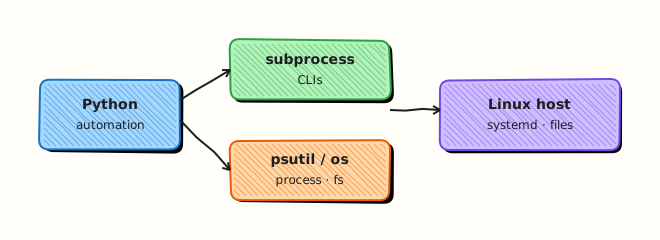
Python sits between your automation and the host: subprocess starts CLIs; pathlib/shutil touch the filesystem; psutil reads /proc-style counters without scraping text by hand.
Theory
What it is
subprocess starts another program, waits (with a timeout), and returns a result object with returncode, stdout, and stderr. os and pathlib describe the process environment and paths. shutil copies trees and reports disk_usage. psutil samples CPU percent, memory, and process tables. Signals (signal module) let you shut down cooperatively when CI cancels a job.
import subprocess

r = subprocess.run(
    ["uname", "-a"],
    check=False,
    capture_output=True,
    text=True,
    timeout=10,
)
print(r.returncode, r.stdout.strip())
Why it matters
Cloud SDKs do not answer “is this bastion out of disk?” or “what kernel is on the build agent?”. Shell one-liners grow fragile; Python wrappers add parsing, tests, and JSON reports. Done badly (no timeout, shell=True, assume root), they become hung runners and injection bugs. Done well, they are the backbone of agentless health checks and inventory bots.
How it works
- Choose argv — pass a list:
["ss", "-tln"], neverf"ss {user_flag}"through a shell. - Run with bounds — set
timeout=…,capture_output=True,text=True. - Inspect result — use
check=Truewhen failure is exceptional; otherwise branch onreturncode. - File facts —
Path.home(),shutil.disk_usage("/"). - Optional metrics —
psutil.cpu_percent(interval=0.1),psutil.virtual_memory().percent. - Signals — register a handler that sets a flag; avoid heavy work inside the handler.
from pathlib import Path
import shutil

usage = shutil.disk_usage(Path("/"))
free_pct = 100 * usage.free / usage.total
Key concepts and comparisons
| Tool | Job |
|---|---|
subprocess | Run CLIs with timeout and captured output |
pathlib / shutil | Paths, copy, disk usage |
psutil | CPU, memory, process tables |
signal | Cooperative shutdown on SIGTERM |
| Practice | Prefer | Avoid |
|---|---|---|
| Invocation | Argument list | shell=True + user input |
| Timeouts | Always set | Infinite wait on NFS / hung CLI |
| Permissions | Fail closed with a clear error | Silent sudo everywhere |
| Output | Machine-friendly flags / JSON | Locale-dependent human text only |
Common pitfalls
- Omitting
timeouton mounts, package managers, or remote CLIs. - Parsing locale-dependent human output instead of stable flags (
-b,--jsonwhen available). - Running as root “to make CI green” instead of fixing permissions.
- Heavy work inside signal handlers (keep them short).
- Treating
returncode == 0as healthy when stdout clearly says degraded.
Hands-on Lab
Objective
Build a small host probe under ~/rebash-python/lab13 that runs uname (and ip/ss when present) via subprocess, optionally samples CPU/memory with psutil, and writes host-evidence.json.
Prerequisites
- Python 3.10+
python3 -m venvavailable- Practice host (not a shared production server)
Lab environment
Workspace: ~/rebash-python/lab13
mkdir -p ~/rebash-python/lab13 && cd ~/rebash-python/lab13
set -euo pipefail
python3 -m venv .venv
# shellcheck disable=SC1091
source .venv/bin/activate
python -m pip install -U pip
python -m pip install 'psutil>=5.9,<7'
python -c "import sys; print(sys.version)" | tee python-version.txt
Expected output
python-version.txt exists; psutil installs in the venv (if pip fails, continue — Task 2 treats psutil as optional).
Real-world scenario
Your platform team wants a lightweight agentless check on new Ubuntu build VMs: kernel string, whether ss works, free disk, and a CPU/memory sample. Security asks for no shell injection and a JSON artefact for the change ticket. You implement the probe locally first.
Step-by-step tasks
Task 1 – Safe subprocess probe (uname / ip / ss)
Create host_probe.py:
#!/usr/bin/env python3
"""Safe host facts via subprocess — no shell=True."""
from __future__ import annotations

import json
import shutil
import subprocess
import sys
from pathlib import Path


def run_cmd(argv: list[str], timeout: float = 10.0) -> dict:
    try:
        completed = subprocess.run(
            argv,
            check=False,
            capture_output=True,
            text=True,
            timeout=timeout,
        )
    except FileNotFoundError:
        return {
            "argv": argv,
            "ok": False,
            "returncode": None,
            "stdout": "",
            "stderr": "command not found",
        }
    except subprocess.TimeoutExpired:
        return {
            "argv": argv,
            "ok": False,
            "returncode": None,
            "stdout": "",
            "stderr": "timeout",
        }
    return {
        "argv": argv,
        "ok": completed.returncode == 0,
        "returncode": completed.returncode,
        "stdout": (completed.stdout or "").strip(),
        "stderr": (completed.stderr or "").strip(),
    }


def main() -> int:
    out_dir = Path(__file__).resolve().parent
    commands: list[list[str]] = [["uname", "-a"]]
    if shutil.which("ip"):
        commands.append(["ip", "-br", "addr"])
    if shutil.which("ss"):
        commands.append(["ss", "-tln"])

    results = [run_cmd(cmd) for cmd in commands]
    usage = shutil.disk_usage(str(Path.home()))
    payload = {
        "commands": results,
        "disk_home": {
            "total": usage.total,
            "used": usage.used,
            "free": usage.free,
        },
        "python": sys.version.split()[0],
    }
    evidence = out_dir / "host-evidence.json"
    evidence.write_text(json.dumps(payload, indent=2) + "\n", encoding="utf-8")
    print(f"wrote {evidence}")
    # At least uname must succeed
    if not results or not results[0]["ok"]:
        print("uname failed", file=sys.stderr)
        return 1
    return 0


if __name__ == "__main__":
    raise SystemExit(main())
Run:
cd ~/rebash-python/lab13
set -euo pipefail
# shellcheck disable=SC1091
source .venv/bin/activate
python host_probe.py | tee probe-run.txt
test -s host-evidence.json
python -c 'import json; d=json.load(open("host-evidence.json")); assert d["commands"][0]["ok"]; print("uname_ok")'
Expected output
wrote …/host-evidence.json; assert prints uname_ok; host-evidence.json is non-empty.
Task 2 – Optional psutil CPU/memory sample
Create metrics_sample.py:
#!/usr/bin/env python3
"""Optional psutil sample; degrades cleanly if missing."""
from __future__ import annotations

import json
import sys
from pathlib import Path


def sample() -> dict:
    try:
        import psutil  # type: ignore
    except ImportError:
        return {"psutil": False, "reason": "not installed"}
    return {
        "psutil": True,
        "cpu_percent": psutil.cpu_percent(interval=0.2),
        "memory_percent": psutil.virtual_memory().percent,
        "process_count": len(psutil.pids()),
    }


def main() -> int:
    path = Path(__file__).resolve().parent / "metrics.json"
    data = sample()
    path.write_text(json.dumps(data, indent=2) + "\n", encoding="utf-8")
    print(json.dumps(data))
    return 0 if data.get("psutil") or data.get("reason") else 1


if __name__ == "__main__":
    raise SystemExit(main())
Run:
cd ~/rebash-python/lab13
set -euo pipefail
# shellcheck disable=SC1091
source .venv/bin/activate
python metrics_sample.py | tee metrics-run.txt
test -s metrics.json
python -c 'import json; d=json.load(open("metrics.json")); assert "psutil" in d; print("metrics_ok", d["psutil"])'
Expected output
metrics.json exists; if psutil installed, "psutil": true with numeric samples; otherwise a clear reason.
Task 3 – Merge evidence pack
Create merge_evidence.py:
import json
from pathlib import Path

base = Path(".")
host = json.loads((base / "host-evidence.json").read_text(encoding="utf-8"))
metrics = json.loads((base / "metrics.json").read_text(encoding="utf-8"))
merged = {"host": host, "metrics": metrics}
(base / "lab13-evidence.json").write_text(json.dumps(merged, indent=2) + "\n", encoding="utf-8")
print("merged ok")
assert host["commands"][0]["ok"]
Run:
cd ~/rebash-python/lab13
set -euo pipefail
# shellcheck disable=SC1091
source .venv/bin/activate
python merge_evidence.py
ls -l lab13-evidence.json host-evidence.json metrics.json | tee evidence-ls.txt
Expected output
lab13-evidence.json exists; evidence-ls.txt lists the three JSON files.
Validation steps
-
host_probe.pyuses argument lists andtimeout(noshell=True) -
host-evidence.jsoncontains a successfulunameresult -
metrics.jsonrecords psutil present or an honest fallback -
lab13-evidence.jsonmerges both artefacts under~/rebash-python/lab13
Common errors and fixes
| Error | Cause | Fix |
|---|---|---|
command not found for ss/ip | Package not installed | Lab already falls back to uname only — continue |
ModuleNotFoundError: psutil | venv not activated or pip skipped | source .venv/bin/activate then pip install psutil |
| Hang forever | Missing timeout | Always pass timeout= to subprocess.run |
Permission denied | Non-root reading restricted paths | Probe only home/disk and public CLIs |
Challenge exercise
Extend host_probe.py with a --json-path CLI flag (use argparse) that writes evidence to a custom path, and add a negative test: call run_cmd(["false"]) and assert ok is False in a small test_probe.py run with python -m pytest (install pytest in the venv). Keep shell=True unused.
Learning outcomes
- Ran host CLIs safely with
subprocesslists and timeouts - Captured stdout into JSON evidence
- Sampled or stubbed metrics with
psutil - Packed artefacts suitable for a change ticket
Cleanup
cd ~/rebash-python/lab13
set -euo pipefail
deactivate 2>/dev/null || true
# Keep evidence JSON if you want it for a portfolio; remove the venv when done:
# rm -rf .venv
# Optional full wipe:
# rm -rf ~/rebash-python/lab13
Validation
- Lab finished under
~/rebash-python/lab13/with JSON evidence - You can explain why argument lists beat
shell=True - You always set timeouts on external commands
- You can describe one production failure: hung CI job without timeout
Code Walkthrough
In real servers, Linux automation with Python usually follows this order:
- Inspect —
uname,ip/ss, disk usage, process list - Bound the call — argv list, timeout, capture text
- Parse and assert — return codes and structured fields, not hope
- Evidence — write JSON/logs for handovers
- Least privilege — never require root for a simple health probe
Keep runbooks short. Automate checks; keep humans for judgement.
Security Considerations
- Never build shell strings from untrusted input (
shell=Truerisk) - Prefer list argv and fixed binaries on
PATHyou control - Do not run inventory scripts as root unless required
- Avoid logging secrets from environment variables next to host facts
- Treat CI runners as hostile: timeouts and resource limits matter
Common Mistakes
Using shell=True with f-strings
User-controlled text can become a second command. Fix: pass a list of arguments; validate inputs before use.
Omitting timeout
A stuck NFS mount or hung CLI blocks the whole pipeline. Fix: always set timeout= and handle TimeoutExpired.
Parsing human-only CLI output
Locale and version changes break scrapers. Fix: prefer machine flags (-br, --json) or stable fields.
Assuming root
Permission errors become mysterious “flakes”. Fix: fail with a clear message; document required capabilities.
Best Practices
- Pin
psutilinrequirements.txtwhen you depend on it - Write evidence files next to the script for ticket attachments
- Prefer pathlib over string path concatenation
- Register SIGTERM handlers for long probes in CI
- Unit-test the parser with fixture stdout, not only live hosts
Troubleshooting
| Symptom | Likely cause | Fix |
|---|---|---|
| Hang | Missing timeout | Add timeout= |
FileNotFoundError | Binary not on PATH | Use shutil.which and degrade |
| Empty stdout | Forgot text=True / capture | Set capture_output=True, text=True |
| Wrong disk numbers | Measured wrong path | Use Path.home() or / deliberately |
| psutil import fails in CI | System Python vs venv | Install into the job’s venv |
Summary
Safe Linux automation in Python means subprocess with lists and timeouts, clear return-code handling, pathlib/shutil for files, and optional psutil metrics — all written to evidence you can show. Next, call HTTP APIs with timeouts and retries in REST APIs — requests, Auth, and Resilience.
Interview Questions
1. Why should DevOps Python prefer an argument list over shell=True?
Reveal answer
An argument list is passed directly to the program. shell=True asks /bin/sh to parse a string, so characters like ;, |, or ` from untrusted input can run extra commands. Prefer lists, fixed binaries, and validated inputs. Use a shell only when you truly need shell features, and never with raw user text.
2. A CI job hangs on subprocess.run(["apt-get", "update"]). What do you check first?
Reveal answer
Check for a missing timeout, waiting on locks (/var/lib/dpkg), or needing a TTY/confirmation. Add timeout=, capture stderr, and fail clearly. For package work, prefer non-interactive flags and run on disposable agents — not as an unbounded step.
3. When is psutil better than scraping /proc or calling top?
Reveal answer
psutil gives structured numbers (CPU percent, memory, PIDs) across platforms with fewer fragile text parsers. Scraping top breaks with locale and version changes. Use psutil for metrics; use subprocess when you must call a specific CLI the team already trusts (ss, systemctl).
4. How do you prove a host probe is safe enough for a shared jump server?
Reveal answer
Show no shell=True, timeouts on every external call, no requirement for root, no secrets in logs, and a read-only style of commands (uname, ss -tln, disk usage). Attach JSON evidence. Negative tests (failed command path) show you handle errors.
5. What is the difference between check=True and inspecting returncode yourself?
Reveal answer
check=True raises CalledProcessError on any non-zero exit — good when failure is exceptional. Inspecting returncode is better when non-zero is expected (for example grep with no match, or probing optional tools). Choose based on whether “not found” is an error or a branch.
6. How would you shut down a long probe when Kubernetes sends SIGTERM to the Pod?
Reveal answer
Register a signal handler for SIGTERM that sets a flag or event; the main loop checks the flag, flushes evidence, and exits with a non-zero or special code. Do not run heavy I/O inside the handler. This matches how CI and orchestrators cancel work.
7. Disk looks fine in df but your script alarms — what might be wrong?
Reveal answer
You may have measured a different mount (Path.home() vs /), used inode exhaustion (df -i), or compared bytes without reserving root’s 5% on ext filesystems. Align the path with the service’s data directory and document the threshold logic.
Related Tutorials
- Python for DevOps Engineers – Overview
- CLI Applications — argparse, Click, and Typer (previous)
- REST APIs — requests, Auth, and Resilience (next)
- Lab — Linux Health Checker (more practice)