File Handling — pathlib, JSON, YAML, CSV
Overview
DevOps tools live on files. Inventory lists, Compose files, kubeconfigs, Terraform plan summaries, and CI reports are usually JSON, YAML, or CSV. If you build paths with string joins, forget encoding, or trust a file without checking it, jobs fail with FileNotFoundError, wrong hosts, or silent data loss.
pathlib gives you a clear path object instead of raw strings. The standard library handles JSON and CSV. PyYAML (or a similar library) loads and dumps YAML. You also need temporary files and shutil for safe copy/move work. In this tutorial you will build a small sample inventory, write it in three formats, and prove a round-trip (write → read → compare).
On cloud virtual machines (VMs), Continuous Integration (CI) runners, and jump servers, scripts must use absolute or well-known project paths, UTF-8 encoding, and validation before acting. Prefer Path over os.path for new code. Never build paths from untrusted user input without checks — that is a common path-injection risk.
This is Tutorial 7 in Module 7: File Handling of the REBASH Academy Python for Cloud & DevOps Engineers series. It is written for DevOps, Cloud, Platform, and Site Reliability Engineering (SRE) engineers. By the end, you will have evidence files under ~/rebash-python/lab07 that you can explain in an interview or change ticket.
Prerequisites
- Modules, Packages, and Dependencies
- A practice Linux machine (or WSL2) with Python 3.12+ and a project virtual environment (venv)
- Ability to run
python3 -m pip install PyYAML
Learning Objectives
By the end of this tutorial, you will be able to:
- Build and join paths with
pathlib.Pathand open files with encoding - Read and write JSON with the standard library
- Read and write YAML with PyYAML
- Read and write CSV for tabular inventory
- Prove a round-trip (write → read → same data) and clean up safely
Architecture
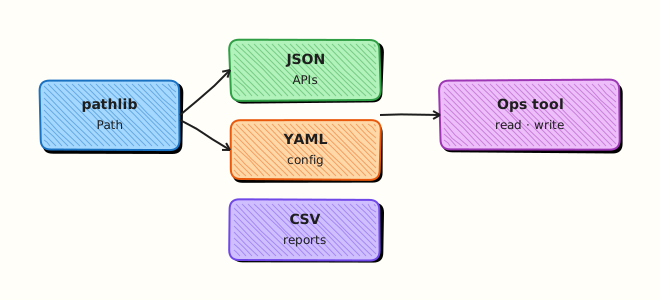
Your script sits above the filesystem. Paths point to JSON, YAML, and CSV artefacts. Parsers turn bytes into Python data; writers reverse the flow. Temporary files and shutil help when you need atomic replace or copy.
Theory
What it is
pathlib.Path is an object for file system paths. You join with /, check exists(), and open with .open() or helpers like .read_text() / .write_text().
JSON is a common API and config format. Use json.load / json.dump with a text file opened as UTF-8.
YAML is common for Kubernetes, Ansible, and Compose. Use yaml.safe_load / yaml.safe_dump (never yaml.load without a Loader — that is unsafe).
CSV is for tables (host lists, cost reports). Use csv.DictReader / csv.DictWriter.
from pathlib import Path
import json

root = Path.home() / "rebash-python" / "lab07"
root.mkdir(parents=True, exist_ok=True)
(root / "sample.json").write_text(json.dumps({"ok": True}), encoding="utf-8")
Why it matters
A wrong relative path in CI means “works on my laptop” and fails on the runner. A YAML load with the unsafe loader is a security issue. CSV without quoting breaks when hostnames or notes contain commas. Round-trip tests catch these problems before production.
How it works
- Choose a root — lab folder or project directory as a
Path. - Write — open with
encoding="utf-8", dump JSON/YAML/CSV. - Read — load back into Python structures (
dict/list). - Validate — compare keys, row counts, or a hash of the logical data.
- Clean up — remove temp files; keep evidence if needed for a ticket.
import csv
from pathlib import Path

path = Path("hosts.csv")
with path.open("w", encoding="utf-8", newline="") as fh:
    writer = csv.DictWriter(fh, fieldnames=["name", "env"])
    writer.writeheader()
    writer.writerow({"name": "web-01", "env": "prod"})
XML appears in some older tools; for this course prefer JSON/YAML/CSV unless a vendor format requires XML. Use tempfile.TemporaryDirectory or NamedTemporaryFile when you need a disposable workspace. Use shutil.copy2 / shutil.move for copy and rename with metadata when needed.
Key concepts and comparisons
| Format | Best for | Library | Watch out |
|---|---|---|---|
| JSON | APIs, structured config | json (stdlib) | Trailing commas not allowed |
| YAML | K8s, Ansible, Compose | PyYAML safe_load | Indentation; unsafe loaders |
| CSV | Spreadsheets, inventories | csv (stdlib) | Commas inside fields need quoting |
| Path | All file work | pathlib | Relative paths depend on cwd |
| Pattern | Prefer when | Avoid when |
|---|---|---|
Path + UTF-8 | New automation | String + path joins |
safe_load | Untrusted or shared YAML | yaml.load without SafeLoader |
| Round-trip assert | CI validation | “Looks fine” visual check only |
| Temp dir for writes | Atomic replace | Partial writes to the live file |
Common pitfalls
- Using the current working directory without documenting it — CI cwd may differ.
- Opening files without
encoding="utf-8"on mixed locales. - Using
yaml.load(unsafe) instead ofyaml.safe_load. - Forgetting
newline=""for CSV on some platforms. - Building paths from user input without resolving and checking under an allowed root.
Hands-on Lab
Objective
Create a sample host inventory, write it as JSON, YAML, and CSV under ~/rebash-python/lab07, read each file back, and prove the data matches.
Prerequisites
- Python 3.12+ with a venv activated
PyYAMLinstalled in that venv- Write access under your home directory
Lab environment
Workspace: ~/rebash-python/lab07
mkdir -p ~/rebash-python/lab07 && cd ~/rebash-python/lab07
set -euo pipefail
python3 -m venv .venv
source .venv/bin/activate
python -m pip install --upgrade pip
python -m pip install 'PyYAML>=6.0'
python -c "import yaml, json, csv; from pathlib import Path; print('ok')"
Expected output
ok printed; .venv exists under lab07.
Real-world scenario
Your team keeps a small host inventory for a practice environment. Ops wants the same list available as JSON (for an API mock), YAML (for Ansible-style tools), and CSV (for a spreadsheet review). You must prove that all three formats describe the same hosts after a write/read cycle.
Step-by-step tasks
Task 1 – Write inventory with pathlib, JSON, YAML, and CSV
cd ~/rebash-python/lab07
set -euo pipefail
source .venv/bin/activate

python << 'PY'
from pathlib import Path
import json
import csv
import yaml

root = Path.home() / "rebash-python" / "lab07"
data_dir = root / "data"
data_dir.mkdir(parents=True, exist_ok=True)

hosts = [
    {"name": "web-01", "env": "prod", "ip": "10.0.1.11"},
    {"name": "web-02", "env": "prod", "ip": "10.0.1.12"},
    {"name": "db-01", "env": "prod", "ip": "10.0.2.11"},
]

(data_dir / "inventory.json").write_text(
    json.dumps({"hosts": hosts}, indent=2) + "\n",
    encoding="utf-8",
)

with (data_dir / "inventory.yaml").open("w", encoding="utf-8") as fh:
    yaml.safe_dump({"hosts": hosts}, fh, sort_keys=False)

with (data_dir / "inventory.csv").open("w", encoding="utf-8", newline="") as fh:
    writer = csv.DictWriter(fh, fieldnames=["name", "env", "ip"])
    writer.writeheader()
    writer.writerows(hosts)

print("wrote", data_dir)
for p in sorted(data_dir.iterdir()):
    print(p.name, p.stat().st_size)
PY
Expected output
Three files under data/ with non-zero sizes: inventory.json, inventory.yaml, inventory.csv.
Task 2 – Round-trip validate JSON, YAML, and CSV
cd ~/rebash-python/lab07
set -euo pipefail
source .venv/bin/activate

python << 'PY'
from pathlib import Path
import json
import csv
import yaml

root = Path.home() / "rebash-python" / "lab07" / "data"
assert root.is_dir()

with (root / "inventory.json").open(encoding="utf-8") as fh:
    from_json = json.load(fh)["hosts"]

with (root / "inventory.yaml").open(encoding="utf-8") as fh:
    from_yaml = yaml.safe_load(fh)["hosts"]

with (root / "inventory.csv").open(encoding="utf-8", newline="") as fh:
    from_csv = list(csv.DictReader(fh))

assert from_json == from_yaml, "JSON and YAML differ"
assert from_json == from_csv, "JSON and CSV differ"
assert len(from_json) == 3

names = {h["name"] for h in from_json}
assert names == {"web-01", "web-02", "db-01"}

report = root.parent / "roundtrip-ok.txt"
report.write_text(
    f"hosts={len(from_json)}\nnames={sorted(names)}\nstatus=ok\n",
    encoding="utf-8",
)
print(report.read_text(encoding="utf-8"))
PY
Expected output
roundtrip-ok.txt shows status=ok and three host names.
Task 3 – Evidence pack with shutil
cd ~/rebash-python/lab07
set -euo pipefail
source .venv/bin/activate

python << 'PY'
from pathlib import Path
import shutil

root = Path.home() / "rebash-python" / "lab07"
evidence = root / "evidence"
if evidence.exists():
    shutil.rmtree(evidence)
evidence.mkdir()

for name in ("inventory.json", "inventory.yaml", "inventory.csv"):
    shutil.copy2(root / "data" / name, evidence / name)
shutil.copy2(root / "roundtrip-ok.txt", evidence / "roundtrip-ok.txt")

archive = shutil.make_archive(str(root / "inventory-evidence"), "gztar", root_dir=evidence)
print(archive)
assert Path(archive).stat().st_size > 0
PY
ls -l inventory-evidence.tar.gz | tee evidence-ls.txt
Expected output
inventory-evidence.tar.gz exists and evidence-ls.txt shows a non-zero size.
Validation steps
-
data/inventory.json,data/inventory.yaml, anddata/inventory.csvexist -
roundtrip-ok.txtcontainsstatus=ok - JSON, YAML, and CSV describe the same three hosts
-
inventory-evidence.tar.gzis not empty
Common errors and fixes
| Error | Cause | Fix |
|---|---|---|
ModuleNotFoundError: yaml | PyYAML not installed | Activate venv; python -m pip install PyYAML |
FileNotFoundError | Wrong cwd or path | Use Path.home() / "rebash-python" / "lab07" |
| CSV rows look wrong | Missing newline="" | Open CSV with newline="" |
| YAML differs from JSON | Extra nesting key | Keep the same {"hosts": [...]} shape |
Challenge exercise
Add a fourth host cache-01 (env=prod, ip=10.0.3.11) to all three formats with a small script add_host.py, re-run the round-trip asserts for four hosts, and write challenge-ok.txt with count=4. Keep the script under ~/rebash-python/lab07.
Learning outcomes
- Used
pathlibfor a fixed lab root - Wrote and read JSON, YAML, and CSV for the same inventory
- Proved equality with asserts and saved evidence
Cleanup
cd ~/rebash-python/lab07
set -euo pipefail
# Keep the evidence archive if you want it; otherwise remove lab artefacts:
# rm -rf data evidence .venv *.txt *.tar.gz add_host.py
deactivate 2>/dev/null || true
Validation
- Lab finished under
~/rebash-python/lab07/with evidence files - You can explain when to use JSON vs YAML vs CSV
- You use
yaml.safe_loadand UTF-8 by default - You can describe one production failure from a wrong path or bad parse
Code Walkthrough
In real DevOps tools, file handling usually follows this order:
- Fix the root — project dir or config path from env/CLI, not “wherever I was when I ran it”
- Open with encoding — UTF-8 unless a vendor format says otherwise
- Prefer safe parsers —
json.load,yaml.safe_load,csv.DictReader - Validate shape — required keys, types, and counts before acting
- Write safely — temp file then replace, or keep a backup before overwrite
Later modules load config from env + YAML and build CLIs that accept a --inventory path.
Security Considerations
- Never pass untrusted path strings into file open without resolving under an allowed directory
- Prefer
yaml.safe_loadfor YAML from shared repos or tickets - Do not log full file contents if they may contain secrets
- Use restrictive permissions (
0o600) for files that might later hold tokens - Prefer explicit paths over relying on a surprising current working directory
Common Mistakes
Building paths with string concatenation
Easy to miss separators or break on Windows/WSL mixes. Fix: use pathlib.Path and the / operator.
Using yaml.load without a safe loader
Older examples enable arbitrary object construction. Fix: always use yaml.safe_load / yaml.safe_dump.
Assuming relative paths work in CI
Runner cwd is often the repo root or a checkout subfolder. Fix: resolve from a known root or CLI argument.
Skipping round-trip checks
Write-only scripts hide format bugs. Fix: read back and assert key fields in CI.
Best Practices
- One inventory schema; generate JSON/YAML/CSV from the same Python list of dicts
- Pin PyYAML in
requirements.txt - Use context managers (
with path.open(...)) so files close on errors - Keep large binary blobs out of JSON/YAML when a file path is enough
- Document the expected path layout in the tool README
Troubleshooting
| Symptom | Likely cause | Fix |
|---|---|---|
JSONDecodeError | Truncated or hand-edited file | Validate with python -m json.tool file.json |
YAML ScannerError | Bad indentation or tabs | Re-indent with spaces; re-dump from Python |
| Empty CSV data rows | Forgot header / wrong fieldnames | Match DictWriter fieldnames to keys |
| Permission denied | Directory owned by root | Fix ownership or use a home-based lab path |
| Different host order | Set vs list compare | Compare sorted names or a canonical sort |
Summary
pathlib, JSON, YAML, and CSV are the daily file tools for DevOps Python. Write from one in-memory inventory, read each format back, and prove they match. Next, learn how to handle failures cleanly in Error Handling and Exceptions.
Interview Questions
1. Why prefer pathlib.Path over string joins for automation paths?
Reveal answer
Path handles joining, existence checks, and opening in a consistent way across platforms. String joins often miss separators or mix / and \\. Interviewers want to hear that you resolve a known root and avoid trusting the current working directory alone.
2. What is the difference between yaml.safe_load and yaml.load, and which should ops tools use?
Reveal answer
safe_load only builds simple Python types (dict, list, str, numbers). Full load without a safe loader can construct arbitrary objects and is a security risk for untrusted YAML. Ops tools should use safe_load / safe_dump unless there is a rare, controlled need for custom tags — and even then, lock the loader carefully.
3. How do you prove JSON, YAML, and CSV represent the same inventory?
Reveal answer
Write from one Python structure, read each file back into comparable lists of dicts, then assert equality (or compare sorted keys/names and counts). Save the assert result as evidence for CI or a change ticket. Visual “looks the same” is not enough.
4. A CI job fails with FileNotFoundError for data/inventory.yaml but works on a laptop. What do you check first?
Reveal answer
Check the current working directory on the runner, whether the file was committed or generated in an earlier job step, and whether the script uses a relative path. Fix by using an absolute path from the project root, a CLI flag, or an environment variable. Re-run with a print of Path.cwd() and the resolved path.
5. When would you choose CSV over YAML for a host list?
Reveal answer
Choose CSV when non-engineers edit the list in a spreadsheet, or when another system exports tables. Choose YAML when you need nested structure (groups, vars). Keep one generator so both formats stay in sync.
6. Why open CSV files with newline="" in Python?
Reveal answer
The csv module needs control of line endings. Passing newline="" avoids extra blank rows or broken newlines on some platforms. It is the documented pattern for csv.reader / csv.writer.
7. How can path handling become a security issue in a CLI that accepts --file?
Reveal answer
An attacker (or a bad ticket) can pass paths like ../../etc/passwd or a symlink outside the allowed tree. Resolve the path, check it stays under an allowed root, and reject escapes. Do not open arbitrary paths with elevated privileges.
Related Tutorials
- Python for Cloud & DevOps – Overview
- Modules, Packages, and Dependencies (previous)
- Error Handling and Exceptions (next)
- Configuration Management and Secrets
References
- pathlib — Object-oriented filesystem paths — Python docs
- json — JSON encoder and decoder — Python docs
- csv — CSV File Reading and Writing — Python docs
- PyYAML documentation — safe_load / safe_dump
- Track index: Python for Cloud & DevOps Engineers