Modules, Packages, and Dependencies
Overview
As soon as a script grows past one file, you need modules and packages. A module is a .py file you can import. A package is a directory of modules (usually with __init__.py) that groups related code. Dependencies are third-party libraries installed into your virtual environment and listed in requirements.txt (or later, pyproject.toml).
In DevOps work, shared helpers — inventory parsers, HTTP clients, logging setup — should live in a small package such as mypkg/, not copied between scripts. You import that package by installing it editable (pip install -e .) or by setting PYTHONPATH during early labs. Production teams prefer a real install layout so CI and laptops behave the same.
This tutorial creates a minimal package layout, imports it from a runner script, pins a dependency, and proves both PYTHONPATH and editable install workflows. Module 23 deepens packaging with wheels; here you learn the daily import and dependency habits.
This is Tutorial 6 in Module 6: Modules & Packages of the REBASH Academy Python for DevOps Engineers series. Next you will handle files and structured data in pathlib, JSON, YAML, CSV.
Prerequisites
Learning Objectives
By the end of this tutorial, you will be able to:
- Explain module vs package vs dependency in plain language
- Create a package layout with
__init__.pyand a submodule - Import your package via
PYTHONPATHand viapip install -e . - Maintain a pinned
requirements.txtfor the project - Avoid common import-path mistakes on CI agents
Architecture
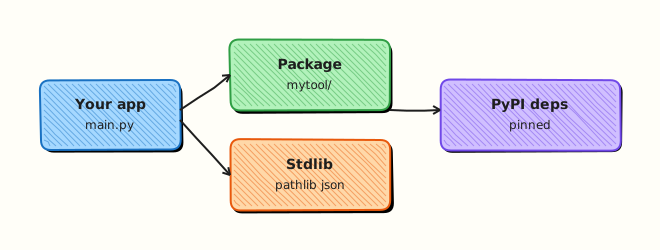
Your application code imports the standard library and your local package. Third-party dependencies resolve from the active venv’s site-packages. Packaging metadata (pyproject.toml or setup.cfg) tells pip how to install the local package.
Theory
What it is
import os— standard library moduleimport mypkg— your packagefrom mypkg.greet import hello— import a function from a submodule- Dependency — e.g.
richinstalled from PyPI into the venv
sys.path decides where Python looks for imports. Editable installs add your project to that path in a stable way.
Why it matters
Copy-pasted helpers drift. Broken sys.path.insert hacks work on one laptop and fail in CI. Pin files make rebuilds reproducible. Clear package boundaries let multiple CLIs share one library without circular imports.
How it works
- Create package dir —
mypkg/+__init__.py - Write submodule —
mypkg/greet.pywith functions - Import —
from mypkg.greet import hello - Make discoverable —
PYTHONPATH=.orpip install -e . - Pin third-party deps —
requirements.txt - Run —
python run_greet.pyinside the venv
Key concepts and comparisons
| Concept | Meaning | Example |
|---|---|---|
| Module | One .py file | greet.py |
| Package | Directory of modules | mypkg/ |
| Absolute import | From package root | from mypkg.greet import hello |
| Editable install | Live link to source | pip install -e . |
| Frozen deps | Pinned versions | rich==13.9.4 |
| Pattern | Prefer when | Avoid when |
|---|---|---|
pip install -e . | Local library used by several scripts | You have not added packaging metadata yet |
PYTHONPATH=. | Quick lab / teaching | Long-term production CI (prefer install) |
| Relative imports | Inside a package only | From random scripts outside the package |
Common pitfalls
- Running a file inside the package as
__main__and breaking relative imports. - Forgetting
__init__.pyon older layouts/tools that still expect it (we include it for clarity). - Installing packages globally instead of into the venv.
- Circular imports between submodules — split shared constants.
- Committing
.venvbut forgettingrequirements.txt/pyproject.toml.
Hands-on Lab
Objective
Create ~/rebash-python/lab06 with package mypkg/, prove imports via PYTHONPATH and pip install -e ., and pin dependencies in requirements.txt.
Prerequisites
- Python 3.11+ and pip in a venv
- Network access for one PyPI install (rich)
Lab environment
Workspace: ~/rebash-python/lab06
mkdir -p ~/rebash-python/lab06 && cd ~/rebash-python/lab06
set -euo pipefail
python3 -m venv .venv
# shellcheck disable=SC1091
source .venv/bin/activate
python -c 'import sys; assert sys.version_info >= (3, 11)'
python -V | tee python-version.txt
Expected output
venv ready with Python 3.11+.
Real-world scenario
Your team is splitting a single tools.py into a small internal library so inventory and greeting/health scripts can share helpers. Platform asks for a package directory, a pin file, and a documented install command (pip install -e .) that CI can run.
Step-by-step tasks
Task 1 – Package layout and PYTHONPATH import
cd ~/rebash-python/lab06
set -euo pipefail
# shellcheck disable=SC1091
source .venv/bin/activate

mkdir -p mypkg
Create mypkg/__init__.py:
Create mypkg/greet.py:
"""Greeting helpers shared by lab scripts."""
from __future__ import annotations


def hello(name: str) -> str:
    cleaned = name.strip() or "world"
    return f"hello {cleaned}"


def banner(name: str, *, shout: bool = False) -> str:
    text = hello(name)
    return text.upper() if shout else text
Create run_greet.py:
"""Runner that imports the local mypkg package."""
from __future__ import annotations

import sys

from mypkg.greet import banner, hello


def main(argv: list[str]) -> int:
    name = argv[1] if len(argv) > 1 else "rebash"
    print(hello(name))
    print(banner(name, shout=True))
    return 0


if __name__ == "__main__":
    raise SystemExit(main(sys.argv))
Run:
# PYTHONPATH makes the project root importable without install
export PYTHONPATH=.
python -c "from mypkg.greet import hello; assert hello('lab') == 'hello lab'"
python run_greet.py platform | tee path-run.txt
grep -F 'hello platform' path-run.txt
grep -F 'HELLO PLATFORM' path-run.txt
Expected output
asserts pass; path-run.txt shows normal and shouted greetings.
Task 2 – Editable install with pyproject.toml
cd ~/rebash-python/lab06
set -euo pipefail
# shellcheck disable=SC1091
source .venv/bin/activate
Create pyproject.toml:
[build-system]
requires = ["setuptools>=68"]
build-backend = "setuptools.build_meta"

[project]
name = "rebash-mypkg"
version = "0.1.0"
description = "REBASH Academy lab06 sample package"
requires-python = ">=3.11"
dependencies = [
  "rich==13.9.4",
]

[tool.setuptools.packages.find]
include = ["mypkg*"]
Run:
python -m pip install --upgrade pip
python -m pip install -e .
python -c "import mypkg, rich; from mypkg.greet import hello; print(hello('editable')); print('rich-ok', rich.__name__)" | tee editable-run.txt
grep -F 'hello editable' editable-run.txt
grep -F 'rich-ok' editable-run.txt

# Unset PYTHONPATH to prove the editable install is enough
unset PYTHONPATH
python run_greet.py ci | tee editable-runner.txt
grep -F 'hello ci' editable-runner.txt
Expected output
editable install succeeds; imports work with PYTHONPATH unset.
Task 3 – Freeze requirements and evidence
cd ~/rebash-python/lab06
set -euo pipefail
# shellcheck disable=SC1091
source .venv/bin/activate
Create requirements.txt:
Run:
python -m pip freeze | tee requirements-full.txt
grep -E '^rich==' requirements.txt

# Optional: show package is importable as proof for tickets
python - << 'PY' | tee import-proof.txt
import mypkg
from pathlib import Path
import mypkg.greet as greet
print("mypkg_file=" + str(Path(mypkg.__file__).resolve()))
print("greet_hello=" + greet.hello("proof"))
assert "lab06" in str(Path(mypkg.__file__).resolve())
print("import-proof-ok")
PY

tar -czf lab06-evidence.tgz \
  mypkg/__init__.py mypkg/greet.py run_greet.py \
  pyproject.toml requirements.txt \
  path-run.txt editable-run.txt editable-runner.txt import-proof.txt
ls -l lab06-evidence.tgz | tee evidence-ls.txt
Expected output
requirements.txt pins rich; import proof shows a path under lab06; evidence archive exists.
Validation steps
-
from mypkg.greet import helloworks -
PYTHONPATH=.run succeeded in Task 1 -
pip install -e .run succeeded withoutPYTHONPATH -
requirements.txtcontainsrich==13.9.4 -
lab06-evidence.tgzexists under~/rebash-python/lab06
Common errors and fixes
| Error | Cause | Fix |
|---|---|---|
ModuleNotFoundError: mypkg | Not installed / no PYTHONPATH | export PYTHONPATH=. or pip install -e . |
pip: error: editable mode... | Old pip / missing build backend | Upgrade pip; ensure pyproject.toml build-system set |
| Import works only in one directory | Relative cwd assumptions | Install editable; do not rely on cwd |
| Wrong rich version | Stale venv | Recreate venv; reinstall from pins |
Challenge exercise
Add mypkg/hosts.py with normalize_hosts(names: list[str]) -> list[str] that strips blanks and lowercases names, export it from the package, and create run_hosts.py that prints normalised hosts from argv. Reinstall editable if needed and prove with python run_hosts.py Web-01 '' API-01 → web-01 and api-01 on separate lines. Save hosts-run.txt.
Learning outcomes
- Created an importable
mypkgpackage - Used both PYTHONPATH and editable install
- Pinned a third-party dependency
- Packed proof for CI-style documentation
Cleanup
cd ~/rebash-python/lab06
set -euo pipefail
# shellcheck disable=SC1091
source .venv/bin/activate
python -m pip uninstall -y rebash-mypkg >/dev/null 2>&1 || true
deactivate 2>/dev/null || true
# rm -rf .venv *.egg-info build dist
# rm -f *.txt lab06-evidence.tgz
Validation
- Lab finished under
~/rebash-python/lab06/ - You can explain module vs package vs dependency
- You prefer editable install over long-term PYTHONPATH hacks
- You know Module 7 continues with file handling
Code Walkthrough
Production habits for modules and deps:
- Package shared code early — before the third copy-paste
- Absolute imports from package name — clearer than deep relatives
- Install the project in CI —
pip install -e .or wheel install - Pin direct dependencies — review upgrades in PRs
- Keep scripts thin — logic lives in
mypkg/
Security Considerations
- Review new dependencies before adding them to pins
- Prefer pinned versions and private indexes when required by policy
- Do not put secrets in package constants committed to git
- Avoid installing packages with
sudo - Be cautious with packages that execute code at import time
Common Mistakes
sys.path.insert hacks in every script
Paths break when CI cwd changes. Fix: package the library and install editable or as a wheel.
Circular imports
Module A imports B while B imports A at import time. Fix: move shared types to a third module; import inside functions only when necessary.
Mixing global site-packages with project vens
Imports resolve to the wrong rich/requests version. Fix: activate the project venv; check python -c "import rich; print(rich.__file__)".
Forgetting to declare dependencies
Works on the author’s machine with leftover packages. Fix: add pins to requirements.txt / pyproject.toml and install into a clean venv.
Best Practices
- One package name, stable and short (
mypkg→ real name likerebash_inventory) - Include
requires-pythonin packaging metadata - Document install steps in README
- Prefer absolute imports in application code
- Graduate to lock files (uv/poetry/pip-tools) as the repo grows
Troubleshooting
| Symptom | Likely cause | Fix |
|---|---|---|
ModuleNotFoundError in CI only | Install step skipped | Add pip install -e . to the job |
| Editable install not updating | Wrong venv / stale process | Recreate venv; confirm which python |
pkg_resources / setuptools errors | Toolchain too old | Upgrade pip/setuptools/wheel |
| Import shadowing | Local file named like stdlib | Rename modules away from json.py, sys.py, etc. |
Summary
Modules and packages turn scripts into a small library. Dependencies belong in the venv and in pin files. Use PYTHONPATH for quick labs, then standardise on pip install -e . for real workflows. Next: File Handling — pathlib, JSON, YAML, CSV.
Interview Questions
1. What is the difference between a module and a package?
Reveal answer
A module is typically a single .py file you can import. A package is a directory of modules (commonly with __init__.py) that groups related functionality under one import name like mypkg.
2. How does Python find modules when you import mypkg?
Reveal answer
It searches entries on sys.path: the script directory, PYTHONPATH, the standard library, and venv site-packages. Editable installs add your project in a controlled way so imports work regardless of a random working directory.
3. When is PYTHONPATH=. acceptable, and when should you use pip install -e .?
Reveal answer
PYTHONPATH is fine for quick labs and teaching. For team CI and shared tools, prefer pip install -e . (or installing a built wheel) so the environment is explicit and reproducible.
4. What belongs in requirements.txt versus application code?
Reveal answer
Pin third-party dependencies and install instructions belong in requirements/packaging metadata. Application logic belongs in packages/modules. Do not hardcode “hope this package exists on the runner” without declaring it.
5. What is an editable install and why do DevOps repos use it?
Reveal answer
pip install -e . installs a project in editable mode: imports use your live source tree. Engineers can change library code without reinstalling a wheel every time — ideal during development of internal tools.
6. How do circular imports happen, and how do you fix them?
Reveal answer
Two modules import each other at module level. Fixes include moving shared constants to a third module, inverting dependencies, or (sparingly) importing inside a function. Redesign is better than clever import tricks.
7. Why pin rich==13.9.4 instead of only writing rich?
Reveal answer
Pins improve reproducibility. Unpinned installs can pull a breaking release later. Upgrade pins deliberately with testing, not silently on every CI run.
8. A colleague’s import works locally but CI fails with ModuleNotFoundError: mypkg. What do you check?
Reveal answer
Confirm CI checks out the repo, creates a venv, installs the project (pip install -e . or equivalent), and runs the same entrypoint. Check working directory and that packaging metadata includes the mypkg package. Compare sys.path and mypkg.__file__ between laptop and CI.
Related Tutorials
- Python for DevOps Engineers – Overview
- Data Structures — Comprehensions and Generators (previous)
- File Handling — pathlib, JSON, YAML, CSV (next)
- Python Fundamentals — Install, venv, and Tooling (related)
- Packaging — pyproject.toml and Wheels (related)
References
- Modules — Python tutorial
- Packaging Python Projects — PyPA
- pip install — editable installs
- Track index: Python for DevOps Engineers