Introduction to Terraform and Infrastructure as Code
Overview
Clicking through a cloud console works once. It fails at scale: nobody remembers who opened port 22, which environment owns a subnet, or whether staging matches production. Infrastructure as Code (IaC) treats networks, servers, databases, and permissions as version-controlled configuration you review, test, and apply repeatably — the same discipline as application code.
Terraform is HashiCorp’s declarative IaC tool. You describe the desired end state in HashiCorp Configuration Language (HCL); Terraform builds a dependency graph, compares desired state to state (a record of what already exists), and calls provider plugins to create, update, or destroy real infrastructure. The daily loop is write → plan → apply, with plan showing changes before anything mutates production.
This is Tutorial 1 in Module 1: IaC Fundamentals of the REBASH Academy Terraform for Cloud & DevOps Engineers series — written for Cloud engineers, DevOps engineers, Platform engineers, and Site Reliability Engineering (SRE) teams. You will explain why IaC beats ad-hoc scripts, contrast imperative and declarative models, sketch Terraform’s architecture, and apply a small declarative Docker stack you can prove with docker ps — no paid cloud account required.
Prerequisites
- Linux — comfortable terminal, files, and basic shell
- Git — commits and pull requests (IaC lives in repos)
- Docker — Docker Engine running locally (
docker info)
Learning Objectives
By the end of this tutorial, you will be able to:
- Define Infrastructure as Code and explain why teams adopt it over manual console work
- Contrast imperative scripts with declarative desired-state configuration
- Describe Terraform’s write → plan → apply workflow and name its core components
- Sketch how configuration, state, providers, and the CLI interact
- Create a minimal declarative manifest and interpret a
terraform planas evidence of desired state
Architecture
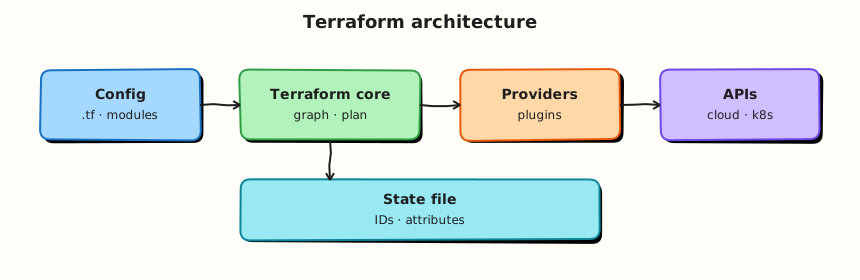
Terraform separates what you want (HCL configuration) from what exists (state) and how to reach APIs (provider plugins). The CLI orchestrates planning and applying; it does not talk to AWS, Azure, or Google Cloud directly — providers do.
Theory
What it is
Infrastructure as Code means infrastructure definitions live in text files under version control. Teams open pull requests for VPC changes the same way they review application code. A pipeline or engineer runs automation that converges the real world toward the declared configuration.
Terraform implements IaC with a declarative model:
| Piece | Role |
|---|---|
Configuration (.tf files) | Declares providers, resources, variables, outputs |
CLI (terraform) | Parses config, builds graph, plans and applies changes |
State (terraform.tfstate) | Maps Terraform addresses to real resource IDs |
| Providers (plugins) | Translate resources into API calls (AWS, Azure, Kubernetes, local, null, …) |
| Registry | Publishes vetted provider and module packages |
You do not write “create subnet, then route table, then associate” as ordered steps in Terraform. You declare all three resources; Terraform orders operations from implicit dependencies (references between resources) and explicit depends_on when needed.
Why it matters
Manual infrastructure creates predictable failures:
- Drift — production diverges from documentation after emergency fixes
- No audit trail — console changes lack peer review
- Slow recovery — rebuilding a region from memory is error-prone
- Environment skew — staging “mostly like prod” until an incident proves otherwise
Teams choose Terraform because:
- Multi-cloud and multi-service — one workflow for AWS, Azure, GCP, Kubernetes, SaaS APIs, and local lab providers
- Plan before change —
terraform planis a contract review step; CI can fail builds on unexpected diffs - Large ecosystem — thousands of providers and reusable modules on the Terraform Registry
- Mature operations story — remote state, locking, workspaces, HCP Terraform, policy-as-code integrations
- Portable skill — HCL patterns transfer across employers and cloud vendors
Terraform complements configuration management (Ansible, cloud-init) and container platforms (Kubernetes): Terraform provisions the platform; other tools configure workloads on top.
How it works
Mental model: configuration + state → plan → apply → updated state.
- Write — Engineers edit
.tffiles describing resources (aws_instance,azurerm_resource_group,local_file, …). - Init —
terraform initdownloads provider plugins and configures backends (covered in Module 2–3). - Plan — Terraform refreshes state (reads current remote attributes), compares to config, and outputs a execution plan: create, update, destroy, no-op.
- Apply — After approval, Terraform calls provider APIs in dependency order and writes new state.
- Destroy —
terraform destroyremoves managed resources in safe order (when you intentionally tear down).
# Conceptual daily loop (Module 3 goes deep on each command)
terraform fmt -recursive
terraform validate
terraform init
terraform plan -out=tfplan
terraform apply tfplan
State is not optional magic — without it Terraform cannot know whether aws_instance.web refers to i-0abc123 or must be created fresh. State is sensitive (often contains secrets and resource IDs); Module 8 covers remote backends and locking.
Key concepts and comparisons
Imperative vs declarative
| Style | You specify | Example mindset | Risk |
|---|---|---|---|
| Imperative | Steps to execute | “Run these 20 CLI commands in order” | Scripts fail mid-way; re-run may duplicate resources |
| Declarative | Desired end state | “This subnet exists with these CIDR and tags” | Terraform computes steps; must trust plan output |
Imperative tools (some SDK scripts, early cloud CLI wrappers) fit one-off migrations. Declarative IaC fits long-lived environments where drift detection and peer review matter.
Why Terraform (vs alternatives)
| Tool / pattern | Strength | When Terraform is often preferred |
|---|---|---|
| Cloud vendor templates (ARM, CloudFormation) | Native integration | Multi-cloud, same workflow everywhere |
| Pulumi (general-purpose languages) | Developers want TypeScript/Python | Teams standardising on HCL + Registry modules |
| Crossplane / Kubernetes CRDs | GitOps-native control planes | Broader infra + app platform already on K8s |
| Click-ops | Fast for learning | Never for production baselines |
No single tool wins every scenario. Terraform’s advantage is breadth, plan/apply discipline, and industry adoption for platform teams.
Terraform workflow (high level)
| Phase | Command / artefact | Purpose |
|---|---|---|
| Author | .tf files in Git | Declare desired infrastructure |
| Format | terraform fmt | Consistent style for reviews |
| Validate | terraform validate | Syntax and internal consistency |
| Initialise | terraform init | Providers, modules, backend |
| Plan | terraform plan | Preview changes |
| Apply | terraform apply | Execute changes |
| Record | State file / remote backend | Map config to reality |
Terraform architecture components
| Component | Location | Notes |
|---|---|---|
| Core CLI | terraform binary | Graph, plan, apply engine |
| Provider plugins | .terraform/providers/ after init | Version pinned in required_providers |
| Configuration | *.tf, *.tfvars | Root module; may call child modules |
| State | Local file or remote backend | Never edit by hand in production |
| Registry | registry.terraform.io | Providers and modules |
Common pitfalls
- Treating Terraform like a shell script runner — use resources and data sources, not
local-execfor everything. - Committing state or secrets to Git — state belongs in a secured backend; secrets in vaults or CI secret stores.
- Skipping plan in CI — merges that apply blind cause outages and untraceable drift.
- Ignoring provider version pins — upgrades can change behaviour silently; pin and test upgrades.
- Assuming declarative means “no ordering issues” — cycles and missing dependencies still break applies; Module 6 covers the graph.
Hands-on Lab
Objective
Declare a declarative Docker stack (network + container) with the kreuzwerker/docker provider, run init, plan, and apply, and prove the running container with docker ps — demonstrating desired-state IaC without a cloud account.
Prerequisites
- Terraform ≥ 1.5 installed (
terraform version) - Docker Engine running (
docker infosucceeds) - Ubuntu 22.04/24.04 VM, macOS, or Linux with network access to download providers and pull
nginx:1.27-alpine - Write access under your home directory
Lab environment
Workspace: ~/rebash-terraform/module-01
Uses kreuzwerker/docker against your local Docker Engine — no AWS, Azure, or GCP credentials.
Real-world scenario
You join a platform team replacing manual docker network create and docker run commands with IaC. Your lead assigns ticket PLAT-101: ship a Terraform root module that declares an isolated bridge network and a pinned nginx container — the same declarative pattern later used for VPCs and compute, but safe on a laptop. Success means terraform apply creates real Docker objects and docker ps shows the container Up.
Step-by-step tasks
Task 1 – Pin the Docker provider and declare desired state
Create main.tf:
terraform {
  required_version = ">= 1.5.0, < 2.0.0"

  required_providers {
    docker = {
      source  = "kreuzwerker/docker"
      version = "~> 3.0"
    }
  }
}

provider "docker" {}

resource "docker_network" "lab" {
  name = "rebash-module-01-net"
}

resource "docker_image" "nginx" {
  name = "nginx:1.27-alpine"
}

resource "docker_container" "web" {
  name  = "rebash-module-01-web"
  image = docker_image.nginx.image_id

  networks_advanced {
    name = docker_network.lab.name
  }

  labels {
    label = "managed_by"
    value = "terraform"
  }
}
Expected output
main.tf exists with one network, one image, and one container resource.
Task 2 – Init, plan, and apply the stack
Run:
cd ~/rebash-terraform/module-01
terraform init | tee init-log.txt
terraform plan -no-color | tee plan-log.txt
grep -q 'docker_network.lab' plan-log.txt
grep -q 'docker_container.web' plan-log.txt
terraform apply -auto-approve | tee apply-log.txt
Expected output
init-log.txt shows kreuzwerker/docker installed; plan-log.txt lists three resources to create; apply-log.txt ends with Apply complete!.
Task 3 – Prove infrastructure with Docker CLI
Run:
cd ~/rebash-terraform/module-01
docker ps --filter name=rebash-module-01-web --format '{{.Names}} {{.Status}}' | tee docker-ps.txt
grep -q 'rebash-module-01-web' docker-ps.txt
grep -q 'Up' docker-ps.txt
docker network ls --filter name=rebash-module-01-net --format '{{.Name}}' | tee docker-net.txt
grep -q 'rebash-module-01-net' docker-net.txt
echo "iac docker proof OK" | tee iac-evidence.txt
Expected output
docker-ps.txt shows rebash-module-01-web Up ...; docker-net.txt contains rebash-module-01-net; iac-evidence.txt contains iac docker proof OK.
Validation steps
-
main.tfpinsrequired_versionandkreuzwerker/docker -
terraform initdownloads the Docker provider -
terraform applycreates network and container without errors -
docker psshowsrebash-module-01-webrunning -
docker network lsshowsrebash-module-01-net - You can explain imperative (
docker run) vs declarative (HCL desired state)
Common errors and fixes
| Error | Cause | Fix |
|---|---|---|
Cannot connect to the Docker daemon | Docker Engine not running | Start Docker Desktop or sudo systemctl start docker; verify docker info |
terraform: command not found | CLI not installed or not on PATH | Install Terraform (Module 2); verify with which terraform |
Invalid provider registry host | No network or proxy blocking registry | Check HTTPS to registry.terraform.io; configure corporate proxy if required |
Unsupported Terraform Core version | CLI older than required_version | Upgrade Terraform to ≥ 1.5 |
| Plan shows no changes after failed apply | Partial apply left resources | Run terraform destroy -auto-approve then re-apply |
Challenge exercise
Create declarative-proof.sh:
#!/usr/bin/env bash
set -euo pipefail
cd ~/rebash-terraform/module-01
terraform plan -detailed-exitcode -no-color >/dev/null 2>&1 || ec=$?
test "${ec:-0}" -eq 0
docker inspect rebash-module-01-web --format '{{index .Config.Labels "managed_by"}}' | grep -q terraform
echo "declarative workflow proof complete"
Run:
chmod +x ~/rebash-terraform/module-01/declarative-proof.sh
~/rebash-terraform/module-01/declarative-proof.sh | tee challenge-result.txt
Expected output
Plan exit code 0 (no pending changes); challenge-result.txt ends with declarative workflow proof complete.
Learning outcomes
- You wrote declarative HCL describing Docker desired state, not shell steps to create it
- You ran
init,plan, andapplyagainst a real provider plugin - You proved managed infrastructure with operational CLI (
docker ps,docker network ls) - You understand why state and providers appear in later modules
Cleanup
cd ~/rebash-terraform/module-01
terraform destroy -auto-approve
docker ps -a --filter name=rebash-module-01-web --format '{{.Names}}' | grep -q . && docker rm -f rebash-module-01-web || true
docker network ls --filter name=rebash-module-01-net --format '{{.Name}}' | grep -q . && docker network rm rebash-module-01-net || true
rm -f init-log.txt plan-log.txt apply-log.txt docker-ps.txt docker-net.txt iac-evidence.txt challenge-result.txt
rm -rf .terraform .terraform.lock.hcl terraform.tfstate terraform.tfstate.backup
Validation
- Completed lab under
~/rebash-terraform/module-01withdocker psevidence - Can explain IaC, declarative model, and Terraform components in own words
- Used
terraform init,plan, andapplywith the Docker provider - Can describe one production failure mode (e.g. applying without plan review)
Code Walkthrough
- Inspect before mutate —
planis your diff; treat unexpected destroys as stop signals. - Pin versions early —
required_versionandrequired_providersbelong in every root module from day one. - Evidence in Git — principles YAML and
.tffiles are review artefacts; console clicks are not. - Start with Docker locally —
kreuzwerker/dockerproves real apply without cloud spend. - Least scope — one network and one container in Module 1; expand complexity only when the concept requires it.
Security Considerations
- Never commit cloud access keys, API tokens, or
terraform.tfstateto Git — state often contains sensitive attributes. - Restrict who can run
terraform applyin production; plan in CI, apply with approval gates. - Treat IaC repos as production documentation — hostnames, CIDRs, and module names reveal architecture.
- Use remote state with encryption and locking before team-wide production use (Module 8).
- Scan pull requests for secrets (
git-secrets,trufflehog, native platform secret scanning).
Common Mistakes
Click-ops with extra steps
Running Terraform from a laptop against production without review mirrors console chaos — only the tool changed.
Fix: Git-backed config, mandatory plan in CI, separate workspaces or accounts per environment.
Confusing IaC with configuration management
Terraform provisions infrastructure; it does not replace Ansible for OS hardening or app deploy inside VMs.
Fix: Terraform for cloud resources; CM or cloud-init for guest configuration — clear handoff documented in runbooks.
Skipping the plan habit
apply -auto-approve in CI without stored plan artefacts loses traceability.
Fix: plan -out=tfplan, store artefact, apply the saved plan in a gated job.
Treating state as disposable in production
Deleting state orphanates real billable resources.
Fix: Remote backend, backups, and documented recovery — never “delete state to fix Terraform.”
Best Practices
- Store all
.tffiles in Git; tag releases that match applied infrastructure versions. - Run
terraform fmt -recursivebefore every commit — consistent style speeds reviews. - Document why a resource exists in module READMEs, not only in ticket comments.
- Standardise on one IaC tool per layer where possible — avoid duplicate AWS definitions in Terraform and CloudFormation.
- Teach new engineers the workflow diagram before granting cloud apply access.
Troubleshooting
| Symptom | Likely cause | Fix |
|---|---|---|
| Plan empty but config changed | Wrong directory or wrong workspace | pwd; terraform workspace show (Module 12) |
| Provider download fails | Network, air-gapped environment | Mirror registry or vendor provider bundle |
| “Configuration invalid” on validate | Syntax error in HCL | terraform validate; check brackets and quotes |
| Team members see different plans | Different provider versions | Commit .terraform.lock.hcl; pin versions |
| Drift between environments | Different .tfvars not documented | Check in example tfvars; use consistent naming |
Summary
Infrastructure as Code makes infrastructure reviewable, repeatable, and auditable. Terraform’s declarative model compares desired configuration to state and executes a plan through provider plugins — write, init, plan, apply. You captured IaC principles, declared a local manifest resource, and previewed change with plan. Next, install and pin the CLI properly: Installing Terraform and the CLI Workflow.
Interview Questions
1. What is Infrastructure as Code, and what problem does it solve?
Reveal answer
Infrastructure as Code stores infrastructure definitions in version-controlled files instead of manual console changes or tribal knowledge. It solves drift, slow/disaster-prone rebuilds, missing audit trails, and inconsistent environments. Teams get peer review, repeatable applies, and history that answers “who changed this security group and when?”
2. Explain imperative vs declarative infrastructure automation.
Reveal answer
Imperative automation lists steps to execute (“create VPC, then subnet, then instance”). Re-runs can duplicate or skip steps if scripts are not idempotent. Declarative automation specifies desired end state (“this subnet exists with this CIDR”); Terraform computes the minimal create/update/delete actions. Declarative tools still execute steps internally — the difference is you review plan output against intent, not script ordering.
3. Walk through the Terraform write → plan → apply workflow.
Reveal answer
Engineers write HCL in Git. terraform init installs providers and configures backends. terraform plan refreshes state, compares to config, and prints proposed changes. After approval, terraform apply executes the plan and updates state with new resource IDs and attributes. terraform destroy removes managed resources when retiring stacks. fmt and validate run before plan in mature pipelines.
4. What are the main components of Terraform architecture?
Reveal answer
Configuration (.tf) declares desired resources. The CLI builds the dependency graph and orchestrates plan/apply. State maps Terraform resource addresses to real world IDs. Provider plugins implement resource types and call APIs. The Terraform Registry distributes providers and modules. Optional HCP Terraform adds remote runs, locking, and policy.
5. Why do teams choose Terraform over cloud-native templates alone?
Reveal answer
Cloud-native tools (CloudFormation, ARM, Deployment Manager) excel on their own platform. Terraform offers one workflow and language across AWS, Azure, GCP, Kubernetes, SaaS, and lab providers — valuable for platform teams, acquisitions, and multi-cloud strategies. The plan step, module ecosystem, and hiring market are additional practical reasons — not that native tools are bad on their home cloud.
6. What is Terraform state and why is it necessary?
Reveal answer
State records which real infrastructure object corresponds to each resource block in configuration (e.g. aws_instance.web → i-0abc123). APIs do not always let Terraform list “everything I manage” globally; state closes that gap. Without state, Terraform cannot know whether to create or update. State is sensitive and must be stored securely with locking for teams (Module 8).
7. How does Terraform relate to Ansible or Kubernetes?
Reveal answer
Terraform provisions platform infrastructure — VPCs, clusters, IAM, databases. Ansible (or cloud-init) configures OS and application state on hosts. Kubernetes schedules containers; Terraform often creates the cluster and node pools. Use each tool for its strength; integrate via outputs (Terraform) feeding inventory or Helm values rather than duplicating the same resource in two systems.
8. A colleague wants to apply -auto-approve from their laptop to production to save time. What do you say?
Reveal answer
Production applies need reviewed plans, least-privilege credentials, and auditability — not convenience. Laptop applies bypass CI, hide diffs from the team, and often use overly broad credentials. Prefer: PR → CI plan → approved merge → gated apply with saved plan artefacts, separate accounts per environment, and break-glass procedures documented for true emergencies.
Related Tutorials
- Terraform course index
- Next: Installing Terraform and the CLI Workflow
- Introduction to Configuration Management and Ansible
- GitOps fundamentals
- Linux fundamentals