Modules — Creating Reusable Infrastructure
Overview
Copy-pasting the same resource blocks into ten environments is how organisations accumulate drift and midnight pages. Modules package Terraform configuration into reusable units with a clear input/output contract — the same idea as functions in programming or roles in Ansible.
This tutorial covers child module structure, calling modules from root modules, passing variables, reading module outputs, and versioning conventions. The lab builds a reusable service Docker module under ~/rebash-terraform/module-09 with real networks and containers.
This is Tutorial 10 in Module 9: Modules of the REBASH Academy Terraform for Cloud & DevOps Engineers series.
Prerequisites
- Remote State and Backends
- Variables, Locals, and Outputs
- Terraform CLI ≥ 1.5
Learning Objectives
By the end of this tutorial, you will be able to:
- Lay out a module directory with
variables.tf,main.tf, andoutputs.tf - Call a child module from a root module with
module "name" { source = ... } - Pass inputs and consume outputs via
module.name.output_name - Explain when to split code into modules versus separate stacks
- Describe module versioning strategies for internal and registry modules
Architecture
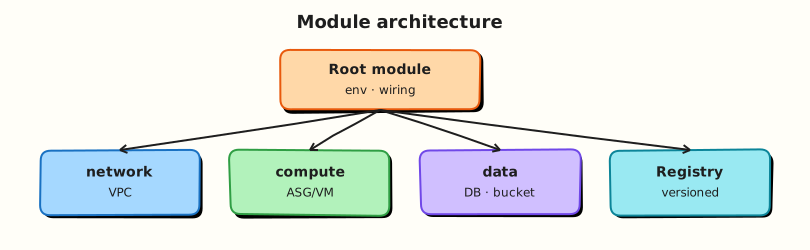
The root module orchestrates one or more child modules; each module owns its resources and exposes outputs upward.
Theory
What it is
A module is a container of Terraform configuration. Every configuration has a root module (your working directory). Child modules are called via:
module "api_service" {
  source = "./modules/service"

  environment = var.environment
  owner       = var.owner
}
The source argument can be:
| Source type | Example |
|---|---|
| Local path | ./modules/service |
| Registry | terraform-aws-modules/vpc/aws |
| Git | git::https://github.com/org/repo.git//modules/vpc?ref=v1.2.0 |
| S3/GCS | s3::https://... |
Module addresses in state look like module.api_service.null_resource.service.
Why it matters
Modules encode standards — naming, tags, security defaults — once. Platform teams publish modules; product teams consume them with minimal inputs. Smaller blast radius: test and version modules independently. Without modules, enterprise repos become monolithic .tf files nobody dares refactor.
How it works
- Root module evaluates
moduleblocks and loads child directories. - Child module receives input variables from the caller.
- Child resources are created with prefixed addresses.
- Outputs from child modules are available as
module.NAME.OUTPUT. - State stores nested module paths.
Standard module layout:
Key concepts and comparisons
| Pattern | Prefer when |
|---|---|
| Child module | Reuse within same repo/stack |
| Separate root stack + remote state | Independent lifecycle (network vs app) |
| Registry module | Community or org-standard building blocks |
for_each on module | Many similar instances (one per team/app) |
| Scope | Can reference |
|---|---|
| Root → child | Pass variables in module block |
| Child → root | Only via outputs returned upward |
| Child → child | Root wires outputs to inputs (no direct import) |
Common pitfalls
- Relative source paths break when cwd changes — prefer stable
./modules/...from root. - Too many required variables — module becomes harder to use than raw resources.
- Hidden provider configuration — child modules inherit providers; explicit
providersmap needed for aliases. - Circular modules — module A calls B calls A; refactor to root orchestration.
- No README — consumers guess required inputs; document every variable.
Hands-on Lab
Objective
Create a reusable service child module that provisions a Docker network and container, then a root module that instantiates it twice with different inputs — prove outputs and state addresses with docker ps and an evidence script under ~/rebash-terraform/module-09.
Prerequisites
- Terraform ≥ 1.5
- Docker Engine running (
docker infosucceeds) - Completed Modules 7–9 labs
Lab environment
Real-world scenario
Platform engineering ships a service module that enforces naming, tags, and a standard Alpine sidecar before teams add cloud-specific resources. Ticket PLAT-410: application teams call the module twice — billing and catalog — with different owners in the same environment; success means four Docker objects (two networks, two containers) visible in docker ps.
Step-by-step tasks
Task 1 – Author the service child module
Create ~/rebash-terraform/module-09/modules/service/versions.tf:
terraform {
  required_version = ">= 1.5.0"

  required_providers {
    docker = {
      source  = "kreuzwerker/docker"
      version = "~> 3.0"
    }
  }
}
Create ~/rebash-terraform/module-09/modules/service/variables.tf:
variable "service_name" {
  type        = string
  description = "Short service identifier"
}

variable "environment" {
  type        = string
  description = "Deployment tier"
}

variable "owner" {
  type        = string
  description = "Owning team"
}
Create ~/rebash-terraform/module-09/modules/service/main.tf:
locals {
  full_name = "${var.service_name}-${var.environment}"
  common_tags = {
    service     = var.service_name
    environment = var.environment
    owner       = var.owner
  }
}

resource "docker_network" "service" {
  name = "${local.full_name}-net"
}

resource "docker_image" "alpine" {
  name = "alpine:3.20"
}

resource "docker_container" "service" {
  name  = "${local.full_name}-svc"
  image = docker_image.alpine.image_id

  command = ["sleep", "3600"]

  networks_advanced {
    name = docker_network.service.name
  }

  dynamic "labels" {
    for_each = local.common_tags
    content {
      label = labels.key
      value = labels.value
    }
  }
}
Create ~/rebash-terraform/module-09/modules/service/outputs.tf:
output "service_full_name" {
  description = "Computed service name"
  value       = local.full_name
}

output "container_name" {
  description = "Running container name"
  value       = docker_container.service.name
}

output "network_name" {
  description = "Dedicated service network"
  value       = docker_network.service.name
}
Run:
cd ~/rebash-terraform/module-09/modules/service
terraform init
terraform validate
echo "child module validate OK" | tee child-validate-ok.txt
Expected output
Validate succeeds in the module directory (isolated syntax check).
Task 2 – Root module calling the child twice
Create ~/rebash-terraform/module-09/versions.tf:
terraform {
  required_version = ">= 1.5.0"

  required_providers {
    docker = {
      source  = "kreuzwerker/docker"
      version = "~> 3.0"
    }
  }
}

provider "docker" {}
Create ~/rebash-terraform/module-09/variables.tf:
Create ~/rebash-terraform/module-09/main.tf:
module "billing" {
  source = "./modules/service"

  service_name = "billing"
  environment  = var.environment
  owner        = "finance-team"
}

module "catalog" {
  source = "./modules/service"

  service_name = "catalog"
  environment  = var.environment
  owner        = "product-team"
}
Create ~/rebash-terraform/module-09/outputs.tf:
output "billing_service_name" {
  value = module.billing.service_full_name
}

output "catalog_service_name" {
  value = module.catalog.service_full_name
}

output "container_names" {
  value = {
    billing = module.billing.container_name
    catalog = module.catalog.container_name
  }
}
Run:
cd ~/rebash-terraform/module-09
terraform init
terraform plan | tee root-plan.txt
grep -q 'module.billing' root-plan.txt
grep -q 'module.catalog' root-plan.txt
terraform apply -auto-approve
terraform output -json | tee root-outputs.json
grep -q 'billing-dev' root-outputs.json
grep -q 'catalog-dev' root-outputs.json
docker ps --filter name=billing-dev --format '{{.Names}}' | grep -q billing-dev-svc
docker ps --filter name=catalog-dev --format '{{.Names}}' | grep -q catalog-dev-svc
echo "root apply OK" | tee root-apply-ok.txt
Expected output
Two module instances in plan; outputs show billing-dev and catalog-dev; both containers running.
Task 3 – Inspect module addresses in state
Run:
cd ~/rebash-terraform/module-09
terraform state list | tee module-state-list.txt
grep -q 'module.billing.docker_container.service' module-state-list.txt
grep -q 'module.catalog.docker_container.service' module-state-list.txt
terraform state show module.billing.docker_container.service | grep -q 'finance-team'
docker network ls --filter name=dev-net --format '{{.Name}}' | tee docker-nets.txt
grep -q 'billing-dev-net' docker-nets.txt
grep -q 'catalog-dev-net' docker-nets.txt
echo "state inspect OK" | tee state-inspect-ok.txt
Expected output
State addresses include module prefix paths; billing labels reference finance-team; two dedicated networks exist.
Task 4 – Module evidence script
Create ~/rebash-terraform/module-09/module-evidence.sh:
#!/usr/bin/env bash
set -euo pipefail
cd ~/rebash-terraform/module-09
terraform validate
terraform output -raw billing_service_name | grep -q '^billing-dev$'
terraform output -raw catalog_service_name | grep -q '^catalog-dev$'
terraform state list | grep -c 'module\.' | grep -q '^6$'
docker ps --filter name=-dev-svc --format '{{.Names}}' | wc -l | grep -q '^2$'
echo "module-evidence PASS" | tee module-evidence-pass.txt
Run:
chmod +x ~/rebash-terraform/module-09/module-evidence.sh
~/rebash-terraform/module-09/module-evidence.sh
Expected output
module-evidence-pass.txt contains module-evidence PASS.
Validation steps
- Child module has variables, main, outputs, versions
- Root calls module twice with different inputs
- Module outputs referenced at root level
- State shows
module.*addresses -
docker psshows both service containers running - Evidence script passes
Common errors and fixes
| Error | Cause | Fix |
|---|---|---|
| Module not found | Wrong source path | Use ./modules/service relative to root |
| Required variable not set | Missing module argument | Pass all required inputs in module block |
| Duplicate module name | Two module "billing" blocks | Unique module block labels |
| Provider config error | Child needs provider upgrade | Align required_providers versions |
| Container name conflict | Prior lab left container | terraform destroy in old module dirs |
Challenge exercise
Add a third module instance module "audit" for service audit owned by security-team. Apply and verify:
Create audit.tf in the root module:
module "audit" {
  source = "./modules/service"

  service_name = "audit"
  environment  = var.environment
  owner        = "security-team"
}
Add to outputs.tf:
Apply:
cd ~/rebash-terraform/module-09
terraform apply -auto-approve
docker ps --filter name=audit-dev-svc --format '{{.Names}}' | grep -q audit-dev-svc
echo "third module challenge OK"
Expected output
Audit container running; output includes audit-dev.
Learning outcomes
- Standard module directory layout with real Docker resources
- Root-to-child variable passing
- Module output consumption
- Module-prefixed state addresses verified with
docker ps
Cleanup
cd ~/rebash-terraform/module-09
terraform destroy -auto-approve
rm -f child-validate-ok.txt root-plan.txt root-outputs.json root-apply-ok.txt \
  module-state-list.txt state-inspect-ok.txt module-evidence-pass.txt docker-nets.txt audit.tf 2>/dev/null || true
rm -rf .terraform .terraform.lock.hcl terraform.tfstate terraform.tfstate.backup
rm -rf modules/service/.terraform modules/service/.terraform.lock.hcl
Validation
- Completed module-10 lab with two module instances and Docker proof
- Can draw root → child variable flow
- Know difference between module and separate stack
- Can locate module resources in state list
Code Walkthrough
- Module as API — variables in, outputs out; hide resource implementation.
- locals inside module — encode naming standard once.
- Unique module block names — become state path segments.
- README on module — document required inputs and example call block.
- Pin module source ref — Git/registry tags for reproducible builds.
Security Considerations
- Modules inherit provider credentials from the caller — restrict who can call prod modules.
- Do not embed secrets in module defaults — require explicit sensitive variables.
- Review third-party modules before enterprise adoption — supply chain risk.
- Module outputs can leak internal IDs — expose minimum necessary fields.
- Sign and scan module artifacts in private registries.
Common Mistakes
Monolithic root module
Five hundred lines in main.tf with no modules.
Fix: Extract repeated patterns when you copy a third time.
Over-flexible modules
Thirty variables with unclear defaults.
Fix: Opinionated modules with sensible defaults; thin wrappers for edge cases.
Calling modules with unstable source
source = "../copy-of-vpc" without version pin.
Fix: Git ref or registry version constraint.
Best Practices
- One logical concern per module (service, network tier, monitoring baseline).
- Include
versions.tfin every module with provider constraints. - Write
README.mdwith example usage and input table. - Use semantic versioning for internal module releases.
- Test modules in isolation with
terraform validateand example root wrappers.
Troubleshooting
| Symptom | Likely cause | Fix |
|---|---|---|
Unsupported argument in module block | Input not declared in child | Add variable to child or remove extra arg |
| Plan changes unrelated resources | Module source changed | Pin source ref; review module diff |
| Provider configuration not present | Child expects alias | Pass providers map in module block |
| Output is unknown after apply | Output references missing resource | Fix dependency in child module |
| State mv needed after module refactor | Moved resource into module | terraform state mv into module.name.* |
Summary
Modules turn repeated Terraform into reusable, testable building blocks. You authored a service child module, called it twice from root, and traced module.* addresses in state. Next, Registry Modules and Composition consumes public Registry modules and composes them with your own code.
Interview Questions
1. What is the difference between a root module and a child module?
Reveal answer
The root module is the working directory where you run terraform apply. Child modules are reusable packages called via module blocks. Every configuration has exactly one root; it may call many children. State addresses prefix child resources with module.NAME..
2. How do you reference a module output in the root module?
Reveal answer
Use module.<MODULE_NAME>.<OUTPUT_NAME> — for example module.vpc.vpc_id. Outputs must be declared in the child module's outputs.tf. Root outputs can re-export module outputs for remote state consumers.
3. When should you use a module versus a separate Terraform stack?
Reveal answer
Modules — same lifecycle, deployed together, shared state file (e.g. VPC + subnets in one apply). Separate stacks — independent lifecycle, different teams, different apply cadence — connect via remote state or data sources. Split when blast radius or ownership differs.
4. What module source types have you used?
Reveal answer
Local paths (./modules/x) for monorepos; Terraform Registry for community modules; Git with ?ref= tags for internal modules; S3/GCS for artefact storage. Always pin versions/refs — floating main branch breaks reproducibility.
5. Why include versions.tf in child modules?
Reveal answer
Declares required Terraform version and provider constraints so callers know compatibility before init. Prevents silent provider upgrades that change resource behaviour. Registry modules require clear version metadata.
6. What happens to resource addresses when you move code into a module?
Reveal answer
Addresses gain a module.NAME. prefix. Without terraform state mv, Terraform plans destroy/create. Migration runbook: refactor code, move each resource address in state, verify empty plan.
7. How do modules interact with provider configuration?
Reveal answer
Child modules inherit default provider configurations from the parent unless the child declares configuration_aliases and the parent passes a providers map. Required for multi-region or multi-account patterns.
8. What belongs in a module README?
Reveal answer
Purpose, example module block, input/output tables, version compatibility, known limitations, and upgrade notes. Treat it as API documentation — consumers should not read main.tf to guess inputs.
Related Tutorials
- Terraform course index
- Previous: Remote State and Backends
- Next: Registry Modules and Composition
- Production Terraform Patterns