Data Sources and Existing Infrastructure
Overview
Not everything belongs in Terraform state on day one. Data sources read existing infrastructure, files, HTTP endpoints, or other stacks without managing lifecycle — ideal for looking up VPC IDs, AMI filters, certificate ARNs, or values maintained by another team.
This tutorial covers data sources, terraform_remote_state, external, and http patterns for existing infrastructure. The lab under ~/rebash-terraform/module-11 reads a brownfield Docker network and config file, calls an external owner lookup, and wires data into a new container — real apply against Docker Engine.
This is Tutorial 13 in Module 11: Data Sources of the REBASH Academy Terraform for Cloud & DevOps Engineers series.
Prerequisites
- Functions, Templates, and Dynamic Blocks
- Remote State and Backends
- Terraform CLI ≥ 1.5
bashandcurlavailable
Learning Objectives
By the end of this tutorial, you will be able to:
- Declare
datablocks and referencedata.TYPE.NAME.attribute - Read local files and external program JSON with data sources
- Fetch remote metadata with
httpdata sources safely - Contrast data sources with
terraform importfor management handover - Explain when read-only lookups beat duplicating hard-coded IDs
Architecture
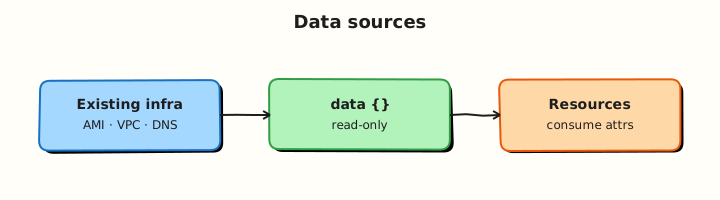
Data sources fetch read-only values at plan time; managed resources depend on those values but data sources are never created or destroyed by apply.
Theory
What it is
Data sources use the data block:
data "local_file" "config" {
  filename = "${path.module}/config/existing.env"
}

resource "null_resource" "app" {
  triggers = {
    config_hash = md5(data.local_file.config.content)
  }
}
Reference attributes as data.local_file.config.content.
Common data sources:
| Data source | Reads |
|---|---|
aws_vpc, aws_ami, … | Live cloud objects (provider-specific) |
local_file | File on disk |
http | HTTP/HTTPS response body |
external | JSON from a helper program stdout |
terraform_remote_state | Outputs from another stack's state |
Data vs managed resource: Terraform never creates or destroys data source objects — it reads them each plan/apply (refresh).
Data vs import: Import brings an existing object under management in state. Data source leaves ownership elsewhere — you only read attributes.
Why it matters
Brownfield deployments reference shared network, DNS, and certificates owned by platform teams. Hard-coding IDs breaks when upstream changes. Data sources keep your module loosely coupled — read the current VPC filter result at plan time. Wrong data source configuration fails plans early instead of at apply.
How it works
- Terraform configures the data source with lookup parameters.
- Provider (or built-in logic) fetches data during plan refresh.
- Attributes populate expressions for resources, locals, and outputs.
- Data sources appear in dependency graph — resources wait for successful read.
- If lookup fails (404, missing file), plan errors unless optional patterns used.
external data source runs a program that must print JSON to stdout:
data "external" "owner" {
  program = ["bash", "${path.module}/scripts/read-owner.sh"]
}
# data.external.owner.result["owner_email"]
Key concepts and comparisons
| Pattern | Manages resource? | Use when |
|---|---|---|
resource | Yes | Terraform owns lifecycle |
data | No | Read-only reference |
import + resource | Yes after import | Adopt existing object |
terraform_remote_state | No (reads other state) | Cross-stack outputs |
| Risk | Mitigation |
|---|---|
| Data changes between plan and apply | Re-run plan before apply; short plan-apply window |
| external script failure | Validate JSON; test script in CI |
| http to untrusted URL | Allow-list hosts; TLS verify |
Common pitfalls
- Confusing data and resource addresses —
data.aws_vpc.mainvsaws_vpc.main. - external program prints logs to stdout — corrupts JSON parse.
- File path outside module — breaks CI checkout paths; use
path.module. - Assuming data is free — cloud API lookups count against rate limits.
- Reading secrets via http — secrets enter state; prefer vault data sources.
Hands-on Lab
Objective
Read a pre-existing Docker network and config file, call an external script for JSON metadata, fetch public HTTP metadata, and wire data sources into a real Docker container under ~/rebash-terraform/module-11.
Prerequisites
- Terraform CLI ≥ 1.5
- Docker Engine running (
docker infosucceeds) - Network access for
httpdata source (HashiCorp checkpoint endpoint)
Lab environment
Runtime: local Docker Engine.
Real-world scenario
Your application stack must attach to a platform-owned Docker network, read a brownfield config file, resolve owner email from an internal script (simulating CMDB lookup), and verify Terraform CLI version metadata from HashiCorp's checkpoint service before provisioning the service container.
Step-by-step tasks
Task 1 – Seed brownfield network and config
Create the platform network outside Terraform (simulating existing infrastructure):
docker network create rebash-platform-net | tee platform-net-create.txt
grep -q 'rebash-platform-net' platform-net-create.txt
Create config/existing.env:
UPSTREAM_SERVICE=payments-api
UPSTREAM_VERSION=2.4.1
MAINTENANCE_WINDOW=sunday-02:00-04:00-utc
Create versions.tf:
terraform {
  required_version = ">= 1.5.0"

  required_providers {
    docker = {
      source  = "kreuzwerker/docker"
      version = "~> 3.0"
    }
    local = {
      source  = "hashicorp/local"
      version = "~> 2.5"
    }
    external = {
      source  = "hashicorp/external"
      version = "~> 2.3"
    }
    http = {
      source  = "hashicorp/http"
      version = "~> 3.4"
    }
  }
}
Create providers.tf:
Create data.tf:
data "docker_network" "platform" {
  name = "rebash-platform-net"
}

data "local_file" "platform_config" {
  filename = "${path.module}/config/existing.env"
}

data "external" "owner_lookup" {
  program = ["bash", "${path.module}/scripts/read-owner.sh"]

  query = {
    service = "payments-api"
  }
}

data "http" "terraform_checkpoint" {
  url = "https://checkpoint-api.hashicorp.com/v1/check/terraform"
}
Create scripts/read-owner.sh:
#!/usr/bin/env bash
set -euo pipefail
query="$(cat)"
service="$(echo "$query" | jq -r '.service')"
owner_email="${service}-owner@example.com"
jq -n --arg owner "$owner_email" --arg service "$service" \
  '{owner_email: $owner, service: $service}'
Run:
chmod +x ~/rebash-terraform/module-11/scripts/read-owner.sh
cd ~/rebash-terraform/module-11
terraform init
echo '{"service":"payments-api"}' | bash scripts/read-owner.sh | grep -q owner_email
echo "seed OK" | tee seed-ok.txt
Expected output
External script prints JSON with owner_email; platform network exists.
Task 2 – Wire data sources into Docker container and outputs
Create main.tf:
locals {
  config_lines = split("\n", trimspace(data.local_file.platform_config.content))
  upstream_version = [
    for line in local.config_lines : trimspace(split("=", line)[1])
    if startswith(line, "UPSTREAM_VERSION=")
  ][0]
}

resource "docker_image" "app" {
  name         = "nginx:1.27-alpine"
  keep_locally = true
}

resource "docker_container" "app" {
  name  = "payments-api-${local.upstream_version}"
  image = docker_image.app.image_id

  networks_advanced {
    name = data.docker_network.platform.name
  }

  labels = {
    upstream_version = local.upstream_version
    owner_email      = data.external.owner_lookup.result.owner_email
    tf_current       = jsondecode(data.http.terraform_checkpoint.response_body).current_version
    managed_by       = "terraform"
  }
}
Create outputs.tf:
output "upstream_version" {
  value = local.upstream_version
}

output "owner_email" {
  value = data.external.owner_lookup.result.owner_email
}

output "network_id" {
  value = data.docker_network.platform.id
}

output "container_name" {
  value = docker_container.app.name
}
Run:
cd ~/rebash-terraform/module-11
terraform validate
terraform apply -auto-approve
terraform output -raw upstream_version | tee upstream-version.txt
test "$(cat upstream-version.txt)" = "2.4.1"
docker inspect payments-api-2.4.1 --format '{{index .Config.Labels "owner_email"}}' \
  | tee owner-label.txt
grep -q 'payments-api-owner@example.com' owner-label.txt
docker network inspect rebash-platform-net --format '{{len .Containers}}' | tee net-containers.txt
test "$(cat net-containers.txt)" -ge 1
echo "task2 OK" | tee task2-ok.txt
Expected output
Container attached to platform network with owner label from external data.
Task 3 – Prove plan changes when upstream file changes
Update config/existing.env:
UPSTREAM_SERVICE=payments-api
UPSTREAM_VERSION=2.5.0
MAINTENANCE_WINDOW=sunday-02:00-04:00-utc
Run:
cd ~/rebash-terraform/module-11
terraform plan -no-color | tee plan-after-config-change.txt
grep -q '2.5.0' plan-after-config-change.txt
terraform apply -auto-approve
terraform output -raw upstream_version | grep -q '2.5.0'
docker ps --filter "name=payments-api-2.5.0" --format '{{.Names}}' | tee new-container.txt
grep -q 'payments-api-2.5.0' new-container.txt
echo "task3 OK" | tee task3-ok.txt
Expected output
Plan detects container rename from version change; new container running.
Task 4 – Data sources evidence script
Create data-evidence.sh:
#!/usr/bin/env bash
set -euo pipefail
cd ~/rebash-terraform/module-11
terraform validate
terraform output -raw upstream_version | grep -q .
terraform output -raw owner_email | grep -q '@example.com'
terraform state list | grep -q 'data.docker_network.platform'
docker inspect "$(terraform output -raw container_name)" --format '{{.State.Running}}' | grep -q true
echo "data-evidence PASS" | tee data-evidence-pass.txt
Run:
chmod +x ~/rebash-terraform/module-11/data-evidence.sh
~/rebash-terraform/module-11/data-evidence.sh
Expected output
data-evidence-pass.txt contains data-evidence PASS.
Validation steps
-
data.docker_networkread brownfield network without managing it - external script returned JSON consumed by Terraform
- http data source fetched checkpoint metadata
- Plan reacted to upstream file edit with container replace
- Evidence script passes with running container
Common errors and fixes
| Error | Cause | Fix |
|---|---|---|
| external JSON parse error | Script printed logs to stdout | Send logs to stderr only |
| Network not found | Network not pre-created | Run docker network create rebash-platform-net |
| http SSL error | Corporate proxy | Fix CA trust or use allowed internal URL |
| Container name invalid | Version contains dots | Use replace() on version in name if needed |
| Data source read during apply fail | Network blip | Re-run plan; add retry in provider config |
Challenge exercise
Add a data "local_file" read of scripts/read-owner.sh and output its SHA256; add a data "docker_image" lookup for nginx:1.27-alpine and output image ID:
data "local_file" "owner_script" {
  filename = "${path.module}/scripts/read-owner.sh"
}

data "docker_image" "nginx" {
  name = "nginx:1.27-alpine"
}

output "owner_script_sha" {
  value = sha256(data.local_file.owner_script.content)
}

output "nginx_image_id" {
  value = data.docker_image.nginx.id
}
Apply and verify:
cd ~/rebash-terraform/module-11
terraform apply -auto-approve
terraform output -raw owner_script_sha | grep -q .
terraform output -raw nginx_image_id | grep -q .
echo "data challenge OK"
Expected output
Non-empty SHA256 and image ID outputs.
Learning outcomes
- Data vs resource mental model on real Docker objects
- external program contract (JSON stdout)
- Wiring data attributes into container labels and network attachment
- Brownfield reads without import
Cleanup
cd ~/rebash-terraform/module-11
terraform destroy -auto-approve
docker network rm rebash-platform-net 2>/dev/null || true
rm -f seed-ok.txt upstream-version.txt owner-label.txt net-containers.txt \
  task*-ok.txt plan-after-config-change.txt new-container.txt data-evidence-pass.txt \
  platform-net-create.txt
rm -rf .terraform .terraform.lock.hcl terraform.tfstate terraform.tfstate.backup
Validation
- Completed module-11 data sources lab
- Can explain data vs import decision
- Know external script JSON requirements
- Understand data sources refresh each plan
Code Walkthrough
- Brownfield file outside Terraform —
local_filedata source reads it; no import needed. - external for CMDB — script encapsulates lookup; swap script per environment.
- http for version checks — gate modules on minimum provider/tool versions.
- Parse in locals — keep resource blocks clean.
- Triggers from data — force replace when upstream metadata changes.
Security Considerations
externalruns arbitrary programs — review scripts; restrict who can change them.httpdata sources can leak response bodies into state — avoid authenticated URLs with secrets in response.- Do not fetch credentials from plain HTTP endpoints.
- Validate and sanitise external JSON before use in resources.
- Cloud data sources need read-only IAM — separate from apply roles.
Common Mistakes
Managing data source objects manually
Editing the VPC in console while using data.aws_vpc is fine — Terraform reads current state.
Fix: Do not confuse with resource — only resources are managed.
external script stderr mixed into stdout
Breaks JSON parsing.
Fix: echo debug >&2; stdout JSON only.
Import when read-only suffices
Import adds management overhead for shared platform resources.
Fix: Use data source unless your team owns lifecycle.
Best Practices
- Prefer data sources for shared platform resources owned elsewhere.
- Pin external scripts in Git; test with fixture JSON in CI.
- Use
terraform_remote_statefor first-party stack outputs over ad-hoc data duplication. - Document required upstream objects (tags, names) for data source filters.
- Handle "not found" with clear variable validation where provider allows.
Troubleshooting
| Symptom | Likely cause | Fix |
|---|---|---|
| data source not found error | Wrong provider alias | Check provider configuration |
| Intermittent http failures | Network or rate limit | Retry; cache in external script |
| Stale data in plan | Cached refresh | -refresh=true default; re-plan |
| import vs data confusion | Wrong block type | data for read; resource+import for manage |
| external exit non-zero | Script error | Run script manually with sample query JSON |
Summary
Data sources let Terraform read existing infrastructure and metadata without taking ownership. You consumed local_file, external, and http data, wired results into resources, and reacted to upstream file changes. Next, Workspaces and Environment Strategies separates dev and staging state.
Interview Questions
1. What is the difference between a resource and a data source?
Reveal answer
A resource is managed — Terraform creates, updates, and destroys it. A data source is read-only — Terraform fetches attributes at plan/refresh time but never changes the object. Use resources for ownership; data sources for lookups.
2. When would you use terraform import instead of a data source?
Reveal answer
Import when your team will manage lifecycle of an existing object going forward (adopt legacy server into state). Data source when another team or system continues to own the object and you only need attributes (VPC ID from network stack).
3. How does the external data source work?
Reveal answer
Terraform runs the program with query JSON on stdin (legacy) or as args depending on provider version; the program must print JSON object to stdout. Attributes appear under data.external.NAME.result. Errors go to stderr; non-zero exit fails the plan.
4. Do data sources appear in terraform state?
Reveal answer
Yes — cached attributes are stored in state so Terraform knows dependency results. They are not managed resources — there is no create/destroy API call for the object itself, only refresh reads.
5. What happens if a data source lookup fails at plan time?
Reveal answer
Plan errors — for example VPC filter matches zero subnets, file missing, HTTP 404. Fix filters, paths, or permissions before apply proceeds. This fail-fast behaviour protects against wrong infrastructure references.
6. How is terraform_remote_state different from aws_vpc data source?
Reveal answer
terraform_remote_state reads outputs from another Terraform stack's state — first-party contract. aws_vpc data source queries AWS API live — useful when network was not built by Terraform or you need current AWS truth.
7. Security concern with external data source?
Reveal answer
It executes ** arbitrary code** during plan with the runner's privileges — supply chain risk if scripts are editable by untrusted users. Review scripts, run in locked-down CI, avoid secrets in query args logged by debug.
8. Can data source values change between plan and apply?
Reveal answer
Yes — upstream systems can change. Terraform refreshes again at apply by default. For critical values, minimise plan-apply delay, use -refresh=false only deliberately, and re-plan before production apply if window is long.
Related Tutorials
- Terraform course index
- Previous: Functions, Templates, and Dynamic Blocks
- Next: Workspaces and Environment Strategies
- Remote State and Backends