Terraform Workflow: Init, Plan, and Apply
Overview
The Terraform daily loop is how teams change infrastructure safely: format and validate configuration, initialise providers, plan diffs against state, apply approved changes, and destroy when retiring environments. Each command touches a different artefact — HCL files, provider plugins, state, and real APIs. Skipping steps (especially plan) recreates click-ops with extra YAML.
This is Tutorial 3 in Module 3: Terraform Basics of the REBASH Academy Terraform for Cloud & DevOps Engineers series — written for Cloud, DevOps, Platform, and SRE engineers. You will execute the full local lifecycle with kreuzwerker/docker, save plan files, interpret exit codes, prove containers with docker ps, and tear down resources cleanly — building muscle memory before cloud modules.
Prerequisites
- Installing Terraform and the CLI Workflow
- Terraform ≥ 1.5 on your
PATH - Docker Engine running (
docker infosucceeds) - Completed Module 2 install/init concepts
Learning Objectives
By the end of this tutorial, you will be able to:
- Run
terraform fmt,validate,init,plan,apply, anddestroyin the correct order - Explain what each command reads and writes (config, state, providers, APIs)
- Save and apply a plan file for reviewable, repeatable applies
- Use
-detailed-exitcodeand interpret plan summary lines - Destroy lab resources and confirm empty state
Architecture
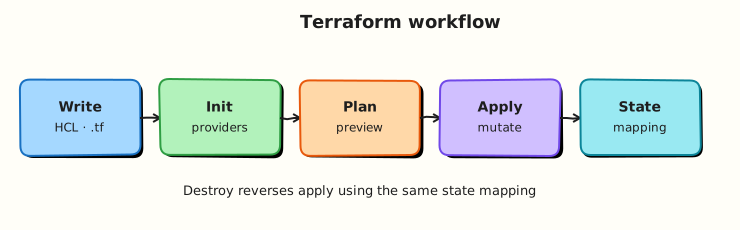
The workflow moves from author-time configuration through CLI phases to provider APIs and back into state. Plan sits between intent and mutation — the control point for humans and CI.
Theory
What it is
| Command | Primary inputs | Primary outputs | Mutates cloud/local resources? |
|---|---|---|---|
terraform fmt | .tf files | Reformatted files | No |
terraform validate | Config + provider schemas | Success/error messages | No |
terraform init | Backend config, modules, providers | .terraform/, lock file | No (downloads plugins) |
terraform plan | Config + state | Plan text/binary (tfplan) | No* |
terraform apply | Plan or config | Updated state, resources | Yes |
terraform destroy | Config + state | Destroy plan/execution | Yes (deletes) |
*Plan may refresh state by reading live attributes (read-only API calls).
Why it matters
Plan is Terraform’s safety valve. It answers: “If I apply now, what changes?” CI pipelines fail when plan shows unexpected destroys. Saved plans (plan -out=tfplan → apply tfplan) ensure apply matches reviewed diff — critical for regulated environments.
Validate catches mistakes before any API call: wrong argument types, missing required attributes, invalid references.
Destroy is not “delete the folder” — it uses state to delete managed objects. Deleting .tf files without destroy orphans billable resources.
How it works
Recommended local sequence
terraform fmt -recursive
terraform init
terraform validate
terraform plan -out=tfplan
terraform apply tfplan
# when retiring:
terraform destroy
terraform init
- Installs providers and modules
- Configures backend (local state file by default)
- Safe to re-run when modules or providers change
-upgradeupdates providers within constraints-backend=falseskips backend setup (common in CI validate-only jobs)
terraform plan
- Refresh: read current remote attributes into state (unless
-refresh=false) - Compare desired config vs state
- Output:
+create,~update in-place,-destroy,-/+replace
Useful flags:
| Flag | Use |
|---|---|
-out=FILE | Save plan for exact apply |
-detailed-exitcode | Exit 0 no changes, 1 error, 2 changes pending |
-target=ADDRESS | Limit scope (emergency only — can break dependencies) |
-var-file= | Supply variable values |
terraform apply
- Without saved plan: implicit plan + prompt (or
-auto-approve) - With saved plan: applies exactly that plan — no config drift between plan and apply
- Updates state after each successful resource change
terraform destroy
- Plans destroys for all managed resources in configuration
- Order respects dependency graph (dependents first)
-auto-approvefor automation — never default in production without gates
terraform fmt and validate
validate does not check cloud credentials or remote object existence — only configuration consistency.
State during workflow
First apply creates terraform.tfstate (default local backend). State maps:
docker_container.web → container on Docker Engine with known name
docker_network.lab → bridge network ID
Module 8 covers remote state; for now treat state as Terraform’s memory — back it up before experiments.
Common pitfalls
applywithout reading plan — especially with-auto-approvein CI tied tomainwithout path filters.- Editing config between saved plan and apply — apply rejects stale plan or worse, partial mismatch if forced.
- Destroying by deleting repo — resources keep running; state loss makes cleanup harder.
- Running validate before init — missing provider schemas.
- Using
-targetroutinely — leaves dangling dependencies and incomplete state.
Hands-on Lab
Objective
Build a Docker stack (network + nginx container), run the full fmt → init → validate → plan → apply → destroy cycle, save plan evidence, prove the container with docker ps, and confirm clean teardown.
Prerequisites
- Terraform ≥ 1.5 (Module 2)
- Docker Engine running (
docker infosucceeds) - Write access under
~/rebash-terraform/module-03
Lab environment
Workspace: ~/rebash-terraform/module-03
Uses kreuzwerker/docker against local Docker Engine.
Real-world scenario
You are building a CI template for a new internal service. Ticket CI-203: before AWS modules land, the pipeline must prove Terraform workflow commands succeed — format check, validate, plan artefact, gated apply, and destroy on ephemeral environments. Your reference stack creates a real bridge network and nginx container; success is logged evidence plus docker ps showing the container Up after apply.
Step-by-step tasks
Task 1 – Author the lab stack
Create versions.tf:
terraform {
  required_version = ">= 1.5.0, < 2.0.0"

  required_providers {
    docker = {
      source  = "kreuzwerker/docker"
      version = "~> 3.0"
    }
  }
}

provider "docker" {}
Create main.tf:
resource "docker_network" "workflow" {
  name = "rebash-module-03-net"
}

resource "docker_image" "nginx" {
  name = "nginx:1.27-alpine"
}

resource "docker_container" "web" {
  name  = "rebash-module-03-web"
  image = docker_image.nginx.image_id

  networks_advanced {
    name = docker_network.workflow.name
  }

  labels {
    label = "lab"
    value = "module-03-workflow"
  }
}
Expected output
versions.tf and main.tf exist with network, image, and container resources.
Task 2 – Format, init, and validate
Run:
cd ~/rebash-terraform/module-03
terraform fmt -recursive
terraform init | tee 01-init.txt
terraform validate | tee 02-validate.txt
grep -q 'Success' 02-validate.txt
echo "validate OK" | tee validate-evidence.txt
Expected output
02-validate.txt contains Success! The configuration is valid.; validate-evidence.txt contains validate OK.
Task 3 – Plan, apply, verify, and destroy
Run:
cd ~/rebash-terraform/module-03
terraform plan -out=tfplan -no-color | tee 03-plan.txt
grep -q 'Plan:' 03-plan.txt
terraform apply -auto-approve tfplan | tee 04-apply.txt
docker ps --filter name=rebash-module-03-web --format '{{.Names}} {{.Status}}' | tee docker-ps.txt
grep -q 'Up' docker-ps.txt
terraform plan -detailed-exitcode -no-color | tee 05-plan-after-apply.txt || ec=$?
test "${ec:-0}" -eq 0
terraform destroy -auto-approve | tee 06-destroy.txt
grep -q 'Destroy complete' 06-destroy.txt
docker ps -a --filter name=rebash-module-03-web --format '{{.Names}}' | tee docker-after-destroy.txt
! grep -q 'rebash-module-03-web' docker-after-destroy.txt
echo "workflow cycle OK" | tee workflow-evidence.txt
Expected output
03-plan.txt shows resources to add; docker-ps.txt shows container Up; second plan exits 0 (no changes); 06-destroy.txt includes Destroy complete!; container absent after destroy; workflow-evidence.txt contains workflow cycle OK.
Validation steps
-
terraform fmtleft files consistently formatted -
validatesucceeded afterinit - Saved plan
tfplanapplied without error -
docker psshowedrebash-module-03-webrunning after apply - Post-apply plan shows no pending changes (exit code 0)
-
destroyremoved all managed resources and container from Docker
Common errors and fixes
| Error | Cause | Fix |
|---|---|---|
Saved plan is stale | Config changed after plan -out | Re-run plan -out=tfplan; apply fresh plan |
validate before init | Providers missing | Run terraform init |
Cannot connect to the Docker daemon | Docker not running | Start Docker Engine; verify docker info |
| Destroy leaves container | Destroy failed partway | Re-run terraform destroy; docker rm -f rebash-module-03-web if orphaned |
| Plan always shows changes | Provider normalizes attributes | Review lifecycle ignore_changes (Module 6) |
Challenge exercise
Create workflow-gate.sh:
#!/usr/bin/env bash
set -euo pipefail
cd ~/rebash-terraform/module-03
terraform fmt -check -recursive
terraform init -input=false >/dev/null
terraform validate
terraform plan -out=gate.tfplan -detailed-exitcode -no-color >/dev/null || test $? -eq 2
terraform apply -auto-approve gate.tfplan >/dev/null
docker ps --filter name=rebash-module-03-web --format '{{.Names}}' | grep -q rebash-module-03-web
terraform destroy -auto-approve >/dev/null
echo "CI gate simulation OK"
Run:
chmod +x ~/rebash-terraform/module-03/workflow-gate.sh
~/rebash-terraform/module-03/workflow-gate.sh | tee challenge-gate.txt
Expected output
challenge-gate.txt contains CI gate simulation OK.
Learning outcomes
- You executed the canonical Terraform command order with evidence logs
- You used a saved plan file bridging plan and apply
- You verified convergence (no-op second plan) and clean destroy with Docker proof
- You have a script pattern suitable for CI gates
Cleanup
cd ~/rebash-terraform/module-03
terraform destroy -auto-approve 2>/dev/null || true
docker rm -f rebash-module-03-web 2>/dev/null || true
docker network rm rebash-module-03-net 2>/dev/null || true
rm -rf .terraform .terraform.lock.hcl terraform.tfstate terraform.tfstate.backup \
  tfplan gate.tfplan \
  01-init.txt 02-validate.txt 03-plan.txt 04-apply.txt 05-plan-after-apply.txt \
  06-destroy.txt docker-ps.txt docker-after-destroy.txt validate-evidence.txt \
  workflow-evidence.txt challenge-gate.txt
Validation
- Completed full cycle under
~/rebash-terraform/module-03withdocker psevidence - Can explain each command’s inputs and outputs without notes
- Used saved plan and
-detailed-exitcode - Can name one production failure mode (e.g. stale plan apply)
Code Walkthrough
- Fmt in CI —
-checkfails PRs that waste review time on spacing debates. - Init is idempotent — safe after provider bumps; watch lock file diffs in PRs.
- Plan artefacts — store
tfplanin CI object storage with commit SHA label. - Apply the plan you reviewed — not a re-plan with
-auto-approveon main. - Destroy ephemerals — schedule destroy for sandbox workspaces to control cost.
Security Considerations
- Plan output may expose sensitive values — use
-compact-warningsand redact logs in CI; mark outputssensitive. -auto-approvein production bypasses human judgement — restrict to disposable accounts with policy checks.- Local state files contain resource metadata — chmod restrict; migrate to remote encrypted backend for teams.
- Do not publish plan files from production to public artefact stores without scrubbing.
- Break-glass
-targetapplies need ticket IDs and follow-up full plans.
Common Mistakes
apply -auto-approve as default
Saves time until an unexpected destroy deletes production data.
Fix: Saved plans + manual approval or policy-as-code in HCP Terraform.
Skipping destroy on sandboxes
Orphaned resources accumulate cost and security exposure.
Fix: TTL labels, automated destroy jobs, or ephemeral workspaces.
Manual state edits to fix apply
Hides root cause; next plan diverges wildly.
Fix: Use terraform state subcommands sparingly with runbooks; fix config or import properly.
validate equals safe to apply
Validate does not check IAM permissions or quota limits.
Fix: Plan in a lower environment with real credentials; use policy checks.
Best Practices
- Standardise command order in Makefile or
./scripts/tf.shwrapper. - Store numbered evidence logs in CI (
01-init,03-plan) for audit replay. - Use
-input=falsein automation to avoid prompts hanging jobs. - Run second plan after apply in CI smoke stage to detect non-convergence.
- Document destroy procedure in every lab and sandbox README.
Troubleshooting
| Symptom | Likely cause | Fix |
|---|---|---|
Apply blocked waiting input | Missing -var or -auto-approve | Pass -var-file or use CI variables |
| Plan shows unexpected replace | Attribute forces new resource | Read forces replacement line; adjust config or use lifecycle |
state locked | Concurrent apply | Wait or break lock only with ops approval (Module 8) |
| Destroy hangs | Provider API slow or dependency | -refresh=false rarely; investigate provider timeout |
| fmt changes break VCS blame | Never ran fmt before | Run fmt once en masse with dedicated commit |
Summary
Terraform’s daily loop — fmt, validate, init, plan, apply, destroy — separates formatting, correctness checking, dependency setup, diff review, and mutation. You ran the full cycle with saved plans, verified convergence, and destroyed cleanly. Next, read and write HCL with confidence: HCL Fundamentals: Blocks, Arguments, and Expressions.
Interview Questions
1. What does terraform plan do, and does it change infrastructure?
Reveal answer
terraform plan compares configuration to state (usually after refresh reads live attributes) and prints proposed create, update, and destroy actions. It does not apply changes. With -out, it saves a plan file for apply. Read-only refresh calls may hit APIs but do not mutate resources.
2. Why save a plan file before apply in CI/CD?
Reveal answer
plan -out=tfplan followed by apply tfplan ensures apply executes exactly the diff reviewers approved. Config drift between plan and apply steps cannot silently alter execution. Pairs with manual or policy approval on the stored artefact — important for compliance and incident prevention.
3. Explain terraform init in one minute.
Reveal answer
terraform init prepares the working directory: downloads provider plugins and modules, configures the backend (state storage), and updates .terraform.lock.hcl. It must run after clone or when dependencies change. It does not create cloud resources. Re-running is normal and idempotent.
4. What is the difference between terraform validate and terraform plan?
Reveal answer
validate checks configuration syntax and internal consistency (types, references, provider schemas) without comparing to real infrastructure — fast, no resource diff. plan requires state context and computes actual infrastructure changes. Validate passes can still fail plan due to credentials, quotas, or drift.
5. When would you use terraform destroy, and what happens if you delete .tf files instead?
Reveal answer
destroy intentionally deletes all resources tracked in state for the current workspace — used when decommissioning environments. Deleting .tf files` without destroy leaves real resources running and billing; Terraform no longer manages them. Deleting state orphans resources and loses mapping — cleanup becomes manual archaeology.
6. What does terraform fmt -check do in CI?
Reveal answer
fmt -check exits non-zero if files need formatting — fails the build without modifying files. Enforces consistent HCL style so reviews focus on logic. Often runs before validate/plan on every pull request.
7. Explain -detailed-exitcode for automation.
Reveal answer
plan -detailed-exitcode returns 0 if no changes, 1 on error, 2 if changes pending. Scripts and CI can branch: fail policy if destroys detected (custom grep), require approval when exit 2, succeed when 0. Clearer than parsing plan text ad hoc.
8. A pipeline runs apply -auto-approve on every merge to main. What risks do you flag?
Reveal answer
No human or policy review of plan output; any merged typo can destroy production; drift and module version changes apply immediately; credentials in CI become high-value targets. Prefer: plan on PR, apply on approved tag or environment gate, separate AWS accounts, OPA/Sentinel/conftest policies, and deny -auto-approve on production workspaces.
Related Tutorials
- Terraform course index
- Previous: Installing Terraform and the CLI Workflow
- Next: HCL Fundamentals
- Terraform State Fundamentals