Terraform Cloud and HCP Terraform
Overview
Platform teams outgrow laptop applies and self-managed state buckets. HCP Terraform (HashiCorp Cloud Platform Terraform; historically Terraform Cloud) is HashiCorp’s managed control plane for remote state, remote execution, team permissions, variable sets, and policy gates. You bind a root module with a cloud block, queue runs (plan and apply) on managed workers, and review history in a UI instead of chasing log files in CI.
This is Tutorial 13 in Module 13: Terraform Cloud & Enterprise of the REBASH Academy Terraform for Cloud & DevOps Engineers series — written for Cloud, DevOps, Platform, and SRE engineers who need to explain when to adopt HCP Terraform versus a self-managed backend.
Beginners learn the vocabulary: organisation, workspace, run, variable set, team. Practitioners learn how VCS-driven workflows and remote execution reduce credential sprawl. Production judgement covers blast radius — HCP workspaces are not a substitute for separate cloud accounts — and why cloud and backend blocks cannot coexist.
Prerequisites
- Workspaces and Environment Strategies
- Remote State and Backends
- Terraform CLI 1.9+
- HashiCorp account optional (the lab runs locally; no paid organisation required)
Learning Objectives
By the end of this tutorial, you will be able to:
- Contrast HCP Terraform workspaces with CLI
terraform workspacecommands - Describe remote execution runs (plan, apply, policy evaluation)
- Map teams, variable sets, and policy stages to a review workflow
- Explain when a
cloudblock replaces abackendblock - Mirror a remote-run artefact workflow locally with saved plan files
Architecture
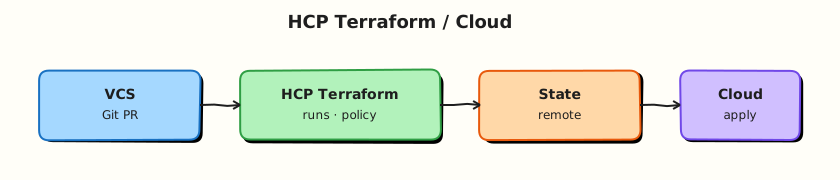
HCP Terraform sits between your Git repository, engineers, and cloud APIs — hosting state, queuing runs, and enforcing policy before apply.
Theory
What it is
HCP Terraform is a SaaS (Software as a Service) platform that manages Terraform state and can execute plans and applies on HashiCorp-hosted runners or self-hosted agents. An organisation is the top-level tenant. An HCP workspace (not the same as a CLI workspace) is a named environment with its own state, variables, run queue, optional VCS connection, and execution mode.
A run is a queued operation: typically plan, then (after approval) apply. Runs produce immutable logs and can attach policy checks (Sentinel on Enterprise tiers; Open Policy Agent integrations vary by setup). Teams grant organisation-level permissions (who can read variables, queue plans, approve applies). Variable sets attach shared Terraform and environment variables to multiple workspaces — for example a TF_VAR_region set reused across staging and production.
Configuration binding uses a cloud block in the root module:
The cloud block is mutually exclusive with a backend block. After terraform login, terraform init connects the working directory to the remote workspace.
Why it matters
Self-managed Amazon Simple Storage Service (S3) plus DynamoDB locking works, but your team owns encryption, versioning, IAM hygiene, runner credentials, and audit exports. HCP Terraform centralises those concerns: credentials can live in the platform, plans appear in a review UI, and platform engineers attach mandatory policies before apply. For regulated industries, run history and team boundaries support audit stories that ad-hoc laptop applies cannot.
How it works
- Create organisation and workspace — UI, API, or the
tfe/ HCP Terraform provider for automation. - Connect VCS — optional; pull requests trigger speculative plans; merges trigger applies when configured.
- Configure execution mode — remote (default on HCP) runs on HashiCorp workers; local execution uses your machine’s credentials while state remains remote.
- Queue a run —
terraform plan/applyfrom CLI or VCS webhook creates a run record with logs. - Policy evaluation — soft or hard gates on the plan; failing policies block apply.
- Apply — after human or automated approval, the saved plan executes against remote state.
CLI workspaces only switch which local or remote state file a directory uses. HCP workspaces add permissions, history, variables, and run tooling — treat them as different concepts.
Key concepts and comparisons
| Concern | Self-managed backend | HCP Terraform |
|---|---|---|
| State storage | You operate bucket + locking | Managed |
| Execution | CI runner or laptop | Remote workers / agents |
| Collaboration | DIY (PR comments, artefacts) | Built-in run UI |
| Policy | OPA, Conftest, custom | Integrated policy sets (tier-dependent) |
| Cost | Cloud storage + CI minutes | Per-seat / run pricing |
| HCP feature | Purpose |
|---|---|
| Workspace | State + variables + runs for one stack |
| Run | Remote plan/apply with audit trail |
| Variable set | Shared secrets/inputs across workspaces |
| Team | RBAC for plan vs apply |
| Policy set | Guardrails on planned changes |
Teams and access patterns
Typical team split:
| Team | Permission | Rationale |
|---|---|---|
platform-admins | Manage workspaces, variable sets | Break-glass platform ownership |
networking-maintainers | Plan + apply on network workspaces | Own landing-zone modules |
app-developers | Plan only on app workspaces | Review without prod apply rights |
Map teams to cloud account isolation — HCP permissions do not replace separate AWS accounts or Google Cloud projects for production blast radius.
Common pitfalls
- Treating HCP workspaces as the only boundary between production and non-production — still use separate cloud accounts where possible.
- Declaring both
cloudandbackendin one root — Terraform rejects the configuration. - Duplicating secrets in Git and HCP variable sets — pick one controlled injection path.
- Assuming remote execution means credentials never touch laptops — local execution mode still uses local credentials.
- Confusing CLI workspace names with HCP workspace names in runbooks and CI scripts.
Hands-on Lab
Objective
Author HCP Terraform-ready configuration (commented cloud block, workspace variable templates) and practise the remote-run artefact discipline locally: saved plan files, human-readable plan review, and apply of the exact plan binary against a real Docker stack under ~/rebash-terraform/module-13.
Prerequisites
- Terraform CLI ≥ 1.9
- Docker Engine running (
docker infosucceeds)
Lab environment
Workspace: ~/rebash-terraform/module-13
Local Terraform with Docker provider. No HCP organisation required — HCP concepts are theory; runs mirror remote-run discipline locally.
Real-world scenario
Your platform team is preparing a repository for HCP Terraform adoption. Leadership wants proof that engineers understand saved-plan review before any remote workspace is wired. You create configuration files that mirror an HCP workspace layout, keep the cloud block as a documented example (not active), and run the same plan → review → apply → destroy loop against a Docker bootstrap stack that a remote run would execute.
Step-by-step tasks
Task 1 – Author root module and HCP workspace templates
Create versions.tf:
terraform {
  required_version = ">= 1.9.0"

  required_providers {
    docker = {
      source  = "kreuzwerker/docker"
      version = "~> 3.0"
    }
    local = {
      source  = "hashicorp/local"
      version = "~> 2.5"
    }
  }

  # When your organisation adopts HCP Terraform, replace this comment block
  # with an active `cloud` block and remove local backend usage.
  #
  # cloud {
  #   organization = "acme-platform"
  #   workspaces {
  #     name = "platform-bootstrap-dev"
  #   }
  # }
}
Create providers.tf:
Create variables.tf:
variable "environment" {
  type        = string
  description = "Workspace environment label mirrored in HCP variable sets."
  default     = "dev"

  validation {
    condition     = contains(["dev", "staging", "prod"], var.environment)
    error_message = "environment must be dev, staging, or prod."
  }
}

variable "service_name" {
  type        = string
  description = "Logical service identifier written into run metadata."
  default     = "platform-bootstrap"
}
Create main.tf:
resource "docker_image" "bootstrap" {
  name         = "nginx:1.27-alpine"
  keep_locally = true
}

resource "docker_container" "bootstrap" {
  name  = "${var.service_name}-${var.environment}"
  image = docker_image.bootstrap.image_id

  labels = {
    environment  = var.environment
    service_name = var.service_name
    managed_by   = "terraform"
    workspace    = "hcp-example-${var.environment}"
  }

  ports {
    internal = 80
    external = 0
  }
}

resource "local_file" "run_summary" {
  filename = "${path.module}/artefacts/run-summary.txt"
  content  = join("\n", [
    "environment=${var.environment}",
    "service=${var.service_name}",
    "workspace=hcp-example-${var.environment}",
    "container=${docker_container.bootstrap.name}",
    "execution=local-simulation",
  ])

  depends_on = [docker_container.bootstrap]
}
Create outputs.tf:
output "run_summary_path" {
  description = "Path to the generated run summary artefact."
  value       = local_file.run_summary.filename
}

output "container_name" {
  description = "Bootstrap container name."
  value       = docker_container.bootstrap.name
}

output "environment" {
  description = "Active environment label."
  value       = var.environment
}
Create workspace.auto.tfvars.example:
Create cloud.tf.example:
# Example HCP Terraform binding — enable only when migrating off local state.
#
# terraform {
#   cloud {
#     organization = "acme-platform"
#     workspaces {
#       tags = ["team:platform", "service:bootstrap"]
#     }
#   }
# }
Initialise and validate:
cd ~/rebash-terraform/module-13
cp workspace.auto.tfvars.example workspace.auto.tfvars
terraform init | tee artefacts/init.log
terraform validate | tee artefacts/validate.log
Expected output
init.log ends with Terraform has been successfully initialized. and validate.log contains Success! The configuration is valid.
Task 2 – Produce and review a saved plan (remote-run artefact)
Remote runs always produce a reviewable plan before apply. Mirror that locally.
cd ~/rebash-terraform/module-13
terraform plan -input=false -out=run.tfplan | tee artefacts/plan.log
terraform show -no-color run.tfplan | tee artefacts/plan-review.txt
grep -q 'docker_container.bootstrap' artefacts/plan-review.txt
grep -q 'local_file.run_summary' artefacts/plan-review.txt
Expected output
plan.log shows Plan: 3 to add; artefacts/plan-review.txt lists container and run summary resources.
Task 3 – Apply the saved plan and capture run metadata
Applying the exact plan binary is what HCP Terraform does after approval — not a fresh implicit plan.
cd ~/rebash-terraform/module-13
terraform apply -input=false run.tfplan | tee artefacts/apply.log
terraform output -json | tee artefacts/outputs.json
test -f artefacts/run-summary.txt
cat artefacts/run-summary.txt | tee artefacts/run-summary-copy.txt
docker ps --filter "name=platform-bootstrap-dev" --format '{{.Names}} {{.Status}}' \
  | tee artefacts/container-ps.txt
grep -q 'platform-bootstrap-dev' artefacts/container-ps.txt
Expected output
apply.log ends with Apply complete!; container running; artefacts/run-summary.txt contains environment=dev.
Task 4 – Document workspace variable mapping
Create docs/hcp-workspace-mapping.md:
# HCP workspace mapping (lab)

| HCP workspace | Terraform variable set | Cloud account |
|---------------|------------------------|---------------|
| platform-bootstrap-dev | rebash-dev-vars | dev-account |
| platform-bootstrap-prod | rebash-prod-vars | prod-account |

Runs: PR → speculative plan; merge to main → apply with manual approval on prod.
Policies: require `managed_by = terraform` tag; deny public object storage.
Verify the file exists:
cd ~/rebash-terraform/module-13
test -f docs/hcp-workspace-mapping.md
grep -q 'platform-bootstrap-prod' docs/hcp-workspace-mapping.md
docker inspect platform-bootstrap-dev --format '{{index .Config.Labels "managed_by"}}' \
  | tee artefacts/label-proof.txt
grep -q 'terraform' artefacts/label-proof.txt
Expected output
Mapping file documents prod workspace separation; container carries managed_by=terraform label.
Validation steps
-
terraform validatepasses under~/rebash-terraform/module-13 - Saved plan
run.tfplanwas reviewed inartefacts/plan-review.txtbefore apply - Apply used
run.tfplan, not an implicit re-plan - Docker container running;
artefacts/run-summary.txtexists with environment metadata -
cloud.tf.exampledocuments HCP binding without being activated
Common errors and fixes
| Error | Cause | Fix |
|---|---|---|
Invalid combination of backend and cloud configuration | Both blocks active | Keep cloud commented until migration |
| Docker daemon not running | Engine stopped | Start Docker; re-run init |
| Plan shows unexpected destroy | Wrong tfvars or stale state | Confirm workspace.auto.tfvars; read plan line-by-line |
| Apply of stale plan fails | Config changed after plan | Re-run terraform plan -out=run.tfplan |
Challenge exercise
Add a policies/tags-required.sentinel.example comment sketch requiring managed_by = terraform on all containers, extend docs/hcp-workspace-mapping.md with which policy set attaches to prod, and re-run saved-plan apply after changing service_name to prove plan diff detection.
Learning outcomes
- Authored HCP-ready root module with documented, inactive
cloudblock - Practised saved-plan review against real Docker infrastructure
- Generated run summary and output JSON artefacts suitable for CI upload
- Documented workspace ↔ variable set ↔ account mapping for platform onboarding
Cleanup
cd ~/rebash-terraform/module-13
terraform destroy -auto-approve
rm -rf .terraform run.tfplan terraform.tfstate terraform.tfstate.backup artefacts
rm -f workspace.auto.tfvars
Validation
- Lab commands completed under
~/rebash-terraform/module-13 - You can explain HCP workspace vs CLI workspace without conflating them
- You produced a saved plan and applied that exact binary
- You can describe one production failure mode (wrong workspace apply, shared credentials)
Code Walkthrough
Production HCP Terraform habits:
- Inspect before queueing — read speculative plan output in the PR/VCS UI; treat destroys as incidents-in-waiting.
- Pin Terraform CLI and provider versions — match local, CI, and HCP agent versions via
required_versionand lock files. - Capture evidence — export run IDs, plan JSON, and apply logs for change tickets.
- Prefer remote execution — keep long-lived cloud keys off laptops; use variable sets for secrets.
- Least privilege teams — separate plan-only and apply-capable memberships per workspace.
Security Considerations
- Store secrets in HCP variable sets or a vault — never in committed
.tfvarsor Git. - Restrict who can approve production applies; use separate workspaces and cloud accounts for prod.
- Encrypt remote state at rest (HCP default) and audit who accessed run logs.
- Treat plan JSON as sensitive — it may echo secret attributes marked
sensitive. - Disable local execution mode for production workspaces unless break-glass procedures require it.
Common Mistakes
Using one HCP workspace for dev and prod
Fix: Create separate workspaces and separate cloud accounts; HCP naming alone does not isolate blast radius.
Activating cloud while a backend block remains
Fix: Choose one state binding per root; migrate with terraform init -migrate-state under change control.
Skipping plan review because runs are remote
Fix: Policy gates catch some issues, not all; humans still read destroys and replacements before approve.
Best Practices
- Name workspaces
{service}-{environment}and tag them for cost and ownership. - Attach variable sets per environment tier — dev secrets must not leak into prod sets.
- Use VCS-driven speculative plans on every pull request.
- Version modules and providers identically across local, CI, and HCP agents.
- Document run approval rules in the same repository as the Terraform code.
Troubleshooting
| Symptom | Likely cause | Fix |
|---|---|---|
| Init asks for HCP token | Active cloud block | Run terraform login or comment block for local lab |
| Run stuck in pending | Agent pool exhausted / misconfigured | Check agent status; queue depth in UI |
| Policy hard-fail on tag | Missing required tag in plan | Add tag in module; or request reviewed exception |
| Apply differs from reviewed plan | New commit merged before apply | Re-run plan; apply saved artefact from approved run only |
| Wrong workspace targeted | CLI context mismatch | Verify cloud.workspaces.name or tags; check org URL |
Summary
HCP Terraform adds managed state, remote runs, teams, variable sets, and policy gates on top of open-source Terraform. The lab mirrored remote-run discipline locally with saved plans and workspace mapping docs. Next, gate changes with format, validate, and terraform test before they reach any run queue.
Interview Questions
1. What capabilities does HCP Terraform add beyond the open-source CLI alone?
Reveal answer
Managed remote state, run history, team permissions, variable sets, VCS-driven workflows, and integrated policy evaluation on plans. The CLI alone has none of that collaboration and governance surface — you would build it with S3, CI, and custom tooling.
2. How is an HCP Terraform workspace different from a CLI workspace?
Reveal answer
CLI workspaces are a state-namespace switch inside one configuration directory. HCP workspaces are rich objects with their own state, variables, VCS links, run queue, and RBAC. Same word, different scope — conflating them causes wrong-state applies.
3. What is a remote run versus a local run in HCP Terraform?
Reveal answer
Remote runs execute plan/apply on HashiCorp workers (or your agents) with credentials stored in the platform. Local runs still use remote state but execute on your machine with local credentials and plugins.
4. Why cannot cloud and backend blocks coexist?
Reveal answer
Both configure where state lives and how the CLI authenticates to the remote service. Terraform allows exactly one remote state binding per root module; you migrate between them with init -migrate-state, not simultaneous declaration.
5. How do policy checks fit into an HCP Terraform run?
Reveal answer
After plan, policy engines evaluate the planned resource graph. Soft failures warn; hard failures block apply until the configuration or policy exception is resolved. This catches org-wide rules (tags, forbidden resource types) before human approval.
6. What organisational trade-offs come with centralising runs in HCP Terraform?
Reveal answer
You gain auditability and consistent credentials, but introduce platform dependency, per-seat cost, and the need for clear workspace permissions so teams cannot apply each other's production stacks. Break-glass local applies should remain documented and rare.
7. How should VCS-driven workflows map to workspaces?
Reveal answer
Typically one workspace per environment/stack branch pattern: PR triggers speculative plan on the target workspace; merge to the protected branch triggers apply (often with manual approval on prod). Map directories to workspaces explicitly in cloud.workspaces tags or names.