Production Terraform Patterns
Overview
Production Terraform is boring in the best way: a predictable repository layout, one state file per environment, version-pinned modules and providers, CI gates on every merge, encrypted remote state, and rehearsed disaster recovery. When every team follows the same modules/ + live/ pattern, on-call can plan the right root without guessing paths or provider versions.
This is Tutorial 19 in Module 19: Production Terraform of the REBASH Academy Terraform for Cloud & DevOps Engineers series — written for Cloud, DevOps, Platform, and SRE engineers. Reference: HashiCorp module composition.
Prerequisites
- Kubernetes Infrastructure with Terraform
- Modules: Creating Reusable Infrastructure
- Remote State and Backends
Learning Objectives
By the end of this tutorial, you will be able to:
- Structure a production repo with reusable modules and thin live roots per environment
- Pin
required_providersand module sources with version constraints - Apply safely using saved plans and separate state per environment
- Refactor resource addresses with
movedblocks instead of destroy/create - Package plan evidence and a CI-style validation script for review
Architecture
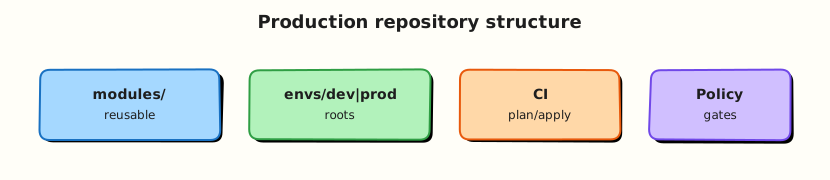
Git stores versioned modules; thin live roots wire modules for each environment; CI runs fmt, validate, and plan; encrypted remote backends hold state with locking.
Theory
What it is
Production Terraform patterns combine:
| Practice | Outcome |
|---|---|
modules/ + live/ (or envs/) | Reusable code separated from instantiation |
| State per env/account | Blast radius contained |
Pinned required_providers / module version | Reproducible plans |
| CI fmt / validate / test / plan | Broken config never merges |
| Encrypted remote state + lock | Safe collaboration |
| DR runbooks | Rebuild from Git + state backup |
import / moved | Adopt or rename without destroy |
A common layout keeps child modules in modules/ (or a module registry) and live roots in live/dev, live/staging, live/prod that only call modules with environment-specific tfvars.
Why it matters
Clever one-off roots that only one author understands become outage multipliers. Enterprises need reviewable provider upgrades, predictable costs, and a documented path to recreate networking and platforms after account loss. Treating Terraform releases like application releases — changelog, version bump, plan review, apply window — aligns infrastructure with how you already ship software.
How it works
A practical production loop:
- Change modules or live roots in a pull request; CI runs
fmt,validate, tests, andplanagainst the target backend (or a PR sandbox). - Pin providers with
~>constraints and Registry modules withversion = "x.y.z"; read changelogs before major bumps. - Promote: merge → apply via pipeline with environment protections and saved plan artefacts.
- Cost: tag resources in modules, prefer right-sizing and lifecycle rules, review plans for expensive replaces (NAT gateways, databases, clusters).
- DR: versioned state backends, cross-region replication where required, documented restore (
state pullbackups, recreate from Git). Use separate DR roots when the secondary region differs. - Refactors:
importbrings existing objects under management;movedblocks rename addresses without destroy/create. Both require careful plan review.
Upgrade strategy: bump in non-production first, watch for forced replacements, keep Terraform CLI versions aligned across laptops, CI, and HCP Terraform.
Key concepts and comparisons
| Env strategy | Pros | Cons |
|---|---|---|
| Dirs + separate state | Clear blast radius | More boilerplate |
| Workspaces | Less duplication | Easy to mis-select; weaker isolation |
| One mega-root | Fast start | Dangerous applies; huge plans |
| Tool | Role |
|---|---|
terraform import | Adopt existing object into state |
moved block | Rename address safely in modern Terraform |
state rm | Stop managing without destroying (use with care) |
Common pitfalls
- One state file for all environments “for simplicity” — Fix: separate backends per environment.
- Unpinned
mainmodule sources in production — Fix: Registry versions or tagged Git refs. - Upgrading providers only in production — Fix: promote through dev/staging first.
- Ignoring replace cost until the invoice arrives — Fix: review
-/+lines in every plan. - Using
importwithout documenting object lifecycle — Fix: add runbook entry and owner tags. - Treating DR as “we have S3 versioning” without a restore rehearsal — Fix: quarterly restore drill.
Hands-on Lab
Objective
Build a production-style modules/ + live/dev + live/prod layout with pinned providers, apply dev with a saved plan using Docker containers, refactor an internal resource address using moved, and produce a CI validation script with evidence files.
Prerequisites
- Terraform CLI ≥ 1.5
- Docker Engine running (
docker infosucceeds)
Lab environment
Workspace: ~/rebash-terraform/module-19
Local Terraform with Docker provider. No AWS/GCP/Azure credentials required.
Real-world scenario
Platform engineering requires every new service repo to boot-strap with separated dev/prod live roots, a versioned Docker greeting module, pinned providers, and a CI script that runs fmt, validate, and plan before any human apply. You prove the layout with running containers and evidence files before the repo is imported into the central pipeline.
Step-by-step tasks
Task 1 – Create the reusable Docker greeting module
Create modules/greeting/versions.tf:
terraform {
  required_version = ">= 1.5.0"
  required_providers {
    docker = {
      source  = "kreuzwerker/docker"
      version = "~> 3.0"
    }
  }
}
Create modules/greeting/variables.tf:
variable "greeting" {
  type        = string
  description = "Label value for the greeting container"

  validation {
    condition     = length(trimspace(var.greeting)) > 0
    error_message = "greeting must not be empty."
  }
}

variable "environment" {
  type        = string
  description = "Environment label for tagging evidence"
}
Create modules/greeting/main.tf:
resource "docker_image" "greeting" {
  name         = "nginx:1.27-alpine"
  keep_locally = true
}

resource "docker_container" "greeting" {
  name  = "greeting-${var.environment}"
  image = docker_image.greeting.image_id

  labels = {
    greeting    = var.greeting
    environment = var.environment
  }
}
Create modules/greeting/outputs.tf:
output "container_name" {
  value = docker_container.greeting.name
}

output "label" {
  value = "${var.environment}=${var.greeting}"
}
Run module validation:
cd ~/rebash-terraform/module-19/modules/greeting
terraform init
terraform validate
echo "module validate OK" | tee ../../evidence/module-validate-ok.txt
Expected output
Success! The configuration is valid.
Task 2 – Wire live/dev and live/prod roots with separate state
Create live/dev/versions.tf:
terraform {
  required_version = ">= 1.5.0"
  required_providers {
    docker = {
      source  = "kreuzwerker/docker"
      version = "~> 3.0"
    }
  }
}
Create live/dev/providers.tf:
Create live/dev/main.tf:
module "greeting" {
  source      = "../../modules/greeting"
  greeting    = var.greeting
  environment = "dev"
}

output "label" {
  value = module.greeting.label
}

output "container_name" {
  value = module.greeting.container_name
}
Create live/dev/variables.tf:
Create live/dev/terraform.tfvars:
Create live/prod/versions.tf (same content as dev versions.tf).
Create live/prod/providers.tf:
Create live/prod/main.tf:
module "greeting" {
  source      = "../../modules/greeting"
  greeting    = var.greeting
  environment = "prod"
}

output "label" {
  value = module.greeting.label
}
Create live/prod/variables.tf:
Create live/prod/terraform.tfvars:
Initialise and plan dev with a saved plan file:
cd ~/rebash-terraform/module-19/live/dev
terraform init
terraform plan -out=tfplan
terraform show -no-color tfplan | tee ../../evidence/plan-dev.txt
grep -q 'module.greeting.docker_container.greeting' ../../evidence/plan-dev.txt
Expected output
Plan shows one create for docker_container.greeting.
Task 3 – Apply dev with saved plan and prove container
cd ~/rebash-terraform/module-19/live/dev
terraform apply tfplan
terraform output -raw label | tee ../../evidence/output-dev.txt
docker ps --filter "name=greeting-dev" --format '{{.Names}} {{.Status}}' \
  | tee ../../evidence/dev-container-ps.txt
grep -q 'greeting-dev' ../../evidence/dev-container-ps.txt
docker inspect greeting-dev --format '{{index .Config.Labels "greeting"}}' \
  | tee ../../evidence/dev-label.txt
grep -q 'hello-dev' ../../evidence/dev-label.txt
Expected output
greeting-dev container running with label hello-dev.
Initialise prod separately:
cd ~/rebash-terraform/module-19/live/prod
terraform init
terraform plan -no-color | tee ../../evidence/plan-prod.txt
grep -q 'module.greeting.docker_container.greeting' ../../evidence/plan-prod.txt
! grep -q 'hello-dev' ../../evidence/plan-prod.txt
Expected output
Prod plan is independent; no dev greeting string in prod plan.
Task 4 – Refactor with moved and add CI validation script
Rename the module resource in modules/greeting/main.tf — change docker_container.greeting to docker_container.message:
resource "docker_container" "message" {
  name  = "greeting-${var.environment}"
  image = docker_image.greeting.image_id

  labels = {
    greeting    = var.greeting
    environment = var.environment
  }
}
Update modules/greeting/outputs.tf:
Add modules/greeting/moved.tf:
Re-plan dev:
cd ~/rebash-terraform/module-19/live/dev
terraform plan -no-color | tee ../../evidence/plan-after-moved.txt
grep -q 'has moved to' ../../evidence/plan-after-moved.txt || grep -q 'moved' ../../evidence/plan-after-moved.txt
! grep -q 'destroy' ../../evidence/plan-after-moved.txt
terraform apply -auto-approve
docker ps --filter "name=greeting-dev" --format '{{.Names}}' | grep -q 'greeting-dev'
Expected output
Plan reports address move; container still running after apply.
Create scripts/ci-validate.sh:
#!/usr/bin/env bash
set -euo pipefail
ROOT="$(cd "$(dirname "$0")/.." && pwd)"
mkdir -p "$ROOT/evidence"
cd "$ROOT/live/dev"
terraform fmt -check -recursive "$ROOT"
terraform init -input=false
terraform validate
terraform plan -input=false -detailed-exitcode -out=tfplan
terraform show -no-color tfplan > "$ROOT/evidence/plan-ci.txt"
terraform apply -input=false tfplan
docker ps --filter "name=greeting-dev" --format '{{.Names}}' | grep -q 'greeting-dev'
echo "CI validation complete — see evidence/plan-ci.txt"
Run:
mkdir -p ~/rebash-terraform/module-19/evidence
chmod +x ~/rebash-terraform/module-19/scripts/ci-validate.sh
~/rebash-terraform/module-19/scripts/ci-validate.sh
test -s ~/rebash-terraform/module-19/evidence/plan-ci.txt
Expected output
Script exits 0; container running; evidence/plan-ci.txt non-empty.
Validation steps
- Module and both live roots pass
terraform validate - Dev apply used a saved plan file (
terraform apply tfplan) -
docker psproves dev container running - Prod plan is independent from dev state
-
movedrefactor produced no destroy in dev plan -
scripts/ci-validate.shproducedevidence/plan-ci.txt
Common errors and fixes
| Error | Cause | Fix |
|---|---|---|
| Module not found | Wrong relative source path | Use ../../modules/greeting from live roots |
| Container name conflict | Prior lab container left | docker rm -f greeting-dev greeting-prod |
| Plan wants destroy after rename | Missing moved block | Add moved { from = … to = … } in module |
fmt -check fails | Unformatted HCL | Run terraform fmt -recursive then commit |
| Docker daemon not running | Engine stopped | Start Docker before apply |
Challenge exercise
Add a live/staging root with its own tfvars and extend scripts/ci-validate.sh to loop over dev, staging, and prod, writing evidence/plan-<env>.txt for each.
Learning outcomes
- Built a production-style modules + live roots layout with Docker
- Pinned providers and validated module inputs
- Applied dev with a saved plan and separate prod state
- Refactored resource addresses safely with
moved - Produced CI validation evidence with operational container proof
Cleanup
cd ~/rebash-terraform/module-19/live/dev && terraform destroy -auto-approve
cd ~/rebash-terraform/module-19/live/prod && terraform destroy -auto-approve 2>/dev/null || true
docker rm -f greeting-dev greeting-prod greeting-staging 2>/dev/null || true
rm -rf ~/rebash-terraform/module-19/live/*/.terraform ~/rebash-terraform/module-19/live/*/tfplan
rm -rf ~/rebash-terraform/module-19/modules/greeting/.terraform
Validation
- Lab completed under
~/rebash-terraform/module-19/ - You can explain modules vs live roots and why state is separated
- You used saved plans before apply in dev
- You can describe one production failure mode (for example unpinned module source)
Code Walkthrough
Production Terraform for repository layout always combines:
- Inspect before change — read plan output line-by-line; never apply blind from laptop in prod
- Pin everything — Terraform CLI, providers, and module versions in Git
- Separate concerns — modules encode capability; live roots encode environment wiring
- Evidence for reviewers — attach plan artefacts to pull requests
- Least privilege — CI plan roles differ from production apply roles
Keep live roots thin; push complexity into tested modules with clear variable contracts.
Security Considerations
- Restrict production apply to pipeline roles with OIDC — not long-lived access keys on laptops
- Encrypt remote state at rest; restrict backend IAM to break-glass and CI roles only
- Never commit secrets in tfvars; use HCP Terraform variables or a secret manager
- Require two-person review for production plans that touch IAM, networking, or data stores
- Audit
terraform state pulldownloads — state contains sensitive attribute values
Common Mistakes
One state file for all environments
A mistaken terraform workspace select or wrong -var-file can destroy production from a dev experiment. Fix: separate directories, backends, and CI jobs per environment.
Unpinned module sources in production
Tracking source = "git::…?ref=main" lets upstream break your plan without notice. Fix: pin semver tags or Registry versions; renovate deliberately.
Applying without reading replace lines
Provider upgrades can force database or cluster recreation. Fix: treat every -/+ as a change ticket; test in non-prod first.
Best Practices
- Treat root modules as release units with changelogs and semver tags
- Run
terraform fmt -checkandvalidateon every pull request - Store plan artefacts (
terraform plan -out=) and apply the same file in CI - Tag all resources with
environment,owner, andcost-centrein modules - Rehearse DR quarterly: restore state backup and re-apply from Git in a sandbox account
Troubleshooting
| Symptom | Likely cause | Fix |
|---|---|---|
| Plan differs between laptop and CI | Different provider or Terraform version | Pin versions in required_version and lock files |
| Module change breaks all envs | Shared module without contract tests | Add terraform test and semver for modules |
| Unexpected destroy after refactor | Renamed resource without moved | Add moved block; re-plan before apply |
| Prod apply blocked by lock | Overlapping CI and human apply | Coordinate; never force-unlock while apply runs |
| Cost spike after module bump | New defaults create billable resources | Review module CHANGELOG; add lifecycle guards |
Summary
Production Terraform succeeds when repository layout, version pins, and CI gates are boring and repeatable. You built a modules + live roots repo, applied with saved plans, and refactored with moved. Next, learn structured troubleshooting in Troubleshooting Terraform.
Interview Questions
1. How do you structure Terraform repositories for many environments?
Reveal answer
Separate live roots per environment (for example live/dev, live/prod), each with its own backend and state. Reusable logic lives in versioned modules. Workspaces can supplement but rarely replace directory separation for production blast-radius control.
2. Which version pinning practices belong in production roots?
Reveal answer
Pin Terraform CLI in CI, constrain providers with ~> in required_providers, and pin Registry modules with explicit version or tagged Git refs. Commit lock files (.terraform.lock.hcl) and upgrade deliberately with changelog review.
3. What review checklist items matter on every production plan?
Reveal answer
Check destroys, forced replacements (-/+), security group and IAM changes, public exposure, and data-store modifications. Confirm the plan matches the approved change ticket and that the saved plan file is the one being applied.
4. How do you limit blast radius of a mistaken apply?
Reveal answer
Separate state per environment, restrict prod apply to CI with approval gates, use prevent_destroy on critical data resources where supported, and maintain canary/staging environments that run the same modules with production-like constraints.
5. When should you use import versus moved?
Reveal answer
import adopts an existing cloud object into Terraform state when configuration already describes it. moved renames an address in state during refactors when the underlying object is unchanged. Both require a clean plan review; neither replaces thoughtful design.
6. How do cost and DR fit into production Terraform design?
Reveal answer
Tag resources in modules for cost allocation, review plans for expensive replacements, and document DR with versioned state backups plus Git as source of truth. Rehearse restore — a backup you have never tested is a wish, not a plan.
Related Tutorials
- Course overview
- Workspaces and Environment Strategies
- Terraform in CI/CD Pipelines
- Troubleshooting Terraform