Registry Modules and Composition
Overview
Writing every resource from scratch does not scale. The Terraform Registry hosts thousands of verified modules — and your organisation can publish private modules too. Composition wires Registry modules with your own local modules into one root stack, pinning versions so today's plan matches tomorrow's pipeline.
This tutorial covers Registry consumption, version constraints, module composition patterns, and testing expectations. The lab under ~/rebash-terraform/module-09-registry composes the public cloudposse/label/null Registry module with a local Docker service wrapper — real terraform apply against Docker Engine, no cloud account.
This is Tutorial 11 in Module 9: Modules of the REBASH Academy Terraform for Cloud & DevOps Engineers series.
Prerequisites
- Modules — Creating Reusable Infrastructure
- Terraform CLI ≥ 1.5
- Network access to
registry.terraform.ioon first init
Learning Objectives
By the end of this tutorial, you will be able to:
- Reference a public Registry module with
sourceandversion - Compose Registry and local modules in one root stack
- Pin module versions with pessimistic constraints
- Explain module testing and validation before promotion
- Describe private registry options for enterprise teams
Architecture
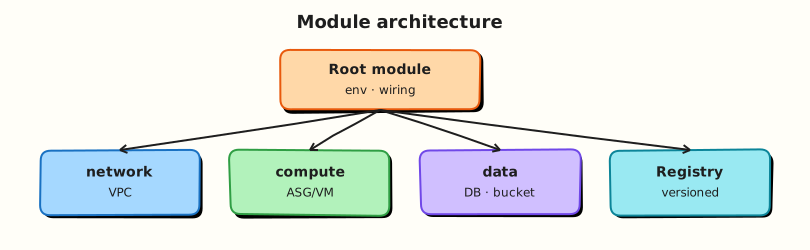
A root module composes a Registry labeling module with a local service module; outputs flow upward for tagging standards.
Theory
What it is
Registry module source format:
module "label" {
  source  = "cloudposse/label/null"
  version = "~> 0.25"

  namespace = "rebash"
  stage     = var.environment
  name      = "api"
}
Terraform downloads the module to .terraform/modules/ during terraform init.
Composition stacks modules vertically:
Version pinning:
| Constraint | Meaning |
|---|---|
version = "1.2.3" | Exact |
version = "~> 1.2" | >= 1.2, < 2.0 |
version = ">= 1.0, < 2.0" | Explicit range |
Why it matters
Registry modules encode community best practices — but unpinned modules can change behaviour on the next init. Composition lets platform teams wrap Registry modules with org-specific defaults (tags, logging, security). Module testing (terraform validate, terraform test, Terratest) catches breaking upgrades before production.
How it works
terraform init— downloads Registry modules and providers.- Root evaluates all
moduleblocks — Registry and local. - Outputs from Registry modules feed inputs to local modules via attributes.
- Private Registry (Terraform Cloud/Enterprise) hosts internal modules with same source syntax.
Module testing layers:
| Layer | Tool |
|---|---|
| Syntax | terraform fmt, terraform validate |
| Native tests | terraform test (.tftest.hcl) |
| Integration | Terratest (Go), kitchen-terraform |
| Policy | Sentinel, OPA, tfsec |
Key concepts and comparisons
| Source | Trust model |
|---|---|
| Verified Registry publisher | HashiCorp/partner review badge |
| Community module | Read source; pin version; test yourself |
| Private registry | Your org's supply chain controls |
| Git source | Tag commits; submodule path syntax |
| Pattern | Use when |
|---|---|
| Thin wrapper module | Org defaults around Registry VPC module |
| Direct Registry call | Quick prototype; accept upgrade risk |
| Monorepo local modules | Tight coupling; same PR for all changes |
Common pitfalls
- No version constraint —
init -upgradepulls breaking major versions. - Registry module without reading inputs — required variables surprise you at plan.
- Deep nesting — modules calling modules calling modules — hard to debug plans.
- Different provider versions in nested modules — init conflicts.
- Trusting verified badge blindly — still review for your compliance needs.
Hands-on Lab
Objective
Compose cloudposse/label/null from the public Registry with a local Docker service module under ~/rebash-terraform/module-09-registry, pin versions, apply a real container, and prove labels with docker inspect.
Prerequisites
- Terraform CLI ≥ 1.5
- Docker Engine running (
docker infosucceeds) - Completed Modules — Creating Reusable Infrastructure lab
Lab environment
mkdir -p ~/rebash-terraform/module-09-registry/modules/service && cd ~/rebash-terraform/module-09-registry
Runtime: local Docker Engine. Registry download requires network on first terraform init.
Real-world scenario
Your platform team mandates Cloud Posse label standards for resource names while service teams deploy containerised workloads. The root stack composes the Registry label module with an internal Docker service module — the same pattern used before wrapping terraform-aws-modules/ecs/aws or terraform-aws-modules/eks/aws in production AWS accounts.
Step-by-step tasks
Task 1 – Local Docker service module (wrapper target)
Create modules/service/versions.tf:
terraform {
  required_version = ">= 1.5.0"

  required_providers {
    docker = {
      source  = "kreuzwerker/docker"
      version = "~> 3.0"
    }
  }
}
Create modules/service/variables.tf:
variable "id" {
  type        = string
  description = "Label id from upstream labeling module"
}

variable "tags" {
  type        = map(string)
  description = "Standard tags map from Registry label module"
}

variable "image" {
  type        = string
  description = "Container image to run"
  default     = "nginx:1.27-alpine"
}
Create modules/service/main.tf:
resource "docker_image" "service" {
  name         = var.image
  keep_locally = true
}

resource "docker_container" "service" {
  name  = replace(var.id, "/", "-")
  image = docker_image.service.image_id

  labels = var.tags

  ports {
    internal = 80
    external = 0
  }
}
Create modules/service/outputs.tf:
output "container_id" {
  value = docker_container.service.id
}

output "container_name" {
  value = docker_container.service.name
}

output "label_id" {
  value = var.id
}
Run:
cd ~/rebash-terraform/module-09-registry/modules/service
terraform init
terraform validate
echo "service module validate OK" | tee ../../service-validate-ok.txt
Expected output
Validate succeeds in the module directory.
Task 2 – Root composition with Registry label module
Create versions.tf:
terraform {
  required_version = ">= 1.5.0"

  required_providers {
    null = {
      source  = "hashicorp/null"
      version = "~> 3.2"
    }
    docker = {
      source  = "kreuzwerker/docker"
      version = "~> 3.0"
    }
  }
}
Create providers.tf:
Create variables.tf:
Create main.tf:
module "label" {
  source  = "cloudposse/label/null"
  version = "~> 0.25"

  namespace  = "rebash"
  stage      = var.environment
  name       = "billing"
  attributes = ["service"]
}

module "billing_service" {
  source = "./modules/service"

  id   = module.label.id
  tags = module.label.tags
}
Create outputs.tf:
output "standard_id" {
  value = module.label.id
}

output "container_name" {
  value = module.billing_service.container_name
}

output "container_id" {
  value = module.billing_service.container_id
}
Run:
cd ~/rebash-terraform/module-09-registry
terraform init
terraform plan | tee registry-plan.txt
grep -q 'module.label' registry-plan.txt
grep -q 'module.billing_service' registry-plan.txt
grep -q 'docker_container' registry-plan.txt
echo "registry plan OK" | tee registry-plan-ok.txt
Expected output
Init downloads cloudposse/label/null; plan shows Registry module and docker_container.service.
Task 3 – Apply and prove container labels operationally
Run:
cd ~/rebash-terraform/module-09-registry
terraform apply -auto-approve
terraform output -raw standard_id | tee standard-id.txt
grep -q 'rebash' standard-id.txt
docker inspect "$(terraform output -raw container_name)" \
  --format '{{json .Config.Labels}}' | tee container-labels.json
grep -q 'rebash' container-labels.json
grep -q 'dev' container-labels.json
docker ps --filter "name=$(terraform output -raw container_name)" --format '{{.Names}} {{.Status}}' \
  | tee container-ps.txt
echo "registry apply OK" | tee registry-apply-ok.txt
Expected output
Container is running; container-labels.json contains Registry label keys (rebash, dev, billing).
Task 4 – Registry composition evidence script
Create registry-evidence.sh:
#!/usr/bin/env bash
set -euo pipefail
cd ~/rebash-terraform/module-09-registry
terraform validate
test -d .terraform/modules/label
CNAME="$(terraform output -raw container_name)"
docker inspect "$CNAME" --format '{{.State.Running}}' | grep -q true
terraform output -raw standard_id | grep -q 'rebash'
echo "registry-evidence PASS" | tee registry-evidence-pass.txt
Run:
chmod +x ~/rebash-terraform/module-09-registry/registry-evidence.sh
~/rebash-terraform/module-09-registry/registry-evidence.sh
Expected output
Container is running; evidence script passes.
Validation steps
- Registry module downloaded on init with version constraint
- Local Docker module consumes Registry module outputs
-
terraform applycreated a running container -
docker inspectshows Registry label tags on the container - Evidence script passes
Common errors and fixes
| Error | Cause | Fix |
|---|---|---|
| Module version not found | Constraint too strict | Relax patch constraint; check Registry page |
| Init network failure | Registry blocked | Retry; mirror in private registry |
| Docker daemon not running | Engine stopped | Start Docker Desktop or systemctl start docker |
| Container name invalid | Label id contains / | Module uses replace() — check wrapper logic |
| Provider version conflict | Nested module constraints | Align required_providers upper bounds |
Challenge exercise
Pin an exact patch version (version = "0.25.0"), add a second module "catalog_service" with name = "catalog", apply, and prove two distinct containers:
cd ~/rebash-terraform/module-09-registry
terraform init -upgrade
terraform apply -auto-approve
docker ps --filter "label=Stage=dev" --format '{{.Names}}' | tee two-services.txt
wc -l two-services.txt | grep -q '^2'
echo "two-service challenge OK"
Expected output
Two running containers tagged with Stage=dev.
Learning outcomes
- Registry source and version syntax
- Wiring Registry outputs into local Docker modules
- Module cache layout under
.terraform/modules - Operational proof with
docker inspectafter apply
Cleanup
cd ~/rebash-terraform/module-09-registry
terraform destroy -auto-approve
rm -f registry-plan.txt registry-plan-ok.txt standard-id.txt container-labels.json \
  container-ps.txt registry-apply-ok.txt registry-evidence-pass.txt service-validate-ok.txt
rm -rf .terraform .terraform.lock.hcl terraform.tfstate terraform.tfstate.backup
rm -rf modules/service/.terraform modules/service/.terraform.lock.hcl
Validation
- Completed module-09-registry composition lab
- Can explain why version pinning matters
- Know where init stores downloaded modules
- Can describe module testing layers
Code Walkthrough
- Label module first — standardise naming before service resources.
- Pass id and tags downstream — local module stays cloud-agnostic in lab.
- Pessimistic constraint
~> 0.25— allow patches, block 1.x surprises. - Lock file in Git — reproducible CI init.
- Read Registry README — input names differ across community modules.
Security Considerations
- Treat Registry modules as supply chain dependencies — review source, pin versions.
- Private modules in Terraform Cloud with RBAC — not everyone publishes.
- Scan third-party modules with tfsec/checkov in CI.
- Do not pass secrets into module inputs logged by debug tooling.
- Mirror critical Registry modules internally if outbound registry access is restricted.
Common Mistakes
Floating version omitted
Next init upgrades module silently.
Fix: Always set version = for Registry and Git sources.
Composition without contract tests
Registry upgrade breaks downstream wrapper.
Fix: terraform test or example stack in CI on module bump PRs.
Wrapping without understanding module
Black box — cannot troubleshoot plan diffs.
Fix: Read module source; start with minimal inputs in dev.
Best Practices
- Pin versions; bump intentionally in dedicated PRs.
- Wrap Registry modules with org defaults in thin local modules.
- Keep example
examples/completein internal modules (Registry convention). - Document which Registry modules are approved in platform catalog.
- Run
terraform init -upgradeonly in controlled upgrade pipelines.
Troubleshooting
| Symptom | Likely cause | Fix |
|---|---|---|
| Init downloads wrong module | Typo in namespace/name | Verify Registry URL slug |
| Plan differs CI vs laptop | Different lock/module cache | Commit lock file; clean .terraform |
| Module upgrade breaks apply | Major version behaviour change | Read changelog; pin previous version |
| Private module 401 | Missing token | terraform login or CI TF_TOKEN |
| Circular module dependency | Wrapper calls itself via local path | Flatten composition at root |
Summary
Registry modules accelerate delivery when you pin versions and compose them with org-specific wrappers. You integrated cloudposse/label/null with a local Docker service module and proved labels with docker inspect. Next, Functions, Templates, and Dynamic Blocks deepens HCL expressions.
Interview Questions
1. How do you reference a module from the public Terraform Registry?
Reveal answer
source = "NAMESPACE/NAME/PROVIDER" with version = constraint — for example source = "terraform-aws-modules/vpc/aws" and version = "~> 5.0". Run terraform init to download into .terraform/modules/.
2. Why must you pin module versions?
Reveal answer
Without pinning, terraform init -upgrade or a fresh clone may fetch a new major version with breaking input or resource changes — producing different plans in CI and production. Pinning makes infrastructure builds reproducible.
3. What is module composition?
Reveal answer
Wiring multiple modules (Registry and local) in a root module where outputs from one become inputs to another — for example label module → service module → app resources. Root orchestrates; child modules stay focused.
4. How do teams test modules before release?
Reveal answer
terraform validate and terraform fmt in CI; terraform test with mock providers; Terratest for integration; policy scans (Sentinel, OPA). Promotion gates run example stacks in a sandbox account before tagging a release.
5. Public Registry vs private registry — when use each?
Reveal answer
Public — community modules (VPC, EKS) with review and wide reuse. Private (Terraform Cloud/Enterprise, Artifactory) — internal modules with company naming, compliance, and RBAC. Production org modules should not rely on unmirrored public pulls if policy forbids.
6. What does the verified badge mean on Registry modules?
Reveal answer
HashiCorp/partner verification of namespace ownership and publishing process — not a full security audit of all releases. Still read module source, pin versions, and run your own policy checks.
7. How do Registry module updates propagate to your stacks?
Reveal answer
Bump version constraint in root module, run terraform init -upgrade, review plan diff, run tests, merge PR, apply per environment promotion. Automated Dependabot-style bumps still need human plan review.
8. When would you prefer Git source over Registry?
Reveal answer
Internal modules not published to Registry, air-gapped environments, or when you need git:: URL with ?ref= to a monorepo path (//modules/vpc). Same pinning rules apply — use tags/commits, not floating branches.
Related Tutorials
- Terraform course index
- Previous: Modules — Creating Reusable Infrastructure
- Next: Functions, Templates, and Dynamic Blocks
- Format, Validate, and terraform test