Troubleshooting Terraform
Overview
Most Terraform failures are not mysterious — they cluster into a short list: bad credentials, provider version skew, configuration reference errors, state lock contention, drift from console edits, dependency cycles, or partial apply corruption. A fixed triage order (auth → init → validate/plan → lock → drift → graph → state recovery) saves hours during change windows.
This is Tutorial 20 in Module 20: Troubleshooting of the REBASH Academy Terraform for Cloud & DevOps Engineers series — written for Cloud, DevOps, Platform, and SRE engineers. Reference: Debugging Terraform.
Prerequisites
Learning Objectives
By the end of this tutorial, you will be able to:
- Classify failures by layer: auth, config, lock, drift, graph, or state
- Fix validate errors and capture before/after evidence
- Interpret plans that want recreate after
state rmor rename - Use
movedand understand whenimportis appropriate - Enable targeted debug logging without leaking secrets
Architecture
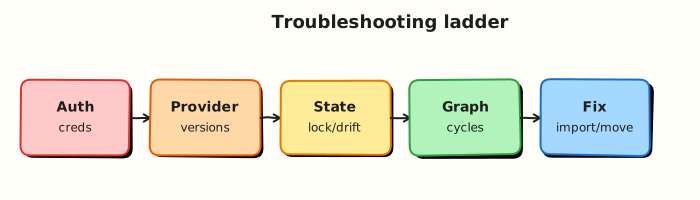
Failures originate in credentials, provider plugins, HCL references, state backends, or the dependency graph. Recovery tools (import, state rm, moved) sit at the end of the ladder — not the start.
Theory
What it is
Troubleshooting Terraform follows layers:
| Symptom | First checks |
|---|---|
| Auth / 401 / 403 | Credentials, OIDC, IAM, subscription/project |
| Provider download / schema | init, version pins, registry access |
| Validate / reference errors | Typos, wrong module outputs, type mismatches |
| State lock | Who holds the lock; CI overlap; crash mid-apply |
| Drift | Console changes; unexpected plan updates |
| Cycle errors | Mutual depends_on or references |
| Slow plans | Huge roots, remote data sources, chatty APIs |
| State inconsistency | Partial failure; object missing from API |
Recovery tools:
| Tool | Effect |
|---|---|
import | Bind real ID → Terraform address |
state rm | Forget address (resource may still exist in cloud) |
moved | Rename address without replace |
| Backend version restore | Roll back corrupted state object |
Why it matters
Mean time to recovery depends on not confusing a bad variable with a bad backend. Platform on-call needs a fixed order juniors can follow under pressure. The same playbook feeds CI: catch validate and provider issues before apply, and treat force-unlock and state surgery as last resorts with audit notes.
How it works
Use this order every time:
- Auth — can the runner assume the role / use the subscription? Clock skew? Wrong account?
- Init —
terraform init; confirm provider versions match lock file. - Validate / plan — read the first error; fix config before touching state.
- Lock — if lock error, identify the holder; wait or
force-unlockonly when sure the other process is dead. - Drift — unexpected updates/deletes → decide re-apply desired state vs update config to match reality.
- Graph — cycle messages → break mutual dependencies; prefer data flow over blanket
depends_on. - State recovery — restore backend version; then consider
import/state rm/movedwith a saved plan. - Performance — split roots, cache providers, reduce refresh scope.
Separate three questions: Does config parse? Does state match reality? Did the API reject the call?
Key concepts and comparisons
| Failure class | Looks like | Not fixed by |
|---|---|---|
| Auth | 403 / invalid token | Reformatting HCL |
| Config | Unknown resource / invalid ref | force-unlock |
| Lock | state locked by … | Random state rm |
| Drift | Perpetual plan changes | Ignoring and re-applying blind |
| Cycle | Cycle: … | More depends_on both ways |
| API / provider | Retryable 5xx or clear API error | Editing unrelated outputs |
Common pitfalls
- Jumping to
force-unlockwhile another apply is healthy — Fix: confirm the holder process is dead. state rmthen apply creating duplicate databases — Fix: understand recreate semantics; preferimportwhen object exists.- Fixing production with console edits Terraform will fight forever — Fix: revert console change or import and align config.
- Assuming
-refresh=falsefixes drift — Fix: it hides drift temporarily; reconcile properly. - Expanding one root until plans take thirty minutes — Fix: split state by blast radius.
Hands-on Lab
Objective
Reproduce and fix a configuration validate failure, demonstrate recreate behaviour after terraform state rm on a Docker container, refactor safely with moved, and capture debug logs with a triage script under ~/rebash-terraform/module-20.
Prerequisites
- Terraform CLI ≥ 1.5
- Docker Engine running (
docker infosucceeds)
Lab environment
Workspace: ~/rebash-terraform/module-20
Local Terraform with Docker provider.
Real-world scenario
A teammate pushed a hotfix during an incident and bypassed CI. The root fails terraform validate, and after a manual state edit the next plan wants to recreate a running container. You reproduce the failure, fix configuration, demonstrate state recovery semantics on real Docker resources, and leave a triage script the team can run on every alert.
Step-by-step tasks
Task 1 – Reproduce a validate failure and capture evidence
Create configs/broken/versions.tf:
terraform {
  required_version = ">= 1.5.0"
  required_providers {
    docker = {
      source  = "kreuzwerker/docker"
      version = "~> 3.0"
    }
  }
}
Create configs/broken/providers.tf:
Create configs/broken/main.tf with an intentional reference error:
resource "docker_image" "app" {
  name = "nginx:1.27-alpine"
}

resource "docker_container" "app" {
  name  = "rebash-troubleshoot-${var.release_version}"
  image = docker_image.app.image_id
}

# variable block intentionally missing — validate should fail
Run validate and save failure output:
cd ~/rebash-terraform/module-20/configs/broken
terraform init -input=false
terraform validate > ../../evidence/validate-before.txt 2>&1 || true
grep -Ei 'undeclared|reference|variable' ../../evidence/validate-before.txt
Expected output
Non-zero exit; log mentions undeclared var.release_version.
Task 2 – Fix configuration and prove validate passes
Create configs/fixed/versions.tf (same as broken).
Create configs/fixed/providers.tf:
Create configs/fixed/variables.tf:
Create configs/fixed/main.tf:
resource "docker_image" "app" {
  name         = "nginx:1.27-alpine"
  keep_locally = true
}

resource "docker_container" "app" {
  name  = "rebash-troubleshoot-${var.release_version}"
  image = docker_image.app.image_id

  labels = {
    release = var.release_version
  }
}

output "release" {
  value = var.release_version
}

output "container_name" {
  value = docker_container.app.name
}
Run validate:
cd ~/rebash-terraform/module-20/configs/fixed
terraform init -input=false
terraform validate | tee ../../evidence/validate-after.txt
grep -q 'Success' ../../evidence/validate-after.txt
Expected output
Success! The configuration is valid.
Task 3 – Apply, remove from state, and observe recreate plan
Apply the fixed configuration:
cd ~/rebash-terraform/module-20/configs/fixed
terraform apply -auto-approve
terraform state list | tee ../../evidence/state-list.txt
grep -q 'docker_container.app' ../../evidence/state-list.txt
docker ps --filter "name=rebash-troubleshoot-1.0.0" --format '{{.Names}}' \
  | tee ../../evidence/container-before-rm.txt
grep -q 'rebash-troubleshoot-1.0.0' ../../evidence/container-before-rm.txt
Remove the resource from state without destroying the container:
cd ~/rebash-terraform/module-20/configs/fixed
terraform state rm docker_container.app
terraform state list | tee ../../evidence/state-after-rm.txt
! grep -q 'docker_container.app' ../../evidence/state-after-rm.txt
docker ps --filter "name=rebash-troubleshoot-1.0.0" --format '{{.Names}}' \
  | tee ../../evidence/container-still-running.txt
grep -q 'rebash-troubleshoot-1.0.0' ../../evidence/container-still-running.txt
terraform plan -no-color | tee ../../evidence/plan-after-rm.txt
grep -q 'docker_container.app' ../../evidence/plan-after-rm.txt
grep -q 'create' ../../evidence/plan-after-rm.txt
Expected output
Container still running in Docker; state empty of app; plan wants to create docker_container.app again (name conflict risk — document in interview answer).
Re-apply to restore consistent state (may require removing orphan container first):
cd ~/rebash-terraform/module-20/configs/fixed
docker rm -f rebash-troubleshoot-1.0.0 2>/dev/null || true
terraform apply -auto-approve
docker ps --filter "name=rebash-troubleshoot-1.0.0" --format '{{.Names}}' \
  | tee ../../evidence/container-after-reapply.txt
grep -q 'rebash-troubleshoot-1.0.0' ../../evidence/container-after-reapply.txt
Expected output
Container recreated and tracked in state again.
Task 4 – Refactor with moved after rename
Rename the resource in configs/fixed/main.tf:
resource "docker_container" "workload" {
  name  = "rebash-troubleshoot-${var.release_version}"
  image = docker_image.app.image_id

  labels = {
    release = var.release_version
  }
}
Update outputs:
Create configs/fixed/moved.tf:
Plan and confirm move without destroy:
cd ~/rebash-terraform/module-20/configs/fixed
terraform plan -no-color | tee ../../evidence/plan-after-moved.txt
grep -q 'workload' ../../evidence/plan-after-moved.txt
! grep -q 'destroy' ../../evidence/plan-after-moved.txt
terraform apply -auto-approve
docker inspect rebash-troubleshoot-1.0.0 --format '{{.State.Running}}' \
  | tee ../../evidence/container-still-running-after-moved.txt
grep -q 'true' ../../evidence/container-still-running-after-moved.txt
Expected output
Plan shows address move; same container still running (no replace).
Task 5 – Collect debug logs with a triage script
Create scripts/triage.sh:
#!/usr/bin/env bash
set -euo pipefail
ROOT="$(cd "$(dirname "$0")/.." && pwd)"
CONFIG="${1:-$ROOT/configs/fixed}"
LOG="$ROOT/evidence/triage.log"
{
  echo "== $(date -u +%Y-%m-%dT%H:%M:%SZ) triage =="
  echo "-- terraform version --"
  terraform version
  echo "-- docker ps (rebash) --"
  docker ps --filter "name=rebash-troubleshoot" --format '{{.Names}} {{.Status}}'
  echo "-- terraform init --"
  (cd "$CONFIG" && terraform init -input=false)
  echo "-- terraform validate --"
  (cd "$CONFIG" && terraform validate)
  echo "-- terraform plan --"
  (cd "$CONFIG" && terraform plan -input=false -no-color)
} > "$LOG" 2>&1
echo "Wrote $LOG"
Run:
chmod +x ~/rebash-terraform/module-20/scripts/triage.sh
~/rebash-terraform/module-20/scripts/triage.sh ~/rebash-terraform/module-20/configs/fixed
test -s ~/rebash-terraform/module-20/evidence/triage.log
grep -q 'Plan:' ~/rebash-terraform/module-20/evidence/triage.log
grep -q 'rebash-troubleshoot' ~/rebash-terraform/module-20/evidence/triage.log
Expected output
evidence/triage.log contains validate, plan, and docker ps sections.
Validation steps
- Captured validate failure in
evidence/validate-before.txt - Fixed config passes validate (
validate-after.txt) -
state rmleft container running but plan wanted recreate -
movedrefactor avoided destroy (plan-after-moved.txt) -
scripts/triage.shwrote non-emptyevidence/triage.log
Common errors and fixes
| Error | Cause | Fix |
|---|---|---|
Reference to undeclared input variable | Missing variable block | Add variable definition and default or tfvars |
state rm then name conflict on apply | Old container still exists | docker rm -f orphan before re-apply |
| Plan still wants destroy after rename | Missing moved | Add moved { from = … to = … } |
| Docker provider connection error | Engine not running | Start Docker before apply |
| Debug log contains secrets | TF_LOG=DEBUG with sensitive env | Use ERROR level; redact before sharing |
Challenge exercise
Extend scripts/triage.sh to accept a second argument strict that exits non-zero when terraform plan output contains - destroy on any managed resource.
Learning outcomes
- Classified validate vs state vs plan failures on real Docker resources
- Fixed configuration errors with before/after evidence
- Demonstrated recreate semantics after
state rmwith operational docker proof - Applied
movedfor safe address refactor without container replace - Built a reusable triage script with captured logs
Cleanup
cd ~/rebash-terraform/module-20/configs/fixed
terraform destroy -auto-approve
docker rm -f rebash-troubleshoot-1.0.0 2>/dev/null || true
rm -rf ~/rebash-terraform/module-20/configs/*/.terraform
rm -f ~/rebash-terraform/module-20/configs/*/.terraform.lock.hcl
rm -f ~/rebash-terraform/module-20/configs/*/{terraform.tfstate,terraform.tfstate.backup}
Validation
- Lab completed under
~/rebash-terraform/module-20/ - You can explain the troubleshooting ladder in order
- You captured evidence files for validate, state rm, and moved
- You can describe when
force-unlockis acceptable
Code Walkthrough
Troubleshooting Terraform in production always combines:
- Read the first error — do not scroll to random Stack Overflow fixes
- Fix config before state — validate/plan must pass before surgery
- Backup state —
terraform state pullbeforerm,import, ormoved - Apply saved plans — after recovery, use
-outplans for evidence - Redact logs —
TF_LOG=DEBUGcan print credentials; share carefully
Keep runbooks short enough to follow at 02:00; automate checks; keep humans for judgement calls.
Security Considerations
- Redact tokens and secrets before sharing
TF_LOGoutput or plan files - Restrict who may run
terraform state rm,import, orforce-unlockin production - Prefer OIDC-backed CI roles over static keys when reproducing auth failures
- Audit every manual state change in the change ticket system
- Never paste production state JSON into public tickets — it contains sensitive attributes
Common Mistakes
Jumping to force-unlock while apply is running
Unlocking during a healthy apply can corrupt state. Fix: confirm the lock holder process is dead; coordinate with CI.
state rm on databases then apply
Terraform will attempt to create a second instance. Fix: understand recreate semantics; use import when the object still exists.
Console hotfix without updating Terraform
The next plan reverts or fights manual changes forever. Fix: either revert the console edit or update HCL and import.
Best Practices
- Follow the same triage order in CI pre-checks and on-call runbooks
- Save plan artefacts for every production change
- Pin provider versions to reproduce errors consistently
- Split large roots before optimising refresh — structure beats flags
- Rehearse state recovery in a sandbox quarterly
Troubleshooting
| Symptom | Likely cause | Fix |
|---|---|---|
Error: configuration invalid | Syntax or reference error | terraform validate; fix first error only |
| Perpetual diff on every plan | Drift or computed attribute churn | Refresh; align config; check lifecycle ignore_changes |
Cycle in graph | Mutual dependency | Remove redundant depends_on; restructure modules |
| Provider plugin error | Version skew or corrupt cache | terraform init -upgrade; align lock file |
| Partial apply, inconsistent state | Network/API failure mid-apply | Refresh; re-plan; restore state backup if needed |
| Plan takes >10 minutes | Monolithic root | Split state; reduce data sources; scope -target only for debug |
Summary
You can design, secure, automate, and operate production Terraform — and diagnose failures by layer instead of guessing. Practise the lab triage script until the validate → plan → state path is muscle memory, then revisit the course overview for capstone and interview prep.
Interview Questions
1. What is your triage order when Terraform fails in CI?
Reveal answer
Auth → init/providers → validate → plan errors → lock → drift → graph cycles → state recovery. Fix configuration before touching state. Never force-unlock or state rm as first steps.
2. How do you interpret a resource that must be replaced (-/+)?
Reveal answer
Replacement means Terraform cannot update in place — often from force-new argument changes or provider schema shifts. Expect delete/create side effects, downtime, and possible data loss. Plan mitigation before apply.
3. What does state inconsistency look like after a partial failure?
Reveal answer
Some resources exist in cloud but not state (or vice versa). Plans may propose duplicate creates or unexpected destroys. Refresh, compare to reality, then use import, state rm, or restored backup — always with a saved plan review.
4. How can TF_LOG help, and what must you avoid when sharing logs?
Reveal answer
TF_LOG=ERROR (or DEBUG locally) surfaces provider RPC details and early failures. Debug logs may include tokens and secrets — redact before sharing. Prefer targeted provider logs over dumping full environment variables.
5. When is terraform import appropriate versus moved?
Reveal answer
import binds an existing real-world object to a Terraform address when config already describes it. moved renames an address in state during refactors when the same object continues under management. Neither skips plan review.
6. How do you handle drift detected in a scheduled plan job?
Reveal answer
Treat drift as an incident signal: identify whether console change, external automation, or provider bug caused it. Either revert the external change or update Terraform config to match the approved new reality — never ignore recurring drift alarms.
Related Tutorials
- Course overview
- Production Terraform Patterns
- Terraform State Fundamentals
- Remote State and Backends