Terraform in CI/CD Pipelines
Overview
Production Terraform is applied by pipelines, not laptops. Pull requests run format, validate, test, and plan; protected branches or environments run apply of a reviewed plan with short-lived credentials. Store the binary plan as an artefact so apply executes exactly what reviewers approved.
This is Tutorial 16 in Module 16: CI/CD of the REBASH Academy Terraform for Cloud & DevOps Engineers series — written for engineers wiring Terraform into GitHub Actions, GitLab CI, Azure DevOps, Jenkins, or Atlantis.
Beginners learn the plan/apply split. Practitioners configure Actions expressions, OIDC, and artefact retention. Production judgement covers fork PR trust, least-privilege roles, and when Atlantis chatops beats YAML pipelines.
Prerequisites
- Terraform Security and Secrets
- Terraform CLI 1.9+
- Basic familiarity with GitHub Actions workflow syntax (lab simulates CI locally)
Learning Objectives
By the end of this tutorial, you will be able to:
- Separate PR plan jobs from privileged apply jobs
- Use
TF_IN_AUTOMATIONand-input=falsecorrectly - Store and consume plan artefacts safely
- Sketch GitHub Actions, GitLab CI, Azure DevOps, and Jenkins patterns
- Explain when Atlantis fits versus native CI YAML
Architecture
CI/CD wraps the Terraform workflow with gates, credentials, artefacts, and approval boundaries.
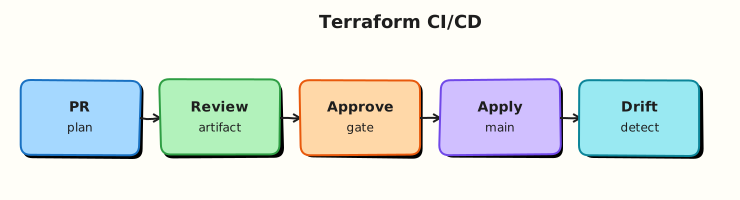
Theory
What it is
Terraform in CI/CD means automated machines run the write → plan → apply loop with auditability:
| Stage | Trigger | Typical privilege |
|---|---|---|
| fmt / validate / test | Every PR | Low — often no cloud write |
terraform plan -out= | Every PR | Read / plan role |
| Human + policy review | PR approval | — |
terraform apply tfplan | Protected branch / environment | Apply role |
GitHub Actions uses workflow YAML under .github/workflows/. GitLab CI uses .gitlab-ci.yml with environments. Azure DevOps uses pipeline YAML and service connections. Jenkins uses Declarative or Scripted Pipeline with credential bindings. Atlantis is a pull-request automation server: comment atlantis plan / atlantis apply, lock directories, and attach plans to PR conversations.
Automation flags: TF_IN_AUTOMATION=true and -input=false keep jobs non-interactive. Pin Terraform versions (setup action or container image) so CI matches local and HCP Terraform agents.
Why it matters
Laptop apply bypasses review, uses personal credentials, and leaves inconsistent audit trails. Pipelines enforce format/test gates, OIDC roles, state locking, and environment protections (required reviewers, wait timers). Plan artefacts prevent “plan on Tuesday, apply different code on Wednesday” drift between review and merge.
How it works
- On pull request: checkout → setup Terraform →
fmt -check→init→validate→test/tflint→plan -out=tfplan→ upload artefact with restricted retention. - Review: attach human-readable plan summary; run policy on JSON if required.
- On merge to protected branch: download the same plan artefact (or re-plan under strict controls) →
apply -input=false tfplanwith apply role. - Credentials: OIDC to AWS/Azure/GCP — avoid long-lived keys in repository secrets when possible.
- Atlantis alternative: VCS webhook → Atlantis runs plan/apply in its VPC using
atlantis.yamlproject definitions and workspace locking.
Prefer apply-of-saved-plan for production; re-plan on main only when change control explicitly allows it and locking prevents races.
Key concepts and comparisons
| System | Strength | Watch-outs |
|---|---|---|
| GitHub Actions | OIDC to clouds, environments | Protect plan artefacts; fork PR trust |
| GitLab CI | Environments, OIDC | Same artefact discipline |
| Azure DevOps | Enterprise approval gates | Scope service connections |
| Jenkins | Flexible agents | Credential sprawl if unmanaged |
| Atlantis | PR-native UX, locking | Host hardening; apply authorisation |
GitLab CI sketch
GitLab uses terraform plan in a plan job with artifacts: paths: [tfplan] and a manual apply job on protected environments — same artefact pattern as Actions, different YAML keys (environment:, id_tokens: for OIDC).
Azure DevOps sketch
Pipeline stages separate Plan and Apply with environment approvals on Apply. Service connections hold cloud credentials — scope them per subscription/project, not one org-wide admin connection.
Jenkins sketch
Declarative pipeline: stage Plan archives tfplan; stage Apply runs only on main with input approval and credentials bound from Jenkins Credential Store — watch for credential exposure in console logs (set +x around secret exports).
Atlantis sketch
atlantis.yaml maps directories to workflows. Engineers comment atlantis plan -d envs/prod on PRs; Atlantis locks the directory, posts plan output, and applies after approval comment — ideal when teams live in VCS review UI.
Common pitfalls
- Applying from a fresh plan on main without tying to the reviewed PR plan.
- Logging full plans that contain sensitive attribute values.
- One static admin key for all environments.
- Letting fork PRs run apply-capable workflows.
- Skipping state locking so two pipelines apply concurrently.
Hands-on Lab
Objective
Author a GitHub Actions plan workflow and a local CI simulator script that runs the same gates (fmt, validate, saved plan, apply) against a real Docker stack under ~/rebash-terraform/module-16.
Prerequisites
- Terraform CLI ≥ 1.9
- Docker Engine running (
docker infosucceeds)
Lab environment
Workspace: ~/rebash-terraform/module-16
mkdir -p ~/rebash-terraform/module-16/{.github/workflows,infra,scripts,artefacts} && cd ~/rebash-terraform/module-16
Real-world scenario
Platform engineering requires every infrastructure pull request to upload a saved plan artefact and pass format/validate gates before merge. Production apply runs only from the protected branch with manual approval. You build the workflow YAML and prove the same steps locally — including apply of a running container.
Step-by-step tasks
Task 1 – Create Docker Terraform stack
Create infra/versions.tf:
terraform {
  required_version = ">= 1.9.0"

  required_providers {
    docker = {
      source  = "kreuzwerker/docker"
      version = "~> 3.0"
    }
  }
}
Create infra/providers.tf:
Create infra/main.tf:
resource "docker_image" "ci_demo" {
  name         = "nginx:1.27-alpine"
  keep_locally = true
}

resource "docker_container" "ci_demo" {
  name  = "module-16-cicd-lab"
  image = docker_image.ci_demo.image_id

  labels = {
    purpose  = "module-16-cicd-lab"
    revision = "1"
    managed_by = "terraform"
  }

  ports {
    internal = 80
    external = 0
  }
}
Create infra/outputs.tf:
output "container_name" {
  value = docker_container.ci_demo.name
}

output "purpose" {
  value = docker_container.ci_demo.labels.purpose
}
Validate locally:
cd ~/rebash-terraform/module-16/infra
terraform init -backend=false | tee ../artefacts/init.log
terraform validate | tee ../artefacts/validate.log
Expected output
artefacts/validate.log contains Success! The configuration is valid.
Task 2 – Author GitHub Actions plan workflow
Create .github/workflows/terraform-plan.yml:
name: Terraform Plan
on:
  pull_request:
    paths:
      - 'infra/**'
      - '.github/workflows/terraform-plan.yml'
  workflow_dispatch:

permissions:
  contents: read
  pull-requests: write

env:
  TF_IN_AUTOMATION: true

jobs:
  plan:
    runs-on: ubuntu-latest
    defaults:
      run:
        working-directory: infra
    steps:
      - name: Checkout
        uses: actions/checkout@v4

      - name: Setup Terraform
        uses: hashicorp/setup-terraform@v3
        with:
          terraform_version: 1.9.8

      - name: Format check
        run: terraform fmt -check -recursive

      - name: Init
        run: terraform init -backend=false

      - name: Validate
        run: terraform validate

      - name: Plan
        run: terraform plan -input=false -out=tfplan

      - name: Upload plan artefact
        uses: actions/upload-artifact@v4
        with:
          name: tfplan-${{ github.sha }}
          path: infra/tfplan
          retention-days: 5
Verify YAML file exists:
cd ~/rebash-terraform/module-16
test -f .github/workflows/terraform-plan.yml
grep -q 'terraform fmt -check' .github/workflows/terraform-plan.yml
grep -q 'upload-artifact' .github/workflows/terraform-plan.yml
Expected output
Both grep commands exit 0.
Task 3 – Local CI simulator (fmt, validate, plan, apply)
Create scripts/simulate-ci.sh:
#!/usr/bin/env bash
set -euo pipefail

ROOT="$(cd "$(dirname "${BASH_SOURCE[0]}")/.." && pwd)"
export TF_IN_AUTOMATION=true

cd "$ROOT/infra"
terraform fmt -check -recursive
terraform init -backend=false
terraform validate
terraform plan -input=false -out=tfplan
terraform show -no-color tfplan > "$ROOT/artefacts/plan-review.txt"
cp tfplan "$ROOT/artefacts/tfplan"
test -s "$ROOT/artefacts/plan-review.txt"

terraform apply -input=false tfplan
docker ps --filter "name=module-16-cicd-lab" --format '{{.Names}} {{.Status}}' \
  > "$ROOT/artefacts/container-ps.txt"
grep -q 'module-16-cicd-lab' "$ROOT/artefacts/container-ps.txt"
echo "simulate-ci: OK"
Run the simulator:
cd ~/rebash-terraform/module-16
chmod +x scripts/simulate-ci.sh
./scripts/simulate-ci.sh | tee artefacts/simulate-ci.log
grep -q 'simulate-ci: OK' artefacts/simulate-ci.log
grep -q 'docker_container.ci_demo' artefacts/plan-review.txt
grep -q 'running' artefacts/container-ps.txt
Expected output
Plan review lists container; apply creates running module-16-cicd-lab container.
Task 4 – Prove saved-plan apply discipline
Re-run plan and apply saved artefact explicitly (merge simulation):
cd ~/rebash-terraform/module-16/infra
terraform plan -input=false -out=../artefacts/merge.tfplan | tee ../artefacts/plan-merge.log
terraform apply -input=false ../artefacts/merge.tfplan | tee ../artefacts/apply-merge.log
docker inspect module-16-cicd-lab --format '{{index .Config.Labels "managed_by"}}' \
  | tee ../artefacts/label-proof.txt
grep -q 'terraform' ../artefacts/label-proof.txt
Expected output
No unexpected changes on re-apply; container label managed_by=terraform.
Validation steps
-
.github/workflows/terraform-plan.ymlauthored with Actions expressions wrapped for MkDocs -
scripts/simulate-ci.shreproduces fmt, validate, plan, and apply offline - Running Docker container proves apply succeeded
-
TF_IN_AUTOMATION=trueset in workflow and simulator - Saved plan artefact captured before apply
Common errors and fixes
| Error | Cause | Fix |
|---|---|---|
| fmt-check fails in CI | Unformatted HCL | Run terraform fmt -recursive locally; commit |
| Docker not available in CI | Missing service | Add Docker setup step or use self-hosted runner |
| Apply changes unexpectedly | Used implicit apply after config drift | Apply explicit tfplan binary |
| Container name conflict | Leftover from prior run | terraform destroy; docker rm -f module-16-cicd-lab |
Challenge exercise
Add .github/workflows/terraform-apply.yml with push to main, environment: production, and document in docs/apply-gate.md why fork PRs must not trigger apply jobs.
Learning outcomes
- Authored a GitHub Actions plan workflow with artefact upload
- Ran equivalent fmt/validate/plan/apply gates locally via
scripts/simulate-ci.sh - Proved infrastructure with
docker psafter apply - Understood where GitLab, Azure DevOps, Jenkins, and Atlantis map to the same stages
Cleanup
cd ~/rebash-terraform/module-16/infra
terraform destroy -auto-approve
cd ~/rebash-terraform/module-16
rm -rf infra/.terraform infra/tfplan artefacts
Validation
- Lab completed under
~/rebash-terraform/module-16 - Workflow YAML uses create-file pattern (not shell heredocs)
- You can explain plan vs apply job separation
- You can describe one production failure mode (fork PR apply)
Code Walkthrough
Production CI habits:
- Inspect plan artefacts — destroys and replacements require explicit reviewer acknowledgement.
- Pin Terraform version in workflow and local devcontainers identically.
- Capture evidence — upload plan text and run URL to change tickets.
- OIDC over static keys — federation to cloud IAM with environment-scoped roles.
- Concurrency controls — one apply per branch/workspace at a time.
Security Considerations
- Never run apply workflows on fork pull requests with write credentials.
- Restrict plan artefact download to protected branches and trusted actors.
- Mask secrets in Actions expressions — inject via environment variables, not echoed commands.
- Scope OIDC
subclaim conditions to repository and environment. - Truncate plan logs posted to PR comments if they may contain sensitive values.
Common Mistakes
Re-planning on main instead of applying reviewed artefact
Fix: Download PR plan artefact or require apply job uses the same commit SHA’s saved plan.
Admin cloud key in repository secrets
Fix: Migrate to OIDC; rotate and delete static keys.
Skipping environment protection on apply
Fix: Require reviewers on environment: production (or equivalent) before apply job starts.
Best Practices
- Run fmt, validate, and test before plan in every PR.
- Upload plan binary with short retention; store human-readable summary separately.
- Use concurrency groups to prevent parallel applies to one state.
- Pin
hashicorp/setup-terraformand provider versions. - Document Atlantis vs Actions choice in platform ADRs (Architecture Decision Records).
Troubleshooting
| Symptom | Likely cause | Fix |
|---|---|---|
| Plan job ok, apply auth fails | Wrong OIDC trust or role ARN | Verify cloud trust policy matches repo/environment |
| Stale plan applied | New commits after plan | Re-run plan on merge commit; block apply if SHA mismatch |
| Duplicate resources | Concurrent applies | Add concurrency; enforce state lock |
| Atlantis lock stuck | Previous PR abandoned | Admin unlock after verifying no partial apply |
| Jenkins secret in console | set -x with env export | Disable xtrace; use masked credentials |
Summary
CI/CD separates low-privilege plan jobs on pull requests from apply jobs on protected branches, using saved plan artefacts and short-lived credentials. The lab authored a GitHub Actions workflow and offline simulator with the same gates. Next, model multi-cloud interfaces with provider aliases and facade modules.
Interview Questions
1. What is a typical PR plan / merge apply pipeline shape?
Reveal answer
PR: fmt → validate → test → plan → upload artefact → review. Merge to protected branch: download artefact (or strict re-plan) → policy check → manual approval → apply saved plan with apply role.
2. Why apply a saved plan file rather than re-planning on apply?
Reveal answer
Re-planning can pick up provider upgrades, drift, or new commits reviewers never saw. Applying the exact plan binary preserves the reviewed intent.
3. How does OIDC improve cloud authentication from CI?
Reveal answer
The CI platform mints a short-lived token; cloud IAM trusts the issuer and returns a scoped role session — no long-lived access keys stored in GitHub/GitLab secrets.
4. What blast-radius controls belong in Terraform pipelines?
Reveal answer
Separate plan/apply roles, environment protections, remote state locking, concurrency limits, policy on plans, and no apply on fork PRs.
5. How do you prevent unreviewed applies to production?
Reveal answer
Require PR review, environment approval gates, apply only from protected branches, and tie apply jobs to saved plan artefacts from the reviewed SHA.
6. When does Atlantis beat a plain GitHub Actions workflow?
Reveal answer
When teams want plan/apply commands in PR comments, automatic directory locking, and less YAML maintenance — common in large monorepos with many Terraform roots.
7. What do TF_IN_AUTOMATION and -input=false signal?
Reveal answer
Non-interactive automation mode — Terraform skips prompts and adjusts messaging for CI logs; combined with explicit variables prevents hung jobs waiting for stdin.