Multi-Cloud Terraform
Overview
Multi-cloud Terraform rarely means one resource block that magically deploys everywhere. Platform teams define a stable module interface (inputs and outputs) and implement provider-specific modules underneath — AWS Virtual Private Cloud (VPC) / Elastic Compute Cloud (EC2) / Identity and Access Management (IAM) / Simple Storage Service (S3), Azure resource groups / Virtual Networks (VNets) / virtual machines, Google Cloud Platform (GCP) VPC / Compute Engine / Cloud Storage.
This is Tutorial 17 in Module 17: Multi-Cloud Infrastructure of the REBASH Academy Terraform for Cloud & DevOps Engineers series — written for engineers standardising landing zones across clouds.
Beginners learn the capability mapping table. Practitioners design facade modules and aliased providers. Production judgement covers separate state per cloud and why identical security postures are a facade, not a guarantee.
Prerequisites
- Terraform in CI/CD Pipelines
- Providers and the Terraform Plugin Model
- Terraform CLI 1.9+
Learning Objectives
By the end of this tutorial, you will be able to:
- Sketch AWS VPC, EC2, IAM, and S3 patterns in HCL
- Sketch Azure resource group, VNet, and VM patterns
- Sketch GCP VPC, Compute Engine, and Cloud Storage patterns
- Design a shared module interface with aliased providers
- Validate multi-cloud configuration locally without billing any cloud
Architecture
A facade module exposes cloud-agnostic inputs; child modules implement AWS, Azure, or GCP specifics behind aliased providers.
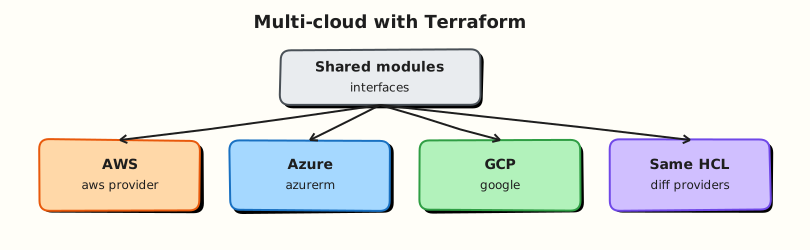
Theory
What it is
Multi-cloud Terraform uses one IaC toolchain and shared vocabulary across providers — not identical APIs. Typical capability mapping:
| Capability | AWS | Azure | GCP |
|---|---|---|---|
| Network | VPC, subnets, routes | VNet, subnets, NSGs | VPC, subnets, firewall rules |
| Compute | EC2 / Auto Scaling | Virtual Machine / VMSS | Compute Engine / MIG |
| Identity | IAM roles/policies | RBAC, managed identities | IAM bindings, service accounts |
| Object storage | S3 | Blob (storage account) | Cloud Storage (GCS) |
| Scope | Account + Region | Subscription + resource group | Project + region |
Providers (hashicorp/aws, hashicorp/azurerm, hashicorp/google) configure in the root with aliases when one configuration manages multiple regions or clouds. Child modules declare configuration_aliases and receive providers = { aws = aws.primary }.
Why it matters
Enterprises run primary workloads on one cloud and disaster recovery, acquisitions, or regulatory requirements on another. Without a shared interface, every squad invents incompatible network and IAM patterns. Platform teams publish thin facades so product roots stay boring: cidr, environment, tags in — network_id, bucket_name out — while specialists own cloud modules and upgrades.
How it works
- Define a contract — variables and outputs meaningful to application teams.
- Implement
modules/network/aws,modules/network/azure,modules/network/gcp(or Registry modules pinned per cloud). - Wire aliased providers in the root; never embed credentials in child modules.
- Keep separate state per cloud/account/subscription/project — do not combine unrelated clouds in one state file.
- Document intentional differences — Azure resource groups, GCP projects, and AWS accounts are not 1:1.
AWS patterns (sketch)
# Illustrative — lab uses null simulation instead of live AWS.
resource "aws_vpc" "this" {
  cidr_block = var.cidr
  tags       = var.tags
}

resource "aws_s3_bucket" "artifacts" {
  bucket = var.bucket_name
  tags   = var.tags
}
IAM roles attach via aws_iam_role + aws_iam_role_policy with least-privilege trust policies scoped to OIDC or service principals.
Azure patterns (sketch)
resource "azurerm_resource_group" "this" {
  name     = var.name
  location = var.location
}

resource "azurerm_virtual_network" "this" {
  name                = var.name
  address_space       = [var.cidr]
  location            = azurerm_resource_group.this.location
  resource_group_name = azurerm_resource_group.this.name
}
Managed identities replace long-lived keys for compute accessing storage.
GCP patterns (sketch)
resource "google_compute_network" "this" {
  name                    = var.name
  auto_create_subnetworks = false
  project                 = var.project_id
}

resource "google_storage_bucket" "artifacts" {
  name     = var.bucket_name
  location = var.region
  project  = var.project_id
}
Prefer workload identity over downloadable service account keys.
Key concepts and comparisons
| Approach | When it works |
|---|---|
| Facade + cloud implementation modules | Platform standardisation |
| Separate roots per cloud | Clearest blast radius |
| Single mega-module for all clouds | Rarely maintainable |
| Cloud-agnostic tools only | Insufficient for real IAM/network |
Common pitfalls
- Expecting identical security postures from one generic module.
- One shared state for AWS + Azure + GCP — locking and blast radius suffer.
- Copy-pasting AWS resource names into Azure modules.
- Forcing lowest-common-denominator features then adding exceptions everywhere.
- Hard-coding provider credentials inside child modules.
Hands-on Lab
Objective
Build a multi-cloud facade with a live AWS S3 bucket (sandbox credentials) plus Docker-based Azure/GCP facades, apply both paths, and prove with aws s3 ls and docker network ls under ~/rebash-terraform/module-17.
Prerequisites
- Terraform CLI ≥ 1.9
- Docker Engine running (
docker infosucceeds) - AWS sandbox credentials configured (
aws sts get-caller-identitysucceeds) or LocalStack withawslocal(see Task 1 alternative) - AWS CLI v2 installed
Lab environment
Workspace: ~/rebash-terraform/module-17
mkdir -p ~/rebash-terraform/module-17/modules/{aws-storage,network/azure,network/gcp} && cd ~/rebash-terraform/module-17
Real-world scenario
Your platform team publishes a landing-zone facade consumed by product squads. The lab applies a real AWS S3 bucket in a sandbox account (or LocalStack) and Docker networks standing in for Azure/GCP network modules — proving provider alias wiring with operational CLIs, not validate-only stubs.
Step-by-step tasks
Task 1 – Declare providers and AWS storage module
Create versions.tf:
terraform {
  required_version = ">= 1.9.0"

  required_providers {
    aws = {
      source  = "hashicorp/aws"
      version = "~> 5.0"
    }
    docker = {
      source  = "kreuzwerker/docker"
      version = "~> 3.0"
    }
    random = {
      source  = "hashicorp/random"
      version = "~> 3.6"
    }
    local = {
      source  = "hashicorp/local"
      version = "~> 2.5"
    }
  }
}
Create providers.tf:
Create variables.tf:
variable "aws_region" {
  type    = string
  default = "ap-south-1"
}

variable "project_prefix" {
  type    = string
  default = "rebash-tf-lab"
}

variable "use_localstack" {
  type        = bool
  description = "Set true when using LocalStack instead of real AWS."
  default     = false
}
Create modules/aws-storage/variables.tf:
Create modules/aws-storage/main.tf:
terraform {
  required_providers {
    aws = {
      source                = "hashicorp/aws"
      configuration_aliases = [aws]
    }
    random = { source = "hashicorp/random" }
  }
}

resource "random_id" "suffix" {
  byte_length = 4
}

resource "aws_s3_bucket" "lab" {
  provider = aws
  bucket   = "${var.bucket_prefix}-${random_id.suffix.hex}"

  tags = merge(var.tags, {
    cloud = "aws"
  })
}

resource "aws_s3_bucket_public_access_block" "lab" {
  provider = aws
  bucket   = aws_s3_bucket.lab.id

  block_public_acls       = true
  block_public_policy     = true
  ignore_public_acls      = true
  restrict_public_buckets = true
}
Create modules/aws-storage/outputs.tf:
LocalStack alternative: if using LocalStack, set use_localstack = true in terraform.tfvars and add endpoints to providers.tf:
provider "aws" {
  alias  = "sandbox"
  region = var.aws_region

  access_key                  = "test"
  secret_key                  = "test"
  skip_credentials_validation = true
  skip_metadata_api_check     = true
  skip_requesting_account_id  = true

  endpoints {
    s3 = "http://localhost:4566"
  }
}
Run:
cd ~/rebash-terraform/module-17
aws sts get-caller-identity | tee artefacts/aws-identity.txt
echo "aws identity OK" | tee artefacts/aws-ok.txt
Expected output
AWS identity JSON (or LocalStack endpoint documented in tfvars).
Task 2 – Docker network modules for Azure/GCP facades
Create modules/network/azure/variables.tf:
Create modules/network/azure/main.tf:
terraform {
  required_providers {
    docker = { source = "kreuzwerker/docker" }
  }
}

resource "docker_network" "azure_facade" {
  name = var.name
  labels = merge(var.labels, {
    cloud = "azure"
  })
}
Create modules/network/azure/outputs.tf:
output "network_id" {
  value = docker_network.azure_facade.id
}

output "network_name" {
  value = docker_network.azure_facade.name
}
Create modules/network/gcp/variables.tf:
Create modules/network/gcp/main.tf:
terraform {
  required_providers {
    docker = { source = "kreuzwerker/docker" }
  }
}

resource "docker_network" "gcp_facade" {
  name = var.name
  labels = merge(var.labels, {
    cloud = "gcp"
  })
}
Create modules/network/gcp/outputs.tf:
output "network_id" {
  value = docker_network.gcp_facade.id
}

output "network_name" {
  value = docker_network.gcp_facade.name
}
Task 3 – Wire facade root module and apply
Create main.tf:
module "aws_storage" {
  source = "./modules/aws-storage"
  providers = {
    aws = aws.sandbox
  }

  bucket_prefix = var.project_prefix
  tags = {
    environment = "lab"
    managed_by  = "terraform"
  }
}

module "azure_network" {
  source = "./modules/network/azure"

  name = "rebash-azure-facade"
  labels = {
    environment = "lab"
    managed_by  = "terraform"
  }
}

module "gcp_network" {
  source = "./modules/network/gcp"

  name = "rebash-gcp-facade"
  labels = {
    environment = "lab"
    managed_by  = "terraform"
  }
}

resource "local_file" "summary" {
  filename = "${path.module}/artefacts/multi-cloud-summary.json"
  content = jsonencode({
    aws_bucket_name   = module.aws_storage.bucket_name
    azure_network_id  = module.azure_network.network_name
    gcp_network_id    = module.gcp_network.network_name
  })
}
Create outputs.tf:
output "aws_bucket_name" {
  value = module.aws_storage.bucket_name
}

output "azure_network_name" {
  value = module.azure_network.network_name
}

output "gcp_network_name" {
  value = module.gcp_network.network_name
}
Apply and prove:
cd ~/rebash-terraform/module-17
mkdir -p artefacts
terraform init | tee artefacts/init.log
terraform apply -auto-approve -input=false | tee artefacts/apply.log
BUCKET="$(terraform output -raw aws_bucket_name)"
if [ "${use_localstack:-false}" = "true" ] || grep -q 'use_localstack = true' terraform.tfvars 2>/dev/null; then
  awslocal s3 ls "s3://${BUCKET}" | tee artefacts/s3-ls.txt
else
  aws s3 ls "s3://${BUCKET}" | tee artefacts/s3-ls.txt
fi
docker network ls --filter "name=rebash-azure-facade" --format '{{.Name}}' | tee artefacts/azure-net.txt
docker network ls --filter "name=rebash-gcp-facade" --format '{{.Name}}' | tee artefacts/gcp-net.txt
grep -q 'rebash-azure-facade' artefacts/azure-net.txt
grep -q 'rebash-gcp-facade' artefacts/gcp-net.txt
test -f artefacts/multi-cloud-summary.json
echo "multi-cloud apply OK" | tee artefacts/apply-ok.txt
Expected output
S3 bucket exists (empty listing OK); two Docker networks present; summary JSON written.
Task 4 – Document separate-state production path
Create docs/live-apply.md:
# Production multi-cloud separation

1. **Separate state** per cloud — never one state file for AWS + Azure + GCP.
2. AWS roots use real credentials via OIDC in CI; Docker facades stay in platform sandbox.
3. Map facade outputs to cloud-specific modules as accounts are onboarded.
4. Run `terraform plan` per account with read-only roles before apply.
5. Destroy lab resources: `terraform destroy` removes S3 bucket and Docker networks.
Verify:
cd ~/rebash-terraform/module-17
grep -q 'Separate state' docs/live-apply.md
terraform output -json | tee artefacts/outputs.json
grep -q 'aws_bucket_name' artefacts/outputs.json
Expected output
Documentation exists; outputs JSON lists all three cloud facade results.
Validation steps
- Real AWS S3 bucket created and listed with
aws s3 ls(orawslocal) - Docker Azure/GCP facade networks exist
- Facade modules receive explicit
providersmaps where required -
artefacts/multi-cloud-summary.jsoncaptures all resource IDs -
terraform destroyremoves billable AWS and Docker resources
Common errors and fixes
| Error | Cause | Fix |
|---|---|---|
AccessDenied on S3 | Wrong AWS profile/region | Export sandbox profile; match aws_region |
| Bucket already exists | Name collision | Random suffix handles this — re-apply |
| Docker network exists | Prior lab not cleaned | docker network rm rebash-azure-facade rebash-gcp-facade |
| LocalStack connection refused | LocalStack not running | Start LocalStack; set use_localstack = true |
| Provider alias not passed | Missing providers map | Pass providers = { aws = aws.sandbox } |
Challenge exercise
Add modules/storage/azure outputting a Docker volume named rebash-azure-vol and extend local_file.summary to include volume name. Tag all resources with facade_version = "1.0".
Learning outcomes
- Applied real AWS S3 with sandbox credentials and operational proof
- Built Docker-based Azure/GCP network facades with explicit provider passing
- Documented separate-state production separation per cloud
- Proved multi-cloud facade outputs with CLIs, not validate-only
Cleanup
cd ~/rebash-terraform/module-17
terraform destroy -auto-approve
rm -rf .terraform artefacts
rm -f terraform.tfstate terraform.tfstate.backup
Validation
Validation
- Lab completed under
~/rebash-terraform/module-17 - Provider aliases and module
configuration_aliaseswired correctly - You can explain why one state file should not hold all clouds
- You can name AWS/Azure/GCP equivalents for network and storage
Code Walkthrough
Production multi-cloud habits:
- Inspect module contracts — facade outputs must stay stable when cloud impl changes.
- Separate state — one backend per cloud/account; never one lock for everything.
- Pin provider majors per cloud module — upgrades are independent.
- Document differences — IAM models are not interchangeable; do not hide behind boolean flags.
- Optional live apply — validate structure locally; apply in sandbox accounts per cloud.
Security Considerations
- Scope IAM per cloud account — multi-cloud does not mean one super-role everywhere.
- Never commit cloud keys for three providers in one tfvars file.
- Encrypt each remote state backend; Azure and GCP equivalents of S3 versioning matter.
- Audit cross-cloud networking paths — VPN/peering increases attack surface.
- Policy-as-code per cloud still required — facade modules can hide dangerous defaults.
Common Mistakes
One Terraform root applying AWS, Azure, and GCP production together
Fix: Split roots and state; coordinate releases at the platform layer, not one state file.
Identical CIDR and naming without cloud-specific constraints
Fix: Respect each cloud’s uniqueness (Azure location pairs, GCP project quotas, AWS account limits).
Embedding credentials in provider blocks
Fix: Environment/OIDC auth at CI; mock providers for validate-only workflows.
Best Practices
- Publish facade modules to an internal registry with semver per cloud implementation.
- Keep simulation/null paths for CI validate jobs — fast feedback without credentials.
- Map capabilities explicitly in README tables (network, compute, IAM, storage).
- Test each cloud module independently with
terraform test. - Align tagging/labels through facade inputs, not copy-pasted resource tags.
Troubleshooting
| Symptom | Likely cause | Fix |
|---|---|---|
| Provider alias not passed | Module call missing providers | Add providers map matching configuration_aliases |
| Plan wants real APIs in CI | simulation_mode false | Default simulation true in CI tfvars |
| Duplicate CIDR deploy error | Overlapping RFC1918 across clouds | Coordinate IPAM; document allocations |
| Azure RM provider registration hang | skip flag missing | Set skip_provider_registration = true for validate stubs |
| Google project not found | Wrong project in provider | Use sandbox project ID or simulation mode |
Summary
Multi-cloud Terraform standardises interfaces, not identical APIs — facade modules over aliased providers with separate state per cloud. The lab applied a live AWS S3 bucket and Docker network facades with operational proof. Next, provision Kubernetes infrastructure and learn where GitOps takes over.
Interview Questions
1. What does multi-cloud Terraform usually mean in practice?
Reveal answer
One IaC toolchain and shared module vocabulary across providers, with cloud-specific implementations hidden behind stable inputs/outputs — not one resource block that abstracts all APIs.
2. Why might separate states per cloud be safer than one mega root module?
Reveal answer
Separate states isolate credentials, locking, failure domains, and blast radius. A corrupted lock or bad apply in one cloud does not block unrelated clouds.
3. How do you keep interfaces consistent across clouds?
Reveal answer
Define a facade contract (cidr, environment, tags → network_id, bucket_name) and implement per-cloud modules that map those inputs to native resources, documenting intentional differences.
4. What operational complexity grows with multi-cloud estates?
Reveal answer
Identity models, networking, observability, cost tooling, and incident response differ per cloud; teams need expertise in each platform — pursue multi-cloud for clear requirements, not fashion.
5. When is multi-cloud the wrong goal?
Reveal answer
When a single cloud meets reliability, compliance, and cost needs; multi-cloud adds coordination overhead without business benefit — DR and acquisition are common valid drivers.
6. How do aliased providers help multi-region or multi-cloud roots?
Reveal answer
Aliases let one configuration declare multiple provider configurations (for example aws.eu and aws.us) and pass them explicitly to modules via the providers meta-argument.
7. Why use simulation/null mode in CI for multi-cloud repos?
Reveal answer
Engineers and CI can run validate and module tests without credentials for every cloud, catching wiring errors early before sandbox applies.