Resources, Dependencies, and Meta-Arguments
Overview
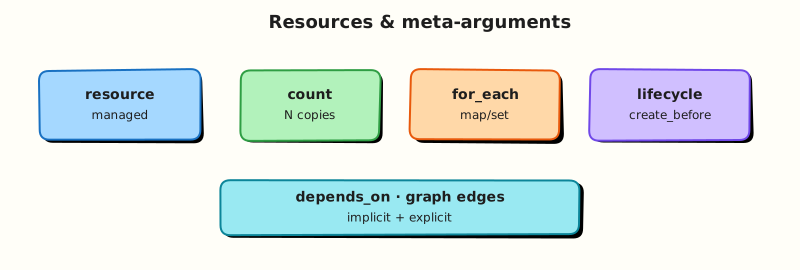
Resources are the managed objects Terraform creates and maintains — aws_instance, kubernetes_deployment, or lab types like local_file. Terraform builds a dependency graph from references and meta-arguments, then walks it during plan and apply. Meta-arguments (count, for_each, lifecycle, depends_on, provider) change how many instances exist and how updates behave — misuse causes race conditions, surprise replacements, or destroy/recreate outages.
This is Tutorial 6 in Module 6: Resources of the REBASH Academy Terraform for Cloud & DevOps Engineers series — written for Cloud, DevOps, Platform, and SRE engineers. You will model resource lifecycle, implicit vs explicit dependencies, and meta-arguments with Docker containers and networks — producing indexed and keyed instances, lifecycle rules, drift diagnosis, and dependency evidence with docker ps.
Prerequisites
- Providers and the Terraform Plugin Model
- HCL Fundamentals
- Module 3 apply/destroy comfort
- Terraform ≥ 1.5 and Docker Engine running
Learning Objectives
By the end of this tutorial, you will be able to:
- Describe Terraform resource lifecycle stages (plan, apply, destroy, refresh)
- Explain implicit dependencies from references vs explicit
depends_on - Use
countandfor_eachto create multiple resource instances safely - Apply
lifecyclerules:create_before_destroy,prevent_destroy,ignore_changes - Debug dependency ordering from plan graph and state addresses
Architecture
Each resource instance has a unique address (local_file.app["api"]). Edges in the graph come from attribute references and depends_on. Meta-arguments modify instance count and update behaviour without changing provider APIs.
Theory
What it is
A resource block declares one or more instances of a provider-managed object:
Address formats:
| Meta-argument | Address pattern | When to use |
|---|---|---|
| (none) | local_file.example | Single instance |
count | local_file.example[0] | Integer index, ordered list |
for_each | local_file.example["key"] | Map or set keys — prefer for stable identity |
Resource lifecycle (conceptual):
- Plan — diff desired vs state
- Create — API create; store ID in state
- Update in-place — change mutable attributes
- Replace — destroy + create when attribute forces new resource
- Destroy — API delete; remove from state
- Refresh — read live attributes into state during plan
Why it matters
Incorrect dependencies cause flaky applies:
- App starts before database is reachable
- Certificate validates before DNS record exists
- Parallel creates hit API rate limits
Incorrect meta-argument choice causes painful state migrations:
- Changing
countindex shifts addresses — destroys/recreates unintended instances - Switching
counttofor_eachrequiresterraform state mvplanning
Production engineers choose for_each with stable string keys for most collections; reserve count for truly ordered lists or conditional single instance (count = var.enabled ? 1 : 0).
How it works
Implicit dependencies
When resource A’s argument references resource B’s attribute, Terraform orders B before A:
resource "null_resource" "seed" { }

resource "local_file" "downstream" {
  content  = null_resource.seed.id
  filename = "${path.module}/downstream.txt"
}
No depends_on needed — reference creates the edge.
Explicit depends_on
When dependency is not visible in arguments (side effects, ordering with resources that do not expose needed attributes):
resource "local_file" "final" {
  filename = "${path.module}/final.txt"
  content  = "ready"

  depends_on = [
    null_resource.bootstrap,
    local_file.config,
  ]
}
Use sparingly — overuse hides true data flow. Valid for null_resource triggers and modules with hidden internals.
count
variable "zones" {
  type    = list(string)
  default = ["a", "b", "c"]
}

resource "local_file" "zone_marker" {
  count    = length(var.zones)
  filename = "${path.module}/zones/${var.zones[count.index]}.txt"
  content  = "zone=${var.zones[count.index]}"
}
Reference: local_file.zone_marker[0], count.index.
Removing middle list element reindexes — destructive. Prefer for_each for named keys.
for_each
variable "services" {
  type = map(string)
  default = {
    api    = "8080"
    worker = "9090"
  }
}

resource "local_file" "service_port" {
  for_each = var.services
  filename = "${path.module}/services/${each.key}.txt"
  content  = "port=${each.value}"
}
Reference: local_file.service_port["api"], each.key, each.value.
Keys must be strings (convert with toset() for list sources).
lifecycle
| Block argument | Effect |
|---|---|
create_before_destroy | New resource created before old destroyed — reduces downtime when replacement required |
prevent_destroy | Terraform errors on destroy — protect stateful resources |
ignore_changes | Skip diff on listed arguments — external actors may change them (tags, AMI) |
replace_triggered_by (1.2+) | Replace when other resource changes |
ignore_changes does not block manual drift detection outside Terraform — document when CMDB tags are owned by another system.
provider meta-argument
Covered in Module 5 — selects provider configuration per resource.
Common pitfalls
count = length(list)when list order changes — unintended destroys.for_eachon list withouttoset()— use map with stable keys instead.depends_onchains everywhere — masks missing attribute references.lifecycle prevent_destroyon wrong resource — blocks sandbox destroy scripts.ignore_changes = allanti-pattern — Terraform stops managing resource entirely for those fields.
Hands-on Lab
Objective
Build a Docker stack combining count, for_each, depends_on, and lifecycle rules; apply and capture state addresses; prove dependency ordering with docker ps; diagnose drift when a container is removed outside Terraform.
Prerequisites
- Modules 3–5 completed
- Terraform ≥ 1.5
- Docker Engine running (
docker infosucceeds)
Lab environment
Workspace: ~/rebash-terraform/module-06
Real-world scenario
You deploy a platform bootstrap pattern: shared Docker network, zone-scoped sidecar containers for three availability zones (indexed), service containers keyed by name, and a gateway container that must start only after all sidecars exist. Ticket SRE-306: production uses the same graph ideas with subnets and ECS tasks — your lab proves ordering and meta-arguments with real containers.
Step-by-step tasks
Task 1 – Network, counted zones, and for_each services
Create versions.tf:
terraform {
  required_version = ">= 1.5.0, < 2.0.0"

  required_providers {
    docker = {
      source  = "kreuzwerker/docker"
      version = "~> 3.0"
    }
  }
}

provider "docker" {}
Create variables.tf:
variable "zones" {
  type    = list(string)
  default = ["zone-a", "zone-b", "zone-c"]
}

variable "services" {
  type = map(string)
  default = {
    api    = "8080"
    worker = "9090"
  }
}
Create main.tf:
resource "docker_network" "platform" {
  name = "rebash-module-06-net"
}

resource "docker_image" "alpine" {
  name = "alpine:3.20"
}

resource "docker_container" "zone_sidecar" {
  count = length(var.zones)

  name  = format("rebash-module-06-%s", var.zones[count.index])
  image = docker_image.alpine.image_id

  command = ["sleep", "3600"]

  networks_advanced {
    name = docker_network.platform.name
  }

  labels {
    label = "zone"
    value = var.zones[count.index]
  }

  depends_on = [docker_network.platform]
}

resource "docker_container" "service" {
  for_each = var.services

  name  = format("rebash-module-06-%s", each.key)
  image = docker_image.alpine.image_id

  command = ["sleep", "3600"]

  networks_advanced {
    name = docker_network.platform.name
  }

  labels {
    label = "service"
    value = each.key
  }

  labels {
    label = "port"
    value = each.value
  }
}

resource "docker_container" "gateway" {
  name  = "rebash-module-06-gateway"
  image = docker_image.alpine.image_id

  command = ["sleep", "3600"]

  networks_advanced {
    name = docker_network.platform.name
  }

  depends_on = [
    docker_container.zone_sidecar,
    docker_container.service,
  ]

  lifecycle {
    ignore_changes = [labels]
  }
}
Expected output
Configuration defines network, three counted zone containers, two keyed service containers, and a gateway with lifecycle and depends_on.
Task 2 – Apply and verify addresses
Run:
cd ~/rebash-terraform/module-06
terraform fmt -recursive
terraform init | tee init.txt
terraform apply -auto-approve | tee apply.txt
terraform state list | tee state-list.txt
grep -q 'docker_container.zone_sidecar[0]' state-list.txt
grep -q 'docker_container.zone_sidecar[1]' state-list.txt
grep -q 'docker_container.service["api"]' state-list.txt
grep -q 'docker_container.service["worker"]' state-list.txt
docker ps --filter network=rebash-module-06-net --format '{{.Names}}' | tee docker-ps.txt
grep -q 'rebash-module-06-gateway' docker-ps.txt
grep -q 'rebash-module-06-zone-a' docker-ps.txt
echo "resource graph OK" | tee resource-evidence.txt
Expected output
State lists indexed and keyed addresses; docker-ps.txt shows six containers on the network; resource-evidence.txt contains resource graph OK.
Task 3 – Prove lifecycle ignore_changes and diagnose drift
Add a label to docker_container.gateway in main.tf inside the resource block:
Run plan — ignore_changes = [labels] should suppress the diff:
cd ~/rebash-terraform/module-06
terraform plan -no-color | tee plan-ignore.txt
grep -q 'No changes' plan-ignore.txt
echo "lifecycle ignore demo OK" | tee lifecycle-evidence.txt
Simulate out-of-band failure — remove one zone container manually:
docker rm -f rebash-module-06-zone-b
terraform plan -no-color | tee plan-drift.txt
grep -q 'docker_container.zone_sidecar[1]' plan-drift.txt
grep -q 'will be created' plan-drift.txt
terraform apply -auto-approve | tee apply-fix.txt
docker ps --filter name=rebash-module-06-zone-b --format '{{.Names}}' | grep -q zone-b
echo "drift fix OK" | tee drift-evidence.txt
Expected output
Label change plan shows no changes; after manual docker rm, plan proposes recreate; apply restores zone-b; drift-evidence.txt contains drift fix OK.
Validation steps
-
countcreated three zone containers with stable indices -
for_eachcreated service containers keyed by name -
depends_onensured gateway after zones and services - State addresses use
[index]and["key"]forms -
ignore_changessuppressed gateway label drift in plan - Manual container removal detected and fixed by apply
Common errors and fixes
| Error | Cause | Fix |
|---|---|---|
Invalid count argument | Non-number count | Use length() or conditional 0/1 |
Duplicate resource instance key | for_each keys collide | Ensure unique map keys |
Cycle: resource A depends on B | Mutual references | Break cycle; refactor dependencies |
| Unexpected destroy on list reorder | count reindex | Migrate to for_each with stable keys |
| Gateway starts before sidecars | Missing depends_on | Keep explicit depends_on on gateway |
Challenge exercise
Create expand-services.tf:
variable "extra_services" {
  type = map(string)
  default = {
    scheduler = "7070"
  }
}

resource "docker_container" "extra_service" {
  for_each = var.extra_services

  name  = format("rebash-module-06-%s", each.key)
  image = docker_image.alpine.image_id

  command = ["sleep", "3600"]

  networks_advanced {
    name = docker_network.platform.name
  }

  labels {
    label = "service"
    value = each.key
  }

  labels {
    label = "extra"
    value = "true"
  }
}
Apply the extension:
cd ~/rebash-terraform/module-06
terraform apply -auto-approve | tee challenge-apply.txt
docker ps --filter name=rebash-module-06-scheduler --format '{{.Names}}' | grep -q scheduler
docker inspect rebash-module-06-scheduler --format '{{index .Config.Labels "extra"}}' | grep -q true
echo "for_each extension OK" | tee challenge-resource.txt
Expected output
Scheduler container running with extra=true label; challenge-resource.txt contains for_each extension OK.
Learning outcomes
- You modelled implicit references and explicit
depends_on - You used
countandfor_eachwith correct state addressing - You applied
lifecycle.ignore_changesand observed plan behaviour - You diagnosed out-of-band container removal and restored desired state
Cleanup
cd ~/rebash-terraform/module-06
terraform destroy -auto-approve
rm -f init.txt apply.txt state-list.txt plan-ignore.txt plan-drift.txt apply-fix.txt \
  resource-evidence.txt lifecycle-evidence.txt drift-evidence.txt \
  challenge-apply.txt challenge-resource.txt docker-ps.txt expand-services.tf 2>/dev/null || true
rm -rf .terraform .terraform.lock.hcl terraform.tfstate terraform.tfstate.backup
Validation
- Completed lab under
~/rebash-terraform/module-06withdocker psand drift-fix evidence - Can explain implicit vs explicit dependencies
- Used count, for_each, lifecycle, and depends_on in one stack
- Can describe one production failure mode (e.g. count reindex destroy)
Code Walkthrough
- Stable keys — prefer
for_eachmaps keyed by logical name, not list index. - Reference over depends_on — wire real data flow when attributes exist.
- Lifecycle sparingly —
ignore_changesdocuments ownership boundaries explicitly. - State list after apply — verify addresses match mental model before production scale.
- prevent_destroy on data — enable on stateful prod resources; not on lab null markers.
Security Considerations
docker_containercan run in CI — sandbox names; no writes outside module scope.local-execprovisioners (not used here) execute shell — high risk; avoid in shared modules without review.prevent_destroyon secrets resources — pair with break-glass procedure documented in runbooks.- Count/for_each over user input — validate keys to avoid path traversal in filenames (
../). - Dependency ordering does not imply security — IAM and network rules still required on real resources.
Common Mistakes
count for named services
Reordering ["api","worker"] to ["worker","api"] reassigns indices — destroy/recreate.
Fix: for_each = toset(var.services) or map keyed by service name.
depends_on instead of references
Hides data flow; plans may not show true ordering needs.
Fix: Reference attributes (bucket.id) when available.
ignore_changes on critical fields
Terraform stops correcting security groups or AMIs.
Fix: Ignore only externally owned tags or autoscaling-managed fields — document owner.
create_before_destroy everywhere
Can fail when names must be unique (single S3 bucket name).
Fix: Use only when replacement downtime unacceptable and names allow overlap strategy.
Best Practices
- Use
for_eachwith maps built from stable business keys (service name, AZ code). - Keep
count = var.enabled ? 1 : 0idiom for optional single resources. - Document
depends_onwith comment explaining non-obvious ordering. - Run
terraform graph | dotoccasionally to visualise complex modules. - Plan
movedblocks (Terraform 1.1+) when refactoring count → for_each.
Troubleshooting
| Symptom | Likely cause | Fix |
|---|---|---|
| Resource destroyed unexpectedly | count index shift | Migrate to for_each; use moved block |
for_each duplicate key | Same key twice in map | Deduplicate input map |
| Cycle error | Circular references | Refactor; split into two applies |
| Replace on minor change | Attribute ForceNew in provider | lifecycle ignore_changes or accept replace window |
| depends_on ignored feeling | Wrong resource type | Verify addresses; depends_on needs full resource references |
Summary
Resources are managed infrastructure objects wired into a dependency graph. Implicit edges come from references; depends_on adds explicit ordering. count and for_each scale instances — prefer stable keys. lifecycle controls destroy and diff behaviour. You built a bootstrap → zones → services → manifest graph with evidence in state and filesystem. Next: deepen inputs and outputs in Variables, Locals, and Outputs.
Interview Questions
1. What is the difference between implicit and explicit dependencies?
Reveal answer
Implicit dependencies form when one resource references another’s attributes in arguments — Terraform orders creates/updates/deletes accordingly. Explicit **depends_on adds ordering when no reference exists but side effects require sequencing (e.g. null_resource trigger before unrelated API eventual consistency). Prefer implicit — clearer plans.
2. When do you use count versus for_each?
Reveal answer
count uses integer indices — good for optional single resources (count = var.enable ? 1 : 0) or fixed-order lists where reordering is acceptable. for_each uses string keys — preferred for named collections (services, users) because removing one key does not reindex others. Changing count addresses destroys unintended instances.
3. Explain create_before_destroy.
Reveal answer
lifecycle { create_before_destroy = true } tells Terraform to create the replacement resource before destroying the old one when replacement is unavoidable — reducing downtime for resources like load balancers or DNS. Requires compatible naming (some resources cannot overlap names — test plan carefully).
4. What does ignore_changes do, and what is the risk?
Reveal answer
ignore_changes lists arguments Terraform should not drift-correct — useful when external systems mutate tags or when autoscaler changes desired count. Risk: real misconfigurations on those fields never get fixed by apply — security groups could drift open. Document field ownership clearly.
5. How are resource instances addressed in state?
Reveal answer
Single: resource_type.name. Count: resource_type.name[0]. For_each: resource_type.name["key"]. State list, import, and terraform state mv use these addresses. Wrong address breaks targeting and imports.
6. What triggers resource replacement vs in-place update?
Reveal answer
Provider schema marks attributes ForceNew — changing them requires destroy/create. Plan shows -/+ or forces replacement. Other attributes update in-place (~). terraform plan explains which attribute forced replacement — read lines carefully before approve.
7. Why might you use depends_on with null_resource?
Reveal answer
null_resource often represents procedural hooks or external ordering without exported attributes you can reference. depends_on ensures sequencing (bootstrap completes before downstream). Better long-term: replace with resource that exports meaningful ID or use module outputs.
8. A plan wants to destroy all counted instances after list reorder. Fix strategy?
Reveal answer
count ties identity to index — reorder changes which index maps to which logical item. Fix: refactor to for_each with stable keys (for_each = { for z in var.zones : z => z }), use moved blocks to remap state without destroy, or accept one-time recreation in non-prod first. Never ignore mass destroy in prod plan.
Related Tutorials
- Terraform course index
- Previous: Providers and the Terraform Plugin Model
- Next: Variables, Locals, and Outputs
- Functions, Templates, and Dynamic Blocks