Variables, Locals, and Outputs
Overview
Hard-coded infrastructure names and sizes do not survive a second environment. Input variables parameterise modules at the boundary; locals hold computed values you do not want callers to set; outputs export results to humans, parent modules, and remote-state consumers.
This tutorial covers typed input variables, validation blocks, .tfvars files, TF_VAR_ environment variables, locals, outputs, and sensitive marking so secrets do not appear in logs. The lab builds a Docker container stack under ~/rebash-terraform/module-07 — real apply with docker ps proof, no cloud account required.
This is Tutorial 7 in Module 7: Variables & Outputs of the REBASH Academy Terraform for Cloud & DevOps Engineers series — written for Cloud, DevOps, Platform, and SRE engineers who need clean module interfaces and safe output handling in production pipelines.
Prerequisites
- Resources, Dependencies, and Meta-Arguments
- HCL Fundamentals
- Terraform CLI ≥ 1.5 installed locally
- Completed Module 6 lab (
~/rebash-terraform/module-06)
Learning Objectives
By the end of this tutorial, you will be able to:
- Declare typed input variables with descriptions, defaults, and
validationrules - Load values from
terraform.tfvars,-var, andTF_VAR_environment variables - Use
localsfor derived resource names without exposing them as module inputs - Export outputs and mark sensitive values so the CLI redacts them in normal output
- Explain variable precedence when debugging unexpected plan values
Architecture
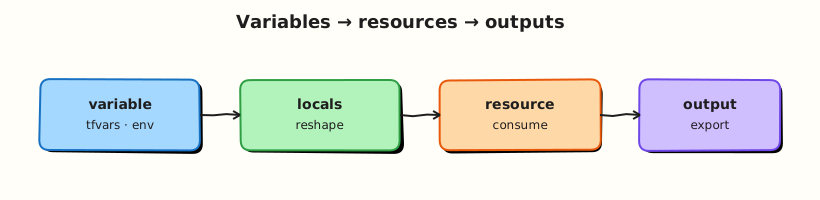
Variables enter the root module from files, CLI flags, and environment; locals are computed inside the module; outputs leave the module boundary to the CLI or downstream stacks.
Theory
What it is
Input variables (variable blocks) declare module inputs:
variable "environment" {
  type        = string
  description = "Deployment tier: dev, staging, or prod"
  default     = "dev"

  validation {
    condition     = contains(["dev", "staging", "prod"], var.environment)
    error_message = "environment must be dev, staging, or prod."
  }
}
Locals (locals blocks) hold intermediate values — not settable from outside:
locals {
  name_prefix = "rebash-${var.environment}"
  common_tags = {
    environment = var.environment
    managed_by  = "terraform"
  }
}
Outputs (output blocks) export values after apply:
output "service_id" {
  description = "Identifier for downstream modules"
  value       = null_resource.service.id
}

output "bootstrap_token" {
  description = "One-time token — treat as secret"
  value       = var.bootstrap_token
  sensitive   = true
}
.tfvars files assign variable values (terraform.tfvars, dev.tfvars, prod.tfvars). Pass a specific file with terraform apply -var-file=staging.tfvars.
Environment variables use the prefix TF_VAR_ — export TF_VAR_environment=staging sets var.environment.
Why it matters
Modules without typed variables become copy-paste forks. Validation catches illegal values at plan time instead of after a failed cloud API call. Locals keep naming conventions DRY without leaking internal details to module consumers. Sensitive outputs reduce accidental secret exposure in CI logs — though state still stores the value, so protect state files too.
How it works
Variable precedence (highest wins):
-varand-var-fileon the command line*.auto.tfvarsfiles (alphabetical order within tier)terraform.tfvarsin the working directoryTF_VAR_*environment variables- Variable
defaultin the block
Terraform evaluates variables before building the resource graph. Locals can reference variables, resources, data sources, and other locals. Outputs evaluate after apply (or from state on terraform output).
Sensitive values: marking sensitive = true on a variable or output redacts it in normal CLI output. It does not encrypt state — use remote backends with encryption and restricted IAM for production secrets.
Key concepts and comparisons
| Mechanism | Set from outside? | Typical use |
|---|---|---|
variable | Yes | Environment name, instance size, feature flags |
local | No | Computed names, merged tag maps |
output | Read-only export | IDs for remote state, connection strings |
.tfvars | Git-reviewed config per env | dev.tfvars, prod.tfvars |
TF_VAR_ | CI/CD injection | Pipeline parameters without committing secrets |
| Loading method | Example |
|---|---|
| Default in block | default = "dev" |
| terraform.tfvars | environment = "staging" |
| -var-file | terraform plan -var-file=prod.tfvars |
| -var | terraform plan -var='environment=prod' |
| TF_VAR_ | export TF_VAR_environment=prod |
Common pitfalls
- Putting computed naming logic in variables instead of locals — callers can override your convention.
- Validation that only runs regex on strings but allows empty values when
default = ""— combinenullable = false(Terraform 1.1+) or explicit checks. - Assuming
sensitive = truehides values in state — it does not; restrict state access. - Committing
terraform.tfvarswith secrets — use CI secrets +TF_VAR_or a vault integration. - Duplicate variable names across
.tffiles in one module — Terraform merges blocks; keep one definition per variable.
Hands-on Lab
Objective
Build a root module under ~/rebash-terraform/module-07 with validated variables, locals for naming, standard and sensitive outputs, a real Docker container, and an evidence script proving TF_VAR_ override behaviour with docker ps.
Prerequisites
- Terraform ≥ 1.5
- Docker Engine running (
docker infosucceeds) - Network access to download the Docker provider once
Lab environment
Workspace: ~/rebash-terraform/module-07
Real-world scenario
Platform engineering requires every stack to accept environment and owner inputs, enforce allowed environment values at plan time, export a service identifier for downstream modules, and redact bootstrap tokens in CI logs. Ticket PLAT-207: reproduce that contract with a labelled Alpine container before the team promotes the module to AWS.
Step-by-step tasks
Task 1 – Provider, variables, locals, and main resources
Create versions.tf:
terraform {
  required_version = ">= 1.5.0"

  required_providers {
    docker = {
      source  = "kreuzwerker/docker"
      version = "~> 3.0"
    }
  }
}

provider "docker" {}
Create variables.tf:
variable "environment" {
  type        = string
  description = "Deployment tier: dev, staging, or prod"

  validation {
    condition     = contains(["dev", "staging", "prod"], var.environment)
    error_message = "environment must be dev, staging, or prod."
  }
}

variable "owner" {
  type        = string
  description = "Team or individual responsible for this stack"
}

variable "bootstrap_token" {
  type        = string
  description = "Simulated secret passed into container labels"
  sensitive   = true
}
Create locals.tf:
locals {
  name_prefix = "rebash-${var.environment}"
  common_tags = {
    environment = var.environment
    owner       = var.owner
    managed_by  = "terraform"
  }
}
Create main.tf:
resource "docker_image" "alpine" {
  name = "alpine:3.20"
}

resource "docker_network" "service" {
  name = "${local.name_prefix}-net"
}

resource "docker_container" "service" {
  name  = "${local.name_prefix}-svc"
  image = docker_image.alpine.image_id

  command = ["sleep", "3600"]

  networks_advanced {
    name = docker_network.service.name
  }

  dynamic "labels" {
    for_each = local.common_tags
    content {
      label = labels.key
      value = labels.value
    }
  }

  labels {
    label = "bootstrap_token"
    value = var.bootstrap_token
  }
}
Create outputs.tf:
output "service_name" {
  description = "Computed service name from locals"
  value       = local.name_prefix
}

output "container_id" {
  description = "Docker container identifier for downstream consumers"
  value       = docker_container.service.id
}

output "bootstrap_token" {
  description = "Sensitive token — redacted in normal CLI output"
  value       = var.bootstrap_token
  sensitive   = true
}
Create terraform.tfvars:
Run:
cd ~/rebash-terraform/module-07
terraform init
terraform validate
terraform plan -out=tfplan | tee plan.txt
grep -q 'docker_container.service' plan.txt
echo "task1 OK" | tee task1-ok.txt
Expected output
terraform validate succeeds; plan shows network, image, and container to create.
Task 2 – Apply, inspect outputs, and prove with Docker CLI
Run:
cd ~/rebash-terraform/module-07
terraform apply tfplan
terraform output
terraform output -json | tee outputs.json
grep -q '<sensitive>' outputs.json || grep -q 'sensitive' outputs.json
terraform output -raw service_name | tee service-name.txt
test "$(cat service-name.txt)" = "rebash-dev"
docker ps --filter name=rebash-dev-svc --format '{{.Names}} {{.Status}}' | tee docker-ps.txt
grep -q 'Up' docker-ps.txt
docker inspect rebash-dev-svc --format '{{index .Config.Labels "owner"}}' | grep -q platform-team
echo "task2 OK" | tee task2-ok.txt
Expected output
service_name prints rebash-dev; bootstrap_token redacted in JSON; container Up with owner label; task2-ok.txt contains task2 OK.
Task 3 – TF_VAR_ override and validation failure
Run:
cd ~/rebash-terraform/module-07
export TF_VAR_environment=staging
terraform plan -var='owner=ci-pipeline' | tee plan-staging.txt
grep -q 'rebash-staging-svc' plan-staging.txt
terraform plan -var='environment=invalid' 2>&1 | tee plan-invalid.txt || true
grep -qi 'environment must be dev' plan-invalid.txt
unset TF_VAR_environment
echo "task3 OK" | tee task3-ok.txt
Expected output
Staging plan shows rebash-staging-svc; invalid environment plan fails validation with the custom error message.
Task 4 – Create vars-evidence.sh audit script
Create vars-evidence.sh:
#!/usr/bin/env bash
set -euo pipefail
cd ~/rebash-terraform/module-07
terraform validate
terraform output -raw service_name | grep -q '^rebash-'
docker ps --filter name=rebash-dev-svc --format '{{.Names}}' | grep -q rebash-dev-svc
export TF_VAR_environment=prod
terraform plan -var='owner=audit' -detailed-exitcode -out=/dev/null
unset TF_VAR_environment
echo "vars-evidence PASS" | tee vars-evidence-pass.txt
Run:
chmod +x ~/rebash-terraform/module-07/vars-evidence.sh
~/rebash-terraform/module-07/vars-evidence.sh
Expected output
vars-evidence-pass.txt contains vars-evidence PASS.
Validation steps
- Variables include validation for
environment - Locals drive
name_prefixvisible in plan and output - Sensitive output redacted in default JSON output
-
TF_VAR_environmentoverride changes planned container name - Invalid environment rejected at plan time
-
docker psproves running container matches tfvars
Common errors and fixes
| Error | Cause | Fix |
|---|---|---|
Invalid value for variable | Value fails validation block | Use dev/staging/prod; read error_message |
| Variable not set | No default and no tfvars | Add to terraform.tfvars or pass -var |
| Sensitive still in plan debug | -json with debug logging | Redaction applies to normal output; restrict log access |
| Wrong precedence | CLI -var lost to tfvars | Remember CLI -var and -var-file beat tfvars |
| Container name conflict | Prior apply left container | terraform destroy or docker rm -f rebash-dev-svc |
Challenge exercise
Create prod.tfvars:
Run a plan with -var-file=prod.tfvars and archive evidence:
cd ~/rebash-terraform/module-07
terraform plan -var-file=prod.tfvars | tee plan-prod.txt
grep -q 'rebash-prod-svc' plan-prod.txt
echo "prod tfvars challenge OK"
Expected output
Plan references rebash-prod-svc container name (plan only — do not apply prod naming if dev stack still exists without destroy first).
Learning outcomes
- Typed variables with validation at plan time
- Locals for internal naming conventions driving real Docker resources
- tfvars and
TF_VAR_loading patterns - Sensitive output handling in CLI and operational proof with
docker ps
Cleanup
cd ~/rebash-terraform/module-07
terraform destroy -auto-approve
rm -f tfplan plan.txt task*-ok.txt outputs.json service-name.txt docker-ps.txt \
  plan-staging.txt plan-invalid.txt vars-evidence-pass.txt plan-prod.txt
rm -rf .terraform .terraform.lock.hcl terraform.tfstate terraform.tfstate.backup
Validation
- Completed module-07 lab with evidence script and
docker psproof - Can explain variable precedence from memory
- Can describe difference between variables and locals
- Know that sensitive marking does not encrypt state
Code Walkthrough
- Validation at the module boundary — reject illegal
environmentvalues before any provider calls. - Locals for naming —
name_prefixstays internal; callers only passenvironment. - tfvars for Git-reviewed defaults —
terraform.tfvarsholds non-secret lab values; prod secrets via CI. - Sensitive on both variable and output — defence in depth for tokens referenced multiple places.
- Evidence script in CI —
terraform validate+ plan exit codes gate merge requests.
Security Considerations
- Never commit real secrets in
*.tfvars— useTF_VAR_from CI secret stores. sensitive = trueredacts CLI output but values remain in state — encrypt remote state and restrict IAM.- Limit who can run
terraform output -rawon sensitive outputs in production workspaces. - Audit
.tfvarsfiles in pull requests the same as application config. - Prefer external secret managers (Vault, cloud SM) over long-lived tokens in variables.
Common Mistakes
Using variables for computed names
Exposing name_prefix as a variable lets callers break naming standards.
Fix: Compute naming in locals; expose only meaningful inputs like environment.
Assuming sensitive hides secrets everywhere
State files, debug logs, and some CI plugins still capture values.
Fix: Encrypt state, restrict backend access, and never log at TRACE in CI with secrets.
Validation without nullable check
Empty strings can pass some regex validations unintentionally.
Fix: Use nullable = false or explicit length(var.name) > 0 conditions.
Best Practices
- Add
descriptionandtypeto every variable — modules are APIs. - Keep environment-specific values in
*.tfvars, not duplicated in.tffiles. - Use
validationfor invariants; use provider constraints for cloud-specific limits. - Export stable outputs (
id,arn,name) that downstream modules actually need. - Document required
TF_VAR_names in module README for pipeline authors.
Troubleshooting
| Symptom | Likely cause | Fix |
|---|---|---|
| Plan shows unexpected env value | Precedence surprise | Check -var, TF_VAR_, and tfvars order |
| Validation error on legal value | Typo in allowed list | Update validation condition or input |
| Output empty after apply | Output references destroyed resource | Re-apply; check terraform state list |
| Sensitive output visible | Used -raw or debug mode | Expected for -raw; restrict who runs it |
| Variable type error | String passed where number expected | Fix tfvars types or add tolist() coercion |
Summary
Variables parameterise modules; locals hold derived values; outputs export results safely. You validated inputs, loaded values from tfvars and TF_VAR_, and redacted sensitive tokens in CLI output. Next, Terraform State Fundamentals explains how Terraform tracks those resources in state.
Interview Questions
1. What is the difference between a variable and a local in Terraform?
Reveal answer
Variables are module inputs settable from .tfvars, -var, and TF_VAR_ environment variables. Locals are computed inside the module and cannot be set from outside. Use variables at the API boundary; use locals for derived names, merged tags, and repeated expressions.
2. How does Terraform load variable values, and what is the precedence order?
Reveal answer
Values come from defaults, TF_VAR_* env vars, terraform.tfvars, auto tfvars files, and finally CLI -var/-var-file (highest). When debugging wrong values, check CLI flags first, then tfvars, then env vars, then defaults.
3. What does sensitive = true on an output actually do?
Reveal answer
It redacts the value in normal human-readable and JSON CLI output when Terraform prints outputs. It does not remove the value from state or from all log levels. Protect state backends and restrict terraform output -raw in production.
4. When would you use a validation block on a variable?
Reveal answer
When invalid input would cause a costly or dangerous apply — wrong environment name, illegal CIDR, disallowed instance type. Validation runs at plan time and fails fast with a custom error_message, saving API calls and rollback work.
5. Why keep secrets out of committed tfvars files?
Reveal answer
tfvars often live in Git and appear in pull request diffs. Secrets in Git are hard to rotate and easy to leak. Inject secrets via CI TF_VAR_, Vault, or cloud secret managers; commit only non-sensitive configuration.
6. How do outputs connect to other Terraform stacks?
Reveal answer
Downstream stacks read outputs via terraform_remote_state data sources (remote backends) or by calling child modules with module.name.output. Outputs are the published contract between stacks — keep them stable and documented.
7. What is the purpose of terraform.tfvars versus prod.tfvars?
Reveal answer
terraform.tfvars is loaded automatically for default lab/dev values. Named files like prod.tfvars are explicit — pass with -var-file=prod.tfvars in pipelines targeting production. Separating files prevents accidental prod applies from default dev values.
8. A plan shows var.environment = "dev" but CI exported TF_VAR_environment=staging. Why?
Reveal answer
A higher-precedence source overrides env vars — typically -var or -var-file on the command line, or a value in terraform.tfvars. -var beats TF_VAR_. Inspect the pipeline script for -var-file and committed tfvars before blaming the environment export.
Related Tutorials
- Terraform course index
- Previous: Resources, Dependencies, and Meta-Arguments
- Next: Terraform State Fundamentals
- Modules — Creating Reusable Infrastructure
- Terraform Security and Secrets