Remote State and Backends
Overview
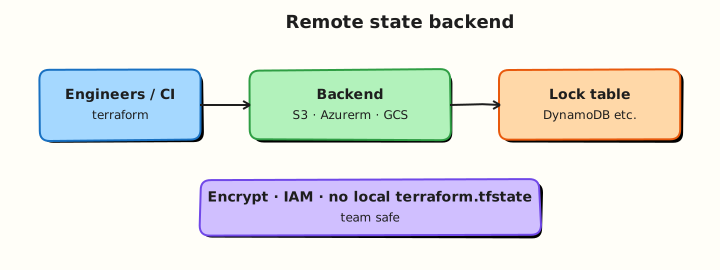
When more than one engineer touches the same stack, local state files collide. Remote backends store state in shared storage (Amazon S3, Azure Blob Storage, Google Cloud Storage, HashiCorp Terraform Cloud) with locking so two applies cannot corrupt the same state serial.
This tutorial explains production remote backends conceptually and teaches terraform_remote_state with a two-stack Docker lab under ~/rebash-terraform/module-08-remote — separate state paths, real networks and containers, no AWS account required. The pattern mirrors S3 + DynamoDB or AzureRM backends in production.
This is Tutorial 9 in Module 8: State Management of the REBASH Academy Terraform for Cloud & DevOps Engineers series.
Prerequisites
- Terraform State Fundamentals
- Terraform CLI ≥ 1.5
- Completed Module 8 state lab
Learning Objectives
By the end of this tutorial, you will be able to:
- Configure a
backendblock and runterraform init -migrate-state - Explain state locking and why concurrent applies are dangerous
- Read another stack's outputs with
terraform_remote_state - Describe S3 and AzureRM backend components at a high level
- Apply state security practices for shared backends
Architecture
The network stack publishes outputs to its state file; the application stack reads them through a remote state data source before creating dependent resources.
Theory
What it is
A backend tells Terraform where to store state. The default is local (terraform.tfstate). Remote backends persist state outside the working directory:
terraform {
  backend "s3" {
    bucket         = "company-terraform-state"
    key            = "network/prod/terraform.tfstate"
    region         = "eu-west-1"
    dynamodb_table = "terraform-locks"
    encrypt        = true
  }
}
Backend configuration cannot use variables — values are fixed at init time. Changing backends requires terraform init -migrate-state (with care and backups).
terraform_remote_state reads another stack's outputs:
data "terraform_remote_state" "network" {
  backend = "s3"
  config = {
    bucket = "company-terraform-state"
    key    = "network/prod/terraform.tfstate"
    region = "eu-west-1"
  }
}

resource "aws_instance" "app" {
  subnet_id = data.terraform_remote_state.network.outputs.private_subnet_id
}
Why it matters
Shared state enables team collaboration, CI pipelines, and stack separation (network vs application). Locking prevents two jobs from interleaving writes — without locks, state corruption can lose resource mappings. Remote storage with versioning supports disaster recovery when bad applies occur.
How it works
terraform init— configures backend; downloads providers.- Plan/apply — Core reads/writes state via backend API; acquires lock if configured.
- Locking — S3 uses DynamoDB; Azure uses blob leases; GCS uses native locking; Terraform Cloud manages locks internally.
- Consumers —
terraform_remote_statereads outputs at plan time from the remote object.
| Backend | Storage | Locking (typical) |
|---|---|---|
local | Disk file | None |
s3 | S3 object | DynamoDB table |
azurerm | Storage blob | Blob lease |
gcs | GCS object | Native |
remote (HCP Terraform) | Managed | Managed |
Key concepts and comparisons
| Pattern | Use when |
|---|---|
| Single remote state per stack | Network, shared services, app tiers |
| Workspace prefix on backend key | Same code, multiple envs (see Module 12) |
terraform_remote_state | App needs VPC/subnet IDs from network stack |
| State versioning on bucket | Roll back bad state writes |
| Separate AWS account for state | Blast-radius isolation |
Common pitfalls
- Backend config with variables — not allowed; use partial config or
-backend-configfiles. - Forgotten
-migrate-state— old local state ignored; plan proposes duplicate resources. - No locking on team backends — rare corruptions become week-long incidents.
- Over-broad IAM on state bucket — any engineer can read prod secrets from state.
- Circular remote state — stack A reads B and B reads A; split contracts or merge stacks.
Hands-on Lab
Objective
Build a network stack and an application stack under ~/rebash-terraform/module-08-remote, each with a separate local backend path, provision real Docker networks and containers, and consume network outputs from the app stack via terraform_remote_state.
Prerequisites
- Terraform ≥ 1.5
- Docker Engine running (
docker infosucceeds) - Completed Module 8 state fundamentals lab
Lab environment
mkdir -p ~/rebash-terraform/module-08-remote/{network,app} && cd ~/rebash-terraform/module-08-remote
Both stacks use backend "local" with different path values — simulating separate S3 state keys without cloud credentials. All resources are real Docker objects.
Real-world scenario
The platform team owns a network stack that exports a Docker network name and CIDR label. Application teams deploy containers that must attach to that network before serving traffic. Ticket PLAT-409: reproduce the read path locally with two state files and real containers before the organisation enables S3 backends in AWS.
Step-by-step tasks
Task 1 – Network stack with dedicated backend path
Create ~/rebash-terraform/module-08-remote/network/versions.tf:
terraform {
  required_version = ">= 1.5.0"

  backend "local" {
    path = "state/network.tfstate"
  }

  required_providers {
    docker = {
      source  = "kreuzwerker/docker"
      version = "~> 3.0"
    }
  }
}

provider "docker" {}
Create ~/rebash-terraform/module-08-remote/network/main.tf:
locals {
  cidr_label = "10.0.0.0/16"
}

resource "docker_network" "platform" {
  name = "rebash-module-08-remote-net"

  labels {
    label = "cidr_label"
    value = local.cidr_label
  }
}
Create ~/rebash-terraform/module-08-remote/network/outputs.tf:
output "network_id" {
  description = "Docker network identifier"
  value       = docker_network.platform.id
}

output "network_name" {
  description = "Network name for downstream stacks"
  value       = docker_network.platform.name
}

output "cidr_label" {
  description = "Human-readable CIDR label for downstream stacks"
  value       = local.cidr_label
}
Run:
cd ~/rebash-terraform/module-08-remote/network
mkdir -p state
terraform init
terraform apply -auto-approve
terraform output -json | tee network-outputs.json
grep -q '10.0.0.0/16' network-outputs.json
docker network ls --filter name=rebash-module-08-remote-net --format '{{.Name}}' | grep -q rebash-module-08-remote-net
test -f ~/rebash-terraform/module-08-remote/network/state/network.tfstate
echo "network task OK" | tee network-task-ok.txt
Expected output
State file at network/state/network.tfstate; network exists in Docker; outputs include cidr_label.
Task 2 – Application stack consuming remote state
Create ~/rebash-terraform/module-08-remote/app/versions.tf:
terraform {
  required_version = ">= 1.5.0"

  backend "local" {
    path = "state/app.tfstate"
  }

  required_providers {
    docker = {
      source  = "kreuzwerker/docker"
      version = "~> 3.0"
    }
  }
}

provider "docker" {}
Create ~/rebash-terraform/module-08-remote/app/main.tf:
data "terraform_remote_state" "network" {
  backend = "local"

  config = {
    path = abspath("${path.module}/../network/state/network.tfstate")
  }
}

resource "docker_image" "alpine" {
  name = "alpine:3.20"
}

resource "docker_container" "app" {
  name  = "rebash-module-08-remote-app"
  image = docker_image.alpine.image_id

  command = ["sleep", "3600"]

  networks_advanced {
    name = data.terraform_remote_state.network.outputs.network_name
  }

  labels {
    label = "network_id"
    value = data.terraform_remote_state.network.outputs.network_id
  }

  labels {
    label = "cidr_label"
    value = data.terraform_remote_state.network.outputs.cidr_label
  }
}
Create ~/rebash-terraform/module-08-remote/app/outputs.tf:
output "attached_cidr" {
  value = data.terraform_remote_state.network.outputs.cidr_label
}

output "attached_network" {
  value = data.terraform_remote_state.network.outputs.network_name
}
Run:
cd ~/rebash-terraform/module-08-remote/app
mkdir -p state
terraform init
terraform plan | tee app-plan.txt
grep -q '10.0.0.0/16' app-plan.txt
terraform apply -auto-approve
terraform output -raw attached_cidr | tee attached-cidr.txt
test "$(cat attached-cidr.txt)" = "10.0.0.0/16"
docker ps --filter name=rebash-module-08-remote-app --format '{{.Names}} {{.Networks}}' | tee docker-ps.txt
grep -q 'rebash-module-08-remote-net' docker-ps.txt
echo "app task OK" | tee app-task-ok.txt
Expected output
App plan shows remote state read; container attached to rebash-module-08-remote-net; output attached_cidr equals 10.0.0.0/16.
Task 3 – Prove dependency when network output changes
Update the CIDR label in ~/rebash-terraform/module-08-remote/network/main.tf:
Apply network, then re-plan app:
cd ~/rebash-terraform/module-08-remote/network
terraform apply -auto-approve
cd ~/rebash-terraform/module-08-remote/app
terraform plan -no-color | tee app-plan-after-network-change.txt
grep -q '10.1.0.0/16' app-plan-after-network-change.txt
terraform apply -auto-approve
terraform output -raw attached_cidr | grep -q '10.1.0.0/16'
docker inspect rebash-module-08-remote-app --format '{{index .Config.Labels "cidr_label"}}' | grep -q '10.1.0.0/16'
echo "dependency task OK" | tee dependency-task-ok.txt
Expected output
App stack plans an update when network CIDR output changes; container label updates after apply.
Task 4 – Remote state evidence script
Create ~/rebash-terraform/module-08-remote/remote-state-evidence.sh:
#!/usr/bin/env bash
set -euo pipefail
NET=~/rebash-terraform/module-08-remote/network
APP=~/rebash-terraform/module-08-remote/app
test -f "$NET/state/network.tfstate"
test -f "$APP/state/app.tfstate"
cd "$APP"
terraform output -raw attached_cidr | grep -q '10.1.0.0/16'
docker ps --filter name=rebash-module-08-remote-app --format '{{.Names}}' | grep -q rebash-module-08-remote-app
echo "remote-state-evidence PASS" | tee remote-state-evidence-pass.txt
Run:
chmod +x ~/rebash-terraform/module-08-remote/remote-state-evidence.sh
~/rebash-terraform/module-08-remote/remote-state-evidence.sh
Expected output
remote-state-evidence-pass.txt contains remote-state-evidence PASS.
Validation steps
- Network stack uses dedicated backend path and real Docker network
- App stack reads outputs via
terraform_remote_state - App container attaches to network from remote state
- Network output change triggers app plan update
- Two separate state files exist
- Evidence script passes with
docker psproof
Common errors and fixes
| Error | Cause | Fix |
|---|---|---|
| Remote state file not found | Wrong relative path | Use abspath() or correct ../network/... path |
| Empty outputs in data source | Network not applied | Apply network stack first |
| Init backend change prompt | Moved backend path | Run terraform init -migrate-state with backup |
| Plan unchanged after network update | Stale remote read | Re-run plan; verify network apply succeeded |
| Container not on expected network | Wrong remote output referenced | Check network_name output in network stack |
Challenge exercise
Create ~/rebash-terraform/module-08-remote/app/backend-config.hcl documenting the production S3 shape (comments only — not active):
# Production example — do not apply in lab
# bucket         = "company-terraform-state"
# key            = "app/prod/terraform.tfstate"
# region         = "eu-west-1"
# dynamodb_table = "terraform-locks"
# encrypt        = true
Validate app stack still passes:
cd ~/rebash-terraform/module-08-remote/app
terraform validate
docker network inspect rebash-module-08-remote-net --format '{{.Name}}' | grep -q rebash-module-08-remote-net
echo "backend config challenge OK"
Expected output
Validate succeeds; network still present in Docker.
Learning outcomes
- Separate state files per stack with real infrastructure in each
- Remote state data source wiring across stacks
- Dependency propagation through outputs into container config
- Production S3/Azure backend mental model
Cleanup
cd ~/rebash-terraform/module-08-remote/app && terraform destroy -auto-approve
cd ~/rebash-terraform/module-08-remote/network && terraform destroy -auto-approve
rm -f ~/rebash-terraform/module-08-remote/network/network-outputs.json network-task-ok.txt
rm -f ~/rebash-terraform/module-08-remote/app/app-plan.txt attached-cidr.txt app-task-ok.txt \
  app-plan-after-network-change.txt dependency-task-ok.txt remote-state-evidence-pass.txt docker-ps.txt
rm -rf ~/rebash-terraform/module-08-remote/network/{state,.terraform,.terraform.lock.hcl}
rm -rf ~/rebash-terraform/module-08-remote/app/{state,.terraform,.terraform.lock.hcl}
Validation
- Completed module-09 two-stack lab with Docker proof
- Can sketch S3 + DynamoDB locking diagram from memory
- Understands why backend blocks cannot use variables
- Can explain one-direction remote state flow
Code Walkthrough
- Network stack owns shared outputs — publish only stable, documented keys.
- Separate backend paths — same pattern as S3 key prefixes per stack.
abspathfor local paths — avoids cwd surprises in CI.- Apply order — network before app; document in pipeline stages.
- Version state bucket — enable S3 versioning before first prod apply.
Security Considerations
- State buckets require encryption (SSE-KMS or SSE-S3) and block public access.
- IAM policies: engineers plan on dev; only CI role may apply prod state paths.
- DynamoDB lock table — deny delete except break-glass roles.
- Never commit
-backend-configfiles containing secrets; use CI variables. - Audit
terraform_remote_stateconsumers — output changes break downstream plans.
Common Mistakes
Skipping migrate when changing backend
Terraform starts with empty state while resources exist.
Fix: terraform init -migrate-state after backup; verify resource count.
Granting s3:* on state bucket to all developers
State holds sensitive metadata — over-privilege is common.
Fix: Separate read/plan vs apply roles; use OIDC in CI.
Bidirectional remote state between stacks
Creates hard-to-debug dependency cycles.
Fix: Layer stacks: network → platform → app; one-way reads only.
Best Practices
- One state file per independently deployable stack.
- Document published outputs as a versioned contract (README or OpenAPI-style table).
- Enable bucket versioning and lifecycle rules for old state versions.
- Use
-backend-configHCL files per environment checked into Git (non-secret keys only). - Run network applies before app applies in pipeline stage order.
Troubleshooting
| Symptom | Likely cause | Fix |
|---|---|---|
| Error acquiring state lock | Concurrent apply | Wait; identify stuck job; break-glass force-unlock only when sure |
| Remote state outputs null | Upstream output removed | Coordinate breaking change; pin output version |
| Init wants reconfigure | Backend block changed | terraform init -reconfigure after team agreement |
| Access denied on S3 backend | Wrong IAM role | Assume CI deploy role; check bucket policy |
| Drift only in consumer | Stale read cached in plan | Re-run plan after upstream apply completes |
Summary
Remote backends enable team-scale Terraform with locking and shared storage. You split network and app stacks, stored state in separate local backend paths, and wired terraform_remote_state — the same read pattern used with S3 and AzureRM in production. Next, Creating Reusable Infrastructure Modules packages these patterns into modules.
Interview Questions
1. Why can't backend configuration use variables?
Reveal answer
Backends initialise before Terraform can evaluate variables — the backend must be known to load state for the rest of the configuration. Use partial configuration, -backend-config files, or CI-injected init flags instead of var.* inside the backend block.
2. How does state locking work with the S3 backend?
Reveal answer
Terraform writes a lock record to a DynamoDB table (or alternative lock mechanism) during plan/apply. Other operations block until the lock releases. Prevents concurrent writes that corrupt state JSON. Use terraform force-unlock only when a job crashed and the lock is stale.
3. What is terraform_remote_state used for?
Reveal answer
It reads outputs from another Terraform stack's state at plan time — for example app stack reading vpc_id from network stack. Enables stack separation without duplicating data sources. Prefer stable output names; treat changes as API breaking changes.
4. Compare local vs S3 backend for a five-person team.
Reveal answer
Local — no locking, state on individual laptops, poor CI story. S3 + DynamoDB — central state, versioning, IAM controls, CI-friendly. Teams almost always use remote backends; local is for learning and solo prototypes.
5. What should you do before migrating backends?
Reveal answer
Back up state (terraform state pull or copy the file), test migrate in non-prod, run terraform init -migrate-state, verify terraform state list count matches, and run a no-change plan before allowing production applies on the new backend.
6. How do you secure a Terraform state bucket?
Reveal answer
Encryption at rest, block public access, versioning enabled, least-privilege IAM (separate plan vs apply), logging to audit trail, optional cross-account isolation for prod state, and no secrets in outputs when avoidable.
7. An app plan fails: remote state output not found. What happened?
Reveal answer
The network stack was not applied, the output was renamed/removed, or the backend path/key in the data source is wrong. Verify upstream outputs with terraform output in the network project and align consumer config.
8. When is force-unlock appropriate?
Reveal answer
When a CI job crashed after acquiring a lock and no legitimate apply is running — confirmed via pipeline logs and team chat. Not appropriate to bypass a teammate's active apply. Document every force-unlock in the incident ticket.
Related Tutorials
- Terraform course index
- Previous: Terraform State Fundamentals
- Next: Modules — Creating Reusable Infrastructure
- Terraform Cloud and HCP Terraform
- Production Terraform Patterns