Providers and the Terraform Plugin Model
Overview
A provider is a plugin that teaches Terraform how to talk to an API — AWS, Azure, Kubernetes, GitHub, or lab providers like hashicorp/local and hashicorp/null. The Terraform CLI does not embed cloud SDKs; it downloads provider binaries at init, loads schemas, and delegates create/read/update/delete to each plugin during apply. Misconfigured providers cause authentication failures, wrong regions, or silent version skew across the team.
This is Tutorial 5 in Module 5: Providers of the REBASH Academy Terraform for Cloud & DevOps Engineers series — written for Cloud, DevOps, Platform, and SRE engineers. You will configure default and aliased Docker providers, pin versions in required_providers, simulate multi-cell patterns with real networks and containers, and document authentication practices that keep secrets out of Git.
Prerequisites
- HCL Fundamentals
- Module 2–3 init and apply experience
- Terraform ≥ 1.5 and Docker Engine running
Learning Objectives
By the end of this tutorial, you will be able to:
- Explain the Terraform plugin model and provider responsibilities
- Declare
required_providerswith source and version constraints - Configure multiple provider instances using aliases
- Route resources to specific provider configurations
- Describe authentication patterns without committing secrets
Architecture
Terraform Core orchestrates graphs; provider plugins implement resource types and call external APIs. One configuration can load multiple instances of the same provider (different regions, accounts, or mock endpoints).
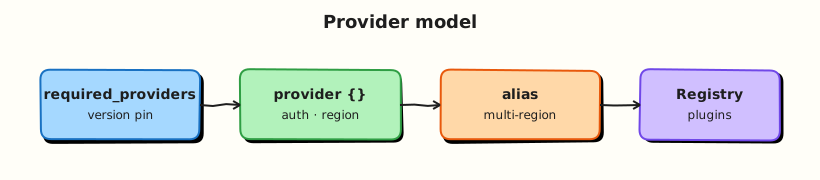
Theory
What it is
| Concept | Meaning |
|---|---|
| Provider | Plugin binary implementing a set of resource and data source types |
| Provider configuration | provider "aws" { region = "eu-west-1" } block — shared settings |
| Resource binding | provider = aws.primary on a resource selects which configuration |
| Registry address | hashicorp/aws, azurerm, integrations/github |
| Schema | Provider defines argument names, types, and computed attributes |
Terraform 0.13+ requires explicit source for providers:
Why it matters
Every API call flows through a provider:
- Wrong region/account — resources land in unintended scope
- Unpinned versions — CI and laptops plan differently after a provider release
- Hard-coded keys in HCL — secrets in Git history forever
- Missing alias — second VPC in another region fails or uses default creds incorrectly
Platform teams standardise provider blocks in _providers.tf, use assume role chains on AWS, OIDC in CI, and Workload Identity on GCP — never long-lived keys in repos.
How it works
Provider installation (recap)
- HCL declares
required_providers terraform initdownloads matching release for OS/arch.terraform.lock.hclrecords checksums- Plan/apply load plugin; Core passes resource changes via gRPC plugin protocol
Provider configuration block
Implicit default provider: first configuration without alias, or only one instance.
Multiple providers and aliases
When you need two regions, accounts, or Kubernetes clusters:
provider "aws" {
  alias  = "replica"
  region = "us-west-2"
}

resource "aws_s3_bucket" "replica_logs" {
  provider = aws.replica
  bucket   = "logs-replica-example"
}
Reference syntax: provider = <type>.<alias> (omit alias for default).
Lab pattern with null provider (no cloud):
Each null_resource can bind to a different alias to prove routing — triggers differ per “region” label.
Provider versioning
| Constraint | Meaning |
|---|---|
= 5.40.0 | Exact version |
>= 5.0 | Minimum (avoid alone in prod) |
~> 5.40 | Allow 5.40.x patch upgrades |
>= 5.0, < 6.0 | Common major pin |
Upgrade workflow: bump constraint → terraform init -upgrade → plan in non-prod → commit lock file.
Authentication (patterns, not secrets)
Providers read credentials from environment variables, shared config files, or HCL arguments (discouraged for secrets).
| Provider | Common auth sources |
|---|---|
| AWS | AWS_ACCESS_KEY_ID / AWS_SECRET_ACCESS_KEY, shared ~/.aws/credentials, IAM role on EC2/EKS, SSO |
| Azure | ARM_* env vars, Azure CLI session, OIDC in GitHub Actions |
| GCP | GOOGLE_APPLICATION_CREDENTIALS, ADC on GCE/GKE |
| Kubernetes | ~/.kube/config, in-cluster config |
| GitHub | GITHUB_TOKEN env var |
Never commit .tf with static access_key / password. Use:
- CI OIDC → cloud IAM role
- Vault/SSM Parameter Store data sources (Module 15)
- Environment variables injected at runtime
For local labs, kreuzwerker/docker talks to your Docker Engine socket — no cloud credentials required.
Provider meta-arguments on resources
Only configuration available at plan time — not dynamic per count iteration special cases beyond HCL rules.
Common pitfalls
- Forgetting
aliason second provider block of same type — Terraform errors on duplicate default provider. - Omitting
provider =on resources when multiple instances exist — uses default unintentionally. - Pinning provider but not committing lock file — CI resolves different builds.
- Using
-targetacross provider aliases without understanding state addresses. - Assuming
providerblocks run code — they configure plugin; secrets still end up in state if passed as arguments.
Hands-on Lab
Objective
Configure default and aliased kreuzwerker/docker providers, pin versions, create networks and containers bound to each alias, and prove provider routing with docker network ls and distinct container labels.
Prerequisites
- Modules 2–4 completed
- Terraform ≥ 1.5
- Docker Engine running (
docker infosucceeds)
Lab environment
Workspace: ~/rebash-terraform/module-05
Real-world scenario
Your team runs primary and replica automation cells (two AWS accounts or regions in production). Ticket PLAT-205: onboarding lab mirrors the pattern — two Docker provider aliases, resources explicitly bound, and containers on separate bridge networks proving which cell created which artefact — before engineers touch real cloud credentials.
Step-by-step tasks
Task 1 – Pin provider and declare aliases
Create versions.tf:
terraform {
  required_version = ">= 1.5.0, < 2.0.0"

  required_providers {
    docker = {
      source  = "kreuzwerker/docker"
      version = "~> 3.0"
    }
  }
}
Create providers.tf:
provider "docker" {
  # default — represents "primary" cell
}

provider "docker" {
  alias = "replica"
}
Expected output
versions.tf and providers.tf with default and replica alias for Docker.
Task 2 – Bind resources to provider configurations
Create variables.tf:
variable "primary_cell" {
  type    = string
  default = "primary"
}

variable "replica_cell" {
  type    = string
  default = "replica"
}
Create main.tf:
resource "docker_image" "alpine" {
  name = "alpine:3.20"
}

resource "docker_network" "primary" {
  name = "rebash-module-05-primary-net"
}

resource "docker_network" "replica" {
  provider = docker.replica

  name = "rebash-module-05-replica-net"
}

resource "docker_container" "primary_marker" {
  name  = "rebash-module-05-primary"
  image = docker_image.alpine.image_id

  command = ["sleep", "3600"]

  networks_advanced {
    name = docker_network.primary.name
  }

  labels {
    label = "cell"
    value = var.primary_cell
  }

  labels {
    label = "provider"
    value = "default"
  }
}

resource "docker_container" "replica_marker" {
  provider = docker.replica

  name  = "rebash-module-05-replica"
  image = docker_image.alpine.image_id

  command = ["sleep", "3600"]

  networks_advanced {
    name = docker_network.replica.name
  }

  labels {
    label = "cell"
    value = var.replica_cell
  }

  labels {
    label = "provider"
    value = "docker.replica"
  }
}
Create outputs.tf:
output "primary_network" {
  value = docker_network.primary.name
}

output "replica_network" {
  value = docker_network.replica.name
}

output "primary_container" {
  value = docker_container.primary_marker.name
}

output "replica_container" {
  value = docker_container.replica_marker.name
}
Expected output
Resources explicitly use default or docker.replica provider.
Task 3 – Init, apply, and verify routing evidence
Run:
cd ~/rebash-terraform/module-05
terraform fmt -recursive
terraform init | tee init.txt
terraform apply -auto-approve | tee apply.txt
terraform providers | tee providers-mirror.txt
grep -q 'docker.replica' providers-mirror.txt
docker network ls --filter name=rebash-module-05 --format '{{.Name}}' | tee docker-nets.txt
grep -q 'rebash-module-05-primary-net' docker-nets.txt
grep -q 'rebash-module-05-replica-net' docker-nets.txt
docker inspect rebash-module-05-primary --format '{{index .Config.Labels "provider"}}' | grep -q default
docker inspect rebash-module-05-replica --format '{{index .Config.Labels "provider"}}' | grep -q docker.replica
echo "provider routing OK" | tee provider-evidence.txt
Expected output
Both networks and containers exist; labels distinguish cells; provider-evidence.txt contains provider routing OK.
Task 4 – Diagnose missing provider binding (fix exercise)
Simulate a common mistake: temporarily remove provider = docker.replica from docker_network.replica in main.tf (comment the line or delete it), then run plan:
Restore the line:
Re-plan and confirm only the intended replica resources use the alias:
cd ~/rebash-terraform/module-05
terraform plan -detailed-exitcode -no-color | tee plan-alias-fixed.txt || ec=$?
test "${ec:-0}" -eq 0
echo "alias fix OK" | tee alias-fix.txt
Expected output
With binding removed, plan may try to recreate replica resources on the default provider; after restore, plan shows no changes (alias fix OK).
Validation steps
-
required_providerspinskreuzwerker/docker - Aliased provider block includes
alias = "replica" - Replica network and container set
provider = docker.replica -
terraform providersreflects multiple configurations -
docker network lsshows both primary and replica networks - You fixed a mis-bound provider and returned to a clean plan
Common errors and fixes
| Error | Cause | Fix |
|---|---|---|
Duplicate provider configuration | Two defaults without alias | Add alias to all but one |
Provider configuration not present | Typo in provider = docker.replica | Match alias name exactly |
Invalid provider registry host | Wrong source address | Use kreuzwerker/docker format |
| Resources all on default | Missing provider meta-argument | Set on each resource needing alias |
| Container name already in use | Prior lab left container | docker rm -f rebash-module-05-primary |
Challenge exercise
Create verify-alias.sh:
#!/usr/bin/env bash
set -euo pipefail
cd ~/rebash-terraform/module-05
terraform state list | tee state-list.txt
grep -q 'docker_container.replica_marker' state-list.txt
grep -q 'docker_container.primary_marker' state-list.txt
docker ps --filter name=rebash-module-05 --format '{{.Names}}' | wc -l | grep -q '^2$'
echo "alias state evidence OK"
Run:
chmod +x ~/rebash-terraform/module-05/verify-alias.sh
~/rebash-terraform/module-05/verify-alias.sh | tee challenge-provider.txt
Expected output
challenge-provider.txt contains alias state evidence OK.
Learning outcomes
- You configured default and aliased providers in one module
- You bound resources to specific provider instances
- You diagnosed a missing
provider =binding and restored a clean plan - You captured state addresses and Docker proof for separate cells
Cleanup
cd ~/rebash-terraform/module-05
terraform destroy -auto-approve
rm -f init.txt apply.txt providers-mirror.txt provider-evidence.txt plan-alias-bug.txt \
  plan-alias-fixed.txt alias-fix.txt challenge-provider.txt state-list.txt docker-nets.txt
rm -rf .terraform .terraform.lock.hcl terraform.tfstate terraform.tfstate.backup
Validation
- Completed lab under
~/rebash-terraform/module-05with Docker network and container evidence - Can explain plugin model and Registry
sourceaddresses - Configured aliases and resource-level
providerbinding - Can describe one production failure mode (e.g. wrong account via default provider)
Code Walkthrough
- One default, rest aliased — explicit pattern prevents ambiguous provider selection.
- Pin major versions — provider upgrades are code changes deserving PR review.
- Auth outside HCL — environment and OIDC keep secrets out of state where possible.
- providers mirror —
terraform providersdebugs wrong plugin version quickly. - Align aliases to org structure — name aliases
prod,dr, notp1,p2.
Security Considerations
- Never commit cloud access keys,
kubeconfigwith prod certs, or API tokens in provider blocks. - Use short-lived credentials (OIDC, STS assume-role) in CI pipelines.
- Provider configuration can appear in state — treat state as confidential.
- Restrict IAM policies per workspace — CI role for plan-only vs apply separation.
- Audit which provider versions are allowed — supply-chain compromise targets popular plugins.
Common Mistakes
Implicit default provider for everything
Second region silently uses first region’s credentials.
Fix: Alias per scope; set provider on every resource outside default.
Secrets in provider blocks
access_key = "AKIA..." in Git is a incident waiting for scanners.
Fix: Environment variables, IAM roles, Vault, or CI secret injection.
Skipping lock file review on provider upgrade
Patch release changes default behaviour — plan shows mass replacement.
Fix: Dedicated upgrade PR; read provider CHANGELOG; test in sandbox.
Same alias name across modules without passing providers
Child modules need configuration_aliases (Module 9) — advanced pitfall early.
Fix: Pass providers explicitly into modules when using aliases.
Best Practices
- Centralise
required_providersinversions.tf; keepproviders.tffor configurations. - Document required environment variables in README per provider.
- Use default_tags (AWS) or equivalent consistent labelling via provider features.
- Run
terraform init -upgradeonly intentionally; commit resulting lock diff. - For multi-account, map aliases to account IDs in comments and runbooks.
Troubleshooting
| Symptom | Likely cause | Fix |
|---|---|---|
No valid credential sources | Missing env/config for cloud provider | Export vars; aws sts get-caller-identity |
Provider produced inconsistent result | Provider bug or API race | Upgrade provider; retry; check issue tracker |
| Wrong account in plan | Default provider credentials | Explicit alias + provider attribute |
| Init downloads wrong arch | Mixed ARM/x86 CI | Ensure lock has hashes for all platforms |
Invalid provider configuration alias | Module without configuration_aliases | Update module block (Module 9) |
Summary
Providers are plugins that implement resource types and authenticate to APIs. Pin source and version, configure defaults and aliases, bind resources with provider =, and keep credentials out of Git. You simulated primary/replica cells with null and local aliases and verified distinct artefacts. Next: Resources, Dependencies, and Meta-Arguments.
Interview Questions
1. What is a Terraform provider?
Reveal answer
A provider is a plugin that implements resource and data source types for one platform or API (AWS, Azure, Kubernetes, etc.). Terraform Core downloads providers at init, reads their schemas, and calls them during plan/apply to create, read, update, and delete remote objects. The CLI itself does not contain cloud SDK logic for every platform.
2. How do provider aliases work?
Reveal answer
When you need multiple configurations of the same provider type (regions, accounts), add alias = "name" to all but one block (the default). Resources select configuration with provider = aws.name. Without explicit binding, resources use the default provider — a common source of cross-account mistakes.
3. Where should cloud credentials live?
Reveal answer
Not in committed HCL. Use environment variables, shared credential files outside Git, IAM roles on instances, OIDC federation from CI, or secret stores integrated via data sources. Credentials passed as provider arguments may persist in state — still sensitive.
4. Explain required_providers source and version.
Reveal answer
source is the Registry address (hashicorp/aws, integrations/github). version is a constraint resolved at init. Together they ensure reproducible plugin selection. .terraform.lock.hcl locks exact builds with checksums. Upgrades require intentional -upgrade and review.
5. When does Terraform download providers?
Reveal answer
During terraform init (and init with -upgrade). Not when installing the Terraform CLI. Plugins cache under .terraform/providers/ per project directory unless using global plugin cache.
6. How do you debug which provider configuration a resource uses?
Reveal answer
Check the resource’s provider meta-argument in HCL. Run terraform providers to see provider configurations in the module tree. Inspect plan output resource header lines showing provider[...]. State addresses include resource type/name but provider binding comes from config.
7. What risks come with unpinned provider versions?
Reveal answer
init on a new laptop may fetch a newer minor/patch release with bug fixes or breaking schema changes — plans differ from teammates, CI may destroy/recreate unexpectedly. Always pin (~>, upper bound) and commit lock file; upgrade via controlled PRs.
8. Compare authentication for AWS in CI vs on a developer laptop.
Reveal answer
CI should use OIDC to assume an IAM role — no long-lived keys in secrets. Developers often use AWS SSO or named profiles locally — still no keys in Terraform files. Both must respect least privilege: plan roles read-only where possible; apply roles scoped to environment.
Related Tutorials
- Terraform course index
- Previous: HCL Fundamentals
- Next: Resources, Dependencies, and Meta-Arguments
- Multi-Cloud Terraform