Introduction to Configuration Management and Ansible
Overview
Servers drift when configuration lives only in memory, sticky notes, or one engineer’s laptop. Configuration management (CM) treats machine state — packages, files, services, users — as desired state you declare in version-controlled files and apply repeatably. That is the same discipline as Infrastructure as Code (IaC), but focused on what runs inside hosts after they exist.
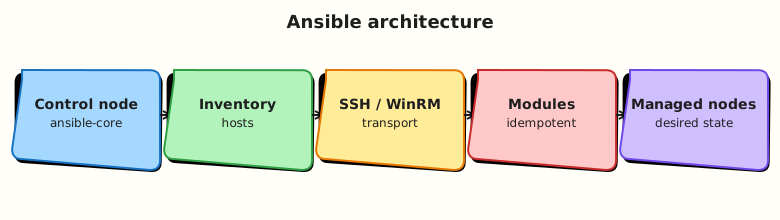
Ansible is an agentless automation engine. A control node (your laptop, a CI runner, or Automation Controller) reads an inventory of hosts, connects over SSH (Linux) or WinRM (Windows), runs modules that encode idempotent operations, and returns structured results. No permanent agent daemon is required on managed nodes — only Python and a login path.
This is Tutorial 1 in Module 1: Configuration Management Fundamentals of the REBASH Academy Ansible for Cloud & DevOps Engineers series — written for Linux administrators, DevOps engineers, Platform engineers, and Site Reliability Engineering (SRE) teams. By the end you will explain why Ansible fits agentless fleets, sketch the architecture, and prove a localhost ping with connection=local.
Prerequisites
- Linux — comfortable terminal, files, and SSH concepts
- Git — commits and pull requests (automation lives in repos)
- Python — Ansible is Python-based on the control node
- A practice VM or laptop with Python 3.9+ (Ubuntu 22.04/24.04 recommended)
Learning Objectives
By the end of this tutorial, you will be able to:
- Define configuration management and contrast it with ad-hoc shell scripts
- Explain Ansible’s agentless model and the control-node → inventory → module flow
- Name when Ansible is a strong fit versus imperative tools or image-only workflows
- Capture architecture facts in YAML and validate the file
- Run
ansible localhost -m pingwithansible_connection=localand interpret success
Architecture
Ansible separates what you want (playbooks, roles, inventory) from how modules apply it on each host. The control node orchestrates; managed nodes execute module code transiently.
Theory
What it is
Configuration management keeps systems aligned to a declared desired state: users exist, packages are installed, config files match templates, services are enabled. When someone edits a file by hand, the next CM run should detect drift and correct it (or fail loudly in check mode).
Ansible implements CM (and broader automation — app deploy, networking, cloud APIs via collections) through:
| Component | Role |
|---|---|
| Control node | Runs ansible / ansible-playbook; holds playbooks and inventory |
| Inventory | List of hosts and groups (web, db, staging) |
| Playbook | YAML document describing plays, tasks, handlers |
| Module | Unit of work (copy, service, apt, user) — idempotent when possible |
| Facts | Variables Ansible gathers about each host (ansible_os_family, IP addresses) |
| Connection plugin | How to reach hosts — usually SSH; local for localhost labs |
Ansible is agentless: it pushes modules over the existing management channel (SSH). Managed nodes need Python (usually preinstalled on Linux) and privilege escalation (sudo) where tasks require root.
Why it matters
Click-ops and one-off scripts do not scale across hundreds of VMs, Kubernetes nodes, or network appliances. Teams choose Ansible because:
- Readable YAML lowers the bar for review in pull requests
- Agentless reduces operational overhead — no daemon to patch on every server
- Batteries included — hundreds of modules for Linux, cloud, network, and Windows
- Composable — ad-hoc commands for debugging; playbooks for production; roles and collections for reuse
- Auditable — Git history shows who changed automation and when
Platform teams use Ansible for baseline hardening, application deployment, day-2 patching workflows, and glue between Terraform-provisioned infrastructure and running services. It complements IaC: Terraform creates the VPC and VM; Ansible configures the OS and app.
How it works
Mental model: inventory + playbook → control node → connection → module on target → result JSON.
- You define hosts in inventory (INI, YAML, or dynamic plugins for AWS, Azure, etc.).
- A play targets a group and lists tasks (each calling a module with parameters).
- Ansible connects (SSH by default;
localfor localhost). - Ansible copies module code, runs it, collects changed/ok/failed status, and optionally gathers facts.
- Handlers run once at the end if notified (e.g. restart nginx after config change).
For remote hosts you need SSH keys or passwords, ansible_user, and often ansible_become: true for privilege escalation.
Key concepts and comparisons
| Approach | You specify | Trade-off |
|---|---|---|
| Shell scripts | Ordered commands | Fast to write; often not idempotent; hard to test |
| Imperative CM (some legacy tools) | Steps with state on agent | Agent lifecycle overhead |
| Ansible (declarative tasks) | Desired state per module | Requires module discipline; YAML sprawl without roles |
| Ansible strength | Limitation |
|---|---|
| Agentless SSH automation | Needs reliable SSH/WinRM and Python on targets |
| Large module/collection ecosystem | Complex orchestration may need Controller/AWX |
| Great for config + app deploy | Not a container orchestrator (use Kubernetes for that) |
| Idempotent modules | shell/command bypass idempotency if misused |
Ansible Core vs ansible package: ansible-core is the minimal engine maintained by the Ansible project; the ansible PyPI package bundles ansible-core plus many collections. Production teams often pin ansible-core and install only the collections they need.
Common pitfalls
- Treating Ansible as “remote bash” — prefer modules over
shellunless no module exists. - Running playbooks without inventory discipline — hostnames and groups should match your CMDB or cloud tags.
- Ignoring idempotency — a task that always reports
changederodes trust in automation. - Skipping version pins — module behaviour and collection APIs evolve; pin in CI and execution environments.
- Forgetting check mode (
--check) before wide production runs — dry-run is not perfect but catches many mistakes.
Hands-on Lab
Objective
Create inventory and a baseline playbook under ~/rebash-ansible/module-01, apply it with ansible-playbook on localhost, prove files exist with cat/ls, fix a broken inventory group, and clean up.
Prerequisites
- Python 3.9+ on your control node
- If
ansibleis not installed yet:python3 -m pip install --user ansible-core(see Ansible installation guide)
Lab environment
Workspace: ~/rebash-ansible/module-01
Runtime: localhost with ansible_connection=local — no remote VM required.
Real-world scenario
You join a platform team onboarding Ansible. Before any production SSH, the lead wants proof that your control node can run a playbook end-to-end: inventory resolves, modules create files under the lab directory, and a wrong group name is caught before a fleet run.
Step-by-step tasks
Task 1 – Inventory, config, and baseline playbook
Create ansible.cfg:
[defaults]
inventory = ./inventory.ini
host_key_checking = False
interpreter_python = auto_silent
Create inventory.ini:
Create group_vars/local.yml:
Create files/baseline.conf:
Create baseline.yml:
---
- name: Module 01 baseline on localhost
  hosts: local
  gather_facts: false
  vars:
    lab_root: "~/rebash-ansible/module-01/lab"
  tasks:
    - name: Ensure lab directory exists
      ansible.builtin.file:
        path: "{{ lab_root }}"
        state: directory
        mode: "0755"

    - name: Deploy baseline configuration
      ansible.builtin.copy:
        src: files/baseline.conf
        dest: "{{ lab_root }}/baseline.conf"
        mode: "0644"

    - name: Write onboarding marker
      ansible.builtin.copy:
        content: "module={{ lab_module }} app={{ app_name }}\n"
        dest: "{{ lab_root }}/onboarding.txt"
        mode: "0644"
Syntax-check and apply:
cd ~/rebash-ansible/module-01
ansible-playbook baseline.yml --syntax-check | tee syntax-check.txt
ansible-playbook baseline.yml | tee playbook-run.txt
grep -q 'PLAY RECAP' playbook-run.txt
test -f ~/rebash-ansible/module-01/lab/baseline.conf
grep -q rebash-cm-lab ~/rebash-ansible/module-01/lab/baseline.conf
cat ~/rebash-ansible/module-01/lab/onboarding.txt | tee onboarding-proof.txt
Expected output
Play recap success; baseline.conf and onboarding.txt exist; onboarding-proof.txt shows module=module-01.
Task 2 – Prove connectivity and inventory merge
cd ~/rebash-ansible/module-01
ansible -i inventory.ini local -m ping | tee ping-local.txt
ansible-inventory -i inventory.ini --host localhost | tee host-localhost.json
grep -q '"ping": "pong"' ping-local.txt
grep -q lab_module host-localhost.json
echo "inventory and ping OK" | tee connectivity-ok.txt
Expected output
Ping returns "ping": "pong"; host vars include lab_module.
Task 3 – Diagnose and fix wrong inventory group
Create needs-local-group.yml:
---
- name: Play targeting wrong group name
  hosts: labhosts
  gather_facts: false
  tasks:
    - name: Should not run when group is wrong
      ansible.builtin.debug:
        msg: "labhosts task ran"
Run with the broken group (inventory has local, not labhosts):
cd ~/rebash-ansible/module-01
ansible-playbook needs-local-group.yml | tee inventory-miss.txt
grep -Ei 'skipping.*no hosts matched|0 hosts' inventory-miss.txt
Fix the play — edit needs-local-group.yml and change hosts: labhosts to hosts: local. Re-run:
cd ~/rebash-ansible/module-01
ansible-playbook needs-local-group.yml | tee inventory-hit.txt
grep -q 'labhosts task ran' inventory-hit.txt || grep -q 'PLAY RECAP' inventory-hit.txt
echo "inventory fix OK" | tee inventory-fix-ok.txt
Expected output
First run shows no matching hosts; second run completes after fixing hosts:.
Task 4 – Idempotent second apply
cd ~/rebash-ansible/module-01
ansible-playbook baseline.yml | tee playbook-run2.txt
grep -E 'changed=0|changed=1' playbook-run2.txt | tail -1 | tee idempotency-line.txt
Expected output
Second run reports zero or minimal changes when files already match desired state.
Validation steps
-
baseline.ymlpasses--syntax-checkand creates files underlab/ -
cat/grepprovebaseline.confcontent - Wrong group
labhostsproduces no-host evidence before fix - Second playbook run is idempotent
- You can explain control node vs managed node without reading notes
Common errors and fixes
| Error | Cause | Fix |
|---|---|---|
ansible: command not found | Ansible not on PATH | pipx install ansible-core or pip install --user ansible-core; add ~/.local/bin to PATH |
localhost \| UNREACHABLE | Missing ansible_connection=local | Set in inventory for localhost |
| Play changes zero hosts | Wrong hosts: pattern | Run ansible-playbook --list-hosts; align group name with inventory |
ERROR! Syntax Error | YAML indent | Spaces only; re-run --syntax-check |
| Files not created | Wrong lab_root path | Use paths under ~/rebash-ansible/module-01 |
Challenge exercise
Add a task to baseline.yml that runs ansible -m command -a "test -f {{ lab_root }}/baseline.conf" via ansible.builtin.command with changed_when: false, re-run the playbook, and confirm the task reports ok without changed.
Learning outcomes
- Created inventory, group_vars, and a real baseline playbook
- Applied automation with
ansible-playbookand proved results on disk - Diagnosed an inventory group mismatch before it could hit production
- Observed idempotent re-run behaviour
Cleanup
cd ~/rebash-ansible/module-01
ansible-playbook -i inventory.ini -e '{"lab_root":"~/rebash-ansible/module-01/lab"}' \
  -c local localhost -m file -a "path=~/rebash-ansible/module-01/lab state=absent" 2>/dev/null || \
  rm -rf ~/rebash-ansible/module-01/lab
rm -f syntax-check.txt playbook-run*.txt ping-local.txt host-localhost.json \
  connectivity-ok.txt inventory-miss.txt inventory-hit.txt inventory-fix-ok.txt \
  onboarding-proof.txt idempotency-line.txt
Validation
- Completed lab under
~/rebash-ansible/module-01with ping evidence - Can explain agentless CM without reading notes
- Used
ansible-inventory --listandansible -m pingwith local connection - Can name one production failure mode (e.g. SSH key rotation breaking runs)
Code Walkthrough
- Inspect before automate — inventory and facts describe reality before you change it.
- Prefer modules —
pingis trivial but follows the same result JSON pattern ascopyorservice. - Evidence in Git — architecture YAML and inventory belong in the repo, not Slack.
- Local connection for CI —
connection=locallets pipelines test modules without SSH secrets. - Least privilege — even in labs, document which tasks need
becomebefore enabling it globally.
Security Considerations
- Store SSH private keys in secure paths (
0600); never commit keys to Git. - Use dedicated automation service accounts with sudo limited to required commands.
- Inventory often reveals hostnames and roles — treat repos as internal documentation classification.
- Disable host key checking only in disposable lab networks; production should verify host keys or use certificates.
- Plan for Ansible Vault (later modules) before storing passwords or API tokens in group_vars.
Common Mistakes
Using Ansible as remote shell only
Running ad-hoc command/shell for everything skips idempotency and reviewable desired state.
Fix: Use modules (copy, file, package, service) and encode repeat work in playbooks.
No inventory structure
A flat list of IP addresses does not scale.
Fix: Use groups (web, db), group_vars/, and naming that matches your environment tiers.
Mixing prod and lab inventory without guards
One typo can target production from a laptop.
Fix: Separate inventory directories, --limit, and CI approval gates for production.
Best Practices
- Pin ansible-core version in documentation and CI (
ansible --versionin evidence scripts). - Keep playbooks and inventory in Git with pull request review.
- Use
ansible_connection=localfor localhost and container-based execution environments. - Document optional SSH targets separately from lab localhost groups.
- Start with ad-hoc discovery, then promote proven commands into idempotent playbooks.
Troubleshooting
| Symptom | Likely cause | Fix |
|---|---|---|
UNREACHABLE! on real hosts | Firewall, wrong IP, SSH down | ssh user@host manually; verify security groups |
Permission denied (publickey) | Missing or wrong SSH key | ssh-add -l; set ansible_user and --private-key |
sudo: a password is required | Privilege escalation without -K or NOPASSWD | Configure --ask-become-pass in lab only, or sudoers for automation account |
| Slow first run | Fact gathering and SSH setup | Expected; use gather_facts: false in playbooks when facts are not needed |
| Wrong host targeted | Inventory typo or missing --limit | ansible-inventory --graph; always --limit for risky changes |
Summary
Configuration management declares desired server state in version-controlled automation. Ansible implements it agentlessly from a control node through inventory, connection plugins, and modules — no permanent agent on targets. You captured architecture facts, defined localhost inventory, and proved connectivity with ping. Next, install and configure Ansible properly: Installing Ansible and Configuration.
Interview Questions
1. What is configuration management, and how does it differ from running shell scripts on servers?
Reveal answer
Configuration management declares desired state (users, packages, files, services) in repeatable, reviewable form. Shell scripts often list imperative steps without guaranteeing idempotency or drift detection. CM tools like Ansible report whether each resource changed, stayed ok, or failed, so repeated runs converge safely. Scripts are fine for one-offs; CM is for fleet-wide, auditable baseline and application state.
2. Why is Ansible called agentless?
Reveal answer
Managed nodes do not run a permanent CM daemon. Ansible connects over existing management channels (typically SSH on Linux), pushes module code, executes it with Python, and exits. You still need Python and network access on targets, but you avoid patching, monitoring, and securing agent software on every server — a major operational win at scale.
3. Describe the Ansible architecture from control node to module result.
Reveal answer
The control node runs CLI tools and holds playbooks/inventory. Inventory maps hosts to groups and variables. For each task, Ansible uses a connection plugin (SSH, local, etc.) to reach the host, runs an module with parameters, and collects structured JSON (changed, failed, msg). Facts from the setup module describe host properties. Handlers run notified tasks once at the end of a play. The flow is declarative at the playbook level even though modules execute imperatively on the target.
4. When would you choose Ansible over Terraform or over golden VM images only?
Reveal answer
Terraform (and similar IaC) excels at creating cloud resources — VPCs, VMs, IAM. Ansible excels at configuring what runs on those resources — packages, config files, services, app deploys. Golden images bake state at build time; Ansible handles drift, per-environment variance, and day-2 changes without rebuilding images. Many teams use Terraform plus Ansible: provision with IaC, configure with CM. Images alone struggle when you need frequent app config changes without full image rebuilds.
5. What is the difference between ansible-core and the ansible package on PyPI?
Reveal answer
ansible-core is the minimal automation engine (CLI, plugin framework, built-in modules). The ansible package bundles ansible-core plus a large set of collections (community and supported content). Production teams often install ansible-core and add only required collections for reproducibility and smaller attack surface. Pin versions in CI and execution environments either way.
6. How do you safely test Ansible against localhost before touching production?
Reveal answer
Use a dedicated lab inventory with ansible_connection=local or --limit to a single test host. Run ansible -m ping and small ad-hoc module checks first. Use --check mode on playbooks for dry-runs where modules support it. Never point a laptop inventory at production groups without --limit and review. CI should run syntax-check and molecule/check mode against disposable targets before merge.
7. What does idempotency mean in Ansible, and why does it matter in production?
Reveal answer
Idempotency means running the same automation twice should leave the system in the desired state without unnecessary changes the second time. Modules like copy, file, and service compare current vs desired state and report ok when already correct. Production schedules re-run playbooks nightly or on drift detection — if tasks always show changed, operators lose trust and real changes hide in noise. Avoid raw shell when a module exists.
8. A junior engineer says “Ansible is just YAML SSH.” How do you respond?
Reveal answer
SSH is the transport; Ansible adds inventory, variable precedence, facts, roles/collections, check mode, handlers, Vault, and structured callback reporting integrated with CI and Automation Controller. YAML is the interface, but the value is idempotent modules, reviewable automation in Git, and enterprise patterns (testing with Molecule, execution environments, RBAC on Controller). Reducing it to “YAML SSH” ignores idempotency, security, and operability at fleet scale.
Related Tutorials
- Ansible course index
- Next: Installing Ansible and Configuration
- Linux fundamentals
- GitOps fundamentals
- Introduction to Terraform and IaC