Ansible Variables and Facts
Overview
Hard-coded playbooks break the first time you add a staging environment or a second region. Variables parameterise automation; facts describe each host so tasks can adapt (package manager family, IP addresses, disk space). register captures task results for later decisions.
This tutorial covers host_vars, group_vars, play vars, register, setup facts, magic variables (inventory_hostname, groups, hostvars), and a practical precedence overview. The lab gathers facts, debugs structured output, registers command results, and archives evidence — still on localhost with connection=local.
This is Tutorial 6 in Module 6: Variables and Facts of the REBASH Academy Ansible for Cloud & DevOps Engineers series.
Prerequisites
- Ansible Playbooks
- Ansible Inventory
- Python — JSON and basic data structures
- Completed Modules 1–5 labs
Learning Objectives
By the end of this tutorial, you will be able to:
- Place variables in
group_vars,host_vars, playvars, and extra-vars (-e) - Gather and inspect facts with
setupandansible.builtin.debug - Use
registerto store task results for conditionals and audits - Reference magic variables for inventory context in templates and tasks
- Explain variable precedence at a high level when debugging surprises
Architecture
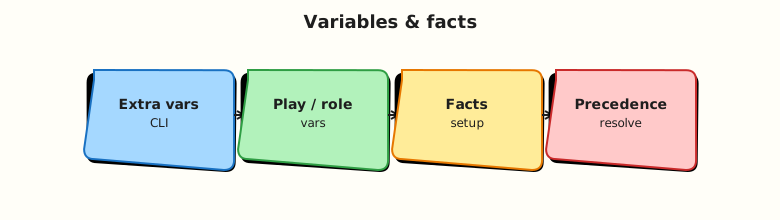
Variables merge from many sources before each task templating step; facts arrive from the setup module unless disabled.
Theory
What it is
Variables are key/value data available in playbooks — strings, numbers, lists, dictionaries. Define them in:
| Source | Example location |
|---|---|
| Inventory inline | web1 ansible_user=deploy |
| host_vars | host_vars/localhost.yml |
| group_vars | group_vars/web.yml |
Play vars: | Inside playbook play header |
Task vars: | Scoped to one task |
| Registered vars | register: result on a task |
| Facts | ansible_os_family, ansible_default_ipv4 |
| extra-vars | ansible-playbook site.yml -e env=prod |
Facts are variables prefixed with ansible_ (mostly) discovered by the setup module when gather_facts: true.
Magic variables are Ansible-provided context:
inventory_hostname— name in inventorygroups— dict of group membershipshostvars['otherhost']— vars/facts for another host (use carefully)ansible_play_hosts— hosts in current play batch
register saves module output:
- name: Check disk free
  ansible.builtin.command: df -h /
  register: disk_out
  changed_when: false

- name: Show disk command stdout
  ansible.builtin.debug:
    var: disk_out.stdout_lines
Why it matters
Variables separate code (tasks) from configuration (environment). Facts enable conditional tasks — install with apt on Debian and dnf on RHEL without duplicate playbooks. register supports assert patterns and custom failure messages. Misunderstanding precedence causes “I set var X but playbook still shows Y” production mysteries.
How it works
Fact gathering runs at play start unless gather_facts: false. Use ansible localhost -m setup -c local ad-hoc to inspect all facts (verbose). Filter with gather_subset or fact_path in advanced setups.
Precedence (simplified — higher wins):
extra-vars(-e) — CLI / AWX survey- Task vars / include vars / block vars
register/set_fact(whencacheable: truebehaves specially)- Role vars (later modules)
- Play
vars: host_varsgroup_vars(child groups can override parent depending on merge)- Inventory host vars /
group_vars/all - Role
defaults(lowest among role layers)
When debugging: ansible-playbook site.yml -e debug_var=value -vvv and debug: var=variable_name.
Key concepts and comparisons
| Mechanism | Mutable during play? | Typical use |
|---|---|---|
| Facts | Refreshed on setup | OS family, network |
| set_fact | Yes | Computed flags mid-play |
| register | Yes (per task) | Capture command output |
| group_vars | Static per run | Environment tier settings |
| extra-vars | Highest precedence | Emergency overrides |
| Debug approach | Command |
|---|---|
| One variable | debug: var=myvar |
| Facts subset | debug: var=ansible_os_family |
| Verbose templating | -vvv on playbook run |
Common pitfalls
- Mutating
ansible_*facts directly — fragile; use separate vars. hostvars[inventory_hostname]confusion — quoting and lazy evaluation in loops.- Secrets in
group_varswithout Vault. registeron skipped tasks — variable exists but skipped keys differ.- Assuming
gather_factsalways fast — disable on large fleets with cached facts.
Hands-on Lab
Objective
Build a playbook that merges group_vars, prints facts, registers a command result, and writes JSON evidence under ~/rebash-ansible/module-06.
Prerequisites
- ansible-core; prior module inventories understood
Lab environment
Workspace: ~/rebash-ansible/module-06
Create ansible.cfg:
[defaults]
inventory = ./inventory
host_key_checking = False
interpreter_python = auto_silent
Create inventory:
Create group_vars/local.yml:
Create host_vars/localhost.yml:
Real-world scenario
Before promoting a playbook to staging, platform engineering requires a facts report artefact proving OS family detection and a registered health command output — the same JSON attachments CI stores for compliance.
Step-by-step tasks
Task 1 – Create facts-and-vars.yml playbook
Create facts-and-vars.yml:
---
- name: Gather and demonstrate variables and facts
  hosts: local
  gather_facts: true
  vars:
    report_dir: "~/rebash-ansible/module-06/reports"
  tasks:
    - name: Ensure report directory exists
      ansible.builtin.file:
        path: "{{ report_dir }}"
        state: directory
        mode: "0755"

    - name: Show inventory and magic variables
      ansible.builtin.debug:
        msg:
          - "inventory_hostname={{ inventory_hostname }}"
          - "environment={{ environment }}"
          - "lab_id={{ lab_id }}"
          - "groups_local={{ groups['local'] | default([]) }}"

    - name: Capture uname for register demo
      ansible.builtin.command: uname -s
      register: uname_result
      changed_when: false

    - name: Show registered command output
      ansible.builtin.debug:
        var: uname_result.stdout

    - name: Write facts summary JSON lines
      ansible.builtin.copy:
        content: |
          os_family={{ ansible_os_family }}
          hostname={{ ansible_hostname }}
          python={{ ansible_python_version }}
          registered_uname={{ uname_result.stdout }}
        dest: "{{ report_dir }}/facts-summary.txt"
        mode: "0644"
Run:
cd ~/rebash-ansible/module-06
ansible-playbook facts-and-vars.yml --syntax-check | tee syntax-check.txt
ansible-playbook facts-and-vars.yml | tee playbook-run.txt
grep -q 'PLAY RECAP' playbook-run.txt
test -f ~/rebash-ansible/module-06/reports/facts-summary.txt
grep -q os_family= ~/rebash-ansible/module-06/reports/facts-summary.txt
echo "task1 OK" | tee task1-ok.txt
Expected output
Report file exists with os_family= line; debug shows inventory_hostname=localhost.
Task 2 – Ad-hoc setup and extra-vars precedence demo
cd ~/rebash-ansible/module-06
ansible localhost -m setup -a "filter=ansible_os*" -c local | tee setup-filter.txt
grep -q ansible_os_family setup-filter.txt
ansible-playbook facts-and-vars.yml -e "environment=override-demo" | tee extra-vars-run.txt
grep -q override-demo extra-vars-run.txt
echo "task2 OK" | tee task2-ok.txt
Expected output
Filtered setup shows OS facts; debug output includes environment=override-demo from extra-vars winning over group_vars.
Task 3 – Create vars-evidence.sh audit script
Create vars-evidence.sh:
#!/usr/bin/env bash
set -euo pipefail
cd ~/rebash-ansible/module-06
ansible-playbook facts-and-vars.yml --syntax-check
ansible-inventory --host localhost | tee evidence-host-vars.json
ansible-playbook facts-and-vars.yml | tee evidence-run.txt
grep -q registered_uname= ~/rebash-ansible/module-06/reports/facts-summary.txt
echo "vars-evidence PASS" | tee vars-evidence-pass.txt
Run:
chmod +x ~/rebash-ansible/module-06/vars-evidence.sh
~/rebash-ansible/module-06/vars-evidence.sh
Expected output
vars-evidence-pass.txt contains vars-evidence PASS.
Validation steps
- Playbook uses group_vars, host_vars, and play vars together
- Facts appear in debug and report file
-
registerresult referenced in template content - extra-vars override demonstrated
- Evidence script passes
Common errors and fixes
| Error | Cause | Fix |
|---|---|---|
'dict object' has no attribute | Typo in var name | debug: var=varname; check host_vars filename |
Undefined environment | Wrong group membership | Ensure host in group with group_vars/local.yml |
| Empty register stdout | Task failed/skipped | -vvv; check failed_when / changed_when |
| extra-vars not applied | Wrong CLI syntax | Use -e key=value or -e '{"key":"value"}' |
| Templating error in dest path | Unexpanded ~ | Use full path or expanduser patterns in vars |
Challenge exercise
Create assert-os-family.yml that fails if OS family is unknown:
---
- name: Assert supported OS family
  hosts: local
  gather_facts: true
  tasks:
    - name: Require known OS family
      ansible.builtin.assert:
        that:
          - ansible_os_family in ['Debian', 'RedHat', 'Darwin', 'Alpine']
        fail_msg: "Unsupported OS family: {{ ansible_os_family }}"
        success_msg: "OS family {{ ansible_os_family }} is supported"
Run and archive:
cd ~/rebash-ansible/module-06
ansible-playbook assert-os-family.yml | tee assert-os.txt
grep -q 'OS family' assert-os.txt
echo "assert challenge OK"
Expected output
Play succeeds with success message naming your OS family.
Learning outcomes
- Variable layering across inventory and play scope
- Fact inspection ad-hoc and in-playbook
- register pattern for operational evidence
- extra-vars precedence internalised for debugging
Cleanup
cd ~/rebash-ansible/module-06
rm -rf ~/rebash-ansible/module-06/reports
rm -f syntax-check.txt playbook-run.txt task*-ok.txt setup-filter.txt \
  extra-vars-run.txt evidence-host-vars.json evidence-run.txt \
  vars-evidence-pass.txt assert-os.txt
Validation
- Completed vars/facts lab with evidence script
- Can list five variable sources
- Used
registeranddebugintentionally - Can explain why extra-vars override group_vars
Code Walkthrough
- group_vars for environment —
environment: stagingtravels with inventory. - host_vars for snowflakes — one-off maintenance flags only.
- changed_when: false on register commands — avoid false change noise.
- Facts drive conditionals — package modules per
ansible_os_family. - Evidence files from copy content — audit trail without manual note-taking.
Security Considerations
- Never commit secrets in
group_vars— Ansible Vault encrypts sensitive YAML. no_log: trueon tasks handling passwords (even registered output).hostvarscan leak cross-host data in multi-tenant Controller — scope RBAC.- extra-vars from surveys can override security vars — restrict survey keys in AWX.
- Filter facts in logs when posting to ticket systems — may contain internal IPs.
Common Mistakes
Overwriting facts
Setting ansible_os_family manually breaks conditionals later.
Fix: Use custom vars (my_os_family) if you must override behaviour.
Debugging without -vvv
Variable templating errors hide the failing expression.
Fix: Increase verbosity; use debug task with var:.
register without changed_when on commands
Commands always show changed unless disabled.
Fix: changed_when: false on read-only commands.
Best Practices
- Namespace custom vars (
app_port, notport) to avoid collisions with facts. - Document precedence surprises in role README when using defaults vs vars.
- Cache facts in large dynamic inventories when safe (
fact cachingsettings). - Use
assertmodule for preflight validation gates in CI. - Pin
gather_factsstrategy per play — disable on roles that never need facts.
Troubleshooting
| Symptom | Likely cause | Fix |
|---|---|---|
| Var wrong in template but OK in debug order | Precedence | Check extra-vars, play vars, host_vars layers |
| Fact missing | gather_facts false or subset | Enable facts or run setup manually |
| Jinja undefined in handler | Handler evaluated at flush time | Ensure var in scope at notify time |
| Different vars host to host | group membership | ansible-inventory --host each |
| register empty stdout | stderr only failure | Check failed key; run command manually |
Summary
Variables parameterise playbooks; facts describe hosts; register captures results for later tasks. You merged group_vars and host_vars, gathered facts, demonstrated extra-vars precedence, and archived evidence. Next modules cover Jinja2 templates, roles, Vault, and testing — continue on the Ansible roadmap.
Interview Questions
1. Name five places Ansible variables can be defined.
Reveal answer
Inventory inline host params, host_vars/, group_vars/, play and task vars:, register, set_fact, role defaults/vars (roles module), facts from setup, and extra-vars (-e) from CLI/Controller surveys. Understanding source helps debug precedence conflicts.
2. What is the difference between facts and registered variables?
Reveal answer
Facts come from the setup module (or custom facts) and describe host state (ansible_os_family, memory, IPs). register captures the result JSON of a specific task — return code, stdout, changed status. Facts are global for the host for that run; registered vars are named after the task's register: key.
3. Explain extra-vars precedence and when to use it.
Reveal answer
extra-vars from -e or AWX surveys sit near the top of precedence — they override inventory and play vars. Use for environment selection (env=prod), emergency toggles, or CI parameters. Avoid routine config in extra-vars because they bypass Git-reviewed group_vars and can surprise operators who forget CLI overrides.
4. What are magic variables? Give three examples.
Reveal answer
Magic variables are automatically available without defining them: inventory_hostname (inventory name), groups (membership dict), hostvars (access other hosts' vars/facts), ansible_play_hosts, playbook_dir, role_names. They power dynamic inventory patterns and cross-host lookups — use hostvars[name]['var'] syntax carefully in loops.
5. How do you debug a variable that shows undefined in a template?
Reveal answer
Add ansible.builtin.debug: var=variable_name tasks before failure point. Run with -vvv to see templating context. Check ansible-inventory --host hostname for merged sources. Verify group membership and filename spelling in host_vars/group_vars. Confirm gather_facts if using ansible_* keys.
6. Why set changed_when false on registered command tasks?
Reveal answer
command and shell default to changed: true every run unless the module detects no change (command module often still reports changed). Read-only probes (disk checks, version queries) should set changed_when: false so handlers are not falsely notified and CI change counts stay meaningful.
7. High-level variable precedence — which wins: host_vars or group_vars?
Reveal answer
host_vars generally override group_vars for the same host because host-specific data should beat group defaults. However, extra-vars and play vars: can override both. Exact ordering has many steps — when in doubt, test with debug and official precedence docs. Child group vars vs parent depends on inventory merge rules.
8. When would you disable gather_facts and what breaks if you do?
Reveal answer
Disable on large-scale runs where facts are cached elsewhere, or minimal ping-only plays for speed. Breaks tasks/templates relying on ansible_os_family, ansible_default_ipv4, ansible_date_time, etc. If disabled, provide needed data via set_fact, host_vars, or explicit setup task scoped to required subsets.
Related Tutorials
- Ansible course index
- Previous: Ansible Playbooks
- Ansible Inventory
- Linux environment variables
- Python data structures