Collections and Galaxy
Overview
Core Ansible ships many modules, but cloud APIs, network devices, and community integrations live in collections — versioned packages with modules, plugins, roles, and playbooks. Ansible Galaxy is the public hub for discovering roles and collections; ansible-galaxy collection install pulls them into your environment. Production teams pin versions in requirements.yml and install from CI for reproducible runs.
Without pinned collections, a teammate’s latest install breaks your playbooks when module arguments change. Understanding namespace.collection.module fully qualified collection names (FQCNs) and semver pins is standard platform engineering practice.
This is Tutorial 10 in Module 10: Collections of the REBASH Academy Ansible for Cloud & DevOps Engineers series — written for DevOps and platform engineers. You will author collections/requirements.yml, validate it offline with Python, and optionally install community.general when network access is available.
Prerequisites
- Jinja2 Templates (Module 9)
- Ansible Core 2.16+ with
ansible-galaxyon PATH - Python 3 with PyYAML (
pip install pyyamlif needed)
Learning Objectives
By the end of this tutorial, you will be able to:
- Explain collections vs standalone roles and core modules
- Author
requirements.ymlwith version pins and source options - Install collections with
ansible-galaxy collection install -r - Reference modules by FQCN in playbooks
- Validate requirements files offline before CI install steps
Architecture
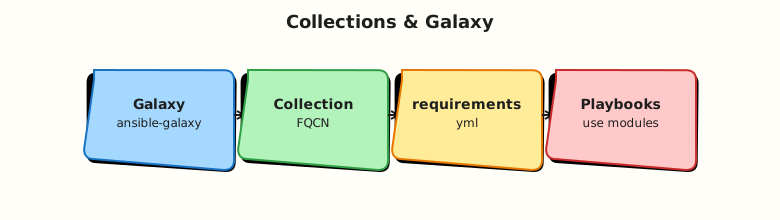
Playbooks declare FQCN modules; Ansible resolves them from installed collections under configured paths (default ~/.ansible/collections).
Theory
What it is
A collection is a distributable unit: namespace/collection_name (for example community.general, amazon.aws). It contains:
plugins/modules/— modulesplugins/inventory/— inventory pluginsroles/,playbooks/— optional bundled content
Ansible Galaxy hosts collections and roles. requirements.yml declares dependencies:
collections:
  - name: community.general
    version: ">=8.0.0,<9.0.0"
  - name: amazon.aws
    version: "7.6.0"
Install command:
Why it matters
Vendors ship API modules faster than core Ansible releases. Pinning prevents surprise upgrades in CI. Execution environments (container images) bake requirements.yml for Automation Platform jobs. Security review focuses on pinned versions and known CVEs.
How it works
- Author or generate
requirements.yml. ansible-galaxy collection install -rdownloads from Galaxy or Git/source URLs.- Ansible config (
ansible.cfg) may setcollections_paths. - Playbooks use FQCN:
community.general.timezoneinstead of legacy bare names.
Key concepts and comparisons
| Artifact | Contains | Install command |
|---|---|---|
| Collection | Modules, plugins, roles | ansible-galaxy collection install |
| Role (Galaxy) | Role tree only | ansible-galaxy role install |
| Core Ansible | ansible.builtin.* | Package manager / pip |
| Pin style | Meaning |
|---|---|
7.6.0 | Exact version |
>=8.0.0,<9.0.0 | Compatible range |
* / omitted | Latest (avoid in production) |
Common pitfalls
- Installing collections globally without pinning in Git — CI and laptops diverge.
- Using deprecated bare module names — may break when redirected.
- Mixing
-pinstall path withoutcollections_pathsinansible.cfg. - Galaxy rate limits in CI — use mirror or pre-baked execution environment.
- Confusing role requirements file with collection requirements file syntax.
Hands-on Lab
Objective
Create collections/requirements.yml, install pinned collections into ./collections, run a playbook using an FQCN module from ansible.posix that reads a real CSV file and writes output — not validate-only stubs.
Prerequisites
- Python 3 with PyYAML
- Network access for
ansible-galaxy collection install - ansible-core installed
Lab environment
Runtime: control node only; no managed hosts required.
Real-world scenario
Your platform team maintains a golden requirements.yml committed to Git. CI runs offline YAML validation, then installs collections into ./collections before ansible-playbook or Molecule tests.
Step-by-step tasks
Task 1 – requirements.yml with version pins
Create collections/requirements.yml:
---
# REBASH Academy Module 10 — collection pins for lab and CI
collections:
  - name: community.general
    version: ">=8.6.0,<10.0.0"
  - name: ansible.posix
    version: ">=1.5.0,<2.0.0"
  # Cloud collections — pinned for reproducibility (install when needed)
  - name: amazon.aws
    version: ">=7.0.0,<8.0.0"
  - name: azure.azcollection
    version: ">=2.0.0,<3.0.0"
  - name: google.cloud
    version: ">=1.0.0,<2.0.0"
Task 2 – Offline Python validation
Create scripts/validate-requirements.py:
#!/usr/bin/env python3
"""Validate collections/requirements.yml structure (offline)."""
from __future__ import annotations

import pathlib
import sys

try:
    import yaml
except ImportError:
    print("PyYAML required: pip install pyyaml", file=sys.stderr)
    sys.exit(1)

REQUIRED_KEYS = {"name", "version"}


def main() -> int:
    path = pathlib.Path("collections/requirements.yml")
    if not path.is_file():
        print(f"Missing {path}", file=sys.stderr)
        return 1
    doc = yaml.safe_load(path.read_text())
    if not isinstance(doc, dict) or "collections" not in doc:
        print("Top-level 'collections' key required", file=sys.stderr)
        return 1
    entries = doc["collections"]
    if not isinstance(entries, list) or not entries:
        print("collections must be a non-empty list", file=sys.stderr)
        return 1
    names: set[str] = set()
    for i, entry in enumerate(entries):
        if not isinstance(entry, dict):
            print(f"Entry {i} must be a mapping", file=sys.stderr)
            return 1
        missing = REQUIRED_KEYS - entry.keys()
        if missing:
            print(f"Entry {i} missing keys: {missing}", file=sys.stderr)
            return 1
        name = entry["name"]
        if name in names:
            print(f"Duplicate collection name: {name}", file=sys.stderr)
            return 1
        names.add(name)
        if not str(entry["version"]).strip():
            print(f"Empty version for {name}", file=sys.stderr)
            return 1
    print(f"collections/requirements.yml OK ({len(names)} collections)")
    for n in sorted(names):
        print(f"  - {n}")
    return 0


if __name__ == "__main__":
    raise SystemExit(main())
Run validation:
cd ~/rebash-ansible/module-10
chmod +x scripts/validate-requirements.py
python3 scripts/validate-requirements.py | tee validate-requirements.txt
grep -q 'requirements.yml OK' validate-requirements.txt
Expected output
collections/requirements.yml OK (5 collections) and list of collection names.
Task 3 – ansible.cfg collections path
Create ansible.cfg:
[defaults]
collections_paths = ./collections:~/.ansible/collections:/usr/share/ansible/collections
inventory = inventory/localhost.yml
host_key_checking = False
Create inventory/localhost.yml:
Task 4 – Install collections and run FQCN playbook
Install collections (required — not optional):
cd ~/rebash-ansible/module-10
ansible-galaxy collection install -r collections/requirements.yml -p ./collections --force-with-deps | tee galaxy-install.txt
test -d collections/ansible_collections/ansible/posix
test -d collections/ansible_collections/community/general
echo 'collections installed' | tee install-proof.txt
Create files/hosts.csv:
Create playbooks/read-inventory-csv.yml:
---
- name: Use ansible.posix and community.general from installed collections
  hosts: localhost
  connection: local
  gather_facts: true
  vars:
    csv_path: "{{ playbook_dir }}/../files/hosts.csv"
    report_path: "~/rebash-ansible/module-10/reports/csv-summary.txt"
  tasks:
    - name: Ensure report directory exists
      ansible.builtin.file:
        path: "{{ report_path | dirname }}"
        state: directory
        mode: "0755"

    - name: Read CSV with community.general.read_csv
      community.general.read_csv:
        path: "{{ csv_path }}"
        delimiter: ","
      register: csv_data

    - name: Write summary from parsed CSV
      ansible.builtin.copy:
        content: |
          host_count={{ csv_data.list | length }}
          first_host={{ csv_data.list[0].hostname }}
          os_family={{ ansible_os_family }}
        dest: "{{ report_path }}"
        mode: "0644"
Run the playbook:
cd ~/rebash-ansible/module-10
ansible-playbook playbooks/read-inventory-csv.yml --syntax-check | tee syntax-check.txt
ansible-playbook playbooks/read-inventory-csv.yml | tee playbook-run.txt
grep -q 'PLAY RECAP' playbook-run.txt
grep -q 'host_count=2' ~/rebash-ansible/module-10/reports/csv-summary.txt
cat ~/rebash-ansible/module-10/reports/csv-summary.txt | tee csv-summary-proof.txt
Expected output
Play succeeds; csv-summary.txt shows host_count=2 and first_host=web1.
Validation steps
-
collections/requirements.ymllists pinned collections including cloud namespaces - Python validator exits 0 and prints collection names
-
ansible-galaxy collection installpopulates./collections - FQCN playbook runs and writes
reports/csv-summary.txt - Can explain FQCN vs legacy module name
Common errors and fixes
| Error | Cause | Fix |
|---|---|---|
Collection not found | Not installed or wrong path | Install to path in collections_paths |
| Galaxy 403/429 | Rate limit or auth | Retry; use token; bake EE image |
| Version conflict | Overlapping deps | Narrow pins; use --force-with-deps carefully |
| YAML parse error | Tabs or bad indent | Run Python validator; use spaces |
| Wrong requirements schema | Used roles: key | Collections use collections: list |
Challenge exercise
Extend validate-requirements.py to fail if any version string is exactly *. Add a roles: section to a separate roles/requirements.yml for a Galaxy role pin and document install command ansible-galaxy role install -r roles/requirements.yml.
Learning outcomes
- Authored a production-style
requirements.ymlwith semver ranges - Validated dependency file offline before Galaxy install
- Configured
collections_pathsfor project-local installs - Documented optional FQCN playbook stub for installed collections
Cleanup
rm -rf ~/rebash-ansible/module-10/reports
# Optional: rm -rf ~/rebash-ansible/module-10/collections/ansible_collections
Validation
- Completed lab under
~/rebash-ansible/module-10 - Python validator passes on requirements file
- Can explain why version pins matter in CI
- Knows FQCN format for at least one community module
Code Walkthrough
- Pin everything — commit
requirements.ymlto Git; reject floating installs in prod CI. - Project-local path —
-p ./collectionskeeps laptops consistent without root. - Validate before install — schema-check YAML in CI cheaply.
- FQCN always — new playbooks use
namespace.collection.module. - Execution environments — container images embed the same requirements for Automation Platform.
Security Considerations
- Verify collection namespace ownership — typosquatting on public Galaxy is a supply-chain risk.
- Pin hashes or versions in high-assurance environments; review changelogs on upgrade.
- Galaxy tokens are secrets — store in CI secret manager, not Git.
- Third-party collections run code on control node — scan and pin like any dependency.
- Mirror Galaxy internally for air-gapped sites.
Common Mistakes
No version pin in production
Latest collection can break playbooks mid-release. Fix: semver ranges or exact pins in Git.
Global install only
Developers diverge from CI paths. Fix: project collections/ + ansible.cfg paths.
Legacy module names in new code
Redirects may be removed. Fix: migrate to FQCN during refactors.
Mixing pip ansible with wrong collection versions
Core vs collection compatibility matrix matters. Fix: check collection README for required ansible-core version.
Best Practices
- One
requirements.ymlper repo or execution environment image. - Automate
ansible-galaxy collection install -rin CI before lint/test. - Document required collections in role README and
meta/main.yml. - Use private automation hub for curated internal collections.
- Test collection upgrades in a branch with full Molecule/integration suite.
Troubleshooting
| Symptom | Likely cause | Fix |
|---|---|---|
| Module not found after install | Wrong collections_paths | Align -p with ansible.cfg |
| Version resolution failed | Conflicting pins | Loosen range or align deps |
| Galaxy install slow | Large deps tree | Install only needed collections |
| Different behaviour CI vs laptop | Unpinned versions | Commit lock or exact versions |
| Syntax-check fails on FQCN | Collection missing locally | Install or mock in CI |
Summary
Collections extend Ansible with cloud, network, and community modules; Galaxy distributes them; requirements.yml pins versions for reproducibility. Validate dependency files offline, install in CI, and use FQCNs in playbooks. Next, protect secrets with Ansible Vault.
Interview Questions
1. What is a collection FQCN example and why use it?
Reveal answer
Example: amazon.aws.ec2_instance. FQCN identifies namespace, collection, and module unambiguously, avoids deprecated redirects, and matches Automation Platform execution environment resolution.
2. How do you pin collection versions for CI reproducibility?
Reveal answer
Commit requirements.yml with semver ranges or exact versions; run ansible-galaxy collection install -r to a known path (-p ./collections); configure collections_paths in ansible.cfg. Optionally bake into container execution environments.
3. Difference between ansible-galaxy role install and collection install?
Reveal answer
Roles install a role tree for roles: usage. Collections install modules, plugins, and may bundle roles/playbooks under a namespace. Modern content is packaged primarily as collections.
4. What happens if two collections provide the same module name?
Reveal answer
FQCN disambiguates. Bare names rely on search path order and redirects — fragile. Always specify namespace.collection.module in new playbooks.
5. How would you air-gap collection installs?
Reveal answer
Download collection tarballs from Galaxy or private hub on a connected build host; vendor into artefact storage; install with ansible-galaxy collection install from file URL or local path on isolated CI.
6. Why validate requirements.yml with Python before Galaxy install?
Reveal answer
Catches schema errors, duplicates, and missing pins cheaply without network. Fails CI fast before slower install and test stages.
7. Production: collection upgrade breaks modules — how do you respond?
Reveal answer
Pin previous version immediately; read collection CHANGELOG and porting guides; run integration tests; upgrade in staged branch with semver-aware pin bump; document new required ansible-core version.
Related Tutorials
- Ansible course index
- Previous: Jinja2 Templates
- Next: Vault and Secrets
- Related: Helm Chart Dependencies