Helm Chart Dependencies
Overview
Declare a dependency in Chart.yaml, run helm dependency update, and explain library charts vs application subcharts.
Parent charts compose subcharts (databases, shared libraries). Pin versions. Prefer OCI or controlled repos in enterprise networks.
This is a core tutorial in Module 6 · Chart Dependencies of the REBASH Academy Helm for Kubernetes Engineers series — written for Cloud, DevOps, Platform, and SRE engineers.
Prerequisites
Learning Objectives
By the end of this tutorial, you will be able to:
- Add a
dependenciesentry - Run
helm dependency update - Contrast library charts
- Pin version constraints
Architecture
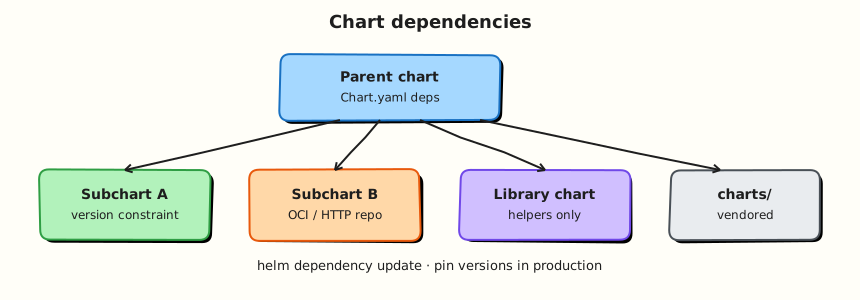
This topic’s control points and relationships are shown below.
Theory
What it is
A chart dependency lets a parent chart compose other charts — for example an application chart that also installs a Redis subchart, or a platform chart that pulls shared library charts (helpers only, type: library). You declare dependencies in Chart.yaml, run helm dependency update, and Helm downloads packages into charts/ while recording exact versions in Chart.lock.
| Kind | Purpose |
|---|---|
| Application subchart | Ships real Kubernetes resources |
| Library chart | Shared templates/helpers; no workload objects |
| OCI / HTTP dependency | Where the subchart package is fetched from |
Why it matters
Composition beats copy-paste. Teams reuse vetted database or messaging charts instead of re-authoring StatefulSets. Lock files and pinned constraints make builds reproducible — critical for supply-chain review and incident rollback. Without dependency discipline you get “works today” charts that break when a floating tag moves.
How it works
- Add a
dependenciesentry inChart.yamlwithname,versionconstraint, andrepository(HTTPS oroci://…). - Run
helm dependency update ./mychart(orhelm dep up). - Helm writes archives under
charts/and updatesChart.lock. - On install, Helm renders the parent and enabled subcharts together; values for a subchart are nested under the subchart’s name (or alias) in the parent values file.
- Conditions/
tagsin the dependency stanza can enable or disable subcharts from values.
Prefer committing Chart.lock (and often the vendored charts/*.tgz in regulated environments) so CI does not need live internet access to resolve versions.
Key concepts and comparisons
| Approach | Pros | Cons |
|---|---|---|
| Subchart dependency | Reuse, version pins | Values nesting complexity |
| Separate releases | Clear ownership, independent upgrade | More GitOps apps to manage |
| Library chart | DRY helpers across app charts | Requires packaging discipline |
Alias renames the values key. global values are a convention for keys shared across parent and subcharts — use sparingly and document them.
Common pitfalls
- Editing unpacked files under
charts/instead of bumping the dependency and re-running update. - Using floating version ranges without a lock file in CI.
- Enabling a heavy subchart in every environment by default (databases in local CI clusters).
- Assuming library charts install workloads — they must not.
Hands-on Lab
Objective
Compose a parent chart with a local file dependency on a child subchart, run helm dependency update, and prove rendered output includes resources from both charts.
Prerequisites
- Helm 3.x (
helm version) - kubectl optional for install
- Writable workspace at
~/rebash-helm/module-06
Lab environment
Workspace: ~/rebash-helm/module-06 on your workstation.
mkdir -p ~/rebash-helm/module-06/rebash-parent/charts/rebash-lib/templates \
  ~/rebash-helm/module-06/rebash-parent/templates && cd ~/rebash-helm/module-06
Real-world scenario
Your application chart wraps a shared ConfigMap subchart maintained by another squad. Instead of copy-pasting YAML, you declare a file:// dependency, vendor it with helm dependency update, and override subchart values from the parent values.yaml.
Step-by-step tasks
Task 1 – Create the child (library-style) subchart
Create rebash-parent/charts/rebash-lib/Chart.yaml:
apiVersion: v2
name: rebash-lib
description: Shared ConfigMap subchart for REBASH lab
type: application
version: 0.1.0
appVersion: "1.0"
Create rebash-parent/charts/rebash-lib/values.yaml:
Create rebash-parent/charts/rebash-lib/templates/configmap.yaml:
apiVersion: v1
kind: ConfigMap
metadata:
  name: {{ .Release.Name }}-lib-config
data:
  message: {{ .Values.configMessage | quote }}
Task 2 – Parent chart with dependency declaration
Create rebash-parent/Chart.yaml:
apiVersion: v2
name: rebash-parent
description: Parent chart with local file dependency
type: application
version: 0.1.0
appVersion: "1.27"
dependencies:
  - name: rebash-lib
    version: 0.1.0
    repository: "file://charts/rebash-lib"
Create rebash-parent/values.yaml:
replicaCount: 1
image:
  repository: nginxinc/nginx-unprivileged
  tag: "1.27-alpine"
service:
  port: 8080
rebash-lib:
  configMessage: "overridden from parent values"
Create rebash-parent/templates/deployment.yaml:
apiVersion: apps/v1
kind: Deployment
metadata:
  name: {{ .Release.Name }}-web
spec:
  replicas: {{ .Values.replicaCount }}
  selector:
    matchLabels:
      app: {{ .Release.Name }}
  template:
    metadata:
      labels:
        app: {{ .Release.Name }}
    spec:
      containers:
        - name: web
          image: "{{ .Values.image.repository }}:{{ .Values.image.tag }}"
          ports:
            - containerPort: {{ .Values.service.port }}
Create rebash-parent/templates/service.yaml:
apiVersion: v1
kind: Service
metadata:
  name: {{ .Release.Name }}-web
spec:
  ports:
    - port: {{ .Values.service.port }}
      targetPort: {{ .Values.service.port }}
  selector:
    app: {{ .Release.Name }}
Task 3 – Dependency update, lint, and template
cd ~/rebash-helm/module-06/rebash-parent
helm dependency update . | tee dep-update-m06.txt
ls charts/ | tee charts-dir-m06.txt
test -f charts/rebash-lib-0.1.0.tgz
helm lint . | tee lint-m06.txt
helm template parent-demo . --namespace rebash-helm-m06 | tee render-m06.yaml
grep -E '^kind:' render-m06.yaml | sort | uniq -c | tee kinds-m06.txt
grep -q 'kind: ConfigMap' render-m06.yaml
grep -q 'overridden from parent values' render-m06.yaml
grep -q 'kind: Deployment' render-m06.yaml
Expected output
charts/rebash-lib-0.1.0.tgz exists; rendered YAML includes ConfigMap with parent override message plus Deployment and Service.
Task 4 – Optional install
Create namespace.yaml:
cd ~/rebash-helm/module-06
if command -v helm >/dev/null && kubectl cluster-info >/dev/null 2>&1; then
  kubectl apply -f namespace.yaml
  helm upgrade --install parent-demo rebash-parent -n rebash-helm-m06 --wait --timeout 120s | tee install-m06.txt
  kubectl get cm,deploy,svc -n rebash-helm-m06 | tee objects-m06.txt
  kubectl get cm -n rebash-helm-m06 -o yaml | grep -A1 'message:' | tee cm-message-m06.txt
else
  echo "Skipping install — cluster unavailable" | tee install-m06.txt
fi
Expected output
ConfigMap, Deployment, and Service exist in rebash-helm-m06; ConfigMap data shows parent override string.
Validation steps
- Parent
Chart.yamldeclaresfile://dependency -
helm dependency updatevendorsrebash-lib-0.1.0.tgzundercharts/ - Rendered manifest includes subchart ConfigMap and parent workload objects
- Parent values override subchart
configMessage - Optional install succeeds in
rebash-helm-m06
Common errors and fixes
| Error | Cause | Fix |
|---|---|---|
found in Chart.yaml, but missing in charts/ | Skipped dependency update | Run helm dependency update from parent directory |
| Subchart values ignored | Wrong values key | Nest under subchart name: rebash-lib.configMessage |
file:// path wrong | Relative path incorrect | Use file://charts/rebash-lib from parent chart root |
| Editing unpacked tgz by hand | Manual drift | Change source under charts/rebash-lib/ and re-run update |
Challenge exercise
Add a condition: rebash-lib.enabled to the dependency stanza and toggle the subchart off from parent values; prove ConfigMap disappears from helm template output.
Learning outcomes
- Declared a local file dependency in
Chart.yaml - Vendored subcharts with
helm dependency update - Overrode subchart values from the parent release
- Verified composed manifests include both parent and child resources
Cleanup
helm uninstall parent-demo -n rebash-helm-m06 2>/dev/null || true
kubectl delete namespace rebash-helm-m06 --ignore-not-found
Validation
- Lab commands run under
~/rebash-helm/module-06/ - You can explain each Theory section in your own words
- You used modern tooling where it applies to this topic
- You can describe one production failure mode for this topic
Code Walkthrough
Production practice for Helm Chart Dependencies always combines:
- Inspect before you change (status, plan, logs, dry-run)
- Prefer reversible, documented changes (Git, IaC, drop-ins, version pins)
- Capture evidence (command output, pipeline logs) for handovers
- Prefer current tools and APIs over legacy shortcuts
- Least privilege — escalate credentials only when required
Keep runbooks short enough to follow under pressure. Automate checks; keep humans for judgement.
Security Considerations
- Treat credentials and tokens for helm as privileged — never commit them
- Prefer short-lived auth (OIDC, roles, SSO) over long-lived keys
- Validate blast radius before apply/deploy/delete operations
- Restrict who can approve production changes
- Collect audit logs; limit who can read sensitive traces
Common Mistakes
Editing unpacked files under charts/ instead of bumping the dependency and re-running up
Validate assumptions against the Theory section and official docs before changing production.
Using floating version ranges without a lock file in CI.
Lab shortcuts (open security groups, admin roles, skip approvals) must not ship unchanged.
Changing production without a rollback path
Always know how to revert (previous artefact, prior release, state rollback, DNS failback).
Best Practices
- Encode Helm Chart Dependencies changes as code and review them in pull requests
- Pin versions (images, modules, actions, provider plugins)
- Separate environments with clear promotion gates
- Alert on symptoms with runbooks attached
- Destroy lab resources; tag everything with owner and expiry where possible
Troubleshooting
| Symptom | Likely cause | Fix |
|---|---|---|
| Auth / permission denied | Wrong identity, policy, or scope | Check caller identity, roles, and least-privilege policies |
| Timeout / no route | Network, DNS, security group, or endpoint | Trace path, DNS, and allow-lists before retrying |
| Drift / unexpected plan | Manual change or wrong state/workspace | Reconcile desired vs actual; avoid click-ops on managed resources |
| Pipeline/job red | Flaky step, cache, or missing secret | Read failing step logs; bisect recent workflow/config changes |
| Cost spike | Idle load balancer, NAT, oversized compute | Inventory billable resources; stop/delete labs promptly |
Summary
Helm Chart Dependencies is essential for Cloud and DevOps engineers working with helm. Practise the lab until the inspection and change path is muscle memory, then continue the track.
Interview Questions
- What does the dependencies field in Chart.yaml declare?
- What do
helm dependency updateand the charts/ directory contain? - How do you override subchart values from a parent?
- What versioning risks exist when depending on floating subchart versions?
- When should a dependency be optional with a condition/tags?
Sample answer — question 2
helm dependency update downloads/packaged charts into charts/ based on Chart.yaml. Parents then render subcharts as part of the release.
Sample answer — question 4
Floating versions can pull breaking subchart changes unexpectedly. Pin versions and test upgrades of parent and children together.