Installing Helm and Repositories
Overview
Install Helm 3, point it at your kubeconfig cluster, add a chart repository, and search/pull a chart.
Install via package manager or the official script. Configure repos (helm repo add) or use OCI registries (oci://…). Plugins extend the CLI (for example helm-diff).
This is a core tutorial in Module 2 · Installing Helm of the REBASH Academy Helm for Kubernetes Engineers series — written for Cloud, DevOps, Platform, and SRE engineers.
Prerequisites
- Helm Architecture
- Working
kubectlcluster (kind/minikube/cloud)
Learning Objectives
By the end of this tutorial, you will be able to:
- Install and verify
helm version -
helm repo add/update/search - List plugins concept
- Confirm cluster context
Architecture
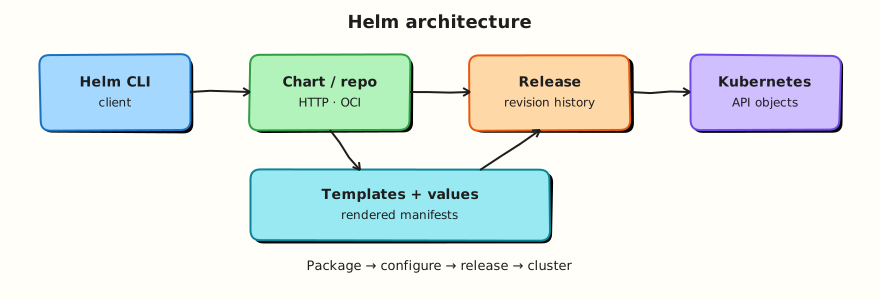
This topic’s control points and relationships are shown below.
Theory
What it is
Installing Helm means putting the Helm 3 CLI on your workstation or CI image and pointing it at a Kubernetes cluster via the same kubeconfig that kubectl uses. A chart repository is a discoverable index of charts (traditionally https://… with index.yaml). OCI registries store charts as OCI artefacts. Plugins extend the CLI (for example helm-diff to preview upgrades).
Vocabulary for day-one ops:
| Action | Purpose |
|---|---|
helm version | Confirm client (and optional server-side notes) |
helm repo add / update | Register and refresh HTTP chart indexes |
helm search repo | Find charts by name |
helm pull | Download a chart archive locally |
helm plugin | Manage CLI extensions |
Why it matters
Every later tutorial assumes a working Helm binary and a deliberate chart source policy. In enterprises you rarely pull random community charts into production without review: you pin versions, prefer approved OCI mirrors, and run Helm from CI/GitOps identities — not from personal laptops for production changes. Getting install and repo hygiene right early prevents “works on my machine” chart versions and surprise dependency downloads.
How it works
- Install Helm via a package manager (
brew,aptpackages, etc.) or the official get-helm-3 script. - Verify with
helm version(expect v3.x). - Confirm
kubectl config current-contextmatches the cluster you intend to use. - Add repositories (
helm repo add bitnami …) or log in to OCI registries as required. helm repo updaterefreshes indexes;helm search/helm pullconsume them.- Optionally install plugins into Helm’s plugin directory for workflow extras.
Helm does not need a special server component in the cluster. If kubectl can reach the API, Helm can manage releases (subject to RBAC).
Key concepts and comparisons
| Source | How you use it | Typical fit |
|---|---|---|
| Local path | helm install ./mychart | Chart development |
| HTTP repo | helm repo add + helm install bitnami/… | Public/vendor charts |
| OCI | helm install oci://registry/… | Enterprise artefact stores |
| Plugin | helm plugin install | Diff, secrets helpers, etc. |
Common pitfalls
- Installing Helm 2 tooling by accident — always verify major version 3.
- Adding a repo once and never running
helm repo update, then wondering why a chart version is missing. - Searching the wrong repo name prefix after
helm repo add. - Assuming plugins are required for core install/upgrade — they are optional helpers.
- Pointing Helm at the wrong kubecontext and installing into the wrong cluster.
Hands-on Lab
Objective
Write a verify-helm.sh script that proves Helm 3 and kubectl connectivity, add the Bitnami chart repository, search for a chart, and capture helm repo list evidence.
Prerequisites
- Helm 3.x (
helm version) - kubectl with a valid context (kind or minikube)
- Network access to
https://charts.bitnami.com/bitnami - Bash shell
Lab environment
Workspace: ~/rebash-helm/module-02 on your workstation.
Real-world scenario
Your CI pipeline must fail fast when Helm is missing, the wrong major version is installed, or kubeconfig points at the wrong cluster. You ship a small verification script and document approved chart repositories before any install job runs.
Step-by-step tasks
Task 1 – Create the verification script
Create verify-helm.sh:
#!/usr/bin/env bash
set -euo pipefail

echo "== Helm version =="
helm version

echo "== kubectl context =="
kubectl config current-context
kubectl cluster-info | head -3

echo "== Helm environment (selected) =="
helm env | grep -E 'HELM_(CACHE|CONFIG|DATA)_HOME'

echo "verify-helm.sh: OK"
Run and capture evidence:
cd ~/rebash-helm/module-02
chmod +x verify-helm.sh
./verify-helm.sh | tee verify-m02.txt
grep -q 'verify-helm.sh: OK' verify-m02.txt
helm version | grep -q 'v3'
Expected output
verify-m02.txt ends with verify-helm.sh: OK; Helm client reports v3.x.
Task 2 – Add and update a chart repository
cd ~/rebash-helm/module-02
helm repo add bitnami https://charts.bitnami.com/bitnami 2>/dev/null || true
helm repo update | tee repo-update-m02.txt
helm repo list | tee repo-list-m02.txt
grep -q 'bitnami' repo-list-m02.txt
Expected output
repo-list-m02.txt lists bitnami with the Bitnami HTTPS URL.
Task 3 – Search and pull evidence (no install required)
cd ~/rebash-helm/module-02
helm search repo bitnami/nginx --versions | head -8 | tee search-nginx-m02.txt
helm show chart bitnami/nginx | tee show-chart-m02.txt
grep -q '^name: nginx' show-chart-m02.txt
grep -q '^version:' show-chart-m02.txt
Expected output
Search returns multiple nginx chart versions; show-chart-m02.txt contains chart name and version fields.
Task 4 – Optional smoke install into isolated namespace
Create namespace.yaml:
cd ~/rebash-helm/module-02
if kubectl cluster-info >/dev/null 2>&1; then
  kubectl apply -f namespace.yaml
  helm upgrade --install nginx-smoke bitnami/nginx \
    -n rebash-helm-m02 \
    --set image.tag=1.27.4-debian-12-r0 \
    --set replicaCount=1 \
    --wait --timeout 180s | tee install-m02.txt
  helm list -n rebash-helm-m02 | tee list-m02.txt
else
  echo "Skipping install — cluster unavailable" | tee install-m02.txt
fi
Expected output
Release nginx-smoke appears in list-m02.txt, or skip message is recorded.
Validation steps
-
verify-helm.shexits successfully and records v3 client - Bitnami repository appears in
helm repo list -
helm search reporeturns nginx chart versions -
helm show chartoutput captured for review - Optional smoke install uses namespace
rebash-helm-m02
Common errors and fixes
| Error | Cause | Fix |
|---|---|---|
helm: command not found | Helm not on PATH | Install Helm 3 per official docs; re-run script |
| Wrong major version | Helm 2 binary present | Remove legacy binary; confirm helm version shows v3 |
repo add 403/timeout | Network or proxy | Check egress; verify URL is reachable |
| Search returns nothing | Stale index | Run helm repo update before search |
| Install timeout | Slow cluster or image pull | Increase --timeout; kubectl describe pod -n rebash-helm-m02 |
Challenge exercise
Extend verify-helm.sh to fail when kubectl config current-context contains the string prod (guardrail for lab laptops), and prove the guard with a simulated check using grep.
Learning outcomes
- Automated Helm and kubectl preflight checks in a reusable script
- Registered and refreshed a chart repository
- Searched and inspected chart metadata before install
- Installed a pinned vendor chart into an isolated namespace when permitted
Cleanup
helm uninstall nginx-smoke -n rebash-helm-m02 2>/dev/null || true
kubectl delete namespace rebash-helm-m02 --ignore-not-found
Validation
- Lab commands run under
~/rebash-helm/module-02/ - You can explain each Theory section in your own words
- You used modern tooling where it applies to this topic
- You can describe one production failure mode for this topic
Code Walkthrough
Production practice for Installing Helm and Repositories always combines:
- Inspect before you change (status, plan, logs, dry-run)
- Prefer reversible, documented changes (Git, IaC, drop-ins, version pins)
- Capture evidence (command output, pipeline logs) for handovers
- Prefer current tools and APIs over legacy shortcuts
- Least privilege — escalate credentials only when required
Keep runbooks short enough to follow under pressure. Automate checks; keep humans for judgement.
Security Considerations
- Treat credentials and tokens for helm as privileged — never commit them
- Prefer short-lived auth (OIDC, roles, SSO) over long-lived keys
- Validate blast radius before apply/deploy/delete operations
- Restrict who can approve production changes
- Collect audit logs; limit who can read sensitive traces
Common Mistakes
Installing Helm 2 tooling by accident — always verify major version 3.
Validate assumptions against the Theory section and official docs before changing production.
Adding a repo once and never running helm repo update, then wondering why a chart versio
Lab shortcuts (open security groups, admin roles, skip approvals) must not ship unchanged.
Changing production without a rollback path
Always know how to revert (previous artefact, prior release, state rollback, DNS failback).
Best Practices
- Encode Installing Helm and Repositories changes as code and review them in pull requests
- Pin versions (images, modules, actions, provider plugins)
- Separate environments with clear promotion gates
- Alert on symptoms with runbooks attached
- Destroy lab resources; tag everything with owner and expiry where possible
Troubleshooting
| Symptom | Likely cause | Fix |
|---|---|---|
| Auth / permission denied | Wrong identity, policy, or scope | Check caller identity, roles, and least-privilege policies |
| Timeout / no route | Network, DNS, security group, or endpoint | Trace path, DNS, and allow-lists before retrying |
| Drift / unexpected plan | Manual change or wrong state/workspace | Reconcile desired vs actual; avoid click-ops on managed resources |
| Pipeline/job red | Flaky step, cache, or missing secret | Read failing step logs; bisect recent workflow/config changes |
| Cost spike | Idle load balancer, NAT, oversized compute | Inventory billable resources; stop/delete labs promptly |
Summary
Installing Helm and Repositories is essential for Cloud and DevOps engineers working with helm. Practise the lab until the inspection and change path is muscle memory, then continue the track.
Interview Questions
- What does
helm repo addstore on your machine? - Why run
helm repo updatebefore installing? - What is the difference between searching a repo and pulling a chart?
- How can a compromised chart repository harm you?
- When should you vendor charts instead of installing straight from the internet?
Sample answer — question 2
Repositories are indexes of chart locations. update refreshes local cache so you see current chart versions rather than stale index data.
Sample answer — question 4
A malicious repo can serve charts that escalate privileges. Prefer HTTPS repos you trust, pin versions, verify provenance when available, and review rendered YAML.