Helm Security
Overview
Apply a Helm security baseline: no secrets in charts, least-privilege deploy identity, pinned images/charts, and OCI provenance where available.
Charts often tempt teams to bake passwords into values.yaml. Prefer external secret stores. Restrict who can create releases. Prefer signed/verified OCI charts in regulated environments.
This is a core tutorial in Module 9 · Security of the REBASH Academy Helm for Kubernetes Engineers series — written for Cloud, DevOps, Platform, and SRE engineers.
Prerequisites
Learning Objectives
By the end of this tutorial, you will be able to:
- List secret anti-patterns
- Outline RBAC for Helm users / CI
- Pin image digests or immutable tags in values
- Describe OCI + provenance / signing options
Architecture
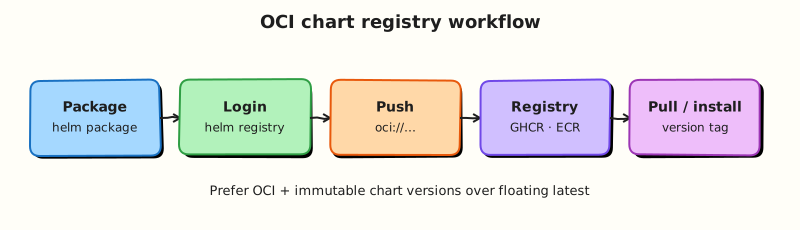
This topic’s control points and relationships are shown below.
Theory
What it is
Helm security covers how charts and releases affect cluster risk: secret handling in values, who is allowed to install releases (RBAC), which charts and images you trust, and whether packages are pulled from approved OCI or HTTP sources with verification. Helm itself is a powerful client — equivalent to applying arbitrary YAML — so the identity that runs Helm is part of your threat model.
| Concern | Secure default |
|---|---|
| Secrets | Externalise; never commit plaintext |
| Identity | Least-privilege ServiceAccount / CI kubeconfig |
| Charts | Pin versions; approved repos/OCI only |
| Images | Immutable tags or digests in prod values |
| Provenance | Signed charts / cosign where required |
Why it matters
Charts are a supply-chain vector: a compromised dependency or a chart that embeds credentials can open namespaces you thought were locked down. DevSecOps reviews treat Helm the same as container images — provenance, pinning, and least privilege. Regulated environments increasingly expect OCI artefacts with signatures, not ad-hoc tarball downloads from the public internet.
How it works
- Secrets: keep
values.yamlfree of passwords; inject via sealed secrets, SOPS, external-secrets, or CI-masked--setonly when necessary. Prefer mounting Secrets created outside the chart. - RBAC: grant CI/GitOps identities create/update/delete only on the namespaces and API groups they manage — including permissions for Helm’s release Secrets/ConfigMaps.
- Pinning: lock chart versions (
Chart.lock) and pin container images (tagor digest) in production values. - Sources: pull from internal mirrors or verified OCI registries; disable unchecked
helm repo addon production runners. - Signing / provenance: where policy requires it, verify chart signatures or OCI attestations before upgrade.
Security is layered: a signed chart that still embeds a default admin password is not “secure”.
Key concepts and comparisons
| Anti-pattern | Better pattern |
|---|---|
| Password in committed values | External secret store + reference |
| Cluster-admin CI token | Namespace-scoped deploy role |
:latest in prod values | Digest or immutable tag |
| Random Bitnami bump unpinned | Approved version + changelog review |
Common pitfalls
- Believing
helm packageencrypts secrets — it does not. - Storing kubeconfigs with broad rights in CI variables “temporarily”.
- Trusting chart provenance while ignoring the image the chart deploys.
- Disabling admission controls so a chart “just installs” — fix the chart or request an exception with review.
Hands-on Lab
Objective
Build a hardened chart with non-root securityContext, an external secret reference (no plaintext credentials in values), least-privilege RBAC, and rendered-manifest proof.
Prerequisites
- Helm 3 CLI and kubectl configured for a lab cluster
- Basic understanding of Pod Security and RBAC
Lab environment
Workspace: ~/rebash-helm/module-09
Helm 3 against kind/minikube; release namespace rebash-helm-m09.
Real-world scenario
Security review flagged a chart that ran as root and embedded database passwords in values.yaml. You must refactor the chart to run non-root, reference secrets created outside Helm, and scope the workload ServiceAccount with namespace RBAC.
Step-by-step tasks
Task 1 – Create values and templates with securityContext
Create secure-chart/Chart.yaml:
apiVersion: v2
name: secure-chart
description: Lab chart for Helm security baseline
type: application
version: 0.1.0
appVersion: "1.27.4"
Create secure-chart/values.yaml:
replicaCount: 1
image:
  repository: nginx
  tag: "1.27.4-alpine"
serviceAccount:
  create: true
  name: ""
securityContext:
  runAsNonRoot: true
  runAsUser: 101
  allowPrivilegeEscalation: false
  readOnlyRootFilesystem: false
externalSecret:
  enabled: true
  secretName: app-db-credentials
  # Password supplied outside the chart — never commit plaintext here
Create secure-chart/templates/serviceaccount.yaml:
{{- if .Values.serviceAccount.create }}
apiVersion: v1
kind: ServiceAccount
metadata:
  name: {{ include "secure-chart.fullname" . }}
  labels:
    app.kubernetes.io/name: {{ .Chart.Name }}
    app.kubernetes.io/instance: {{ .Release.Name }}
{{- end }}
Create secure-chart/templates/_helpers.tpl:
{{- define "secure-chart.fullname" -}}
{{- printf "%s-%s" .Release.Name .Chart.Name | trunc 63 | trimSuffix "-" -}}
{{- end -}}
Create secure-chart/templates/role.yaml:
apiVersion: rbac.authorization.k8s.io/v1
kind: Role
metadata:
  name: {{ include "secure-chart.fullname" . }}-reader
rules:
  - apiGroups: [""]
    resources: ["pods"]
    verbs: ["get", "list"]
Create secure-chart/templates/rolebinding.yaml:
apiVersion: rbac.authorization.k8s.io/v1
kind: RoleBinding
metadata:
  name: {{ include "secure-chart.fullname" . }}-reader
subjects:
  - kind: ServiceAccount
    name: {{ include "secure-chart.fullname" . }}
    namespace: {{ .Release.Namespace }}
roleRef:
  apiGroup: rbac.authorization.k8s.io
  kind: Role
  name: {{ include "secure-chart.fullname" . }}-reader
Create secure-chart/templates/deployment.yaml:
apiVersion: apps/v1
kind: Deployment
metadata:
  name: {{ include "secure-chart.fullname" . }}
  labels:
    app.kubernetes.io/name: {{ .Chart.Name }}
    app.kubernetes.io/instance: {{ .Release.Name }}
spec:
  replicas: {{ .Values.replicaCount }}
  selector:
    matchLabels:
      app.kubernetes.io/name: {{ .Chart.Name }}
      app.kubernetes.io/instance: {{ .Release.Name }}
  template:
    metadata:
      labels:
        app.kubernetes.io/name: {{ .Chart.Name }}
        app.kubernetes.io/instance: {{ .Release.Name }}
    spec:
      serviceAccountName: {{ include "secure-chart.fullname" . }}
      securityContext:
        runAsNonRoot: {{ .Values.securityContext.runAsNonRoot }}
        runAsUser: {{ .Values.securityContext.runAsUser }}
      containers:
        - name: web
          image: "{{ .Values.image.repository }}:{{ .Values.image.tag }}"
          securityContext:
            allowPrivilegeEscalation: {{ .Values.securityContext.allowPrivilegeEscalation }}
            readOnlyRootFilesystem: {{ .Values.securityContext.readOnlyRootFilesystem }}
          {{- if .Values.externalSecret.enabled }}
          env:
            - name: DB_PASSWORD
              valueFrom:
                secretKeyRef:
                  name: {{ .Values.externalSecret.secretName }}
                  key: password
          {{- end }}
          ports:
            - containerPort: 80
Prove security settings in rendered output (offline):
cd ~/rebash-helm/module-09
helm lint ./secure-chart | tee lint.txt
helm template secure-demo ./secure-chart 2>&1 | tee render.txt
grep -q 'runAsNonRoot: true' render.txt
grep -q 'runAsUser: 101' render.txt
grep -q 'kind: ServiceAccount' render.txt
grep -q 'kind: Role' render.txt
grep -q 'secretKeyRef' render.txt
grep -qv 'password: changeme' render.txt
grep -q '0 chart(s) failed' lint.txt
Expected output
Rendered manifest includes non-root context, RBAC objects, and a secretKeyRef — no plaintext password in values or render output.
Task 2 – Create the external Secret and install
Create the Secret outside the chart (simulating external-secrets or sealed secrets):
Create external-secret.yaml:
apiVersion: v1
kind: Secret
metadata:
  name: app-db-credentials
  namespace: rebash-helm-m09
type: Opaque
stringData:
  password: lab-only-not-for-git
Install and verify RBAC bindings:
kubectl create namespace rebash-helm-m09 --dry-run=client -o yaml | kubectl apply -f -
kubectl apply -f external-secret.yaml
helm upgrade --install secure-demo ./secure-chart \
  -n rebash-helm-m09 --wait --timeout 3m | tee install.txt
kubectl get sa,role,rolebinding -n rebash-helm-m09 | tee rbac.txt
kubectl get deploy -n rebash-helm-m09 -o jsonpath='{.items[0].spec.template.spec.securityContext.runAsUser}{"\n"}' | tee run-as.txt
grep -q '101' run-as.txt
grep -q 'secure-demo-secure-chart' rbac.txt
Expected output
ServiceAccount, Role, and RoleBinding exist; Deployment runs as UID 101.
Validation steps
- Rendered manifest shows
runAsNonRoot: trueand pinned image tag - No plaintext password appears in
values.yamlor rendered YAML - ServiceAccount, Role, and RoleBinding are created in the namespace
- External Secret is referenced via
secretKeyRef, not embedded in values
Common errors and fixes
| Error | Cause | Fix |
|---|---|---|
Pod CreateContainerConfigError | External Secret missing | Create app-db-credentials before install or disable externalSecret.enabled for render-only practice |
runAsNonRoot violation | Image expects root | Use an image that supports non-root (nginx official image UID 101) |
| RBAC denied at runtime | Role too broad or missing binding | Confirm RoleBinding subject matches ServiceAccount name |
| Secret in Git history | Password committed to values | Rotate secret; use sealed-secrets or external-secrets operator in production |
Challenge exercise
Add a networkPolicy template stub (disabled by default) and a values flag networkPolicy.enabled. Render with the flag enabled and prove the NetworkPolicy appears:
Create networkpolicy.yaml in secure-chart/templates/:
{{- if .Values.networkPolicy.enabled }}
apiVersion: networking.k8s.io/v1
kind: NetworkPolicy
metadata:
  name: {{ include "secure-chart.fullname" . }}
spec:
  podSelector:
    matchLabels:
      app.kubernetes.io/name: {{ .Chart.Name }}
  policyTypes:
    - Ingress
  ingress:
    - from:
        - podSelector: {}
{{- end }}
Add to values.yaml:
cd ~/rebash-helm/module-09
helm template secure-demo ./secure-chart --set networkPolicy.enabled=true | grep -q 'kind: NetworkPolicy'
Expected output
Render includes a NetworkPolicy when the flag is enabled.
Learning outcomes
- Applied non-root
securityContextthrough values and templates - Referenced secrets externally instead of embedding credentials in values
- Scoped workload identity with ServiceAccount and namespace RBAC
- Validated security posture from rendered manifests before install
Cleanup
helm uninstall secure-demo -n rebash-helm-m09 2>/dev/null || true
kubectl delete namespace rebash-helm-m09 --ignore-not-found
Validation
- Lab commands run under
~/rebash-helm/module-09/ - You proved non-root securityContext and RBAC in rendered manifests
- No plaintext credentials appear in values or rendered YAML
- You can describe one production failure mode for Helm security
Code Walkthrough
Production practice for Helm Security always combines:
- Inspect before you change (status, plan, logs, dry-run)
- Prefer reversible, documented changes (Git, IaC, drop-ins, version pins)
- Capture evidence (command output, pipeline logs) for handovers
- Prefer current tools and APIs over legacy shortcuts
- Least privilege — escalate credentials only when required
Keep runbooks short enough to follow under pressure. Automate checks; keep humans for judgement.
Security Considerations
- Treat credentials and tokens for helm as privileged — never commit them
- Prefer short-lived auth (OIDC, roles, SSO) over long-lived keys
- Validate blast radius before apply/deploy/delete operations
- Restrict who can approve production changes
- Collect audit logs; limit who can read sensitive traces
Common Mistakes
Believing helm package encrypts secrets — it does not.
Validate assumptions against the Theory section and official docs before changing production.
Storing kubeconfigs with broad rights in CI variables “temporarily”.
Lab shortcuts (open security groups, admin roles, skip approvals) must not ship unchanged.
Changing production without a rollback path
Always know how to revert (previous artefact, prior release, state rollback, DNS failback).
Best Practices
- Encode Helm Security changes as code and review them in pull requests
- Pin versions (images, modules, actions, provider plugins)
- Separate environments with clear promotion gates
- Alert on symptoms with runbooks attached
- Destroy lab resources; tag everything with owner and expiry where possible
Troubleshooting
| Symptom | Likely cause | Fix |
|---|---|---|
| Auth / permission denied | Wrong identity, policy, or scope | Check caller identity, roles, and least-privilege policies |
| Timeout / no route | Network, DNS, security group, or endpoint | Trace path, DNS, and allow-lists before retrying |
| Drift / unexpected plan | Manual change or wrong state/workspace | Reconcile desired vs actual; avoid click-ops on managed resources |
| Pipeline/job red | Flaky step, cache, or missing secret | Read failing step logs; bisect recent workflow/config changes |
| Cost spike | Idle load balancer, NAT, oversized compute | Inventory billable resources; stop/delete labs promptly |
Summary
Helm Security is essential for Cloud and DevOps engineers working with helm. Practise the lab until the inspection and change path is muscle memory, then continue the track.
Interview Questions
- What chart features should you audit before install?
- How do ServiceAccounts and RBAC in charts expand cluster rights?
- Why pin image digests or immutable tags in production values?
- What is chart provenance, and when does it help?
- How should secrets be supplied to Helm releases?
Sample answer — question 2
Charts may create ClusterRoles, privileged pods, or hostPath mounts. Rendering and reviewing these objects prevents accidental cluster-admin paths.
Sample answer — question 4
Mutable tags like latest can change under you. Pin versions/digests so rollbacks and audits know exactly what ran, reducing supply-chain surprise.