Helm Values and Overrides
Overview
Merge chart defaults with environment files and CLI overrides, and keep secrets out of Git-committed values.
Later sources win. Production teams keep values.yaml safe defaults, then values-<env>.yaml per environment, and inject secrets at deploy time (sealed secrets, SOPS, external secrets — not plaintext in Git).
This is a core tutorial in Module 5 · Values of the REBASH Academy Helm for Kubernetes Engineers series — written for Cloud, DevOps, Platform, and SRE engineers.
Prerequisites
Learning Objectives
By the end of this tutorial, you will be able to:
- Explain override precedence
- Use
-fand--set - Structure env-specific files
- Avoid committing secrets
Architecture
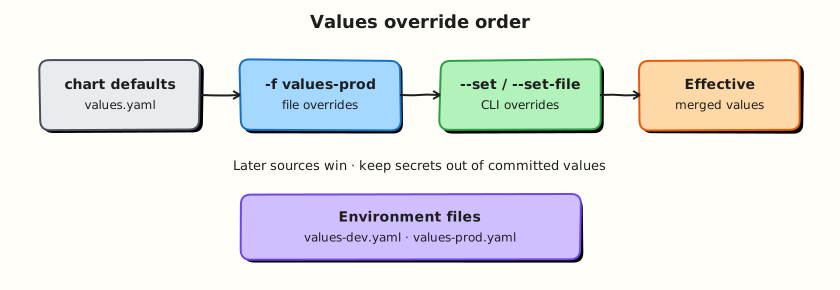
This topic’s control points and relationships are shown below.
Theory
What it is
Values are the configuration interface of a chart. Defaults live in the chart’s values.yaml. At install or upgrade time you override those defaults with extra YAML files (-f / --values) and fine-grained CLI flags (--set, --set-string, --set-file). The result is one merged tree that templates read as .Values.
Think of values as the “API” of your package: stable keys, documented defaults, and environment-specific overlays that do not fork the templates.
Why it matters
Most production incidents blamed on “Helm” are actually values mistakes — wrong image tag, replica count, or ingress host for an environment. Clear override practice lets the same chart ship to many clusters safely. It also keeps secrets out of Git: defaults stay non-secret, and sensitive material is injected by CI, sealed-secrets, SOPS, or external-secrets operators at deploy time.
How it works
Helm merges sources in a defined order. Later sources win on conflicting keys (deep merge for maps; exact behaviour for lists is “replace”, not element-wise merge — design list values carefully).
Typical precedence (simplified):
- Chart
values.yamldefaults - Parent chart values for subcharts (when composing)
-f values-a.yaml -f values-b.yaml(left to right; later file wins)--set/--set-string/--set-file(highest common CLI priority)
Mental model for teams: safe defaults in the chart → env files in Git → secrets from a secret manager at deploy. Use helm template … -f … --set … to inspect the effective render before you apply.
Key concepts and comparisons
| Mechanism | Best for | Caution |
|---|---|---|
Chart values.yaml | Safe, documented defaults | No production secrets |
values-<env>.yaml | Replicas, hosts, non-secret env diffs | Keep files small and reviewed |
--set | CI one-offs, image digests | Harder to audit than files |
| External secrets | Passwords, tokens, certs | Do not commit plaintext |
--set parses types loosely; prefer --set-string when you need a literal string (for example versions that look like numbers).
Common pitfalls
- Believing list values deep-merge — they usually replace entirely.
- Committing database passwords “just for the demo chart” that later become production defaults.
- Overusing
--setin tribal wiki commands instead of checked-in env files. - Forgetting that subcharts read values under their chart name key unless aliases/
globalare designed intentionally.
Hands-on Lab
Objective
Maintain base values.yaml plus environment overlays (values-dev.yaml, values-prod.yaml), demonstrate -f merge order with rendered diffs, and install production-like settings into an isolated namespace.
Prerequisites
- Helm 3.x (
helm version) - kubectl optional for install
- Writable workspace at
~/rebash-helm/module-05
Lab environment
Workspace: ~/rebash-helm/module-05 on your workstation.
Real-world scenario
The same chart promotes from dev (single replica, debug logging) to production (three replicas, production hostname). Platform engineers store safe defaults in the chart and environment diffs in Git — never secrets — and prove effective values with helm template before CI deploys.
Step-by-step tasks
Task 1 – Base chart and default values
Create rebash-values/Chart.yaml:
apiVersion: v2
name: rebash-values
description: Values override lab chart
type: application
version: 0.1.0
appVersion: "1.27"
Create rebash-values/values.yaml:
replicaCount: 1
image:
  repository: nginxinc/nginx-unprivileged
  tag: "1.27-alpine"
service:
  port: 8080
appEnv: dev
logLevel: info
ingress:
  enabled: false
  host: app.example.com
Create rebash-values/templates/deployment.yaml:
apiVersion: apps/v1
kind: Deployment
metadata:
  name: {{ .Release.Name }}-web
spec:
  replicas: {{ .Values.replicaCount }}
  selector:
    matchLabels:
      app: {{ .Release.Name }}
  template:
    metadata:
      labels:
        app: {{ .Release.Name }}
    spec:
      containers:
        - name: web
          image: "{{ .Values.image.repository }}:{{ .Values.image.tag }}"
          env:
            - name: APP_ENV
              value: {{ .Values.appEnv | quote }}
            - name: LOG_LEVEL
              value: {{ .Values.logLevel | quote }}
          ports:
            - containerPort: {{ .Values.service.port }}
Create rebash-values/templates/service.yaml:
apiVersion: v1
kind: Service
metadata:
  name: {{ .Release.Name }}-web
spec:
  ports:
    - port: {{ .Values.service.port }}
      targetPort: {{ .Values.service.port }}
  selector:
    app: {{ .Release.Name }}
Task 2 – Environment overlay files
Create values-dev.yaml:
Create values-prod.yaml:
replicaCount: 3
appEnv: production
logLevel: warn
ingress:
  enabled: true
  host: app.prod.example.com
Task 3 – Render and diff merge order
cd ~/rebash-helm/module-05
helm template vals-dev rebash-values -f values-dev.yaml --namespace rebash-helm-m05 | tee render-dev-m05.yaml
helm template vals-prod rebash-values \
  -f values-dev.yaml -f values-prod.yaml \
  --namespace rebash-helm-m05 | tee render-prod-m05.yaml
grep 'replicas:' render-dev-m05.yaml | head -1 | tee replicas-dev-m05.txt
grep 'replicas:' render-prod-m05.yaml | head -1 | tee replicas-prod-m05.txt
grep 'LOG_LEVEL' render-dev-m05.yaml | tee log-dev-m05.txt
grep 'LOG_LEVEL' render-prod-m05.yaml | tee log-prod-m05.txt
grep -q 'replicas: 1' replicas-dev-m05.txt
grep -q 'replicas: 3' replicas-prod-m05.txt
grep -q 'value: debug' log-dev-m05.txt
grep -q 'value: warn' log-prod-m05.txt
diff -u render-dev-m05.yaml render-prod-m05.yaml | tee diff-dev-prod-m05.txt || true
Expected output
Dev render shows replicas: 1 and LOG_LEVEL debug; prod render (later file wins) shows replicas: 3 and LOG_LEVEL warn; diff-dev-prod-m05.txt highlights changes.
Task 4 – Optional install with prod overlay
Create namespace.yaml:
cd ~/rebash-helm/module-05
if command -v helm >/dev/null && kubectl cluster-info >/dev/null 2>&1; then
  kubectl apply -f namespace.yaml
  helm upgrade --install vals-prod rebash-values \
    -n rebash-helm-m05 \
    -f values-dev.yaml -f values-prod.yaml \
    --wait --timeout 120s | tee install-m05.txt
  kubectl get deploy -n rebash-helm-m05 -o wide | tee deploy-m05.txt
  helm get values vals-prod -n rebash-helm-m05 | tee live-values-m05.txt
else
  echo "Skipping install — cluster unavailable" | tee install-m05.txt
fi
Expected output
Deployment shows three replicas when install runs; live-values-m05.txt reflects merged effective values.
Validation steps
- Base
values.yamlcontains safe defaults only (no secrets) - Dev and prod overlay files change replicas and log level
- Later
-ffile overrides earlier keys (values-prod.yamlwins) - Render diff captured between environments
- Optional install uses namespace
rebash-helm-m05
Common errors and fixes
| Error | Cause | Fix |
|---|---|---|
| Prod still shows dev replicas | File order wrong | Pass -f values-dev.yaml -f values-prod.yaml (prod last) |
--set surprises | CLI overrides files | Prefer files for auditability; remember --set wins over -f |
| List replaced unexpectedly | Helm replaces whole lists | Design list values to be replaced intentionally, not merged |
| Secrets in Git overlay | Password copied into values | Use external-secrets or sealed-secrets; keep overlays non-secret |
Challenge exercise
Add --set replicaCount=5 to the prod template command and show it overrides values-prod.yaml in the rendered output; capture the single replicas: line as evidence.
Learning outcomes
- Structured environment-specific values without forking templates
- Applied
-fmerge order with later files winning on conflicts - Compared rendered manifests between dev and prod overlays
- Inspected live release values after install when a cluster is available
Cleanup
helm uninstall vals-prod -n rebash-helm-m05 2>/dev/null || true
kubectl delete namespace rebash-helm-m05 --ignore-not-found
Validation
- Lab commands run under
~/rebash-helm/module-05/ - You can explain each Theory section in your own words
- You used modern tooling where it applies to this topic
- You can describe one production failure mode for this topic
Code Walkthrough
Production practice for Helm Values and Overrides always combines:
- Inspect before you change (status, plan, logs, dry-run)
- Prefer reversible, documented changes (Git, IaC, drop-ins, version pins)
- Capture evidence (command output, pipeline logs) for handovers
- Prefer current tools and APIs over legacy shortcuts
- Least privilege — escalate credentials only when required
Keep runbooks short enough to follow under pressure. Automate checks; keep humans for judgement.
Security Considerations
- Treat credentials and tokens for helm as privileged — never commit them
- Prefer short-lived auth (OIDC, roles, SSO) over long-lived keys
- Validate blast radius before apply/deploy/delete operations
- Restrict who can approve production changes
- Collect audit logs; limit who can read sensitive traces
Common Mistakes
Believing list values deep-merge — they usually replace entirely.
Validate assumptions against the Theory section and official docs before changing production.
Committing database passwords “just for the demo chart” that later become production defau
Lab shortcuts (open security groups, admin roles, skip approvals) must not ship unchanged.
Changing production without a rollback path
Always know how to revert (previous artefact, prior release, state rollback, DNS failback).
Best Practices
- Encode Helm Values and Overrides changes as code and review them in pull requests
- Pin versions (images, modules, actions, provider plugins)
- Separate environments with clear promotion gates
- Alert on symptoms with runbooks attached
- Destroy lab resources; tag everything with owner and expiry where possible
Troubleshooting
| Symptom | Likely cause | Fix |
|---|---|---|
| Auth / permission denied | Wrong identity, policy, or scope | Check caller identity, roles, and least-privilege policies |
| Timeout / no route | Network, DNS, security group, or endpoint | Trace path, DNS, and allow-lists before retrying |
| Drift / unexpected plan | Manual change or wrong state/workspace | Reconcile desired vs actual; avoid click-ops on managed resources |
| Pipeline/job red | Flaky step, cache, or missing secret | Read failing step logs; bisect recent workflow/config changes |
| Cost spike | Idle load balancer, NAT, oversized compute | Inventory billable resources; stop/delete labs promptly |
Summary
Helm Values and Overrides is essential for Cloud and DevOps engineers working with helm. Practise the lab until the inspection and change path is muscle memory, then continue the track.
Interview Questions
- In what order do default values, values files, and --set flags combine?
- When should you prefer values files over long --set chains?
- How do you see the values a release is currently using?
- What security issue appears when secrets are placed in values files?
- How do you manage values across staging and production?
Sample answer — question 2
Later sources override earlier ones: chart defaults, then -f files in order, then --set. Knowing precedence prevents surprise configuration.
Sample answer — question 4
Values files in Git often leak credentials. Keep secrets in sealed/external secret systems and reference them; treat values repos as sensitive if they contain any secrets.