Helm GitOps Integration
Overview
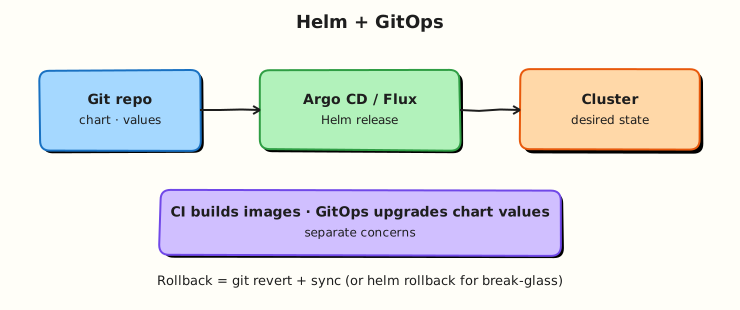
Design a GitOps layout where Argo CD or Flux renders a Helm chart from Git (or OCI) with per-environment values — CI builds images, GitOps upgrades values.
GitOps controllers can install Helm charts as first-class releases. Keep chart source and env values in Git; avoid helm upgrade from laptops for production.
This is a core tutorial in Module 10 · GitOps Integration of the REBASH Academy Helm for Kubernetes Engineers series — written for Cloud, DevOps, Platform, and SRE engineers.
Prerequisites
Learning Objectives
By the end of this tutorial, you will be able to:
- Separate image CI from Helm GitOps
- Sketch Argo CD Application (Helm) fields
- Lay out multi-env values
- Explain progressive delivery options
Architecture
This topic’s control points and relationships are shown below.
Theory
What it is
GitOps with Helm means a controller in the cluster (commonly Argo CD or Flux) reconciles desired state from Git (or OCI) by rendering and applying Helm charts. Humans merge pull requests; the controller performs the equivalent of helm upgrade. Per-environment values files (or Application/HelmRelease parameters) select replicas, image tags, and ingress hosts without forking the chart.
| Piece | Role |
|---|---|
| Chart source | Path in Git or OCI chart artefact |
| Env values | values-dev.yaml / values-prod.yaml (or overlays) |
| Controller | Argo CD Application / Flux HelmRelease |
| Image CI | Builds/pushes images; updates tag/digest in Git |
Why it matters
Laptop helm upgrade does not scale for production auditability. GitOps makes desired state reviewable, reversible, and continuous. Separating image CI (build/test/push) from deploy GitOps (merge values bump → controller upgrades) is the standard platform pattern: pipelines produce artefacts; Git records what should run where.
How it works
- Chart lives in a repo (or is published to OCI).
- Environment values live beside it or in an env repo.
- An Application / HelmRelease points at chart + value files + destination cluster/namespace.
- CI builds an image and opens a PR that changes
image.tagor digest in the right values file. - On merge, the controller detects drift from desired state and upgrades the Helm release.
- Rollback is a Git revert (and/or controller rollback) rather than an untracked CLI action.
Progressive delivery (Argo Rollouts, Flagger) can sit in front of Services while Helm still owns the base chart resources — canaries are complementary, not a replacement for chart packaging.
Key concepts and comparisons
| Pattern | When to use |
|---|---|
Mono-repo chart + envs/ | Small platforms, single team |
| Chart OCI + env Git repo | Strong separation of package vs config |
| App-of-apps / root HelmRelease | Many services, fleet management |
Prefer controller-managed upgrades for production; reserve direct Helm CLI for break-glass and local labs.
Common pitfalls
- Embedding environment URLs inside the chart templates instead of values.
- Letting CI call
helm upgradeand GitOps manage the same release — dual controllers fight. - Putting secrets in Git “because GitOps needs them” — use sealed/SOPS/external secrets patterns.
- Path mistakes in Argo CD
valueFiles(relative paths are easy to get wrong).
Hands-on Lab
Objective
Lay out a GitOps-friendly repo with a chart, per-environment values overlays, an Argo CD Application stub, and offline helm template evidence for dev.
Prerequisites
- Helm 3 CLI (kubectl optional for this lab — render is offline)
- Familiarity with GitOps fundamentals
Lab environment
Workspace: ~/rebash-helm/module-10
Offline Helm render; optional cluster for later Argo CD sync. Namespace for future deploys: rebash-helm-m10.
mkdir -p ~/rebash-helm/module-10/charts/rebash-app/templates \
  ~/rebash-helm/module-10/envs/dev \
  ~/rebash-helm/module-10/envs/prod \
  ~/rebash-helm/module-10/argocd && cd ~/rebash-helm/module-10
Real-world scenario
Platform engineering stores one application chart in Git with environment-specific values. Argo CD watches the repo and upgrades Helm releases when values change. You structure the repo and prove dev renders correctly before any controller sync.
Step-by-step tasks
Task 1 – Create the application chart
Create charts/rebash-app/Chart.yaml:
apiVersion: v2
name: rebash-app
description: Sample app chart for GitOps layout
type: application
version: 1.0.0
appVersion: "1.27.4"
Create charts/rebash-app/values.yaml:
replicaCount: 1
image:
  repository: nginx
  tag: "1.27.4-alpine"
ingress:
  enabled: false
  host: app.example.internal
resources:
  requests:
    cpu: 50m
    memory: 64Mi
  limits:
    cpu: 200m
    memory: 128Mi
Create charts/rebash-app/templates/deployment.yaml:
apiVersion: apps/v1
kind: Deployment
metadata:
  name: {{ .Release.Name }}-web
  labels:
    app.kubernetes.io/name: {{ .Chart.Name }}
    app.kubernetes.io/instance: {{ .Release.Name }}
spec:
  replicas: {{ .Values.replicaCount }}
  selector:
    matchLabels:
      app.kubernetes.io/name: {{ .Chart.Name }}
      app.kubernetes.io/instance: {{ .Release.Name }}
  template:
    metadata:
      labels:
        app.kubernetes.io/name: {{ .Chart.Name }}
        app.kubernetes.io/instance: {{ .Release.Name }}
    spec:
      containers:
        - name: web
          image: "{{ .Values.image.repository }}:{{ .Values.image.tag }}"
          resources:
            {{- toYaml .Values.resources | nindent 12 }}
          ports:
            - containerPort: 80
Create charts/rebash-app/templates/service.yaml:
apiVersion: v1
kind: Service
metadata:
  name: {{ .Release.Name }}-web
spec:
  selector:
    app.kubernetes.io/name: {{ .Chart.Name }}
    app.kubernetes.io/instance: {{ .Release.Name }}
  ports:
    - port: 80
      targetPort: 80
Lint the chart:
cd ~/rebash-helm/module-10
helm lint ./charts/rebash-app | tee lint.txt
grep -q '0 chart(s) failed' lint.txt
Expected output
Chart lint passes with zero failures.
Task 2 – Add environment value overlays
Create envs/dev/values.yaml:
replicaCount: 1
image:
  repository: nginx
  tag: "1.27.4-alpine"
ingress:
  enabled: false
  host: rebash-app.dev.example.internal
Create envs/prod/values.yaml:
replicaCount: 3
image:
  repository: nginx
  tag: "1.27.4-alpine"
ingress:
  enabled: true
  host: rebash-app.prod.example.internal
resources:
  requests:
    cpu: 100m
    memory: 128Mi
  limits:
    cpu: 500m
    memory: 256Mi
Render dev and prod offline and compare replica counts:
cd ~/rebash-helm/module-10
helm template rebash-app-dev ./charts/rebash-app -f envs/dev/values.yaml \
  | grep 'replicas:' | head -1 | tee dev-replicas.txt
helm template rebash-app-prod ./charts/rebash-app -f envs/prod/values.yaml \
  | grep 'replicas:' | head -1 | tee prod-replicas.txt
grep -q 'replicas: 1' dev-replicas.txt
grep -q 'replicas: 3' prod-replicas.txt
Expected output
Dev render shows one replica; prod render shows three.
Task 3 – Create an Argo CD Application stub
Create argocd/application-dev.yaml:
apiVersion: argoproj.io/v1alpha1
kind: Application
metadata:
  name: rebash-app-dev
  namespace: argocd
spec:
  project: default
  source:
    repoURL: https://github.com/example/platform-gitops.git
    targetRevision: main
    path: charts/rebash-app
    helm:
      valueFiles:
        - ../../envs/dev/values.yaml
  destination:
    server: https://kubernetes.default.svc
    namespace: rebash-helm-m10
  syncPolicy:
    automated:
      prune: true
      selfHeal: true
    syncOptions:
      - CreateNamespace=true
Validate the Application manifest and capture offline render evidence:
cd ~/rebash-helm/module-10
kubectl apply --dry-run=client -f argocd/application-dev.yaml 2>&1 | tee argocd-dryrun.txt || true
helm template rebash-app-dev ./charts/rebash-app -f envs/dev/values.yaml \
  | grep -E '^kind:' | sort | uniq -c | tee dev-kinds.txt
grep -q 'Deployment' dev-kinds.txt
Expected output
Application YAML is valid client-side; dev template lists Deployment (and Service if rendered).
Validation steps
- Chart lives under
charts/rebash-app/with pinned image tag - Dev and prod overlays produce different replica counts offline
- Argo CD Application stub references chart path and dev values file
-
helm template -f envs/dev/values.yamlsucceeds without cluster access
Common errors and fixes
| Error | Cause | Fix |
|---|---|---|
| Wrong replica count in render | Overlay path incorrect | Pass -f envs/dev/values.yaml relative to repo root |
| Argo CD path mismatch | valueFiles path wrong relative to chart | Adjust paths — Argo resolves from chart directory |
| Dual controllers | CI runs helm upgrade and GitOps syncs same release | Choose one writer; GitOps merges values in Git |
| Secrets in env values | Password copied into overlay | Use sealed-secrets or external-secrets; reference only |
Challenge exercise
Create a Flux HelmRelease stub at flux/helmrelease-dev.yaml pointing at the same chart and dev values, then render offline:
apiVersion: helm.toolkit.fluxcd.io/v2
kind: HelmRelease
metadata:
  name: rebash-app-dev
  namespace: rebash-helm-m10
spec:
  interval: 5m
  chart:
    spec:
      chart: ./charts/rebash-app
      sourceRef:
        kind: GitRepository
        name: platform-gitops
        namespace: flux-system
      valuesFiles:
        - envs/dev/values.yaml
  install:
    createNamespace: true
cd ~/rebash-helm/module-10
kubectl apply --dry-run=client -f flux/helmrelease-dev.yaml 2>&1 | tee flux-dryrun.txt || true
helm template rebash-app-dev ./charts/rebash-app -f envs/dev/values.yaml | grep -q 'kind: Deployment'
Expected output
HelmRelease YAML validates client-side; offline render still succeeds.
Learning outcomes
- Structured a mono-repo with chart source and environment overlays
- Rendered environment-specific manifests without touching a cluster
- Authored an Argo CD Application stub wiring chart path to values
- Separated image CI concerns from GitOps configuration merges
Cleanup
No cluster resources are created in the offline path. If you installed manually for experimentation:
helm uninstall rebash-app-dev -n rebash-helm-m10 2>/dev/null || true
kubectl delete namespace rebash-helm-m10 --ignore-not-found
rm -rf ~/rebash-helm/module-10
Validation
- Lab commands run under
~/rebash-helm/module-10/ - Dev and prod overlays render different replica counts offline
- Argo CD Application stub references chart path and values file
- You can describe one production failure mode for Helm GitOps
Code Walkthrough
Production practice for Helm GitOps Integration always combines:
- Inspect before you change (status, plan, logs, dry-run)
- Prefer reversible, documented changes (Git, IaC, drop-ins, version pins)
- Capture evidence (command output, pipeline logs) for handovers
- Prefer current tools and APIs over legacy shortcuts
- Least privilege — escalate credentials only when required
Keep runbooks short enough to follow under pressure. Automate checks; keep humans for judgement.
Security Considerations
- Treat credentials and tokens for helm as privileged — never commit them
- Prefer short-lived auth (OIDC, roles, SSO) over long-lived keys
- Validate blast radius before apply/deploy/delete operations
- Restrict who can approve production changes
- Collect audit logs; limit who can read sensitive traces
Common Mistakes
Embedding environment URLs inside the chart templates instead of values.
Validate assumptions against the Theory section and official docs before changing production.
Letting CI call helm upgrade and GitOps manage the same release — dual controllers fig
Lab shortcuts (open security groups, admin roles, skip approvals) must not ship unchanged.
Changing production without a rollback path
Always know how to revert (previous artefact, prior release, state rollback, DNS failback).
Best Practices
- Encode Helm GitOps Integration changes as code and review them in pull requests
- Pin versions (images, modules, actions, provider plugins)
- Separate environments with clear promotion gates
- Alert on symptoms with runbooks attached
- Destroy lab resources; tag everything with owner and expiry where possible
Troubleshooting
| Symptom | Likely cause | Fix |
|---|---|---|
| Auth / permission denied | Wrong identity, policy, or scope | Check caller identity, roles, and least-privilege policies |
| Timeout / no route | Network, DNS, security group, or endpoint | Trace path, DNS, and allow-lists before retrying |
| Drift / unexpected plan | Manual change or wrong state/workspace | Reconcile desired vs actual; avoid click-ops on managed resources |
| Pipeline/job red | Flaky step, cache, or missing secret | Read failing step logs; bisect recent workflow/config changes |
| Cost spike | Idle load balancer, NAT, oversized compute | Inventory billable resources; stop/delete labs promptly |
Summary
Helm GitOps Integration is essential for Cloud and DevOps engineers working with helm. Practise the lab until the inspection and change path is muscle memory, then continue the track.
Interview Questions
- How can Helm fit a GitOps workflow?
- What is the risk of managing the same object with both Helm and kubectl/GitOps?
- Why render charts to YAML in CI for some platforms?
- How do you handle secrets when Helm is used with GitOps?
- What drift symptoms appear when two controllers fight?
Sample answer — question 2
Double management causes thrashing updates and confusing rollbacks. Choose Helm releases or rendered manifests in Git as the single writer for each object.
Sample answer — question 4
Secrets should not live in plain values committed to Git. Use sealed secrets, external operators, or SOPS so GitOps can sync without exposing credentials.