Helm Releases and Lifecycle
Overview
Install a release, upgrade it, inspect history, roll back, and know when to use --atomic and --wait.
A release is a named installation. Each upgrade creates a revision. Rollback restores a prior revision’s manifests.
This is a core tutorial in Module 7 · Releases of the REBASH Academy Helm for Kubernetes Engineers series — written for Cloud, DevOps, Platform, and SRE engineers.
Prerequisites
- Working cluster + Chart basics
Learning Objectives
By the end of this tutorial, you will be able to:
-
helm install/upgrade/uninstall -
helm history/rollback - Use
--atomicand--wait - Outline
helm diffplugin use
Architecture
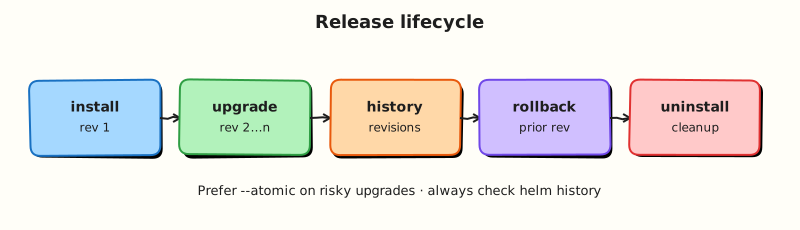
This topic’s control points and relationships are shown below.
Theory
What it is
A release is a named installation of a chart into a Kubernetes namespace. Each successful (or attempted) change creates a revision in Helm’s history. Lifecycle operations are the verbs you use daily: install, upgrade, rollback, and uninstall. Flags such as --wait, --timeout, and --atomic control how strictly Helm treats success.
| Command | Role |
|---|---|
helm install / upgrade --install | Create or converge a release |
helm history | List revisions |
helm rollback | Re-apply a prior revision’s manifests |
helm uninstall | Remove the release’s resources |
helm status | Inspect current release state |
Why it matters
Release discipline is how you change production safely. Rollback is only useful if history exists and upgrades were applied as releases (not ad-hoc kubectl apply beside Helm). Flags like --atomic turn a failed upgrade into an automatic rollback — vital in CI. In GitOps setups the controller owns these operations; understanding them still helps you debug stuck Applications and failed HelmReleases.
How it works
helm upgrade --install NAME CHARTrenders manifests and applies a three-way strategic merge against the previous release (Helm 3).- A new revision is stored in-cluster.
- With
--wait, Helm blocks until Deployments/Pods (and related resources) report ready, or until--timeout. - With
--atomic, a failure triggers rollback to the last successful revision. helm rollback NAME REVISIONre-applies that revision’s recorded manifests.helm uninstalldeletes resources tracked by the release (CRDs and some resources may be retained depending on annotations/policy).
Optional helm-diff compares the current live/release state to a proposed upgrade without applying it — excellent for PR review when combined with helm template.
Key concepts and comparisons
| Concern | Prefer |
|---|---|
| First deploy or converge | helm upgrade --install |
| Fail closed in CI | --atomic --wait |
| Inspect before apply | helm template / helm diff upgrade |
| Recover bad upgrade | helm history then helm rollback |
Releases are namespaced by default (Helm 3). The same release name can exist in different namespaces independently.
Common pitfalls
- Running
kubectl applyon the same objects Helm manages — ownership conflicts and surprise diffs. - Expecting rollback to undo cluster data (PVC contents, external DNS) — it restores manifests, not databases.
- Omitting
--waitand assuming the release is healthy because the CLI exited zero. - Losing history by deleting the namespace or release Secrets/ConfigMaps carelessly.
Hands-on Lab
Objective
Install a release, upgrade it with new values to create revision 2, inspect helm history and helm status, then roll back to revision 1 with evidence files.
Prerequisites
- Helm 3 CLI and kubectl configured for a lab cluster (kind or minikube)
- Ability to create namespaces
Lab environment
Workspace: ~/rebash-helm/module-07
Helm 3 against kind/minikube; release namespace rebash-helm-m07.
Real-world scenario
Platform ops must deploy version 1 of an internal web chart, scale it for a traffic bump, then roll back when the new replica count causes resource pressure. You need revision history before you can roll back safely.
Step-by-step tasks
Task 1 – Create a minimal lifecycle chart
Create lifecycle-chart/Chart.yaml:
apiVersion: v2
name: lifecycle-chart
description: Lab chart for release lifecycle practice
type: application
version: 0.1.0
appVersion: "1.27.4"
Create lifecycle-chart/values.yaml:
Create lifecycle-chart/templates/deployment.yaml:
apiVersion: apps/v1
kind: Deployment
metadata:
  name: {{ .Release.Name }}-web
  labels:
    app.kubernetes.io/name: {{ .Chart.Name }}
    app.kubernetes.io/instance: {{ .Release.Name }}
spec:
  replicas: {{ .Values.replicaCount }}
  selector:
    matchLabels:
      app.kubernetes.io/name: {{ .Chart.Name }}
      app.kubernetes.io/instance: {{ .Release.Name }}
  template:
    metadata:
      labels:
        app.kubernetes.io/name: {{ .Chart.Name }}
        app.kubernetes.io/instance: {{ .Release.Name }}
    spec:
      containers:
        - name: web
          image: "{{ .Values.image.repository }}:{{ .Values.image.tag }}"
          ports:
            - containerPort: 80
Create lifecycle-chart/templates/service.yaml:
apiVersion: v1
kind: Service
metadata:
  name: {{ .Release.Name }}-web
spec:
  selector:
    app.kubernetes.io/name: {{ .Chart.Name }}
    app.kubernetes.io/instance: {{ .Release.Name }}
  ports:
    - port: {{ .Values.service.port }}
      targetPort: 80
Lint and render:
cd ~/rebash-helm/module-07
helm lint ./lifecycle-chart | tee lint.txt
helm template lifecycle-demo ./lifecycle-chart | grep -E '^kind:' | sort | uniq -c | tee kinds.txt
grep -q '0 chart(s) failed' lint.txt
Expected output
lint.txt reports zero failures; kinds.txt lists Deployment and Service.
Task 2 – Install revision 1
Install the first revision and capture status evidence.
kubectl create namespace rebash-helm-m07 --dry-run=client -o yaml | kubectl apply -f -
helm upgrade --install lifecycle-demo ./lifecycle-chart \
  -n rebash-helm-m07 --wait --timeout 3m | tee install-rev1.txt
helm status lifecycle-demo -n rebash-helm-m07 | tee status-rev1.txt
kubectl get deploy lifecycle-demo-web -n rebash-helm-m07 -o jsonpath='{.spec.replicas}{"\n"}' | tee replicas-rev1.txt
Expected output
status-rev1.txt shows STATUS: deployed; replicas-rev1.txt contains 1.
Task 3 – Upgrade to revision 2 with values override
Create rev2-values.yaml:
Upgrade and prove the replica change:
cd ~/rebash-helm/module-07
helm template lifecycle-demo ./lifecycle-chart -f rev2-values.yaml | grep 'replicas:' | head -1 | tee render-rev2.txt
helm upgrade lifecycle-demo ./lifecycle-chart \
  -n rebash-helm-m07 -f rev2-values.yaml --wait --timeout 3m | tee upgrade-rev2.txt
helm history lifecycle-demo -n rebash-helm-m07 | tee history.txt
kubectl get deploy lifecycle-demo-web -n rebash-helm-m07 -o jsonpath='{.spec.replicas}{"\n"}' | tee replicas-rev2.txt
grep -q ' 2 ' history.txt
Expected output
history.txt lists revisions 1 and 2; replicas-rev2.txt contains 3.
Task 4 – Roll back to revision 1
Roll back and confirm the prior replica count returns.
helm rollback lifecycle-demo 1 -n rebash-helm-m07 --wait --timeout 3m | tee rollback.txt
helm history lifecycle-demo -n rebash-helm-m07 | tee history-after-rollback.txt
helm status lifecycle-demo -n rebash-helm-m07 | tee status-after-rollback.txt
kubectl get deploy lifecycle-demo-web -n rebash-helm-m07 -o jsonpath='{.spec.replicas}{"\n"}' | tee replicas-after-rollback.txt
grep -q 'superseded' history-after-rollback.txt
grep -q '^1$' replicas-after-rollback.txt
Expected output
history-after-rollback.txt shows revision 3 as deployed (rollback revision); replicas-after-rollback.txt contains 1.
Validation steps
-
helm lintpasses with zero failures - Revision 1 installed and
helm statusshows deployed - Upgrade created revision 2 with three replicas
- Rollback restored one replica; history lists all revisions
Common errors and fixes
| Error | Cause | Fix |
|---|---|---|
Error: release: not found | Wrong release name or namespace | Confirm -n rebash-helm-m07 and release name lifecycle-demo |
| Rollback to revision 0 | Invalid revision number | Run helm history; roll back to an existing revision (1 or 2) |
context deadline exceeded | Pods not Ready within timeout | kubectl describe pod -n rebash-helm-m07; increase --timeout or fix image pull |
| Revision missing after rollback | Namespace deleted | Never delete the namespace before capturing history evidence |
Challenge exercise
Create bad-image-values.yaml with tag does-not-exist:9.9.9. Attempt an upgrade with --atomic --wait --timeout 2m and capture that the release returns to the last good revision:
cd ~/rebash-helm/module-07
helm upgrade lifecycle-demo ./lifecycle-chart \
  -n rebash-helm-m07 -f bad-image-values.yaml --atomic --wait --timeout 2m 2>&1 | tee atomic-fail.txt || true
helm history lifecycle-demo -n rebash-helm-m07 | tee history-after-atomic.txt
helm status lifecycle-demo -n rebash-helm-m07 | grep -E 'STATUS|REVISION' | tee status-after-atomic.txt
Expected output
Upgrade fails; release status remains deployed on the last successful revision.
Learning outcomes
- Installed and upgraded a Helm release with values overrides
- Read revision history and release status as operational evidence
- Rolled back to a prior revision and verified workload state
- Understood how
--atomicprevents leaving a failed upgrade as the active revision
Cleanup
helm uninstall lifecycle-demo -n rebash-helm-m07 2>/dev/null || true
kubectl delete namespace rebash-helm-m07 --ignore-not-found
Validation
- Lab commands run under
~/rebash-helm/module-07/ - You captured
helm historyandhelm statusevidence across upgrade and rollback - You can explain when
--atomicauto-rolls back a failed upgrade - You can describe one production failure mode for release lifecycle operations
Code Walkthrough
Production practice for Helm Releases and Lifecycle always combines:
- Inspect before you change (status, plan, logs, dry-run)
- Prefer reversible, documented changes (Git, IaC, drop-ins, version pins)
- Capture evidence (command output, pipeline logs) for handovers
- Prefer current tools and APIs over legacy shortcuts
- Least privilege — escalate credentials only when required
Keep runbooks short enough to follow under pressure. Automate checks; keep humans for judgement.
Security Considerations
- Treat credentials and tokens for helm as privileged — never commit them
- Prefer short-lived auth (OIDC, roles, SSO) over long-lived keys
- Validate blast radius before apply/deploy/delete operations
- Restrict who can approve production changes
- Collect audit logs; limit who can read sensitive traces
Common Mistakes
Running kubectl apply on the same objects Helm manages — ownership conflicts and surpris
Validate assumptions against the Theory section and official docs before changing production.
Expecting rollback to undo cluster data (PVC contents, external DNS) — it restores manifes
Lab shortcuts (open security groups, admin roles, skip approvals) must not ship unchanged.
Changing production without a rollback path
Always know how to revert (previous artefact, prior release, state rollback, DNS failback).
Best Practices
- Encode Helm Releases and Lifecycle changes as code and review them in pull requests
- Pin versions (images, modules, actions, provider plugins)
- Separate environments with clear promotion gates
- Alert on symptoms with runbooks attached
- Destroy lab resources; tag everything with owner and expiry where possible
Troubleshooting
| Symptom | Likely cause | Fix |
|---|---|---|
| Auth / permission denied | Wrong identity, policy, or scope | Check caller identity, roles, and least-privilege policies |
| Timeout / no route | Network, DNS, security group, or endpoint | Trace path, DNS, and allow-lists before retrying |
| Drift / unexpected plan | Manual change or wrong state/workspace | Reconcile desired vs actual; avoid click-ops on managed resources |
| Pipeline/job red | Flaky step, cache, or missing secret | Read failing step logs; bisect recent workflow/config changes |
| Cost spike | Idle load balancer, NAT, oversized compute | Inventory billable resources; stop/delete labs promptly |
Summary
Helm Releases and Lifecycle is essential for Cloud and DevOps engineers working with helm. Practise the lab until the inspection and change path is muscle memory, then continue the track.
Interview Questions
- What does a release revision represent?
- When would you
helm rollbackversus fix-forward with another upgrade? - What does
helm uninstallremove, and what might remain? - How can hooks complicate upgrades and rollbacks?
- Why is
--atomicuseful on production upgrades?
Sample answer — question 2
Rollback restores a previous revision’s manifest set. Fix-forward is better when rollback would reintroduce a known bug or when data migrations only go one way.
Sample answer — question 4
Hooks can create Jobs that are not fully reverted by rollback, leaving incomplete migrations. Design hooks carefully and document manual cleanup steps.