Production Helm Practices
Overview
Apply SemVer to charts, structure an enterprise chart repo, and complete a production readiness checklist.
Production charts are boring: small templates, documented values, pinned deps, OCI publish, CI lint/template, GitOps deploy. Treat chart version bumps as release engineering.
This is a core tutorial in Module 11 · Production Helm of the REBASH Academy Helm for Kubernetes Engineers series — written for Cloud, DevOps, Platform, and SRE engineers.
Prerequisites
- Modules 7–10
Learning Objectives
By the end of this tutorial, you will be able to:
- Version charts with SemVer
- Separate library vs app charts
- Document values (README / values schema)
- Complete an excellence checklist
Architecture
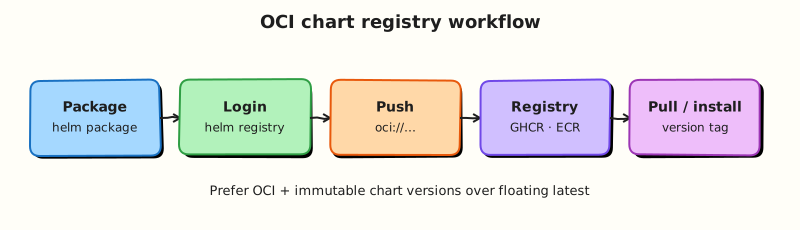
This topic’s control points and relationships are shown below.
Theory
What it is
Production Helm practices are the engineering habits that make charts operable at scale: Semantic Versioning (SemVer) for chart packages, clear ownership of library vs application charts, documented values (README and optionally values.schema.json), reproducible publishes to OCI, CI gates (lint + template), and GitOps deploy with tested rollback. Production charts are deliberately boring — small templates, explicit defaults, pinned dependencies.
| Practice | Outcome |
|---|---|
SemVer chart version | Consumers know when upgrades are breaking |
| Documented values | Teams configure without reading every template |
| OCI publish | Immutable artefacts beside images |
| CI lint/template | Broken charts never merge |
| Rollback drill | Confidence when upgrades fail |
Why it matters
A clever template that only one author understands becomes an outage multiplier. Enterprises need charts that pass review, publish cleanly, and upgrade safely across dozens of services. Treating chart releases as release engineering — changelog, version bump, artefact publish — aligns Helm with how you already ship container images.
How it works
A practical production loop:
- Change templates/values in a PR; CI runs
helm lintandhelm templatefor each env values file. - Bump
versioninChart.yamlusing SemVer (MAJOR for breaking values/template contracts, MINOR for compatible features, PATCH for fixes). - Update
appVersionwhen the bundled application release changes (informational clarity). helm packageand push to an OCI registry with an immutable reference.- GitOps Applications consume the new chart version / digest and env values.
- Verify rollback path in staging before promoting.
Structure repos so library charts (shared helpers) version independently from application charts. Keep values schemas honest — required keys fail fast in CI rather than at apply time.
Key concepts and comparisons
| Chart type | Contains | Consumers |
|---|---|---|
| Application | Workload manifests | GitOps apps / product teams |
| Library | Helpers only | Other charts via dependencies |
| Umbrella | Mostly dependencies | Platform compositions (use sparingly) |
Excellence means you can answer: What changed in 1.4.0? Which values are required? How do we roll back?
Common pitfalls
- Bumping only
appVersionwhen templates changed — consumers track chartversion. - One mega-chart for every microservice — prefer composeable units.
- Undocumented required values discovered only in production.
- Publishing mutable
latestchart tags in OCI for production promotion.
Hands-on Lab
Objective
Publish a production-ready chart with SemVer versioning, standard label helpers, PodDisruptionBudget and resource defaults, then package it into a .tgz artefact with evidence.
Prerequisites
- Helm 3 CLI
- kubectl optional (packaging is offline)
Lab environment
Workspace: ~/rebash-helm/module-11
Offline packaging; optional install namespace rebash-helm-m11.
Real-world scenario
Release engineering requires every chart bump to follow SemVer, carry consistent Kubernetes labels, protect availability with a PDB, and ship as an immutable .tgz consumed by GitOps or OCI publish pipelines.
Step-by-step tasks
Task 1 – Create a SemVer chart with helpers and PDB
Create prod-chart/Chart.yaml:
apiVersion: v2
name: prod-chart
description: Production baseline chart for REBASH lab
type: application
version: 1.0.0
appVersion: "1.27.4"
Create prod-chart/values.yaml:
replicaCount: 2
image:
  repository: nginx
  tag: "1.27.4-alpine"
resources:
  requests:
    cpu: 50m
    memory: 64Mi
  limits:
    cpu: 200m
    memory: 128Mi
podDisruptionBudget:
  enabled: true
  minAvailable: 1
Create prod-chart/templates/_helpers.tpl:
{{- define "prod-chart.name" -}}
{{- default .Chart.Name .Values.nameOverride | trunc 63 | trimSuffix "-" -}}
{{- end -}}

{{- define "prod-chart.labels" -}}
helm.sh/chart: {{ .Chart.Name }}-{{ .Chart.Version }}
app.kubernetes.io/name: {{ include "prod-chart.name" . }}
app.kubernetes.io/instance: {{ .Release.Name }}
app.kubernetes.io/version: {{ .Chart.AppVersion | quote }}
app.kubernetes.io/managed-by: {{ .Release.Service }}
{{- end -}}
Create prod-chart/templates/deployment.yaml:
apiVersion: apps/v1
kind: Deployment
metadata:
  name: {{ .Release.Name }}-web
  labels:
    {{- include "prod-chart.labels" . | nindent 4 }}
spec:
  replicas: {{ .Values.replicaCount }}
  selector:
    matchLabels:
      app.kubernetes.io/name: {{ include "prod-chart.name" . }}
      app.kubernetes.io/instance: {{ .Release.Name }}
  template:
    metadata:
      labels:
        {{- include "prod-chart.labels" . | nindent 8 }}
    spec:
      containers:
        - name: web
          image: "{{ .Values.image.repository }}:{{ .Values.image.tag }}"
          resources:
            {{- toYaml .Values.resources | nindent 12 }}
          ports:
            - containerPort: 80
Create prod-chart/templates/pdb.yaml:
{{- if .Values.podDisruptionBudget.enabled }}
apiVersion: policy/v1
kind: PodDisruptionBudget
metadata:
  name: {{ .Release.Name }}-web
  labels:
    {{- include "prod-chart.labels" . | nindent 4 }}
spec:
  minAvailable: {{ .Values.podDisruptionBudget.minAvailable }}
  selector:
    matchLabels:
      app.kubernetes.io/name: {{ include "prod-chart.name" . }}
      app.kubernetes.io/instance: {{ .Release.Name }}
{{- end }}
Lint and prove labels, resources, and PDB render:
cd ~/rebash-helm/module-11
helm lint ./prod-chart | tee lint.txt
helm template prod-demo ./prod-chart 2>&1 | tee render.txt
grep -q 'app.kubernetes.io/managed-by: Helm' render.txt
grep -q 'kind: PodDisruptionBudget' render.txt
grep -q 'minAvailable: 1' render.txt
grep -q 'cpu: 50m' render.txt
grep -q '0 chart(s) failed' lint.txt
Expected output
Render includes standard labels, resource requests/limits, and a PDB with minAvailable: 1.
Task 2 – Bump version and package the chart
Create prod-chart/Chart.yaml version bump — update the version field to 1.1.0:
apiVersion: v2
name: prod-chart
description: Production baseline chart for REBASH lab
type: application
version: 1.1.0
appVersion: "1.27.4"
Package and capture artefact evidence:
cd ~/rebash-helm/module-11
helm package ./prod-chart | tee package.txt
ls -1 prod-chart-*.tgz | tee package-list.txt
tar -tzf prod-chart-1.1.0.tgz | tee package-contents.txt
grep -q 'Chart.yaml' package-contents.txt
grep -q 'prod-chart-1.1.0.tgz' package-list.txt
Expected output
package.txt reports packaged path; prod-chart-1.1.0.tgz exists and contains Chart.yaml and templates.
Task 3 – Install from the packaged chart (optional)
Install from the tarball to prove consumers can deploy the artefact:
kubectl create namespace rebash-helm-m11 --dry-run=client -o yaml | kubectl apply -f -
helm upgrade --install prod-demo prod-chart-1.1.0.tgz \
  -n rebash-helm-m11 --wait --timeout 3m | tee install.txt
helm list -n rebash-helm-m11 | tee list.txt
kubectl get pdb -n rebash-helm-m11 | tee pdb.txt
grep -q 'prod-demo' list.txt
grep -q 'prod-demo-web' pdb.txt
Expected output
Release installs from .tgz; PDB exists in the namespace.
Validation steps
-
Chart.yamluses SemVer (1.0.0then1.1.0) - Rendered manifests include standard
app.kubernetes.io/*labels - PodDisruptionBudget and resource defaults appear in template output
-
helm packageproducesprod-chart-1.1.0.tgzwith expected contents
Common errors and fixes
| Error | Cause | Fix |
|---|---|---|
| PDB not created | podDisruptionBudget.enabled: false | Enable in values; ensure selector labels match Pod template |
| Package name mismatch | Forgot to bump version in Chart.yaml | Edit Chart.yaml; re-run helm package |
| Lint warning on icon | Missing icon field | Add icon URL or accept INFO-level lint hints |
| Install from tgz fails | Wrong path or corrupt archive | Confirm prod-chart-1.1.0.tgz in current directory |
Challenge exercise
Add a values.schema.json requiring replicaCount and prove lint catches a missing key when you pass an empty values file:
Create prod-chart/values.schema.json:
{
  "$schema": "https://json-schema.org/draft-07/schema#",
  "type": "object",
  "required": ["replicaCount"],
  "properties": {
    "replicaCount": { "type": "integer", "minimum": 1 }
  }
}
cd ~/rebash-helm/module-11
helm lint ./prod-chart --values /dev/null 2>&1 | tee schema-lint.txt || true
helm lint ./prod-chart | tee schema-lint-ok.txt
grep -q '0 chart(s) failed' schema-lint-ok.txt
Expected output
Lint with valid defaults passes; invalid/missing values may produce schema warnings depending on Helm version.
Learning outcomes
- Versioned charts with SemVer and documented
appVersion - Applied reusable label helpers and production resource defaults
- Protected workloads with a PodDisruptionBudget template
- Packaged and verified an immutable
.tgzrelease artefact
Cleanup
helm uninstall prod-demo -n rebash-helm-m11 2>/dev/null || true
kubectl delete namespace rebash-helm-m11 --ignore-not-found
rm -f ~/rebash-helm/module-11/prod-chart-*.tgz
Validation
- Lab commands run under
~/rebash-helm/module-11/ - Chart uses SemVer and packages to a verifiable
.tgz - Rendered manifests include labels, resources, and PDB
- You can describe one production failure mode for production chart publishing
Code Walkthrough
Production practice for Production Helm Practices always combines:
- Inspect before you change (status, plan, logs, dry-run)
- Prefer reversible, documented changes (Git, IaC, drop-ins, version pins)
- Capture evidence (command output, pipeline logs) for handovers
- Prefer current tools and APIs over legacy shortcuts
- Least privilege — escalate credentials only when required
Keep runbooks short enough to follow under pressure. Automate checks; keep humans for judgement.
Security Considerations
- Treat credentials and tokens for helm as privileged — never commit them
- Prefer short-lived auth (OIDC, roles, SSO) over long-lived keys
- Validate blast radius before apply/deploy/delete operations
- Restrict who can approve production changes
- Collect audit logs; limit who can read sensitive traces
Common Mistakes
Bumping only appVersion when templates changed — consumers track chart version.
Validate assumptions against the Theory section and official docs before changing production.
One mega-chart for every microservice — prefer composeable units.
Lab shortcuts (open security groups, admin roles, skip approvals) must not ship unchanged.
Changing production without a rollback path
Always know how to revert (previous artefact, prior release, state rollback, DNS failback).
Best Practices
- Encode Production Helm Practices changes as code and review them in pull requests
- Pin versions (images, modules, actions, provider plugins)
- Separate environments with clear promotion gates
- Alert on symptoms with runbooks attached
- Destroy lab resources; tag everything with owner and expiry where possible
Troubleshooting
| Symptom | Likely cause | Fix |
|---|---|---|
| Auth / permission denied | Wrong identity, policy, or scope | Check caller identity, roles, and least-privilege policies |
| Timeout / no route | Network, DNS, security group, or endpoint | Trace path, DNS, and allow-lists before retrying |
| Drift / unexpected plan | Manual change or wrong state/workspace | Reconcile desired vs actual; avoid click-ops on managed resources |
| Pipeline/job red | Flaky step, cache, or missing secret | Read failing step logs; bisect recent workflow/config changes |
| Cost spike | Idle load balancer, NAT, oversized compute | Inventory billable resources; stop/delete labs promptly |
Summary
Production Helm Practices is essential for Cloud and DevOps engineers working with helm. Practise the lab until the inspection and change path is muscle memory, then continue the track.
Interview Questions
- Which Helm flags help safer production upgrades?
- How should chart and image versions be pinned?
- What belongs in a release checklist before upgrading prod?
- How do you limit blast radius of a bad chart upgrade?
- Why keep values structured per environment rather than one mega file?
Sample answer — question 2
--atomic, timeouts, and staged environments help upgrades fail cleanly. Pin chart version and image tags, review helm diff/template output, and ensure PDBs exist for the app.
Sample answer — question 4
Use canary namespaces, smaller replica changes, and fast rollback. Separate prod pipelines with approvals so a bad values edit cannot silently ship.