Troubleshooting Helm
Overview
Diagnose common Helm failures with a fixed order: lint → template → dry-run → release status → Kubernetes events.
Most “Helm is broken” tickets are template nil pointers, values typos, or cluster admission errors. Separate render failures from apply failures.
This is a core tutorial in Module 12 · Troubleshooting of the REBASH Academy Helm for Kubernetes Engineers series — written for Cloud, DevOps, Platform, and SRE engineers.
Prerequisites
Learning Objectives
By the end of this tutorial, you will be able to:
- Fix template nil / type errors
- Read
helm status/helm history - Recover failed upgrades (
--atomic, rollback) - Debug dependency / repo fetch issues
Architecture
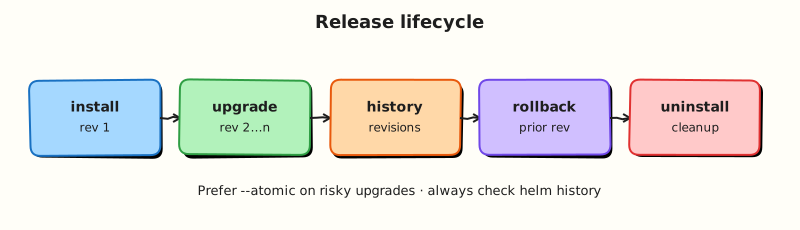
This topic’s control points and relationships are shown below.
Theory
What it is
Troubleshooting Helm is a disciplined split between render failures (templates/values/dependencies) and apply failures (Kubernetes API, RBAC, admission, runtime health). Most tickets that say “Helm is broken” are nil pointer template errors, mistyped values keys, repo auth problems, or cluster Events after a successful render. Your job is to locate which layer failed before changing random flags.
| Symptom | First checks |
|---|---|
| Template error | helm lint, helm template --debug, nil .Values path |
| Install pending/failed | helm status, kubectl get events, hooks |
| Upgrade stuck | --wait timeout, image pull, PDB, probes |
| Rollback fails | helm history, resource ownership, empty revisions |
| Dep download fail | repo/OCI URL, credentials, version constraint |
Why it matters
Mean time to recovery depends on not confusing a bad chart with a bad cluster. Platform on-call needs a fixed order that junior engineers can follow under pressure. The same playbook feeds CI: catch render errors before GitOps ever sees them, and keep --atomic upgrades so failed releases do not leave half-applied state without a path back.
How it works
Use this order every time:
- Lint —
helm lint ./chart. - Render —
helm template NAME ./chart -f values-<env>.yaml(add--debugon failure). - Authz —
kubectl auth can-ifor the deploy identity on required verbs/resources. - Converge carefully —
helm upgrade --install --atomic --waitin non-prod first. - Inspect cluster —
helm status,kubectl describe, Events on failing objects. - History —
helm history; rollback to a known good revision if apply succeeded but behaviour is wrong. - Dependencies —
helm dependency build/ check repo login if fetch fails.
Separate questions: Did YAML render? Did the API accept it? Did Pods become Ready?
Key concepts and comparisons
| Failure class | Looks like | Not fixed by |
|---|---|---|
| Render | CLI error before resources change | Restarting nodes |
| Apply / admission | API reject, webhook errors | Editing unrelated values |
| Runtime | Release deployed, Pods crash | Another helm template alone |
| Fetch | Cannot download chart/deps | Rollback of a different release |
Common pitfalls
- Jumping to
helm rollbackwhen the chart never rendered — there may be nothing valid to roll back to. - Ignoring
--previouscontainer logs and Events while blaming Helm. - Fixing production with
kubectl editon Helm-owned objects (drift returns on next reconcile). - Assuming
--forceor deleting release Secrets is a routine fix — both are last resorts with data-loss risk.
Hands-on Lab
Objective
Diagnose a broken template, fix the render error, trigger a failed upgrade with a bad image, then recover with helm history and helm rollback evidence.
Prerequisites
- Helm 3 CLI and kubectl configured for a lab cluster
- Completion of Helm Releases and Lifecycle lab
Lab environment
Workspace: ~/rebash-helm/module-12
Helm 3 against kind/minikube; release namespace rebash-helm-m12.
Real-world scenario
On-call receives “Helm upgrade failed.” You must decide whether the failure is render-time (bad template) or runtime (bad image). The playbook: lint → template → fix → install → failed upgrade → history → rollback.
Step-by-step tasks
Task 1 – Create a chart with an intentional template bug
Create triage-chart/Chart.yaml:
apiVersion: v2
name: triage-chart
description: Lab chart for Helm troubleshooting
type: application
version: 0.1.0
appVersion: "1.27.4"
Create triage-chart/values.yaml:
Create triage-chart/templates/deployment.yaml with a deliberate nil-pointer bug:
apiVersion: apps/v1
kind: Deployment
metadata:
  name: {{ .Release.Name }}-web
spec:
  replicas: {{ .Values.replicaCount }}
  selector:
    matchLabels:
      app: {{ .Release.Name }}
  template:
    metadata:
      labels:
        app: {{ .Release.Name }}
    spec:
      containers:
        - name: web
          image: "{{ .Values.image.repository }}:{{ .Values.image.tag }}"
          env:
            - name: FEATURE_FLAG
              value: {{ .Values.feature.enabled | quote }}
          ports:
            - containerPort: 80
Capture the render failure (.Values.feature is undefined):
cd ~/rebash-helm/module-12
helm lint ./triage-chart 2>&1 | tee lint-broken.txt || true
helm template triage-demo ./triage-chart --debug 2>&1 | tee template-broken.txt || true
grep -qi 'nil pointer\|error' template-broken.txt
Expected output
Template fails with a nil pointer or similar error referencing .Values.feature.
Task 2 – Fix the template and prove clean render
Add defaults to triage-chart/values.yaml:
Re-run lint and template:
cd ~/rebash-helm/module-12
helm lint ./triage-chart | tee lint-fixed.txt
helm template triage-demo ./triage-chart | grep -E '^kind:' | tee kinds-fixed.txt
grep -q '0 chart(s) failed' lint-fixed.txt
grep -q 'Deployment' kinds-fixed.txt
Expected output
Lint passes; template renders a Deployment without errors.
Task 3 – Install, fail an upgrade, then roll back
Install the good release, attempt a bad-image upgrade, inspect history, and roll back.
Create bad-image-values.yaml:
replicaCount: 1
image:
  repository: nginx
  tag: "does-not-exist:9.9.9"
feature:
  enabled: false
Run the failed-upgrade drill:
kubectl create namespace rebash-helm-m12 --dry-run=client -o yaml | kubectl apply -f -
helm upgrade --install triage-demo ./triage-chart \
  -n rebash-helm-m12 --wait --timeout 3m | tee install-good.txt
helm upgrade triage-demo ./triage-chart \
  -n rebash-helm-m12 -f bad-image-values.yaml --wait --timeout 2m 2>&1 | tee upgrade-bad.txt || true
helm status triage-demo -n rebash-helm-m12 | tee status-failed.txt
helm history triage-demo -n rebash-helm-m12 | tee history-failed.txt
kubectl get pods -n rebash-helm-m12 | tee pods-failed.txt
grep -qi 'ImagePull\|ErrImage\|failed' upgrade-bad.txt || grep -qi 'ImagePull' pods-failed.txt
Roll back to the last good revision:
helm rollback triage-demo 1 -n rebash-helm-m12 --wait --timeout 3m | tee rollback.txt
helm history triage-demo -n rebash-helm-m12 | tee history-after-rollback.txt
helm status triage-demo -n rebash-helm-m12 | tee status-after-rollback.txt
kubectl rollout status deployment/triage-demo-web -n rebash-helm-m12 --timeout=120s | tee rollout-ok.txt
grep -q 'deployed' status-after-rollback.txt
grep -q 'superseded\|deployed' history-after-rollback.txt
Expected output
Bad upgrade fails or leaves release in failed/pending state; rollback restores deployed status and Ready pods.
Validation steps
- Broken template fails
helm template --debugwith a clear error - Fixed chart passes lint and renders cleanly
- Bad-image upgrade produces failure evidence in status/history/pod list
- Rollback returns release to deployed with working pods
Common errors and fixes
| Error | Cause | Fix |
|---|---|---|
| Nil pointer evaluating interface | Missing nested values key | Add defaults in values.yaml or use default/dig in templates |
| Rollback when nothing rendered | No successful revision exists | Fix template first; install a good revision before rollback drills |
ImagePullBackOff after rollback | Rollback target also bad | Roll back to a revision known good in helm history |
| Editing Helm-owned objects with kubectl | Drift on next upgrade | Fix chart/values; upgrade or rollback through Helm |
Challenge exercise
Repeat the bad-image upgrade using --atomic --wait and capture that Helm auto-rolls back without manual helm rollback:
cd ~/rebash-helm/module-12
helm upgrade triage-demo ./triage-chart \
  -n rebash-helm-m12 -f bad-image-values.yaml --atomic --wait --timeout 2m 2>&1 | tee atomic-fail.txt || true
helm status triage-demo -n rebash-helm-m12 | grep -E 'STATUS|REVISION' | tee status-atomic.txt
helm history triage-demo -n rebash-helm-m12 | tee history-atomic.txt
grep -q 'deployed' status-atomic.txt
Expected output
Atomic upgrade fails; release remains on the last deployed revision without manual rollback.
Learning outcomes
- Separated template render failures from runtime apply failures
- Used lint and debug template output to locate nil-pointer bugs
- Inspected
helm statusandhelm historyduring a failed upgrade - Recovered a release with rollback and verified pod readiness
Cleanup
helm uninstall triage-demo -n rebash-helm-m12 2>/dev/null || true
kubectl delete namespace rebash-helm-m12 --ignore-not-found
Validation
- Lab commands run under
~/rebash-helm/module-12/ - You fixed a template nil-pointer and re-ran lint/template successfully
- You captured failed-upgrade and rollback evidence from history/status
- You can describe one production failure mode for Helm troubleshooting
Code Walkthrough
Production practice for Troubleshooting Helm always combines:
- Inspect before you change (status, plan, logs, dry-run)
- Prefer reversible, documented changes (Git, IaC, drop-ins, version pins)
- Capture evidence (command output, pipeline logs) for handovers
- Prefer current tools and APIs over legacy shortcuts
- Least privilege — escalate credentials only when required
Keep runbooks short enough to follow under pressure. Automate checks; keep humans for judgement.
Security Considerations
- Treat credentials and tokens for helm as privileged — never commit them
- Prefer short-lived auth (OIDC, roles, SSO) over long-lived keys
- Validate blast radius before apply/deploy/delete operations
- Restrict who can approve production changes
- Collect audit logs; limit who can read sensitive traces
Common Mistakes
Jumping to helm rollback when the chart never rendered — there may be nothing valid to r
Validate assumptions against the Theory section and official docs before changing production.
Ignoring --previous container logs and Events while blaming Helm.
Lab shortcuts (open security groups, admin roles, skip approvals) must not ship unchanged.
Changing production without a rollback path
Always know how to revert (previous artefact, prior release, state rollback, DNS failback).
Best Practices
- Encode Troubleshooting Helm changes as code and review them in pull requests
- Pin versions (images, modules, actions, provider plugins)
- Separate environments with clear promotion gates
- Alert on symptoms with runbooks attached
- Destroy lab resources; tag everything with owner and expiry where possible
Troubleshooting
| Symptom | Likely cause | Fix |
|---|---|---|
| Auth / permission denied | Wrong identity, policy, or scope | Check caller identity, roles, and least-privilege policies |
| Timeout / no route | Network, DNS, security group, or endpoint | Trace path, DNS, and allow-lists before retrying |
| Drift / unexpected plan | Manual change or wrong state/workspace | Reconcile desired vs actual; avoid click-ops on managed resources |
| Pipeline/job red | Flaky step, cache, or missing secret | Read failing step logs; bisect recent workflow/config changes |
| Cost spike | Idle load balancer, NAT, oversized compute | Inventory billable resources; stop/delete labs promptly |
Summary
You can create, release, secure, GitOps-deploy, and troubleshoot production Helm charts end to end.
Interview Questions
- What commands start Helm release triage?
- How do you distinguish a template failure from a Kubernetes runtime failure?
- What does a pending-install/pending-upgrade state often indicate?
- How can resources with
helm.sh/resource-policy: keepsurprise you during uninstall? - When should you use
helm rollbackduring an incident?
Sample answer — question 2
Template failures happen at render time; runtime failures show after objects apply (ImagePullBackOff, CrashLoop). Use helm status, history, and kubectl describe/logs together.
Sample answer — question 4
Resources marked to keep remain after uninstall and can block reinstalls or leave credentials behind. Know which objects persist and delete them deliberately when appropriate.