Helm Templates and Go Templating
Overview
Author templates that use values, if/range, and named helpers — then render with helm template to verify output.
Helm uses the Go template language plus Sprig-like functions. Keep logic thin; push complexity into values schema and helpers.
This is a core tutorial in Module 4 · Templates of the REBASH Academy Helm for Kubernetes Engineers series — written for Cloud, DevOps, Platform, and SRE engineers.
Prerequisites
Learning Objectives
By the end of this tutorial, you will be able to:
- Use
.Values,.Release,.Chart - Apply pipelines and common functions
- Write
if/range - Define and
includenamed templates
Architecture
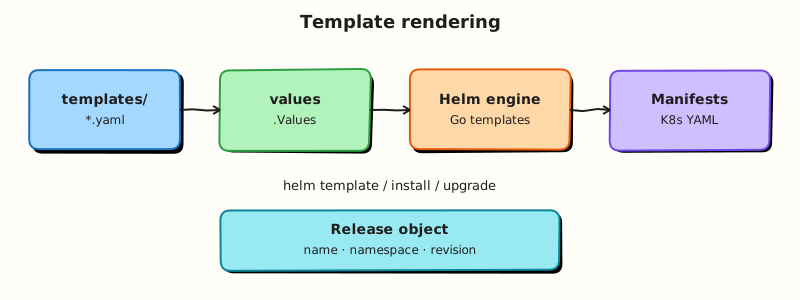
This topic’s control points and relationships are shown below.
Theory
What it is
Helm templates are Go templates plus a rich function library (Sprig-style helpers such as default, quote, toYaml, and nindent). Files under templates/ mix YAML structure with actions delimited by double braces. At render time Helm evaluates those actions against a root context (often written as a lone dot) that exposes objects such as .Values, .Release, and .Chart.
Core objects you will use constantly:
| Object | Typical fields | Role |
|---|---|---|
.Values | Your config tree | User-facing knobs |
.Release | Name, Namespace, Service | Instance identity |
.Chart | Name, Version, AppVersion | Package metadata |
.Files | chart file helpers | Embed non-template files |
.Capabilities | API versions | Gate resources by cluster APIs |
Why it matters
Templates are where parameterisation becomes real manifests. Weak templates produce silent misconfigurations (wrong labels, missing quotes, nil pointer panics) that only appear at deploy time. Strong templates stay thin: prefer clear values schemas and named helpers over deep nested logic. Reviewers should be able to predict output from values alone.
How it works
Helm walks template files, executes actions, and emits YAML documents separated by ---. Pipelines pass values through functions left to right. Conditionals (if / else) and loops (range) control optional blocks and repeated items. Named templates in _helpers.tpl are defined with define and reused with include — the usual place for standard labels and fully qualified names.
Example shape (not a full chart):
metadata:
  name: {{ include "mychart.fullname" . }}
  labels:
    {{- include "mychart.labels" . | nindent 4 }}
data:
  APP_ENV: {{ .Values.appEnv | quote }}
Always render locally with helm template (and lint) before installing. Whitespace-control dashes on template delimiters matter — stray newlines can break YAML indentation.
Key concepts and comparisons
- Pipelines compose functions:
default,required,toYaml,nindent,quote. includevstemplate:includereturns a string you can pipeline (preferred for helpers);templatewrites directly.- Logic budget: if you need complex branching for every environment, push more into values files or split charts — do not build a programming language inside YAML.
Common pitfalls
- Forgetting to
quotevalues that become labels or annotation strings. - Dereferencing a missing key (
nil pointer evaluating interface…) — usedefaultordig-style patterns carefully. - Incorrect
nindentlevels aftertoYaml, producing invalid YAML. - Putting executable business logic in templates that belongs in the application or in values schema validation.
Hands-on Lab
Objective
Author templates that use if, range, and include/define helpers, drive optional Ingress and extra environment variables from values, and prove conditionals with helm template.
Prerequisites
- Helm 3.x (
helm version) - kubectl optional for install step
- Writable workspace at
~/rebash-helm/module-04
Lab environment
Workspace: ~/rebash-helm/module-04 on your workstation.
Real-world scenario
Your chart must expose optional Ingress for production while staying minimal in dev, and inject a list of extra environment variables from values. Reviewers require rendered proof that toggling values adds or removes entire YAML documents.
Step-by-step tasks
Task 1 – Values schema with toggles and lists
Create rebash-tpl/Chart.yaml:
apiVersion: v2
name: rebash-tpl
description: Template features lab chart
type: application
version: 0.1.0
appVersion: "1.27"
Create rebash-tpl/values.yaml:
replicaCount: 1
image:
  repository: nginxinc/nginx-unprivileged
  tag: "1.27-alpine"
service:
  port: 8080
ingress:
  enabled: false
  host: tpl.example.com
extraEnv:
  - name: LOG_LEVEL
    value: info
  - name: FEATURE_X
    value: "off"
Task 2 – Helpers, Deployment with range, optional Ingress
Create rebash-tpl/templates/_helpers.tpl:
{{- define "rebash-tpl.name" -}}
{{- default .Chart.Name .Values.nameOverride | trunc 63 | trimSuffix "-" }}
{{- end }}

{{- define "rebash-tpl.fullname" -}}
{{- printf "%s-%s" .Release.Name .Chart.Name | trunc 63 | trimSuffix "-" }}
{{- end }}

{{- define "rebash-tpl.env" -}}
{{- range .Values.extraEnv }}
- name: {{ .name }}
  value: {{ .value | quote }}
{{- end }}
{{- end }}
Create rebash-tpl/templates/deployment.yaml:
apiVersion: apps/v1
kind: Deployment
metadata:
  name: {{ include "rebash-tpl.fullname" . }}
spec:
  replicas: {{ .Values.replicaCount }}
  selector:
    matchLabels:
      app: {{ include "rebash-tpl.name" . }}
  template:
    metadata:
      labels:
        app: {{ include "rebash-tpl.name" . }}
    spec:
      containers:
        - name: web
          image: "{{ .Values.image.repository }}:{{ .Values.image.tag }}"
          ports:
            - containerPort: {{ .Values.service.port }}
          env:
            {{- include "rebash-tpl.env" . | nindent 12 }}
Create rebash-tpl/templates/service.yaml:
apiVersion: v1
kind: Service
metadata:
  name: {{ include "rebash-tpl.fullname" . }}
spec:
  ports:
    - port: {{ .Values.service.port }}
      targetPort: {{ .Values.service.port }}
  selector:
    app: {{ include "rebash-tpl.name" . }}
Create rebash-tpl/templates/ingress.yaml:
{{- if .Values.ingress.enabled }}
apiVersion: networking.k8s.io/v1
kind: Ingress
metadata:
  name: {{ include "rebash-tpl.fullname" . }}
spec:
  rules:
    - host: {{ .Values.ingress.host | quote }}
      http:
        paths:
          - path: /
            pathType: Prefix
            backend:
              service:
                name: {{ include "rebash-tpl.fullname" . }}
                port:
                  number: {{ .Values.service.port }}
{{- end }}
Task 3 – Prove conditionals with template output
Create values-ingress.yaml:
ingress:
  enabled: true
  host: tpl.lab.example.com
extraEnv:
  - name: LOG_LEVEL
    value: debug
  - name: FEATURE_X
    value: "on"
cd ~/rebash-helm/module-04
helm lint rebash-tpl | tee lint-m04.txt
helm template tpl-off rebash-tpl --namespace rebash-helm-m04 | tee render-off-m04.yaml
helm template tpl-on rebash-tpl -f values-ingress.yaml --namespace rebash-helm-m04 | tee render-on-m04.yaml
grep -c 'kind: Ingress' render-off-m04.yaml | tee ingress-off-count-m04.txt
grep -c 'kind: Ingress' render-on-m04.yaml | tee ingress-on-count-m04.txt
grep 'value: debug' render-on-m04.yaml | tee env-debug-m04.txt
test "$(cat ingress-off-count-m04.txt)" -eq 0
test "$(cat ingress-on-count-m04.txt)" -eq 1
Expected output
Ingress absent when disabled (ingress-off-count-m04.txt is 0); Ingress present when enabled (ingress-on-count-m04.txt is 1); env-debug-m04.txt shows LOG_LEVEL overridden to debug.
Task 4 – Optional cluster install (ingress disabled)
Create namespace.yaml:
cd ~/rebash-helm/module-04
if command -v helm >/dev/null && kubectl cluster-info >/dev/null 2>&1; then
  kubectl apply -f namespace.yaml
  helm upgrade --install tpl-off rebash-tpl -n rebash-helm-m04 --wait --timeout 120s | tee install-m04.txt
  kubectl get deploy,svc -n rebash-helm-m04 | tee objects-m04.txt
else
  echo "Skipping install — cluster unavailable" | tee install-m04.txt
fi
Expected output
Deployment and Service Ready in rebash-helm-m04; no Ingress object when defaults apply.
Validation steps
-
include/definehelpers render env vars from a list - Ingress omitted when
ingress.enabled: false - Ingress rendered when override file enables it
-
helm lintpasses without errors - Optional install succeeds in
rebash-helm-m04
Common errors and fixes
| Error | Cause | Fix |
|---|---|---|
nil pointer evaluating | Missing values key | Add defaults in values.yaml or use default in template |
| Ingress always present | Condition inverted | Ensure an ingress-enabled conditional wraps the entire Ingress template file |
Broken YAML indentation after range | Missing nindent on include | Use include "rebash-tpl.env" . \| nindent 12 |
| MkDocs build error | Unescaped template delimiters | Wrap template fences in raw Jinja blocks in tutorials |
Challenge exercise
Add a required helper call so rendering fails when ingress.enabled is true but ingress.host is empty; prove failure with helm template exit code non-zero.
Learning outcomes
- Used
ifto gate optional Kubernetes resources - Used
rangeto iterate values lists into manifest fields - Reused env rendering via
defineandinclude - Verified conditional output offline before cluster apply
Cleanup
helm uninstall tpl-off -n rebash-helm-m04 2>/dev/null || true
kubectl delete namespace rebash-helm-m04 --ignore-not-found
Validation
- Lab commands run under
~/rebash-helm/module-04/ - You can explain each Theory section in your own words
- You used modern tooling where it applies to this topic
- You can describe one production failure mode for this topic
Code Walkthrough
Production practice for Helm Templates and Go Templating always combines:
- Inspect before you change (status, plan, logs, dry-run)
- Prefer reversible, documented changes (Git, IaC, drop-ins, version pins)
- Capture evidence (command output, pipeline logs) for handovers
- Prefer current tools and APIs over legacy shortcuts
- Least privilege — escalate credentials only when required
Keep runbooks short enough to follow under pressure. Automate checks; keep humans for judgement.
Security Considerations
- Treat credentials and tokens for helm as privileged — never commit them
- Prefer short-lived auth (OIDC, roles, SSO) over long-lived keys
- Validate blast radius before apply/deploy/delete operations
- Restrict who can approve production changes
- Collect audit logs; limit who can read sensitive traces
Common Mistakes
Forgetting to quote values that become labels or annotation strings.
Validate assumptions against the Theory section and official docs before changing production.
Dereferencing a missing key (nil pointer evaluating interface…) — use default or dig
Lab shortcuts (open security groups, admin roles, skip approvals) must not ship unchanged.
Changing production without a rollback path
Always know how to revert (previous artefact, prior release, state rollback, DNS failback).
Best Practices
- Encode Helm Templates and Go Templating changes as code and review them in pull requests
- Pin versions (images, modules, actions, provider plugins)
- Separate environments with clear promotion gates
- Alert on symptoms with runbooks attached
- Destroy lab resources; tag everything with owner and expiry where possible
Troubleshooting
| Symptom | Likely cause | Fix |
|---|---|---|
| Auth / permission denied | Wrong identity, policy, or scope | Check caller identity, roles, and least-privilege policies |
| Timeout / no route | Network, DNS, security group, or endpoint | Trace path, DNS, and allow-lists before retrying |
| Drift / unexpected plan | Manual change or wrong state/workspace | Reconcile desired vs actual; avoid click-ops on managed resources |
| Pipeline/job red | Flaky step, cache, or missing secret | Read failing step logs; bisect recent workflow/config changes |
| Cost spike | Idle load balancer, NAT, oversized compute | Inventory billable resources; stop/delete labs promptly |
Summary
Helm Templates and Go Templating is essential for Cloud and DevOps engineers working with helm. Practise the lab until the inspection and change path is muscle memory, then continue the track.
Interview Questions
- What engine does Helm use for templates?
- Why use
includewith helpers instead of duplicating labels? - How do
requiredanddefaultfunctions improve chart safety? - What dangers exist with
| safe/ unescaped HTML-like injection into manifests? - How do you debug a failing template render?
Sample answer — question 2
Helpers keep names and labels consistent across templates, which Services and selectors rely on. Duplication invites subtle mismatches that break traffic.
Sample answer — question 4
Careless sprig usage or piping untrusted values into YAML can break structure or inject unexpected fields. Validate inputs, quote carefully, and render in CI before apply.