Helm Testing and Validation
Overview
Gate chart changes with helm lint, helm template, dry-run installs, and optional helm test hooks before merge.
Never discover template typos in production. CI should lint + render for every env values file. --debug --dry-run shows manifests without apply (still contacts the cluster for some lookups).
This is a core tutorial in Module 8 · Testing & Validation of the REBASH Academy Helm for Kubernetes Engineers series — written for Cloud, DevOps, Platform, and SRE engineers.
Prerequisites
Learning Objectives
By the end of this tutorial, you will be able to:
-
helm lint -
helm templatefor review - Dry-run upgrade
- Outline chart tests (
templates/tests/)
Architecture
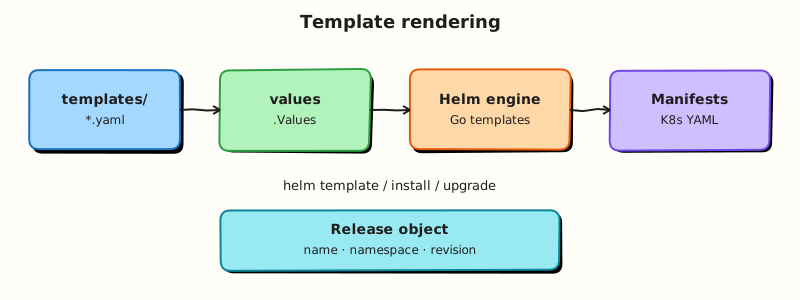
This topic’s control points and relationships are shown below.
Theory
What it is
Testing and validation for Helm means proving a chart renders correctly and behaves as intended before it changes production. The core tools are helm lint (static checks), helm template (render manifests for review), install/upgrade dry-runs, and optional chart tests — Jobs or Pods under templates/tests/ that helm test runs against a live release.
| Tool | What it catches |
|---|---|
helm lint | Structural issues, common chart mistakes |
helm template | Render errors, bad YAML shape, values holes |
--dry-run | Server-side interactions (partial); still careful |
helm test | Post-install smoke checks via test hooks |
Why it matters
Template typos and wrong values should fail in CI, not at Friday deploy. A pipeline that lints and renders every environment values file turns chart PRs into reviewable artefacts. Chart tests add a lightweight smoke layer after install (for example, hitting a Service endpoint). Together they reduce mean time to detect packaging defects and protect GitOps from merging broken desired state.
How it works
Recommended gate order:
helm lint ./chart— fail the build on errors.helm template release ./chart -f values-dev.yaml(repeat for stage/prod files) — store or diff rendered output in CI.- Optionally
helm upgrade --install --dry-run --debugwhen you need cluster lookups (note: dry-run still contacts the API for some behaviour; preferhelm templatefor pure render checks). - After a real install in a test cluster,
helm test RELEASEexecutes hooks annotated as tests. - Keep test Pods ephemeral; they should not leave lasting side effects.
Treat rendered YAML as a review surface: reviewers skim Deployments, probes, and Service selectors the same way they review application code.
Key concepts and comparisons
| Layer | Offline? | Cluster needed? |
|---|---|---|
| Lint | Yes | No |
| Template render | Yes | No |
| Dry-run install | Mostly | Often yes |
helm test | No | Yes (release installed) |
Unit-testing frameworks (for example chart-testing/ct, or snapshot tests of helm template output) extend the same idea for teams with many charts.
Common pitfalls
- Relying only on lint — lint will not prove your prod values file renders a valid Ingress host.
- Assuming
--dry-runnever talks to the cluster. - Chart tests that require manual cleanup or depend on flaky external networks.
- Skipping render for “tiny” values changes that alter nested maps and break templates.
Hands-on Lab
Objective
Gate a chart with helm lint, helm template --debug, a dry-run install, a chart test hook, and (when a cluster is available) helm test evidence.
Prerequisites
- Helm 3 CLI and kubectl configured for a lab cluster
- Cluster with enough quota to run a small Deployment and test Pod
Lab environment
Workspace: ~/rebash-helm/module-08
Helm 3 against kind/minikube; release namespace rebash-helm-m08.
mkdir -p ~/rebash-helm/module-08/validate-chart/templates/tests && cd ~/rebash-helm/module-08
Real-world scenario
CI must reject broken charts before merge. Your pipeline runs lint and template locally, dry-runs the install against the API server, then smoke-tests the release with a Helm test hook after deploy.
Step-by-step tasks
Task 1 – Create a chart with a test hook
Create validate-chart/Chart.yaml:
apiVersion: v2
name: validate-chart
description: Lab chart for Helm validation gates
type: application
version: 0.1.0
appVersion: "1.27.4"
Create validate-chart/values.yaml:
replicaCount: 1
image:
  repository: nginx
  tag: "1.27.4-alpine"
service:
  port: 80
testImage:
  repository: busybox
  tag: "1.36.1"
Create validate-chart/templates/deployment.yaml:
apiVersion: apps/v1
kind: Deployment
metadata:
  name: {{ .Release.Name }}-web
  labels:
    app.kubernetes.io/name: {{ .Chart.Name }}
    app.kubernetes.io/instance: {{ .Release.Name }}
spec:
  replicas: {{ .Values.replicaCount }}
  selector:
    matchLabels:
      app.kubernetes.io/name: {{ .Chart.Name }}
      app.kubernetes.io/instance: {{ .Release.Name }}
  template:
    metadata:
      labels:
        app.kubernetes.io/name: {{ .Chart.Name }}
        app.kubernetes.io/instance: {{ .Release.Name }}
    spec:
      containers:
        - name: web
          image: "{{ .Values.image.repository }}:{{ .Values.image.tag }}"
          ports:
            - containerPort: 80
Create validate-chart/templates/service.yaml:
apiVersion: v1
kind: Service
metadata:
  name: {{ .Release.Name }}-web
spec:
  selector:
    app.kubernetes.io/name: {{ .Chart.Name }}
    app.kubernetes.io/instance: {{ .Release.Name }}
  ports:
    - port: {{ .Values.service.port }}
      targetPort: 80
Create validate-chart/templates/tests/test-connection.yaml:
apiVersion: v1
kind: Pod
metadata:
  name: {{ .Release.Name }}-test-connection
  annotations:
    "helm.sh/hook": test
spec:
  restartPolicy: Never
  containers:
    - name: wget
      image: "{{ .Values.testImage.repository }}:{{ .Values.testImage.tag }}"
      command: ["wget"]
      args: ["{{ .Release.Name }}-web:{{ .Values.service.port }}"]
Run lint and template with debug:
cd ~/rebash-helm/module-08
helm lint ./validate-chart | tee lint.txt
helm template validate-demo ./validate-chart --debug 2>&1 | tee template-debug.txt
grep -q '0 chart(s) failed' lint.txt
grep -q 'kind: Deployment' template-debug.txt
grep -q 'helm.sh/hook: test' template-debug.txt
Expected output
Lint passes; debug render includes Deployment, Service, and the test hook Pod.
Task 2 – Dry-run install against the cluster
Prove the chart passes a server-side dry-run before any real apply.
kubectl create namespace rebash-helm-m08 --dry-run=client -o yaml | kubectl apply -f -
helm upgrade --install validate-demo ./validate-chart \
  -n rebash-helm-m08 --dry-run --debug 2>&1 | tee dry-run.txt
grep -q 'STATUS: pending-install' dry-run.txt || grep -q 'dry run' dry-run.txt
Expected output
Dry-run completes without template errors; manifests appear in dry-run.txt.
Task 3 – Install and run helm test
Install the release, wait for readiness, then execute chart tests.
cd ~/rebash-helm/module-08
helm upgrade --install validate-demo ./validate-chart \
  -n rebash-helm-m08 --wait --timeout 3m | tee install.txt
kubectl rollout status deployment/validate-demo-web -n rebash-helm-m08 --timeout=120s | tee rollout.txt
helm test validate-demo -n rebash-helm-m08 --timeout 3m | tee helm-test.txt
kubectl get pods -n rebash-helm-m08 -l 'helm.sh/hook=test' | tee test-pods.txt
grep -q 'Succeeded' helm-test.txt || grep -qi 'completed' helm-test.txt
Expected output
helm-test.txt reports tests succeeded; test Pod shows Completed.
Validation steps
-
helm lintpasses with zero failures -
helm template --debugrenders Deployment, Service, and test hook - Dry-run install completes without render errors
-
helm testsucceeds after a real install (skip if no cluster)
Common errors and fixes
| Error | Cause | Fix |
|---|---|---|
Lint [ERROR] on test hook | Hook Pod missing restartPolicy | Set restartPolicy: Never on test Pods |
| Template nil pointer | Missing values key | Add defaults in values.yaml; re-run helm template --debug |
| Dry-run talks to cluster | Expected behaviour for some lookups | Prefer helm template for pure offline render; use dry-run for API validation |
helm test timeout | Service not Ready or wrong hostname | Check kubectl get svc; ensure test args target RELEASE-web:PORT |
Challenge exercise
Introduce a deliberate typo in validate-chart/templates/deployment.yaml (remove a closing brace from a raw Jinja block), capture the lint or template failure, then restore the file and prove the gate passes again:
cd ~/rebash-helm/module-08
helm lint ./validate-chart 2>&1 | tee lint-broken.txt || true
helm template validate-demo ./validate-chart 2>&1 | tee template-broken.txt || true
helm lint ./validate-chart | tee lint-fixed.txt
grep -q '0 chart(s) failed' lint-fixed.txt
Expected output
Broken chart fails lint or template; fixed chart passes lint cleanly.
Learning outcomes
- Ran lint and debug template render as CI gates
- Used dry-run install to validate against the API server
- Added and executed a Helm chart test hook
- Distinguished offline render checks from cluster-side validation
Cleanup
helm uninstall validate-demo -n rebash-helm-m08 2>/dev/null || true
kubectl delete namespace rebash-helm-m08 --ignore-not-found
Validation
- Lab commands run under
~/rebash-helm/module-08/ - You ran lint, debug template, dry-run, and chart test gates
- You can explain the difference between offline render and dry-run install
- You can describe one production failure mode for chart validation
Code Walkthrough
Production practice for Helm Testing and Validation always combines:
- Inspect before you change (status, plan, logs, dry-run)
- Prefer reversible, documented changes (Git, IaC, drop-ins, version pins)
- Capture evidence (command output, pipeline logs) for handovers
- Prefer current tools and APIs over legacy shortcuts
- Least privilege — escalate credentials only when required
Keep runbooks short enough to follow under pressure. Automate checks; keep humans for judgement.
Security Considerations
- Treat credentials and tokens for helm as privileged — never commit them
- Prefer short-lived auth (OIDC, roles, SSO) over long-lived keys
- Validate blast radius before apply/deploy/delete operations
- Restrict who can approve production changes
- Collect audit logs; limit who can read sensitive traces
Common Mistakes
Relying only on lint — lint will not prove your prod values file renders a valid Ingress h
Validate assumptions against the Theory section and official docs before changing production.
Assuming --dry-run never talks to the cluster.
Lab shortcuts (open security groups, admin roles, skip approvals) must not ship unchanged.
Changing production without a rollback path
Always know how to revert (previous artefact, prior release, state rollback, DNS failback).
Best Practices
- Encode Helm Testing and Validation changes as code and review them in pull requests
- Pin versions (images, modules, actions, provider plugins)
- Separate environments with clear promotion gates
- Alert on symptoms with runbooks attached
- Destroy lab resources; tag everything with owner and expiry where possible
Troubleshooting
| Symptom | Likely cause | Fix |
|---|---|---|
| Auth / permission denied | Wrong identity, policy, or scope | Check caller identity, roles, and least-privilege policies |
| Timeout / no route | Network, DNS, security group, or endpoint | Trace path, DNS, and allow-lists before retrying |
| Drift / unexpected plan | Manual change or wrong state/workspace | Reconcile desired vs actual; avoid click-ops on managed resources |
| Pipeline/job red | Flaky step, cache, or missing secret | Read failing step logs; bisect recent workflow/config changes |
| Cost spike | Idle load balancer, NAT, oversized compute | Inventory billable resources; stop/delete labs promptly |
Summary
Helm Testing and Validation is essential for Cloud and DevOps engineers working with helm. Practise the lab until the inspection and change path is muscle memory, then continue the track.
Interview Questions
- What does
helm lintcheck? - How do Helm test hooks differ from unit-testing templates?
- Why run
helm templatein CI before allowing merges? - What security benefit comes from validating rendered manifests against policies?
- When can
helm testpass while production still fails?
Sample answer — question 2
template in CI catches render errors and lets policy engines scan YAML without touching a cluster. It is a cheap gate before install.
Sample answer — question 4
Policy checks (for example Pod Security) catch privileged defaults that lint may miss. Preventing those charts from shipping reduces cluster compromise risk.