Ansible Roles
Overview
Copy-pasted task blocks drift across teams. Roles package automation into a standard directory layout with a clear variable contract — defaults for overridable values, tasks for work, handlers for service restarts, templates and files for content, and meta for dependencies. Application playbooks stay thin: they set variables and list roles.
Roles are how platform engineering teams ship baselines (time sync, logging agents, hardening) and how product teams consume them without reading hundreds of YAML lines. Understanding role precedence (defaults vs vars) prevents surprise overrides in production inventories.
This is Tutorial 8 in Module 8: Roles of the REBASH Academy Ansible for Cloud & DevOps Engineers series — written for DevOps engineers, cloud engineers, and platform engineers. You will build a common role on disk, invoke it from a playbook, and prove success with syntax-check and run output.
Prerequisites
- Conditionals and Loops (Module 7)
- Ansible Core 2.16+ installed
- Completed at least one playbook lab on
localhost
Learning Objectives
By the end of this tutorial, you will be able to:
- Describe the standard role directory layout and purpose of each folder
- Set overridable values in
defaults/main.ymlvs internal constants invars/main.yml - Wire handlers, templates, and static files into role tasks
- Call a role from a playbook and validate with
--syntax-check - Explain role dependencies declared in
meta/main.yml
Architecture
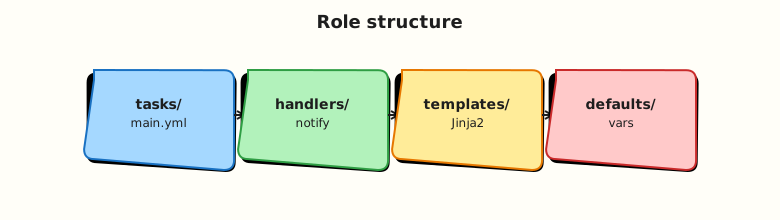
A playbook imports roles; Ansible merges variables, runs role tasks in order, and notifies handlers when tasks report changed.
Theory
What it is
A role is a directory named after the role (for example roles/common/) with conventional subdirectories:
| Path | Purpose |
|---|---|
defaults/main.yml | Low-precedence default variables callers override |
vars/main.yml | Higher-precedence internal variables |
tasks/main.yml | Entry task list (can import_tasks / include_tasks other files) |
handlers/main.yml | Notified tasks (often service restarts) |
templates/ | Jinja2 templates (.j2) deployed with template module |
files/ | Static files deployed with copy module |
meta/main.yml | Role metadata, dependencies (dependencies:), Galaxy tags |
README.md | Contract documentation for consumers |
Roles load from roles/ adjacent to the playbook or from configured roles_path. Collections may ship roles under namespace.collection.role.
Why it matters
Roles encode reviewed patterns once: naming, tags, secure defaults. Playbooks express intent (roles: [common]) instead of implementation. Code review focuses on variable contracts and handler behaviour. Version roles in Git tags or collections for reproducible fleet rollouts.
How it works
- Playbook lists
roles:ortasks: ansible.builtin.include_role:. - Ansible merges variables (inventory > play vars > role vars > role defaults).
tasks/main.ymlruns;notifyqueues handlers until the play’s task section completes.meta/main.ymldependencies run first (unlessallow_duplicatesset).
# site.yml
- hosts: localhost
  connection: local
  roles:
    - role: common
      vars:
        common_banner: "Lab host"
Key concepts and comparisons
| Location | Precedence (simplified) | Typical content |
|---|---|---|
defaults/main.yml | Low | Port numbers, feature toggles |
vars/main.yml | Higher inside role | Paths, package names fixed by role |
Play vars: | Overrides defaults | Environment-specific |
group_vars / host_vars | Inventory layer | Fleet-wide settings |
| Pattern | Prefer when |
|---|---|
Role per concern (common, nginx, postgres) | Clear ownership and reuse |
include_role in tasks | Conditional role application |
Static roles: list | Baseline always applied |
Common pitfalls
- Putting secrets in
defaults/— they are easy to override accidentally; use Vault for secrets. - Mega-roles with unrelated tasks — hard to test and review.
- Missing handler
listennames — typos silently skip restarts. - Relative paths outside the role — use
role_pathor modulesrcrelative tofiles//templates/. - Forgetting
meta/main.ymlGalaxy metadata when publishing.
Hands-on Lab
Objective
Create a common role with defaults, tasks, handlers, a template, and a static file; run a playbook that applies the role on localhost with syntax-check and run evidence.
Prerequisites
- Ansible installed
- Lab directory writable under
$HOME
Lab environment
mkdir -p ~/rebash-ansible/module-08/{playbooks,roles/common/{defaults,vars,tasks,handlers,templates,files,meta}}
cd ~/rebash-ansible/module-08
Runtime: local control node; connection: local.
Real-world scenario
Every server in your organisation receives a standard banner file and a marker file proving baseline Ansible ran. The platform team ships this as the common role; application playbooks only include the role name.
Step-by-step tasks
Task 1 – Role defaults and vars
Create roles/common/defaults/main.yml:
---
common_banner: "REBASH Academy baseline"
common_marker_path: /tmp/rebash-common-applied
common_create_marker: true
Create roles/common/vars/main.yml:
Task 2 – Tasks, handler, template, and file
Create roles/common/files/baseline.txt:
Create roles/common/templates/motd.j2:
# {{ common_banner }}
# Applied by common role v{{ common_role_version }}
# Host: {{ ansible_hostname | default(inventory_hostname) }}
Create roles/common/handlers/main.yml:
---
- name: common marker updated
  ansible.builtin.debug:
    msg: "Handler ran — baseline marker changed"
Create roles/common/tasks/main.yml:
---
- name: Deploy static baseline file
  ansible.builtin.copy:
    src: baseline.txt
    dest: /tmp/rebash-baseline.txt
    mode: "0644"

- name: Deploy motd template
  ansible.builtin.template:
    src: motd.j2
    dest: /tmp/rebash-motd.txt
    mode: "0644"

- name: Create baseline marker
  ansible.builtin.file:
    path: "{{ common_marker_path }}"
    state: touch
    mode: "0644"
  when: common_create_marker | bool
  notify: common marker updated
Create roles/common/meta/main.yml:
---
galaxy_info:
  author: rebash
  description: Common baseline role for lab
  license: MIT
  min_ansible_version: "2.16"
  platforms:
    - name: Ubuntu
      versions:
        - jammy
        - noble
dependencies: []
Task 3 – Playbook that includes the role
Create playbooks/site.yml:
---
- name: Apply common role
  hosts: localhost
  connection: local
  gather_facts: true
  roles:
    - role: common
      vars:
        common_banner: "Module 08 lab host"
Syntax-check and run:
cd ~/rebash-ansible/module-08
ansible-playbook playbooks/site.yml --syntax-check | tee syntax-check.txt
ansible-playbook playbooks/site.yml | tee run-site.txt
test -f /tmp/rebash-motd.txt
grep -q 'Module 08 lab host' /tmp/rebash-motd.txt
grep -q 'PLAY RECAP' run-site.txt
Expected output
Syntax check passes; /tmp/rebash-motd.txt contains Module 08 lab host; recap shows success.
Task 4 – Prove idempotency and handler behaviour
cd ~/rebash-ansible/module-08
ansible-playbook playbooks/site.yml | tee run-idempotent.txt
grep -E 'changed=0|changed=1' run-idempotent.txt | tee changed-summary.txt
test -f /tmp/rebash-common-applied
Expected output
Second run reports few or zero changes; marker file exists.
Validation steps
- Role tree matches standard layout under
roles/common/ -
--syntax-checkpasses - Template rendered to
/tmp/rebash-motd.txtwith custom banner var - Static file copied to
/tmp/rebash-baseline.txt - Can explain defaults vs vars precedence
Common errors and fixes
| Error | Cause | Fix |
|---|---|---|
role 'common' not found | Wrong roles_path or cwd | Run playbook from module-08; role under roles/common |
| Template not found | File not in templates/ | Place motd.j2 in roles/common/templates/ |
| Handler never runs | Task not changed on second run | First run must change marker; use force: true only in lab |
| Variable undefined | Typo in var name | Match common_banner in defaults and playbook |
Permission denied on /tmp | Unusual permissions | Use paths under lab dir if needed |
Challenge exercise
Add roles/common/tasks/assert.yml and import_tasks: assert.yml at the end of main.yml to assert /tmp/rebash-motd.txt contains the banner string using ansible.builtin.assert. Re-run the playbook and capture success output.
Learning outcomes
- Built a multi-directory role with defaults, vars, tasks, handlers, template, and file
- Consumed the role from a thin playbook with override variables
- Validated with syntax-check, file content grep, and idempotent re-run
Cleanup
rm -f /tmp/rebash-motd.txt /tmp/rebash-baseline.txt /tmp/rebash-common-applied
# Keep ~/rebash-ansible/module-08 for portfolio review
Validation
- Lab completed under
~/rebash-ansible/module-08 - Can draw role layout from memory
- Used
--syntax-checkbefore run - Can name one production failure mode (variable precedence surprise)
Code Walkthrough
- Defaults first — expose every caller-tunable value in
defaults/main.yml. - One entry — keep
tasks/main.ymlas the readable index; split large roles by concern file. - Handlers idempotent — handlers must tolerate re-run; use service modules with
state: restarted. - Meta dependencies — declare role order in
meta/main.yml, not hidden imports in tasks. - Document contract — README lists variables, tags, and example playbook snippet.
Security Considerations
- Do not store credentials in role defaults committed to Git — use Ansible Vault.
- Templates rendering user input need escaping — understand Jinja autoescape limits for your content type.
copy/templatefile modes matter — avoid world-writable config (0666).- Role dependencies pull external code — pin collection and role versions.
- Review handler side effects (restarts) for availability impact during rolling updates.
Common Mistakes
Everything in vars/main.yml
Callers cannot override internal vars easily. Fix: move tunables to defaults/.
Flat playbooks instead of roles
Teams duplicate 200-line plays. Fix: extract when a pattern repeats twice.
Wrong notify name
Handler name must match exactly (case-sensitive). Fix: use consistent naming; test with deliberate change.
Roles path confusion in monorepos
Playbook in playbooks/ may not see roles/ unless configured. Fix: set roles_path in ansible.cfg or use FQCN collection roles.
Best Practices
- One role, one responsibility (
common,nginx, noteverything). - Tag role tasks for selective runs (
tags: [common, baseline]). - Ship
meta/main.ymlwithmin_ansible_versionand platforms. - Version roles via Git tags or collection releases.
- Test roles with Molecule or minimal localhost playbooks in CI.
Troubleshooting
| Symptom | Likely cause | Fix |
|---|---|---|
| Variable not applied | vars vs defaults precedence | Put override in play or use -e |
| Role tasks run twice | Duplicate listing + dependency | Check meta dependencies |
| Template renders empty | Undefined fact | gather_facts: true or default filter |
| File not found in role | Wrong module path | copy/template use filenames relative to role dirs |
| Syntax check fails on role | YAML indentation in nested file | ansible-playbook --syntax-check -vv |
Summary
Roles standardise reusable automation behind a directory layout and variable contract. Defaults invite overrides; vars and inventory layers specialise behaviour. Next, deepen dynamic file generation with Jinja2 Templates.
Interview Questions
1. What is the difference between defaults/main.yml and vars/main.yml in a role?
Reveal answer
defaults have lower precedence — designed for values callers override in play, inventory, or -e. vars inside the role have higher precedence among role data and suit internal constants the role should not casually override. Tunables go in defaults; fixed role internals go in vars.
2. When do handlers run?
Reveal answer
Handlers run once at the end of the play’s tasks section, only if notified by a task that reported changed (unless force_handlers). Multiple notifies to the same handler dedupe to a single run. They are suited to restarts and batchable reactions, not immediate sequential logic.
3. How do role dependencies work?
Reveal answer
Listed under dependencies in meta/main.yml, dependencies execute before the role that declares them. You can pass vars into dependencies. Avoid circular dependencies; pin versions when roles come from Galaxy or collections.
4. Why use include_role instead of listing under roles:?
Reveal answer
include_role in tasks allows conditional application (when), loops, and dynamic ordering mid-play. Static roles: sections run in defined order at role import time — simpler for baselines always applied.
5. Where should static binaries live — files/ or templates/?
Reveal answer
files/ for byte-identical content deployed with copy. templates/ for Jinja2-processed content deployed with template. Do not Jinja-process binaries in templates.
6. Production scenario: a role works in dev but prod hosts skip tasks — what do you check?
Reveal answer
Inventory group vars may override defaults differently; check host_vars/group_vars precedence. Tags may limit runs (--tags). Facts may differ (ansible_os_family). Run with -vvv on one prod host in check mode if safe.
7. How do collection roles differ from standalone roles on disk?
Reveal answer
Collection roles install under ~/.ansible/collections/... and are referenced by FQCN (namespace.collection.role). Standalone roles live in roles/ on the project tree. Both follow the same internal layout; distribution and versioning differ.
Related Tutorials
- Ansible course index
- Previous: Conditionals and Loops
- Next: Jinja2 Templates
- Related: Terraform Modules