Ansible CI/CD Integration
Overview
Automation that only runs on a laptop is not production automation. Continuous Integration (CI) pipelines should lint playbooks, run ansible-playbook --syntax-check, and optionally execute Molecule or check-mode runs before anyone merges to main. GitHub Actions, GitLab CI, and Jenkins each wrap ansible-playbook with different secret and runner models — the engineering habits stay the same: fast feedback, pinned tooling, no secrets in logs.
This is Tutorial 14 in Module 14: CI/CD Integration of the REBASH Academy Ansible for Cloud & DevOps Engineers series — written for Cloud, DevOps, Platform, and SRE engineers. Official Ansible guidance: Using Ansible in CI/CD.
Prerequisites
- Ansible Kubernetes Automation or prior playbook authoring experience
- Collections and Galaxy (ansible-lint and collection install concepts)
- Basic familiarity with GitHub Actions or GitLab CI
Learning Objectives
By the end of this tutorial, you will be able to:
- Design a CI job that syntax-checks Ansible playbooks on every pull request
- Author a GitHub Actions workflow that avoids MkDocs macro conflicts with Actions expressions
- Sketch an equivalent GitLab CI stub for Ansible validation
- Validate pipeline YAML offline with PyYAML before pushing
- Explain where secrets, Vault passwords, and execution environments belong in CI
Architecture
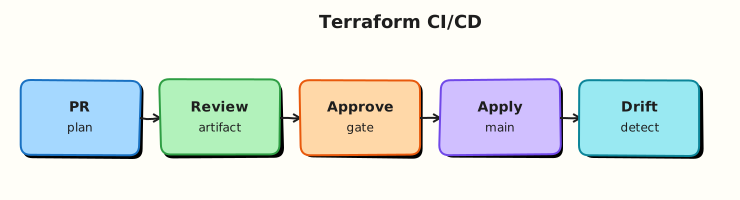
Developers push Ansible changes; CI runners install pinned ansible-core, lint, syntax-check, and optionally run check-mode or Molecule before deploy jobs promote artefacts.
Theory
What it is
Ansible CI/CD integration wires playbook repositories into pipeline stages:
| Stage | Typical commands | Purpose |
|---|---|---|
| Lint | ansible-lint, yamllint | Style and risky patterns |
| Syntax | ansible-playbook --syntax-check site.yml | Catch YAML/Jinja errors early |
| Dry run | --check with limited inventory | Idempotency smoke test |
| Test | Molecule, pytest | Reusable role verification |
| Deploy | ansible-playbook against staging/prod | Controlled promotion |
Why it matters
A missing colon in a handler block should fail in CI, not during a production change window. Pipelines also provide audit trails — who ran what, against which inventory, with which Git SHA.
How it works
GitHub Actions: workflow under .github/workflows/ triggers on push / pull_request. Steps checkout the repo, set up Python, pip install ansible-core ansible-lint, then run syntax-check. Use repository secrets for Vault passwords or SSH keys — inject via env: not hard-coded files.
GitLab CI: .gitlab-ci.yml defines lint and syntax-check jobs in stages. Runners need Python + Ansible; cache pip wheels for speed.
Jenkins: Declarative Pipeline stage runs the same commands inside a container agent (quay.io/ansible/ansible-runner or custom Execution Environment image) for reproducible tooling.
Key concepts and comparisons
| Platform | Secret storage | Runner isolation |
|---|---|---|
| GitHub Actions | Encrypted secrets, OIDC | ubuntu-latest or self-hosted |
| GitLab CI | CI/CD variables (masked) | Shared or dedicated runners |
| Jenkins | Credentials plugin | Docker/Kubernetes agents |
Common pitfalls
- Committing Vault passwords or SSH private keys — Fix: CI secrets +
ansible-vault decryptat runtime. - Unpinned Ansible versions causing flaky lint rules — Fix: pin in
requirements.txtor container image digest. - Running deploy jobs on fork PRs with secrets — Fix: restrict deploy to protected branches; lint-only on forks.
- Forgetting inventory path in CI — Fix: commit
inventories/ci/hosts.ymlwith localhost targets for syntax jobs.
Hands-on Lab
Objective
Create a minimal Ansible repo layout with a GitHub Actions workflow (syntax-check job), a GitLab CI stub, and offline PyYAML validation of all pipeline files.
Prerequisites
- Ansible 2.18+ locally
- Python 3 with PyYAML
- Git repository (local is fine)
Lab environment
Workspace: ~/rebash-ansible/module-14
mkdir -p ~/rebash-ansible/module-14 && cd ~/rebash-ansible/module-14
ansible --version | tee ansible-version.txt
Real-world scenario
Your team stores Ansible in GitHub. Security requires every pull request to pass ansible-playbook --syntax-check before merge. Platform also mirrors the repo to GitLab — you must supply a equivalent stub job definition.
Step-by-step tasks
Task 1 – Create playbook and inventory for CI
Create inventories/ci/hosts.yml:
Create site.yml:
---
- name: CI site play — deploy marker and config
  hosts: localhost
  gather_facts: false
  vars:
    ci_root: "~/rebash-ansible/module-14/ci-artifacts"
  tasks:
    - name: Ensure CI artifact directory exists
      ansible.builtin.file:
        path: "{{ ci_root }}"
        state: directory
        mode: "0755"

    - name: Write CI gate marker
      ansible.builtin.copy:
        content: "ci_gate=passed\nmodule=module-14\n"
        dest: "{{ ci_root }}/gate-marker.txt"
        mode: "0644"

    - name: Deploy site configuration
      ansible.builtin.copy:
        content: "environment=ci\nmanaged_by=ansible-playbook\n"
        dest: "{{ ci_root }}/site.conf"
        mode: "0644"
Create ansible.cfg:
[defaults]
inventory = inventories/ci/hosts.yml
host_key_checking = False
retry_files_enabled = False
interpreter_python = auto_silent
Verify locally:
cd ~/rebash-ansible/module-14
ansible-playbook --syntax-check site.yml | tee local-syntax.txt
ansible-playbook site.yml | tee local-apply.txt
grep -q 'PLAY RECAP' local-apply.txt
grep -q ci_gate=passed ~/rebash-ansible/module-14/ci-artifacts/gate-marker.txt
echo "local apply OK" | tee local-apply-ok.txt
Expected output
Syntax check and apply succeed; gate-marker.txt contains ci_gate=passed.
Task 2 – Create GitHub Actions workflow
Create .github/workflows/ansible-ci.yml:
name: Ansible CI

on:
  push:
    branches: [main]
  pull_request:
    branches: [main]

jobs:
  syntax-check:
    runs-on: ubuntu-latest
    steps:
      - name: Checkout
        uses: actions/checkout@v4

      - name: Set up Python
        uses: actions/setup-python@v5
        with:
          python-version: "3.12"

      - name: Install Ansible
        run: pip install 'ansible-core>=2.18,<2.19'

      - name: Ansible syntax check
        run: ansible-playbook --syntax-check site.yml

      - name: Ansible apply (lab gate)
        run: ansible-playbook site.yml

      - name: Verify CI artifacts
        run: grep -q ci_gate=passed ~/rebash-ansible/module-14/ci-artifacts/gate-marker.txt

  lint-hint:
    runs-on: ubuntu-latest
    needs: syntax-check
    if: ${{ github.event_name == 'pull_request' }}
    steps:
      - name: Checkout
        uses: actions/checkout@v4
      - name: Remind lint stage
        run: echo "Add ansible-lint in production pipelines"
Validate workflow YAML offline:
cd ~/rebash-ansible/module-14
python3 - <<'PY' | tee github-yaml-validate.txt
import yaml
from pathlib import Path
path = Path(".github/workflows/ansible-ci.yml")
data = yaml.safe_load(path.read_text())
assert data["name"] == "Ansible CI"
assert "syntax-check" in data["jobs"]
print("OK github workflow")
PY
grep -q 'OK github workflow' github-yaml-validate.txt
Expected output
PyYAML parses the workflow; jobs key contains syntax-check.
Task 3 – Create GitLab CI stub
Create .gitlab-ci.yml:
stages:
  - validate

ansible-syntax-check:
  stage: validate
  image: python:3.12-slim
  before_script:
    - pip install 'ansible-core>=2.18,<2.19'
  script:
    - ansible-playbook --syntax-check site.yml
    - ansible-playbook site.yml
    - grep -q ci_gate=passed ~/rebash-ansible/module-14/ci-artifacts/gate-marker.txt
  rules:
    - if: $CI_PIPELINE_SOURCE == "merge_request_event"
    - if: $CI_COMMIT_BRANCH == "main"
Validate offline:
cd ~/rebash-ansible/module-14
python3 - <<'PY' | tee gitlab-yaml-validate.txt
import yaml
from pathlib import Path
data = yaml.safe_load(Path(".gitlab-ci.yml").read_text())
assert "ansible-syntax-check" in data
print("OK gitlab ci")
PY
grep -q 'OK gitlab ci' gitlab-yaml-validate.txt
Expected output
GitLab stub parses; job name present.
Task 4 – Package CI evidence tarball
cd ~/rebash-ansible/module-14
tar -czf module-14-evidence.tgz \
  site.yml ansible.cfg inventories/ .github/ .gitlab-ci.yml \
  ansible-version.txt local-syntax.txt \
  github-yaml-validate.txt gitlab-yaml-validate.txt
ls -lh module-14-evidence.tgz | tee tarball.txt
test -s module-14-evidence.tgz
Expected output
Non-empty evidence archive with playbook and pipeline definitions.
Validation steps
-
ansible-playbook --syntax-check site.ymlpasses locally - GitHub workflow YAML parses with PyYAML
- GitLab CI stub YAML parses with PyYAML
- Actions expressions in the workflow are wrapped for MkDocs (raw Jinja blocks in the tutorial source)
- Evidence tarball includes pipeline and playbook files
Common errors and fixes
| Error | Cause | Fix |
|---|---|---|
ERROR! the playbook could not be found | Wrong working directory in CI | Set default working directory to repo root; confirm site.yml path |
| MkDocs build breaks on workflow | Unescaped Actions expressions in docs | Wrap committed tutorial examples in raw Jinja blocks when documenting workflows |
| GitLab job skipped | rules do not match branch | Push to main or open merge request to trigger |
| Ansible version drift | Unpinned pip install | Pin ansible-core minor range in workflow |
Challenge exercise
Add an ansible-lint job (install ansible-lint via pip) that runs against site.yml and fails on risky-shell-pipe. Gate the lint job so it only runs when ansible-lint config exists in the repo root.
Learning outcomes
- Portable CI patterns for Ansible across GitHub and GitLab
- Offline YAML validation before pushing pipeline changes
- Safe handling of workflow expressions in academy documentation
Cleanup
Validation
- Lab artefacts created under
~/rebash-ansible/module-14/ - Local syntax-check log captured
- Both pipeline stubs validate with PyYAML
- You can describe where Vault passwords belong in CI
Code Walkthrough
The GitHub workflow separates syntax-check (always) from a lint-hint job that only runs on pull requests — mirroring how teams stage ansible-lint after basic syntax gates pass. The GitLab stub uses rules instead of only only/except, matching modern GitLab syntax. Both install a pinned ansible-core range so lint rules stay stable week to week.
Security Considerations
- Never echo
ANSIBLE_VAULT_PASSWORDor private keys in CI logs — mark variables masked in GitLab; use GitHub encrypted secrets - Do not run production deploy jobs from fork pull requests
- Pin third-party Actions (
actions/checkout@v4) and review updates - Use OIDC to cloud roles where possible instead of long-lived cloud keys in Ansible vars
- Store inventory with sensitive vars in Vault-encrypted files; CI decrypts just-in-time
Common Mistakes
Deploying to production from every branch
Fix: restrict deploy workflows to protected branches and manual approval environments.
Skipping inventory in syntax-check jobs
Fix: commit a localhost CI inventory so --syntax-check resolves hosts.
Copying GitHub secrets expressions into MkDocs without raw blocks
Fix: wrap GitHub workflow fences in raw Jinja blocks in tutorial markdown.
Best Practices
- Lint and syntax-check on every pull request; deploy only after merge
- Pin Ansible, collections, and Python in CI images or pip constraints
- Cache Galaxy collections in CI for speed (
ansible-galaxy collection install -r requirements.yml) - Separate read-only validation jobs from jobs that need SSH or cloud credentials
- Attach playbook stdout as CI artefacts for failed deploy debugging
Troubleshooting
| Symptom | Likely cause | Fix |
|---|---|---|
| Workflow not triggering | Wrong branch filter in on: | Match default branch name (main vs master) |
ansible-playbook: command not found | Ansible not installed in job | Add pip install step before playbook |
| Vault decrypt fails in CI | Secret not injected | Map ANSIBLE_VAULT_PASSWORD from CI secret store |
| Intermittent Galaxy failures | Transient network or rate limit | Mirror collections internally; use requirements.yml lock |
| Fork PR exfiltration concern | Workflow reads secrets on PR | Use pull_request_target only with extreme care; prefer lint-only on forks |
Summary
Treat Ansible like application code: CI must syntax-check and lint before merge. GitHub Actions, GitLab CI, and Jenkins differ in secret and runner models, but the validation commands are the same. Offline PyYAML validation catches broken pipelines before they block your team.
Interview Questions
1. What is the minimum Ansible gate for every pull request?
Reveal answer
ansible-playbook --syntax-check against the site playbook (and role playbooks if applicable), plus YAML lint. This catches structural errors before anyone runs against real inventory.
2. How do you supply Vault passwords in GitHub Actions safely?
Reveal answer
Store the password in encrypted repository or environment secrets; export ANSIBLE_VAULT_PASSWORD in the job env block for steps that run Ansible. Never commit .vault_pass files or print the variable.
3. Why pin ansible-core in CI?
Reveal answer
ansible-lint rules and module behaviour shift between minors. Pinning keeps main green and makes upgrades a deliberate change with a tested bump PR.
4. How does GitLab CI differ from GitHub Actions for Ansible?
Reveal answer
GitLab uses .gitlab-ci.yml with stages/jobs and masked CI variables; GitHub uses workflow YAML under .github/workflows/ with encrypted secrets and Actions expressions. Both should install the same pinned Ansible tooling before running playbooks.
5. Should deploy jobs run on fork pull requests?
Reveal answer
No. Forks must not receive production secrets. Run lint/syntax-only jobs on forks; restrict deploy to trusted branches with approval gates.
6. Where do Execution Environments fit in CI?
Reveal answer
Container images bundle ansible-core, collections, and system deps for reproducible runs — especially for AAP-style pipelines and Molecule. Use them when pip installs on vanilla runners become slow or inconsistent.
Related Tutorials
- Collections and Galaxy
- Ansible Kubernetes Automation
- AWX and Ansible Automation Platform
- GitHub Actions Basics