Cloud Automation
Overview
Cloud infrastructure APIs change fast. Ansible addresses AWS, Azure, and Google Cloud through collections — not core modules — so teams can pin versions and follow each vendor’s authentication model. Typical modules include amazon.aws.ec2_instance, azure.azcollection.azure_rm_virtualmachine, and google.cloud.gcp_compute_instance. Credentials usually arrive via environment variables, cloud CLI profiles, or IAM roles on the control host — never committed in playbooks.
Production teams prefer check_mode (dry run) and staged inventories before mutating shared accounts. This tutorial documents real module names from docs.ansible.com collections and builds offline stub playbooks with ansible.builtin.debug so you learn structure without cloud spend.
This is Tutorial 12 in Module 12: Cloud Automation of the REBASH Academy Ansible for Cloud & DevOps Engineers series — written for cloud and DevOps engineers. You will author inventory stubs, cloud playbook stubs, and cloud-matrix.yaml validated by Python.
Prerequisites
- Vault and Secrets (Module 11)
- Collections and Galaxy —
requirements.ymlpins - Python 3 with PyYAML
- Optional: cloud CLI credentials for future live runs (not required for this lab)
Learning Objectives
By the end of this tutorial, you will be able to:
- Name primary Ansible collections for AWS, Azure, and GCP
- Describe credential delivery via environment variables and IAM roles
- Structure playbooks for check mode and staged rollouts
- Author offline debug stubs that mirror real module calls
- Validate a multi-cloud module matrix with Python
Architecture
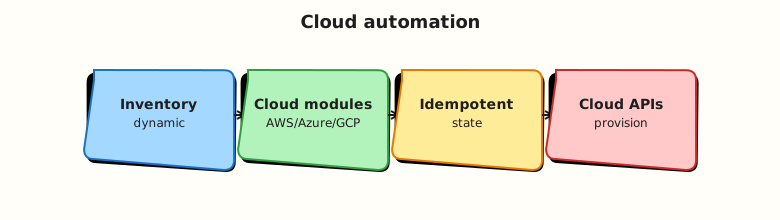
The control node holds cloud credentials; Ansible collection modules call cloud APIs; inventory selects accounts/regions/projects.
Theory
What it is
| Cloud | Collection namespace | Example modules (FQCN) |
|---|---|---|
| AWS | amazon.aws | ec2_instance, s3_bucket, iam_role, ec2_vpc_net |
| Azure | azure.azcollection | azure_rm_virtualmachine, azure_rm_virtualnetwork, azure_rm_storageaccount |
| GCP | google.cloud | gcp_compute_instance, gcp_storage_bucket, gcp_compute_network |
Install via collections/requirements.yml (see Module 10). Reference modules by FQCN in tasks.
Why it matters
Multi-cloud organisations standardise on Ansible for bootstrapping, drift remediation, and day-2 operations alongside Terraform for provisioning. Shared patterns — inventory per account, Vault for secrets, check mode in CI — reduce outage risk when API defaults change.
How it works
- Configure credentials on control node (env vars, shared credentials file, or instance profile).
- Inventory defines hosts or
localhostwith cloud-specific vars (ansible_python_interpreter, region, subscription). - Tasks call collection modules; modules translate to API requests.
check_mode: true(play or task) asks modules to report planned changes without applying (module support varies).
AWS credential environment variables (common):
export AWS_ACCESS_KEY_ID=...
export AWS_SECRET_ACCESS_KEY=...
export AWS_SESSION_TOKEN=...   # when using STS
export AWS_DEFAULT_REGION=ap-south-1
Azure: AZURE_SUBSCRIPTION_ID, AZURE_CLIENT_ID, AZURE_SECRET, AZURE_TENANT_ID, or Azure CLI login / federated credentials.
GCP: GOOGLE_APPLICATION_CREDENTIALS pointing to service account JSON, or Application Default Credentials from gcloud auth application-default login.
Key concepts and comparisons
| Pattern | Use when |
|---|---|
check_mode | Pre-flight CI or change review |
connection: local on localhost | API modules from control node |
| Dynamic inventory plugins | Large fleets (EC2, Azure RM, GCE) |
| Terraform + Ansible split | Terraform provisions; Ansible configures OS/apps |
| Risk | Mitigation |
|---|---|
| Accidental prod delete | Separate inventory; --limit; confirmation vars |
| Credential leak | Vault; env vars; no keys in Git |
| API rate limits | Serial/throttle; backoff |
| Drift vs state files | Document ownership: Terraform vs Ansible |
Common pitfalls
- Running cloud modules without check mode in shared CI — costly mistakes.
- Using root account keys instead of IAM roles or OIDC.
- Assuming all modules support check mode — verify collection docs.
- Wrong Python SDK on control node — collections document required pip packages.
- Hard-coding region/subscription in tasks instead of inventory vars.
Hands-on Lab
Objective
Install cloud collections locally, create inventory and playbooks that provision a local resource registry (real files under the lab dir) per cloud provider, run ansible-playbook to apply them, and validate with cat/grep — no cloud API spend.
Prerequisites
- Ansible Core installed
- Python 3 + PyYAML
- Network for
ansible-galaxy collection install
Lab environment
mkdir -p ~/rebash-ansible/module-12/{inventory,playbooks,scripts}
cd ~/rebash-ansible/module-12
Runtime: localhost connection: local; offline validation only.
Real-world scenario
Your platform guild maintains a cloud module matrix documenting which FQCN modules each team may use. Before enabling live AWS/Azure/GCP credentials in CI, architects review stub playbooks and the validated YAML matrix.
Step-by-step tasks
Task 1 – Inventory stub
Create inventory/cloud-stub.yml:
---
all:
  hosts:
    localhost:
      ansible_connection: local
      ansible_python_interpreter: "{{ ansible_playbook_python }}"
  vars:
    cloud_env: lab-stub
    aws_region: ap-south-1
    azure_location: centralindia
    gcp_project: rebash-lab-stub
    gcp_zone: asia-south1-a
Create ansible.cfg:
Task 2 – Install cloud collections and requirements
Create collections/requirements.yml:
---
collections:
  - name: amazon.aws
    version: ">=7.0.0,<8.0.0"
  - name: azure.azcollection
    version: ">=2.0.0,<3.0.0"
  - name: google.cloud
    version: ">=1.0.0,<2.0.0"
Create ansible.cfg:
[defaults]
inventory = inventory/cloud-stub.yml
collections_paths = ./collections:~/.ansible/collections
host_key_checking = False
Install collections:
cd ~/rebash-ansible/module-12
ansible-galaxy collection install -r collections/requirements.yml -p ./collections --force-with-deps | tee galaxy-install.txt
ansible-galaxy collection list amazon.aws | tee collection-list-aws.txt
grep -q amazon.aws collection-list-aws.txt
Expected output
amazon.aws appears in collection list output.
Task 3 – Playbook that writes cloud resource registry files
Create playbooks/provision-local-registry.yml:
---
- name: Build local cloud resource registry from inventory vars
  hosts: localhost
  connection: local
  gather_facts: false
  vars:
    registry_root: "~/rebash-ansible/module-12/registry"
  tasks:
    - name: Ensure registry directory exists
      ansible.builtin.file:
        path: "{{ registry_root }}"
        state: directory
        mode: "0755"

    - name: Write AWS registry stub
      ansible.builtin.template:
        src: ../templates/aws-resource.json.j2
        dest: "{{ registry_root }}/aws-ec2-stub.json"
        mode: "0644"

    - name: Write Azure registry stub
      ansible.builtin.template:
        src: ../templates/azure-resource.json.j2
        dest: "{{ registry_root }}/azure-vm-stub.json"
        mode: "0644"

    - name: Write GCP registry stub
      ansible.builtin.template:
        src: ../templates/gcp-resource.json.j2
        dest: "{{ registry_root }}/gcp-instance-stub.json"
        mode: "0644"
Create templates/aws-resource.json.j2:
{
  "provider": "aws",
  "module": "amazon.aws.ec2_instance",
  "region": "{{ aws_region }}",
  "name": "rebash-lab-vm",
  "instance_type": "t3.micro",
  "check_mode_required": true
}
Create templates/azure-resource.json.j2:
{
  "provider": "azure",
  "module": "azure.azcollection.azure_rm_virtualmachine",
  "location": "{{ azure_location }}",
  "name": "rebash-lab-vm",
  "vm_size": "Standard_B1s"
}
Create templates/gcp-resource.json.j2:
{
  "provider": "gcp",
  "module": "google.cloud.gcp_compute_instance",
  "project": "{{ gcp_project }}",
  "zone": "{{ gcp_zone }}",
  "machine_type": "e2-micro"
}
Run playbook:
cd ~/rebash-ansible/module-12
mkdir -p templates
ansible-playbook playbooks/provision-local-registry.yml --syntax-check
ansible-playbook playbooks/provision-local-registry.yml | tee registry-run.txt
grep -q 'PLAY RECAP' registry-run.txt
grep -q 'amazon.aws.ec2_instance' ~/rebash-ansible/module-12/registry/aws-ec2-stub.json
grep -q 'ap-south-1' ~/rebash-ansible/module-12/registry/aws-ec2-stub.json
grep -q 'google.cloud.gcp_compute_instance' ~/rebash-ansible/module-12/registry/gcp-instance-stub.json
echo "registry apply OK" | tee registry-ok.txt
Expected output
Three JSON files under registry/ with correct FQCN module names and inventory vars.
Task 4 – cloud-matrix.yaml and Python validator
Create cloud-matrix.yaml:
---
# REBASH Module 12 — Ansible cloud collection module matrix (offline reference)
schema_version: 1
clouds:
  aws:
    collection: amazon.aws
    credential_hint: "AWS_ACCESS_KEY_ID / IAM role / AWS CLI profile"
    check_mode: recommended
    modules:
      compute: amazon.aws.ec2_instance
      network: amazon.aws.ec2_vpc_net
      identity: amazon.aws.iam_role
      storage: amazon.aws.s3_bucket
  azure:
    collection: azure.azcollection
    credential_hint: "AZURE_* service principal env vars or az login"
    check_mode: recommended
    modules:
      compute: azure.azcollection.azure_rm_virtualmachine
      network: azure.azcollection.azure_rm_virtualnetwork
      storage: azure.azcollection.azure_rm_storageaccount
  gcp:
    collection: google.cloud
    credential_hint: "GOOGLE_APPLICATION_CREDENTIALS or ADC"
    check_mode: recommended
    modules:
      compute: google.cloud.gcp_compute_instance
      network: google.cloud.gcp_compute_network
      storage: google.cloud.gcp_storage_bucket
playbook_stubs:
  - playbooks/aws-stub.yml
  - playbooks/azure-stub.yml
  - playbooks/gcp-stub.yml
Create scripts/validate-cloud-matrix.py:
#!/usr/bin/env python3
"""Validate cloud-matrix.yaml structure and FQCN prefixes."""
from __future__ import annotations

import pathlib
import sys

try:
    import yaml
except ImportError:
    print("PyYAML required", file=sys.stderr)
    sys.exit(1)

EXPECTED_CLOUDS = {"aws", "azure", "gcp"}
MODULE_KEYS = {"compute", "network", "storage"}
FQCN_PREFIX = {
    "aws": "amazon.aws.",
    "azure": "azure.azcollection.",
    "gcp": "google.cloud.",
}


def main() -> int:
    path = pathlib.Path("cloud-matrix.yaml")
    doc = yaml.safe_load(path.read_text())
    clouds = doc.get("clouds", {})
    if set(clouds.keys()) != EXPECTED_CLOUDS:
        print("clouds must be aws, azure, gcp", file=sys.stderr)
        return 1
    for cloud, cfg in clouds.items():
        prefix = FQCN_PREFIX[cloud]
        mods = cfg.get("modules", {})
        if set(mods.keys()) != MODULE_KEYS:
            print(f"{cloud}: modules must include compute, network, storage", file=sys.stderr)
            return 1
        for role, fqcn in mods.items():
            if not str(fqcn).startswith(prefix):
                print(f"{cloud}.{role}: FQCN must start with {prefix}", file=sys.stderr)
                return 1
        if cfg.get("check_mode") != "recommended":
            print(f"{cloud}: check_mode should be recommended for lab policy", file=sys.stderr)
            return 1
    stubs = doc.get("playbook_stubs", [])
    for stub in stubs:
        if not pathlib.Path(stub).is_file():
            print(f"Missing stub playbook: {stub}", file=sys.stderr)
            return 1
    print("cloud-matrix.yaml OK")
    for c in sorted(clouds):
        print(f"  {c}: {clouds[c]['collection']}")
    return 0


if __name__ == "__main__":
    raise SystemExit(main())
Validate:
cd ~/rebash-ansible/module-12
chmod +x scripts/validate-cloud-matrix.py
python3 scripts/validate-cloud-matrix.py | tee validate-matrix.txt
grep -q 'cloud-matrix.yaml OK' validate-matrix.txt
Expected output
cloud-matrix.yaml OK with three cloud collection names listed.
Validation steps
- Three stub playbooks syntax-check and run offline
- Each stub documents real FQCN module name from official collections
-
cloud-matrix.yamlpasses Python validator - Inventory stub sets region/location/project vars
- Can explain credential env vars for one cloud
Common errors and fixes
| Error | Cause | Fix |
|---|---|---|
Collection not found on live run | Collection not installed | ansible-galaxy collection install -r requirements.yml |
| Authentication failure | Missing env credentials | Export cloud env vars or use role-based auth |
| Check mode shows changed but no change | Module partial check support | Read collection module docs |
| Wrong region/project | Inventory vars typo | Fix cloud-stub.yml vars |
| Python validator fails FQCN | Wrong prefix in matrix | Match amazon.aws., azure.azcollection., google.cloud. |
Challenge exercise
Add requirements.yml referencing the three cloud collections with pins, extend the validator to require schema_version: 1, and add a playbooks/check-mode-policy.yml that sets check_mode: true at play level and debugs a message for each cloud.
Learning outcomes
- Documented real cloud module FQCNs without API spend
- Ran debug stub playbooks on localhost
- Built and validated a multi-cloud module matrix in YAML
- Understood credential and check-mode production habits
Cleanup
rm -f ~/rebash-ansible/module-12/run-stubs.txt ~/rebash-ansible/module-12/validate-matrix.txt
# Keep stubs for portfolio review
Validation
- Lab completed under
~/rebash-ansible/module-12 - Python validator passes on
cloud-matrix.yaml - Can name one module per cloud from memory
- Can describe when to use check mode
Code Walkthrough
- Stub before spend — validate playbook structure with
debugbefore enabling credentials. - Pin collections — cloud APIs change; lock
amazon.aws,azure.azcollection,google.cloudversions. - Separate inventories — dev/staging/prod account IDs in different inventory trees.
- Check mode first — default CI to check mode unless explicitly deploying.
- Credential hygiene — env vars and roles; rotate keys; never commit.
Security Considerations
- Use least-privilege IAM/service principals scoped to required API actions.
- Prefer short-lived STS/OIDC credentials over long-lived access keys.
- Vault-encrypt cloud secrets referenced in vars; do not embed in playbooks.
- Audit cloud API calls from CI control nodes; restrict prod credentials to prod runners.
- Review module
state: absenttasks carefully — deletion is irreversible.
Common Mistakes
Full admin cloud keys in CI
Key leak owns the account. Fix: scoped IAM roles, OIDC federation, time-bound tokens.
Skipping check mode in shared accounts
One typo creates billable resources. Fix: CI check mode + manual approval for apply.
Terraform and Ansible fighting same resources
Dual ownership causes drift and deletes. Fix: clear boundary — who owns which resource type.
Assuming identical module arguments across clouds
API models differ. Fix: read per-collection docs; use cloud-matrix for standards.
Best Practices
- Maintain
requirements.ymland cloud module matrix in Git. - Use dynamic inventory for large fleets; static stub for lab/architecture review.
- Tag all cloud resources created by Ansible for cost and ownership tracking.
- Test collection upgrades in sandbox subscriptions/projects first.
- Document required Python libraries on execution environment image.
Troubleshooting
| Symptom | Likely cause | Fix |
|---|---|---|
Unable to locate credentials | Env not set on control node | Export vars or configure role |
| Module not found | Collection missing | Install from requirements |
| Wrong subscription/project | Inventory var error | Fix azure/gcp vars |
| Check mode always changed | Module limitation | Treat as estimate; read docs |
| Slow playbook | Sequential API calls | async/poll or batch where supported |
Summary
Cloud automation in Ansible flows through vendor collections, environment-based credentials, and disciplined check mode. Offline stubs and a validated module matrix let teams agree on FQCNs before live API access. Continue with Kubernetes automation or CI integration in later modules.
Interview Questions
1. Which collections cover AWS, Azure, and GCP in modern Ansible?
Reveal answer
amazon.aws for AWS, azure.azcollection for Azure, and google.cloud for GCP. They ship separately from ansible-core and must be installed via Galaxy or execution environment images with version pins.
2. How do you supply AWS credentials to Ansible without putting keys in playbooks?
Reveal answer
Environment variables (AWS_ACCESS_KEY_ID, etc.), shared credentials file on control node, instance/profile IAM role on EC2/Automation Platform, or STS-assumed role. Playbooks reference neither keys nor secrets inline.
3. What is check mode and when should you use it for cloud modules?
Reveal answer
Check mode (--check or check_mode: true) asks modules to predict changes without applying. Use in CI review and before prod changes. Not all modules support all check features — verify collection documentation.
4. Name one compute module FQCN per cloud.
Reveal answer
AWS: amazon.aws.ec2_instance. Azure: azure.azcollection.azure_rm_virtualmachine. GCP: google.cloud.gcp_compute_instance.
5. Why use localhost with connection local for cloud API modules?
Reveal answer
Cloud modules call HTTP APIs from the control node; no SSH to a managed host is required. Inventory host represents the automation context while modules interact with cloud endpoints.
6. How would you prevent Ansible from deleting production resources accidentally?
Reveal answer
Separate inventories and credentials; require --limit and confirmation vars; default CI to check mode; use RBAC on cloud accounts; avoid broad state: absent without strict tags/naming guards.
7. Terraform already provisioned VMs — what should Ansible do?
Reveal answer
Ansible configures OS, agents, applications, and day-2 drift remediation on existing hosts. Avoid duplicating provisioning unless architecture explicitly splits responsibilities with clear state ownership.
Related Tutorials
- Ansible course index
- Previous: Vault and Secrets
- Next: Kubernetes and CI modules (course roadmap)
- Related: Multi-Cloud Terraform, Collections and Galaxy