Ansible Ad-hoc Commands
Overview
Ad-hoc commands run a single module against selected hosts without writing a playbook. They are the fastest way to probe connectivity, restart a service during an incident, or copy a hotfix file — and the pattern every playbook task wraps.
This tutorial covers essential modules: ping, command, shell, copy, file, package, and service — with caveats for privilege escalation and localhost safety. The lab targets ansible_connection=local and builds an evidence script that archives module results under ~/rebash-ansible/module-04.
This is Tutorial 4 in Module 4: Ad-hoc Commands of the REBASH Academy Ansible for Cloud & DevOps Engineers series.
Prerequisites
- Ansible Inventory
- Linux — files, packages, systemd basics
- Shell — quoting and pipelines
- ansible-core installed; inventory from prior modules
Learning Objectives
By the end of this tutorial, you will be able to:
- Run ad-hoc commands with
-m,-a,-i, and--becomeflags - Choose
commandvsshellvs dedicated modules - Use
file,copy, andpackageidempotently on localhost - Understand
servicemodule limits without full init systems in containers - Produce an evidence script wrapping multiple ad-hoc checks
Architecture
Ad-hoc invocations follow the same path as playbook tasks: inventory → connection → module → JSON result.
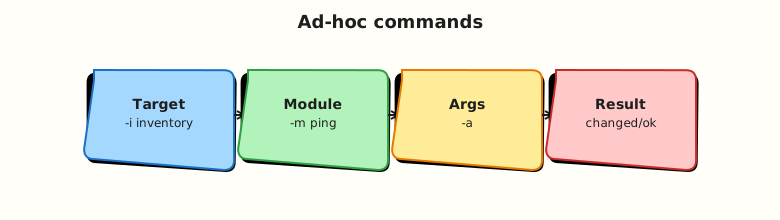
Theory
What it is
Syntax pattern:
| Flag | Meaning |
|---|---|
-m | Module name (ping, file, copy) |
-a | Module arguments as quoted string or key=value pairs |
-i | Inventory source |
-c | Connection plugin (local, ssh) |
-b / --become | Privilege escalation (sudo) |
-o | One-line output (useful for logs) |
ping — connectivity test (not ICMP; Ansible ping module).
command — run command without shell (| redirects fail).
shell — run through /bin/sh; use only when necessary.
copy — push file from control node to target (src/dest, mode).
file — manage files, directories, symlinks, permissions, state (touch, absent, directory).
package — abstract package manager (name, state=present).
service — manage services (name, state=started, enabled=true) — requires working init (systemd on Linux).
Why it matters
On-call engineers use ad-hoc commands before promoting fixes to playbooks. ansible all -m ping validates SSH after key rotation. ansible web -m service -a "name=nginx state=restarted" -b recovers a bad deploy. Discipline matters: ad-hoc changes bypass Git unless you capture commands in incident tickets and backfill playbooks.
How it works
Ansible forks workers per host (see forks in cfg), executes the module, returns JSON:
Prefer modules that report changed: false on second run (idempotent).
Examples (localhost lab):
ansible localhost -m ping -c local
ansible localhost -m file -a "path=/tmp/ansible-lab state=touch mode=0644" -c local
ansible localhost -m command -a "uname -r" -c local
Optional SSH target: document in inventory; same commands work without -c local when SSH is configured.
Key concepts and comparisons
| Module | Use when | Avoid when |
|---|---|---|
| command | Simple argv, no shell features | Pipes, redirects, $VAR expansion needed |
| shell | Shell syntax required | A dedicated module exists (user, yum, apt) |
| copy | Push static files from control node | Large trees — consider synchronize or git |
| file | Permissions, directories, absent | Content upload — use copy or template |
| package | Install/remove packages | Pinning complex repos — use apt/yum modules with options |
| service | systemd/init service state | Container without init — use container tools instead |
| Ad-hoc | Playbook |
|---|---|
| Fast one-off | Reviewable, repeatable |
| Easy to forget audit trail | Git history |
| Great for debugging | Production default |
Common pitfalls
- Using
shellformkdiroruseraddwhenfile/usermodules exist. - Forgetting
-bfor package/service tasks needing root on real hosts. servicein WSL or minimal containers without systemd — usecommandto check process instead.- Quoting errors in
-a— usekey=valuepairs or JSON-a '{"key":"value"}'. - Running ad-hoc against production without
--limit.
Hands-on Lab
Objective
Execute ad-hoc modules against localhost, create files under ~/rebash-ansible/module-04, and archive evidence with ad-hoc-evidence.sh.
Prerequisites
- ansible-core; write access under home directory
- Linux with Python on localhost target
Lab environment
Workspace: ~/rebash-ansible/module-04
Create ansible.cfg:
[defaults]
inventory = ./inventory
host_key_checking = False
interpreter_python = auto_silent
Create inventory:
Real-world scenario
During a staging incident, you verify Ansible can still reach hosts, drop a marker file, confirm kernel version, and ensure a lab directory exists — before running a full playbook rollback.
Step-by-step tasks
Task 1 – Connectivity and command modules
Run:
cd ~/rebash-ansible/module-04
ansible local -m ping | tee adhoc-ping.txt
ansible local -m command -a "uname -s" | tee adhoc-uname.txt
ansible local -m shell -a "echo adhoc_ok > /tmp/ansible-adhoc-shell.txt && cat /tmp/ansible-adhoc-shell.txt" | tee adhoc-shell.txt
grep -q '"ping": "pong"' adhoc-ping.txt
grep -q Linux adhoc-uname.txt
grep -q adhoc_ok adhoc-shell.txt
echo "task1 OK" | tee task1-ok.txt
Expected output
task1-ok.txt shows task1 OK; ping returns pong.
Task 2 – file module under lab workspace
Create files/marker.txt:
Run file and copy modules:
cd ~/rebash-ansible/module-04
ansible local -m file -a "path=~/rebash-ansible/module-04/labdir state=directory mode=0755" | tee adhoc-mkdir.txt
ansible local -m copy -a "src=files/marker.txt dest=~/rebash-ansible/module-04/labdir/marker.txt mode=0644" | tee adhoc-copy.txt
ansible local -m file -a "path=~/rebash-ansible/module-04/labdir/touched.txt state=touch mode=0644" | tee adhoc-touch.txt
test -f ~/rebash-ansible/module-04/labdir/marker.txt
grep -q rebash-adhoc-marker ~/rebash-ansible/module-04/labdir/marker.txt
test -f ~/rebash-ansible/module-04/labdir/touched.txt
echo "task2 OK" | tee task2-ok.txt
Expected output
labdir/marker.txt and touched.txt exist; task2-ok.txt shows task2 OK.
Task 3 – package module (safe local check) and evidence script
Query package state without forcing install (works on apt/dnf systems):
cd ~/rebash-ansible/module-04
ansible local -m package -a "name=python3 state=present" | tee adhoc-package.txt
grep -q '"failed": false' adhoc-package.txt || grep -q SUCCESS adhoc-package.txt
Create ad-hoc-evidence.sh:
#!/usr/bin/env bash
set -euo pipefail
cd ~/rebash-ansible/module-04
ansible local -m ping -o | tee evidence-ping.txt
ansible local -m command -a "test -f ~/rebash-ansible/module-04/labdir/marker.txt" | tee evidence-test.txt
ansible local -m file -a "path=~/rebash-ansible/module-04/labdir state=directory" | tee evidence-file.txt
grep -q pong evidence-ping.txt
echo "ad-hoc-evidence PASS" | tee evidence-pass.txt
Run:
chmod +x ~/rebash-ansible/module-04/ad-hoc-evidence.sh
~/rebash-ansible/module-04/ad-hoc-evidence.sh
Expected output
evidence-pass.txt contains ad-hoc-evidence PASS.
service module caveat
ansible -m service requires systemd (or supported init). On minimal lab VMs run: ansible local -m service -a "name=ssh state=started" -b only if systemd manages ssh. Skip or document failure on WSL/containers without init.
Validation steps
-
ping,command, andshellad-hoc runs archived -
fileandcopycreatedlabdirartefacts -
ad-hoc-evidence.shexits 0 - You can explain when not to use
shell
Common errors and fixes
| Error | Cause | Fix |
|---|---|---|
template error in -a | Unescaped quotes | Use JSON: -a '{"dest":"/tmp/x"}' |
Permission denied on file ops | Needs root on real host | Add -b and sudo |
Could not find the requested service | No systemd | Use ps/command or skip service demo |
src not found for copy | Wrong path on control node | Path is relative to playbook/ad-hoc CWD |
UNREACHABLE | Missing connection=local | Fix inventory for localhost |
Challenge exercise
Create adhoc-idempotency-check.sh that runs the same file task twice and greps for "changed": false on the second run:
#!/usr/bin/env bash
set -euo pipefail
cd ~/rebash-ansible/module-04
ansible local -m file -a "path=~/rebash-ansible/module-04/labdir/idempotent.txt state=touch" | tee idempotent-run1.txt
ansible local -m file -a "path=~/rebash-ansible/module-04/labdir/idempotent.txt state=touch" | tee idempotent-run2.txt
grep -q '"changed": false' idempotent-run2.txt
echo "idempotency OK"
Expected output
Second run reports "changed": false.
Learning outcomes
- Ad-hoc syntax for daily ops and debugging
- Module selection (
file/copyvsshell) - Evidence scripting for incidents and CI
- Awareness of service module environment requirements
Cleanup
cd ~/rebash-ansible/module-04
ansible local -m file -a "path=~/rebash-ansible/module-04/labdir state=absent"
rm -f adhoc-*.txt task*-ok.txt evidence-*.txt idempotent-run*.txt
rm -f /tmp/ansible-adhoc-shell.txt
Validation
- Lab artefacts created and cleaned up
- Evidence script passes
- Can explain command vs shell vs file module
- Know when ad-hoc is acceptable vs playbook required
Code Walkthrough
- Probe with ping — always first after inventory or SSH changes.
- Modules over shell —
file state=touchis idempotent;touchin shell is not tracked the same way. - Archive JSON — tee ad-hoc output to incident tickets.
- Become deliberately —
-bonly when module requires root. - Promote to playbook — repeated ad-hoc becomes a task under Git.
Security Considerations
- Ad-hoc
shellwith user input enables injection — avoid in production runbooks. copypushes from control node — verify src is trusted and not world-writable.--becomewith-Kon shared screens leaks passwords — prefer NOPASSWD automation accounts with sudo limits.- Log ad-hoc commands in change management; unlogged ad-hoc is shadow IT.
- Restrict who can run Ansible against production inventory from laptops.
Common Mistakes
Permanent ad-hoc operations
Running manual ad-hoc every deploy drifts from Git truth.
Fix: Capture in playbooks after validation.
shell for everything
Loses idempotency and structured change reporting.
Fix: Use command or dedicated modules.
No --limit on prod
Pattern all plus typo hits entire fleet.
Fix: --list-hosts then --limit canary.
Best Practices
- Alias risky patterns behind wrapper scripts with
--limitbaked in. - Use
-ofor log-friendly one-line output in CI probes. - Prefer
ansible.builtin.copyFQCN in playbooks (ad-hoc accepts short names). - Test package modules with
state=presenton common packages before exotic ones. - Document optional SSH targets separately from localhost lab groups.
Troubleshooting
| Symptom | Likely cause | Fix |
|---|---|---|
FAILED! => {"msg": "module not found"} | Typo or missing collection | ansible-doc -l \| grep name; install collection |
| Intermittent UNREACHABLE | SSH rate limit / MaxStartups | Lower forks; use -f 1 |
| copy changed every time | checksum mismatch or permissions | Set explicit mode; use force: false when appropriate |
| package hangs | Metadata refresh | Set update_cache wisely on apt |
| Different result ad-hoc vs playbook | Different inventory/cwd | Align ansible.cfg and -i |
Summary
Ad-hoc commands execute single modules for debugging and quick operations — same engine as playbooks, less auditability. You ran ping, command, shell, file, copy, and package against localhost and captured evidence. Next, combine tasks in Ansible Playbooks.
Interview Questions
1. When do you use ad-hoc commands versus playbooks?
Reveal answer
Ad-hoc suits quick probes (ping), one-off incident actions, and discovering module arguments before codifying tasks. Playbooks suit anything repeated, reviewed in Git, tested in CI, or applied across environments. Rule of thumb: if you might run it twice, write a playbook. Ad-hoc still uses the same modules and inventory.
2. What is the difference between the command and shell modules?
Reveal answer
command runs executable argv without shell — no pipes, redirects, or unexpanded $VAR unless you use shell. shell runs through /bin/sh with full shell syntax. Prefer command when possible for safety and predictability. Use shell only when shell features are required — or better, use a dedicated module.
3. Why prefer file or copy over shell touch or cp?
Reveal answer
file and copy are idempotent and return structured changed status. Ansible can report drift and run check mode. Shell touch or cp always executes imperatively and may show changed incorrectly if wrapped poorly. Modules also handle permissions, SELinux contexts (where applicable), and cross-platform differences.
4. How does ansible -m ping differ from ICMP ping?
Reveal answer
Ansible ping is a Python module that verifies the control node can connect, execute Python on the target, and return JSON — not network ICMP. It is the first connectivity check for SSH/Linux targets. Windows uses win_ping over WinRM. Name collision confuses newcomers; think “Ansible connectivity ping.”
5. What flags do you need for ad-hoc package install on Ubuntu?
Reveal answer
Target pattern, -m package or -m apt, -a "name=nginx state=present", inventory -i, and usually --become (-b) for root. On localhost lab with user-writable paths you may omit become for file ops but package installs typically need sudo. Use ansible-doc apt for distro-specific args like update_cache.
6. Explain idempotency using the file module.
Reveal answer
First run state=touch creates the file → changed: true. Second run finds file already present with correct state → changed: false. That proves desired-state semantics. Operators rely on second runs being quiet during compliance scans. Non-idempotent shell breaks that signal.
7. Why might service module fail in CI containers?
Reveal answer
service talks to init systems like systemd. Many CI containers lack systemd as PID 1 — no service manager to query. Failures are environmental, not Ansible bugs. Use full VMs, molecule with systemd-enabled images, or test service tasks in integration environments — not minimal Alpine CI unless configured.
8. How do you safely run ad-hoc against production?
Reveal answer
Require --list-hosts approval, strict --limit on canary hosts, change ticket linkage, and preferably run from CI/Controller not laptops. Avoid shell with untrusted input. Capture output logs. Backfill successful ad-hoc into playbooks. Never use permissive hosts: all without limits during incidents without explicit approval.
Related Tutorials
- Ansible course index
- Previous: Ansible Inventory
- Next: Ansible Playbooks
- Linux package management
- systemd services