Package Management
Overview
Installing and updating software is weekly work on Linux servers. This tutorial teaches the package manager workflow and how to read the errors when a dependency fails.
Plain problem: Your teammate says “run apt install nginx”. On another server the same command fails because that host uses dnf (Red Hat family) or apk (Alpine). Installing the wrong way wastes time and can break production images.
A package manager is the distro’s official shop for software: it downloads signed packages, tracks versions, and removes files cleanly. Unpatched packages are security debt — attackers exploit known bugs in old versions.
This tutorial answers, in order:
- What is a package and a package manager?
- How does
aptwork on Ubuntu? - What are
dnf,yum, andapk? - How do you install, query, hold, and remove a package safely?
- How do you prove package state for a ticket or interview?
This is Tutorial 10 in Module 10: Package Management of the REBASH Academy Linux for Cloud & DevOps Engineers series — practical Linux for Cloud and DevOps work.
Prerequisites
- A practice Ubuntu 22.04/24.04 VM, cloud Free Tier VM, or Windows Subsystem for Linux (WSL2) Ubuntu
- SSH or local terminal access
- A normal user account with
sudowhen the lab asks for it - Completed SSH and Remote Access or equivalent comfort in a terminal
You do not need to have built software from source before.
Learning Objectives
By the end of this tutorial, you will be able to:
- Explain what a package manager does in plain language
- Refresh metadata, install, query, and remove packages with
apton Ubuntu - Map
aptcommands todnf/yum/apkequivalents on other distros - Place an apt hold so a package does not upgrade by accident
- Save a package evidence pack for tickets or interviews
- Answer common fresher interview questions on package management
Architecture
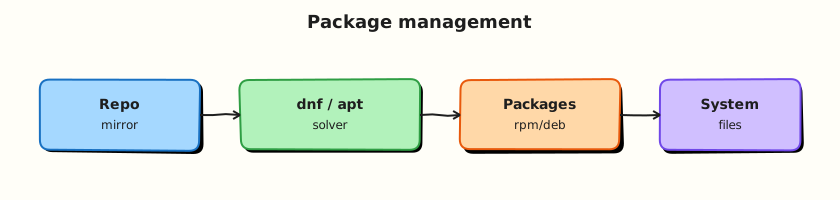
Your shell talks to the package manager (apt), which reads package lists from repositories on the internet (or a mirror), verifies signatures, and installs files into standard paths (/usr/bin, /lib, …). Lower-level tools (dpkg on Debian family, rpm on RHEL family) track what is installed on disk.
Theory
The problem (before any jargon)
You join a team and need tree (a small directory-listing tool) on a build server. You Google “install tree linux” and see five different command sets. You pick one at random. Half work; half fail with “command not found” for the package manager itself.
The fix is always the same: identify the distro family first (cat /etc/os-release), then use that family’s package manager.
What is a package? (simple words)
Analogy: A package is a pre-packed box from a trusted warehouse — the program, its libraries, and a manifest saying which files go where. The package manager is the shop clerk: finds the box, checks the seal (signature), unpacks it, and records what you own so uninstall is clean.
| Term | Plain meaning |
|---|---|
| Package | Archive of software + metadata (name, version, dependencies) |
| Repository (repo) | Server listing available packages for your distro |
| Package manager | Tool that installs, updates, and removes packages (apt, dnf, …) |
| Dependency | Another package this one needs to run |
| Hold / pin | Mark a package so it does not auto-upgrade |
What you can say in an interview: “On Ubuntu I use apt to install from signed repositories; I always refresh metadata with update before upgrade, and I query installed version before blaming the app.”
apt on Ubuntu and Debian
| Goal | Command |
|---|---|
| Refresh package lists | sudo apt update |
| Upgrade installed packages | sudo apt upgrade |
| Install a package | sudo apt install <name> |
| Show installed version | apt list --installed <name> |
| Show files from a package | dpkg -L <name> |
| Remove package | sudo apt remove <name> |
| Prevent upgrade | sudo apt-mark hold <name> |
Tiny example — check if curl is installed:
Other families (you will meet these at work)
| Family | Tool | Install example | Query example |
|---|---|---|---|
| Debian / Ubuntu | apt / dpkg | sudo apt install tree | dpkg -l tree |
| RHEL / Rocky / Amazon Linux | dnf / rpm | sudo dnf install tree | rpm -q tree |
| Alpine (containers) | apk | apk add tree | apk info tree |
| SUSE | zypper | sudo zypper install tree | rpm -q tree |
Interview line: “I never assume apt; I read /etc/os-release and use the matching tool.”
update vs upgrade vs dist-upgrade
apt update— downloads new package lists (catalogues). Does not change installed software.apt upgrade— installs newer versions of packages already installed (safe default).apt full-upgrade— may remove/replace packages to resolve dependency conflicts (use with care on production; test first).
Holds, snapshots, and production habits
Golden images and Configuration Management (Ansible, cloud-init) assume a known package set. An accidental kernel or OpenSSL upgrade during an incident window can break apps. apt-mark hold pins one package. Teams also snapshot disks or bake new images instead of upgrading live servers blindly.
Common pitfalls
- Running
apt installwithoutsudo updatefirst (stale lists → “package not found”) - Using Ubuntu tutorials on Rocky Linux (
dnfnotapt) - Confusing “remove package” with “delete my data in
/home” (config files may remain — usepurgewhen appropriate) - Installing random
.debfiles from the internet without checking signatures
Hands-on Lab
Objective
Install and query tree, place a hold, remove it cleanly, and save a package evidence pack under ~/rebash-linux/lab16.
Prerequisites
| Item | Notes |
|---|---|
| Ubuntu practice host | 22.04 or 24.04 |
| Network | Outbound HTTPS to Ubuntu mirrors |
sudo | Required for install/remove |
Lab environment
mkdir -p ~/rebash-linux/lab16 && cd ~/rebash-linux/lab16
cat /etc/os-release | grep -E '^(NAME|VERSION_ID)='
Real-world scenario
Your mentor asks: “Install tree on the build agent, confirm the version, pin it so tonight’s auto-upgrade does not change it, then show me how you would remove it after the test.” This lab is that ticket with proof files.
Step-by-step tasks
Task 1 – Refresh metadata and install tree
cd ~/rebash-linux/lab16
sudo apt update 2>&1 | tee apt-update.log
sudo apt install -y tree 2>&1 | tee apt-install-tree.log
command -v tree
tree --version | tee tree-version.txt
test -s tree-version.txt
Expected output
command -v tree prints a path such as /usr/bin/tree. tree-version.txt shows a version line.
Task 2 – Query files and place a hold
cd ~/rebash-linux/lab16
dpkg -L tree | head -20 | tee tree-files-head.txt
apt list --installed tree 2>/dev/null | tee tree-installed.txt
sudo apt-mark hold tree
apt-mark showhold | tee hold-list.txt
grep -q tree hold-list.txt
Expected output
hold-list.txt contains tree. tree-installed.txt shows installed status.
Task 3 – Break, fix, and prove (simulate stale install attempt)
Create bad-install-notes.md:
# Wrong-family mistake (lab note)

If you run `dnf install tree` on Ubuntu, you get "command not found" for dnf.
Fix: use `apt` after confirming NAME=Ubuntu in /etc/os-release.
cd ~/rebash-linux/lab16
! command -v dnf && echo "dnf absent on Ubuntu — expected" | tee dnf-check.txt
sudo apt-mark unhold tree
sudo apt remove -y tree
! command -v tree && echo "tree removed OK" | tee remove-proof.txt
sudo apt install -y tree
tree --version | tee tree-version-after-reinstall.txt
echo "lab16 package evidence OK" | tee evidence.txt
ls -la
Expected output
remove-proof.txt confirms tree was absent after remove. Reinstall succeeds; evidence.txt marks completion.
Validation steps
-
apt updateandapt install treecompleted without errors - You demonstrated hold and unhold with
apt-mark - Evidence files exist under
~/rebash-linux/lab16 - You can explain
aptvsdnfwithout notes
Common errors and fixes
| Error | Cause | Fix |
|---|---|---|
E: Unable to locate package tree | Stale lists or wrong distro | Run sudo apt update; confirm Ubuntu with /etc/os-release |
E: Could not get lock | Another apt process running | Wait or identify process: ps aux \| grep apt |
dpkg: error processing | Interrupted install | sudo dpkg --configure -a then retry |
hold ignored in upgrade | Used unattended-upgrades override | Check /etc/apt/apt.conf.d/; document exception |
Challenge exercise
Create family-cheatsheet.md with one install and one query command each for apt, dnf, and apk in your own words.
cd ~/rebash-linux/lab16
test -s family-cheatsheet.md
echo "challenge OK" | tee challenge.txt
Learning outcomes
- You installed and removed a real package on Ubuntu
- You used hold/unhold like a cautious operator
- You have interview-ready evidence of package state
Cleanup
cd ~/rebash-linux/lab16
sudo apt-mark unhold tree 2>/dev/null || true
# Optional: sudo apt remove -y tree
# Keep evidence files for revision
Validation
- Lab completed under
~/rebash-linux/lab16 - Can map three package managers to three distro families
- Ready for scheduling and automation next
Code Walkthrough
apt updatebefore install — refreshes catalogues; prevents “not found” on valid packages.dpkg -L— shows which files a package owns; useful when config paths confuse you.apt-mark hold— production pin for one package; document why in tickets.- Remove then reinstall — proves you understand lifecycle, not only install.
- Log with
tee— attaches command output to evidence files for mentors.
Security Considerations
- Install only from your distro’s signed repositories unless security team approves exceptions.
- Patch regularly; unpatched OpenSSH, OpenSSL, and glibc CVEs are common breach paths.
- Do not
curl | bashrandom install scripts on production hosts. - Review what a package installs (
dpkg -L) before adding to golden images. - Use
sudofor package changes; do not run daily work as root.
Common Mistakes
❌ Skipping apt update.
✅ Always refresh lists before install or upgrade on Ubuntu. Stale metadata causes false “package not found” errors.
❌ Mixing distro tutorials.
✅ Rocky Linux needs dnf. Alpine containers need apk. Ubuntu needs apt. Check /etc/os-release first.
❌ Removing without checking dependents.
✅ Removing a library package can break other apps. Use apt remove and read proposed changes; test on non-production first.