systemd Services and journalctl
Overview
On modern servers, systemd starts and supervises services. journalctl is how you read what those services logged when something fails.
On almost every modern Linux cloud image, systemd is the first process (PID 1). It starts services at boot, restarts failed apps, and records logs through journald. Day-to-day you use systemctl to control services and journalctl to read their logs.
Plain problem: You deploy a new app. It runs when you start it manually, but after reboot it is gone. Or it fails silently. systemd fixes persistence (enable) and gives you logs (journalctl -u).
This is Tutorial 10 in Module 7: Services & Boot of the REBASH Academy Linux for Cloud & DevOps Engineers series — practical Linux for Cloud and DevOps work.
Prerequisites
- Process Management
- A practice Ubuntu 22.04/24.04 VM where you have
sudo - Do not run this lab on a shared production server
Learning Objectives
By the end of this tutorial, you will be able to:
- Explain unit files, vendor vs
/etclocations, and drop-ins in plain words - Create a simple systemd service, reload, start, and enable it
- Query logs with
journalctl -uand time filters - Override a setting with a drop-in without editing vendor files
- Remove the lab unit cleanly and save evidence under
~/rebash-linux/lab10 - Answer common fresher interview questions on systemd
Architecture
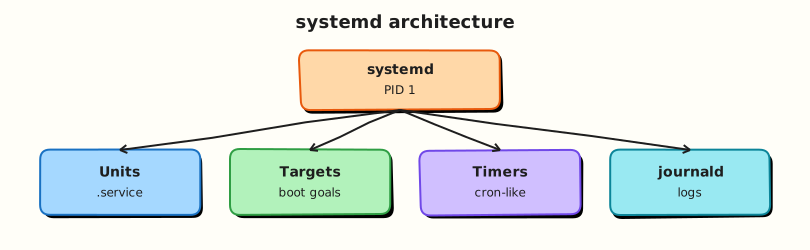
systemd sits as PID 1: it activates units (services, sockets, timers), supervises processes, and stores structured logs operators query with journalctl.
Theory
The problem (before any jargon)
You write a script that must run 24/7. You start it in SSH and log out — it dies (unless you used nohup). You add it to rc.local (old habit) — it has no restart policy and no standard logs.
systemd is the supported way on Ubuntu and most enterprise Linux: define a service unit, enable it for boot, read logs with journalctl.
What systemd is (simple words)
Analogy: systemd is the building manager. It knows which shops (services) must open at boot, checks they are still running, and keeps a central logbook (journal).
| Term | Plain meaning |
|---|---|
| Unit | Something systemd manages (service, timer, mount, …) |
| Service unit | .service file describing how to run a programme |
| systemctl | CLI to start/stop/enable/status units |
| journalctl | CLI to read journal logs |
| Drop-in | Small override file under /etc/systemd/system/ |
What you can say in an interview: “systemd is PID 1; I manage apps with unit files, systemctl enable --now, and debug with journalctl -u.”
Unit file anatomy
A simple service has three sections:
| Section | Purpose |
|---|---|
[Unit] | Description, ordering (After=network.target) |
[Service] | ExecStart=, user, restart policy |
[Install] | WantedBy=multi-user.target for boot |
Tiny example — read an existing unit:
systemctl status ssh.service
systemctl cat ssh.service
journalctl -u ssh.service -n 20 --no-pager
Interview line: “I never edit files under /lib/systemd/system directly — I use /etc/systemd/system or systemctl edit drop-ins.”
systemctl actions
| Command | Effect |
|---|---|
start / stop | Run or stop now |
enable / disable | Start at boot (symlinks) |
enable --now | Enable and start together |
restart | Stop then start |
daemon-reload | Re-read unit files after you change them |
status | State + recent log lines |
sudo systemctl daemon-reload
sudo systemctl start myapp.service
sudo systemctl enable myapp.service
sudo systemctl status myapp.service --no-pager
journalctl essentials
journalctl -u myapp.service -f              # follow live
journalctl -u myapp.service --since today
journalctl -u myapp.service -n 50 --no-pager
journalctl -p err -b                          # errors this boot
Interview line: “journalctl -u is my first stop when a service fails after deploy.”
Drop-ins — safe overrides
Vendor packages own /lib/systemd/system/*.service. Your changes go in /etc/systemd/system/myapp.service.d/override.conf or via systemctl edit myapp.service.
After any unit change: daemon-reload then restart.
Common pitfalls
- Forgetting
daemon-reloadafter editing units — changes ignored - Editing vendor unit bodies — lost on package upgrade
enablewithoutstart— survives reboot but not running now (useenable --now)- Running production services as root when a dedicated user exists
Hands-on Lab
Objective
Create a lab systemd service that writes heartbeat lines to the journal, override one setting with a drop-in, prove logs with journalctl, then remove the unit cleanly.
Prerequisites
| Item | Notes |
|---|---|
| Ubuntu VM with systemd | systemctl --version works |
sudo | Required to install units |
| Not a shared prod server | You will create /etc/systemd/system files |
Lab environment
Real-world scenario
Platform team asks you to wrap a small health-check script as a supervised service: start at boot, restart on failure, logs in journald. You deliver the unit file, drop-in, and journalctl proof.
Step-by-step tasks
Task 1 – Create the lab script
Create heartbeat.sh:
#!/usr/bin/env bash
set -euo pipefail
while true; do
  echo "rebash-lab10 heartbeat $(date -Is)"
  sleep 5
done
cd ~/rebash-linux/lab10
chmod +x heartbeat.sh
./heartbeat.sh &
hpid=$!
sleep 2
kill -TERM "$hpid"
test -x heartbeat.sh
Expected output
Script prints one or two heartbeat lines when run manually, then stops cleanly.
Task 2 – Install systemd unit and start
Create rebash-lab10.service (you will copy this to systemd):
[Unit]
Description=REBASH lab10 heartbeat
After=network.target

[Service]
Type=simple
ExecStart=/home/USER/rebash-linux/lab10/heartbeat.sh
Restart=on-failure
RestartSec=3

[Install]
WantedBy=multi-user.target
Replace USER with your username before installing:
cd ~/rebash-linux/lab10
sed "s|/home/USER|/home/$USER|g" rebash-lab10.service > rebash-lab10.local.service
sudo cp rebash-lab10.local.service /etc/systemd/system/rebash-lab10.service
sudo systemctl daemon-reload
sudo systemctl enable --now rebash-lab10.service
sudo systemctl status rebash-lab10.service --no-pager | tee service-status.txt
grep -q 'active (running)' service-status.txt
Expected output
service-status.txt shows active (running). Unit is enabled for boot.
Task 3 – journalctl evidence
cd ~/rebash-linux/lab10
sudo journalctl -u rebash-lab10.service -n 10 --no-pager | tee journal-sample.txt
grep -q 'rebash-lab10 heartbeat' journal-sample.txt
sudo journalctl -u rebash-lab10.service --since "5 min ago" --no-pager | wc -l | tee journal-line-count.txt
test -s journal-sample.txt
Expected output
journal-sample.txt contains heartbeat lines with timestamps.
Task 4 – Drop-in override (RestartSec)
Create drop-in directory and file:
cd ~/rebash-linux/lab10
sudo mkdir -p /etc/systemd/system/rebash-lab10.service.d
sudo cp override.conf /etc/systemd/system/rebash-lab10.service.d/override.conf
sudo systemctl daemon-reload
sudo systemctl restart rebash-lab10.service
systemctl show rebash-lab10.service -p RestartSec -p Environment | tee dropin-proof.txt
grep -q 'RestartSec=10' dropin-proof.txt
echo "lab10 systemd OK" | tee evidence.txt
Expected output
dropin-proof.txt shows RestartSec=10 and Environment=LAB_TAG=rebash-lab10.
Validation steps
- Service is
active (running)andenabled -
journalctl -u rebash-lab10.serviceshows heartbeat lines - Drop-in changed
RestartSecwithout editing main unit body in/etc - You ran
daemon-reloadafter each unit change
Common errors and fixes
| Error | Cause | Fix |
|---|---|---|
Failed to execute | Wrong path in ExecStart | Use full path; chmod +x script |
| Unit not found after edit | No daemon-reload | sudo systemctl daemon-reload |
Status shows disabled | Only started, not enabled | sudo systemctl enable --now |
| No journal lines | Service failed immediately | journalctl -u unit -b --no-pager; fix script |
Challenge exercise
Add User= and Group= to the drop-in so the service runs as your normal user (not root). Reload, restart, and prove with ps -o user= -p $(systemctl show -p MainPID --value rebash-lab10.service).
Extend override.conf:
Replace USER, apply, and verify:
cd ~/rebash-linux/lab10
sed "s|USER|$USER|g" override.conf > override.local.conf
sudo cp override.local.conf /etc/systemd/system/rebash-lab10.service.d/override.conf
sudo systemctl daemon-reload
sudo systemctl restart rebash-lab10.service
ps -o user= -p "$(systemctl show -p MainPID --value rebash-lab10.service)" | tee challenge-user.txt
grep -q "$USER" challenge-user.txt
Learning outcomes
- You created and enabled a real systemd service
- You read logs with journalctl and applied a drop-in override
- You understand vendor vs
/etcunit locations
Cleanup
sudo systemctl disable --now rebash-lab10.service
sudo rm -f /etc/systemd/system/rebash-lab10.service
sudo rm -rf /etc/systemd/system/rebash-lab10.service.d
sudo systemctl daemon-reload
sudo systemctl reset-failed rebash-lab10.service 2>/dev/null || true
cd ~/rebash-linux/lab10
# Keep local unit copies and evidence for revision
Validation
- Lab completed under
~/rebash-linux/lab10 - Can explain enable vs start vs daemon-reload
- Ready for targets, timers, and boot next
Code Walkthrough
- Full paths in
ExecStart=— systemd does not use your shell$PATHthe way you expect. enable --now— common production one-liner after deploy.systemctl cat— shows merged unit + drop-ins; use before guessing.journalctl -u -f— follow logs during restart tests.- Cleanup disable + remove — lab hygiene; production uses config management for units.
Security Considerations
- Run services as dedicated users, not root, when possible (
User=,Group=). - Use
NoNewPrivileges=,ProtectSystem=,PrivateTmp=where compatible. - Restrict who can write under
/etc/systemd/system. - Do not put secrets in unit files — use environment files with strict permissions.
maskis stronger thandisable— use deliberately on compromised units.
Common Mistakes
❌ Skipping daemon-reload.
✅ systemd keeps old unit definitions in memory. Fix: always reload after file changes.
❌ Editing /lib/systemd/system.
✅ Package updates overwrite vendor files. Fix: drop-ins under /etc/systemd/system/*.d/.
❌ Relative ExecStart paths.
✅ Service fails with status 203/EXEC. Fix: absolute path to script or binary.
❌ No Restart= policy.
✅ One crash leaves service down until manual start. Fix: Restart=on-failure or always with sane RestartSec.