Process Management
Overview
When a service “hangs” or a host runs hot, you need to see which processes are running, what they use, and how to stop them safely.
Every command you run — ls, nginx, a Python script — becomes a process: a running programme with an ID number, a parent, and resource use (CPU, memory). On a busy cloud virtual machine (VM), knowing how to see, stop, and prioritise processes is basic hygiene before you touch systemd services.
Plain problem: A deploy script hangs. CPU hits 100%. Your mentor asks “what is eating the CPU, and can you stop it cleanly?” This tutorial teaches you to answer with ps, signals, and job control — not by rebooting the server first.
This is Tutorial 9 in Module 6: Process Management of the REBASH Academy Linux for Cloud & DevOps Engineers series — practical Linux for Cloud and DevOps work.
Prerequisites
- Text Processing with grep, sed, and awk — comfortable with pipes and basic commands
- A practice Linux host: Ubuntu 22.04/24.04 VM with a normal user account
- Optional:
htop(sudo apt install htop) — not required
Learning Objectives
By the end of this tutorial, you will be able to:
- Explain PID, parent process, signals, and niceness in plain words
- Inspect processes with
psand read useful columns - Start background work, use job control, and stop processes cleanly
- Send
TERMbeforeKILLand explain why that matters - Complete the lab under
~/rebash-linux/lab09with evidence files - Answer common fresher interview questions on process management
Architecture
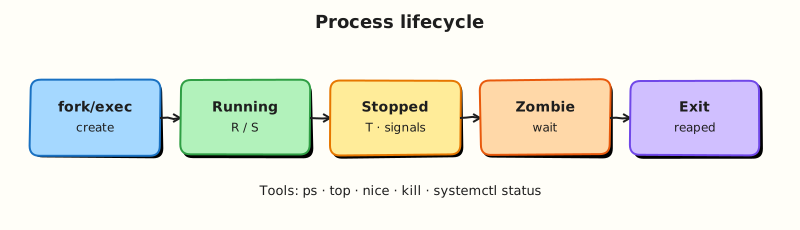
User commands and long-running services become processes scheduled by the kernel. Operators observe them, send signals, adjust priority, or hand durable work to systemd (next tutorial).
Theory
The problem (before any jargon)
You SSH into a build agent. The load average is high. Something is spinning. If you kill -9 everything, you may corrupt a half-written file or leave a lock. If you do nothing, the whole VM becomes unusable and costs money.
You need to identify the process, ask it politely to stop, and only force if it ignores you.
What a process is (simple words)
Analogy: A process is a worker in a factory. Each worker has a badge number (PID — Process ID), a manager (PPID — parent PID), a desk full of open files, and a CPU time sheet.
| Term | Plain meaning |
|---|---|
| PID | Unique ID for this running instance |
| PPID | PID of the process that started this one |
| State | Running (R), sleeping (S), zombie (Z), stopped (T) |
| Signal | A short message to a process (stop, continue, terminate) |
| Niceness | CPU priority hint (−20 highest to +19 lowest; default 0) |
What you can say in an interview: “A process is a running programme instance with a PID; I inspect with ps, stop with signals, and use systemd for supervised services in production.”
Inspecting processes
Tiny example:
ps -p $$ -o pid,ppid,user,stat,cmd    # your current shell
ps -eo pid,ppid,user,stat,pcpu,pmem,cmd --sort=-pcpu | head
pgrep -a bash
| Tool | Role |
|---|---|
ps | Snapshot of processes |
top / htop | Live updating view |
pgrep / pidof | Find PID by name |
Interview line: “I sort ps by %CPU or %MEM to find runaway processes before I kill anything.”
Signals — polite stop vs force
Analogy: TERM (15) is tapping someone on the shoulder — “please finish up and leave.” KILL (9) is pulling the fire alarm — the process cannot ignore it and may leave a mess.
| Signal | Number | Meaning | Use when |
|---|---|---|---|
TERM | 15 | Polite terminate | First choice |
KILL | 9 | Force kill | Process ignored TERM |
HUP | 1 | Hangup (reload configs in some daemons) | After config change |
STOP / CONT | 19 / 18 | Pause / resume | Debugging (careful) |
Interview line: “I always try SIGTERM before SIGKILL so the app can flush buffers and release locks.”
Job control — foreground and background
When you start a command in your terminal, it is usually foreground (you wait for it). Append & to run in background. Ctrl-Z suspends; bg resumes in background; fg brings back to foreground.
Interview line: “Job control is for my shell session; production services belong in systemd, not nohup in tmux forever.”
nice and renice — CPU priority
Analogy: Niceness is letting others go first in a queue. Higher niceness (+19) means “I am not urgent.” Lower (−20) means “I am important” — usually needs root.
nohup vs systemd
nohup keeps a command running after you log out — fine for ad-hoc lab work. Production long-running apps should be systemd services with restart policy, logging, and boot persistence (next tutorial).
Common pitfalls
- Jumping to
kill -9immediately — can corrupt data - Killing PID 1 or random
systemdchildren — breaks the system - Confusing
%CPUontop(can exceed 100% on multi-core) with “number of cores used” - Leaving zombie processes — usually fix the parent that is not reaping children
Hands-on Lab
Objective
Start lab processes, inspect them with ps, adjust niceness, stop them with TERM, and prove each step with evidence files.
Prerequisites
| Item | Notes |
|---|---|
| Linux practice host | Ubuntu preferred |
stress-ng optional | sudo apt install stress-ng — lab works without it using sleep |
| Normal user | Most tasks need no sudo |
Lab environment
Real-world scenario
A CI job left a sleep process running on a shared agent. It is not harmful, but it holds a job slot. You must find its PID, confirm it is yours, stop it cleanly, and attach command output to the ticket.
Step-by-step tasks
Task 1 – Start background work and capture PID
cd ~/rebash-linux/lab09
sleep 600 &
echo $! | tee sleeper.pid
ps -p "$(cat sleeper.pid)" -o pid,ppid,user,stat,cmd | tee sleeper-ps.txt
test -s sleeper.pid && test -s sleeper-ps.txt
Expected output
sleeper.pid contains one number. sleeper-ps.txt shows the sleep 600 line with state S (sleeping).
Task 2 – Job control and second process
cd ~/rebash-linux/lab09
( while true; do echo tick >> ticker.log; sleep 2; done ) &
echo $! | tee ticker.pid
jobs > jobs.txt
sleep 3
wc -l ticker.log | tee ticker-lines.txt
test -s ticker.pid
Expected output
jobs.txt lists at least one running job. ticker.log grows (line count ≥ 1 after a few seconds).
Task 3 – Inspect and renice
cd ~/rebash-linux/lab09
ps -eo pid,nice,cmd | grep -E 'sleep 600|ticker' | grep -v grep | tee nice-before.txt
renice -n 10 -p "$(cat sleeper.pid)" 2>/dev/null | tee renice-out.txt || echo "renice may need same user — OK on lab VM"
ps -p "$(cat sleeper.pid)" -o pid,nice,cmd | tee nice-after.txt
grep -q 'sleep 600' nice-after.txt
Expected output
nice-after.txt shows the sleeper with niceness 10 (or renice message if policy blocks it).
Task 4 – Stop cleanly with TERM, then verify
cd ~/rebash-linux/lab09
kill -TERM "$(cat ticker.pid)"
sleep 1
ps -p "$(cat ticker.pid)" >/dev/null 2>&1 && echo "still running" || echo "ticker stopped" | tee ticker-stop.txt
kill -TERM "$(cat sleeper.pid)"
sleep 1
ps -p "$(cat sleeper.pid)" >/dev/null 2>&1 && echo "still running" || echo "sleeper stopped" | tee sleeper-stop.txt
grep -q 'stopped' ticker-stop.txt sleeper-stop.txt
echo "lab09 process lifecycle OK" | tee evidence.txt
Expected output
Both ticker-stop.txt and sleeper-stop.txt report stopped. evidence.txt confirms completion.
Validation steps
- You captured PIDs before killing processes
- You used
TERM, notKILL, first - Evidence files exist under
~/rebash-linux/lab09 - You can explain zombie vs stopped vs sleeping
Common errors and fixes
| Error | Cause | Fix |
|---|---|---|
kill: (1234) - No such process | Already exited | Re-run start step; check ps immediately |
Operation not permitted on renice | Not owner / policy | Normal on shared systems; note in ticket |
Job not in jobs | Started outside current shell | Use ps and PID file instead |
ticker.log empty | Loop not started | Check ticker.pid; ps -p $(cat ticker.pid) |
Challenge exercise
Create stop-if-running.sh that reads a PID file and sends TERM, waiting up to 5 seconds before reporting status.
Create stop-if-running.sh:
#!/usr/bin/env bash
set -euo pipefail
pidfile="${1:?usage: stop-if-running.sh pidfile}"
pid="$(cat "$pidfile")"
if ps -p "$pid" >/dev/null 2>&1; then
  kill -TERM "$pid"
  for _ in 1 2 3 4 5; do
    ps -p "$pid" >/dev/null 2>&1 || { echo "stopped $pid"; exit 0; }
    sleep 1
  done
  echo "still running after 5s: $pid"
  exit 1
else
  echo "not running: $pid"
fi
cd ~/rebash-linux/lab09
chmod +x stop-if-running.sh
sleep 120 & echo $! > challenge.pid
./stop-if-running.sh challenge.pid | tee challenge-out.txt
grep -q 'stopped' challenge-out.txt
Learning outcomes
- You started and tracked background processes with PIDs
- You stopped processes with SIGTERM and verified exit
- You have interview-ready evidence of process hygiene
Cleanup
cd ~/rebash-linux/lab09
pkill -TERM -f 'sleep 600' 2>/dev/null || true
pkill -TERM -f 'ticker.log' 2>/dev/null || true
rm -f challenge.pid
# Keep evidence files for revision
Validation
- Lab completed under
~/rebash-linux/lab09 - Can explain TERM vs KILL to a classmate
- Ready for systemd services next
Code Walkthrough
echo $!— PID of last background job; save it immediately.ps -p PID -o …— narrow view of one process; safer than grepping all ofps.kill -TERMfirst — production habit before-9.jobsvsps— jobs are shell-local;psis system-wide.- Move long-running work to systemd — next tutorial; do not rely on
nohupin prod.
Security Considerations
- Do not kill processes you do not own on shared servers without approval.
- Runaway processes as root can be symptoms of compromise — investigate before killing blindly.
pkill -fmatches full command line — double-check pattern to avoid collateral kills.- Limit who can
renicenegative values — usually root-only. - Document process stops in change tickets on production hosts.
Common Mistakes
❌ kill -9 as first move.
✅ Forces immediate death; databases and queues may corrupt. Fix: kill -TERM, wait, then -KILL if needed.
❌ Killing the wrong PID.
✅ Numbers are reused. Fix: always ps -p PID -o cmd= immediately before kill.
❌ Zombie hoard.
✅ Zombies (Z) are dead children waiting for parent to reap. Fix: restart or fix the parent process, not the zombie.
❌ nohup for production services.
✅ No restart policy, no structured logging. Fix: systemd unit with Restart= and journalctl.