Text Processing with grep, sed, and awk
Overview
Log files and config dumps are large. grep, sed, and awk let you find lines, edit streams, and report columns without opening everything in an editor.
Most evidence you will touch at work is text: application logs, web server access lines, Continuous Integration (CI) output, and configuration files. You rarely open a spreadsheet on a server. You search, edit, and summarise lines with classic Unix tools. This tutorial teaches that skill from zero.
Plain problem: A mentor says “find every ERROR in app.log and tell me which host appears most.” Without text tools, you scroll for an hour. With grep, awk, and sort | uniq -c, you answer in minutes.
This is Tutorial 8 in Module 5: Text Processing of the REBASH Academy Linux for Cloud & DevOps Engineers series — practical Linux for Cloud and DevOps work.
Prerequisites
- Basic shell skills: run commands, use
|pipes and>redirects (from earlier tutorials) - A practice Linux host: Ubuntu 22.04/24.04 VM, cloud Free Tier VM, or Windows Subsystem for Linux (WSL2)
- A normal user account; no
sudorequired for this lab
You do not need regular expressions mastery yet — we build them step by step.
Learning Objectives
By the end of this tutorial, you will be able to:
- Explain when to use grep, sed, or awk in plain words
- Filter log lines with
grep(including-E,-v,-n) - Edit text safely with
sed(with a backup before in-place change) - Build a small report with
awkand rank counts withsort | uniq -c - Complete an incident-style pipeline under
~/rebash-linux/lab08with evidence files - Answer common fresher interview questions on text processing
Architecture
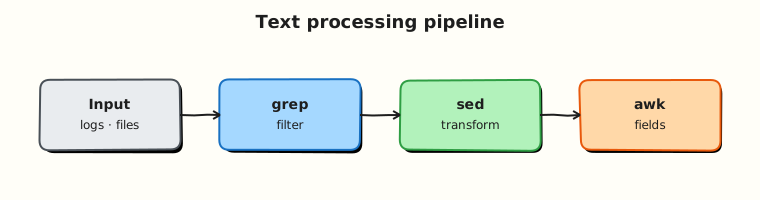
Text tools sit between raw files or command output and the answer you need: filter → transform → summarise → feed the next command.
Theory
The problem (before any jargon)
It is 03:00. A ticket says “payments API is failing.” You have a 200 MB log file. Opening it in an editor is slow and you cannot see patterns. You need to pull out error lines, count how many times each message appears, and save proof for the ticket.
That is text processing — working on line-oriented data from the terminal.
What grep, sed, and awk are (simple words)
Analogy: Imagine a stack of printed receipts.
- grep is a highlighter — “show me every line that contains
ERROR.” - sed is a stamp — “on every line, replace
DEBUGwithINFO” or “delete lines matching a pattern.” - awk is a small spreadsheet on each line — split columns, add counts, print field 3.
| Tool | Plain meaning | Typical job |
|---|---|---|
grep | Find (or exclude) matching lines | grep ERROR app.log |
sed | Stream editor — substitute, delete, print ranges | Change a config value |
awk | Field processor and mini-report writer | Count errors per host |
cut / tr | Slice columns or change characters | Fixed-width data |
sort / uniq / wc | Order, unique, count lines | Top-N errors |
xargs | Turn lines into command arguments | Run a command on many files |
What you can say in an interview: “grep finds lines; sed edits streams; awk splits fields and reports. I chain them with pipes for log triage.”
grep — find lines
Tiny example:
grep -n ERROR sample.log
grep -v DEBUG sample.log          # exclude DEBUG lines
grep -E 'ERROR|WARN' sample.log   # extended regex (either word)
grep -i error sample.log          # case-insensitive
grep -I ERROR .                   # skip binary files when searching a tree
Useful flags:
| Flag | Meaning |
|---|---|
-n | Show line numbers |
-v | Invert — show lines that do not match |
-E | Extended regex (|, +, ?) |
-i | Ignore case |
-c | Count matching lines only |
-I | Skip binary files |
Interview line: “I use grep -E for OR patterns and grep -v to remove noise before awk.”
sed — edit a stream
Analogy: sed reads input line by line, applies an edit rule, and prints the result. Think “find and replace on a conveyor belt.”
Tiny example (print only — safe):
sed 's/DEBUG/INFO/g' sample.log
sed -n '10,20p' sample.log        # print lines 10–20 only
sed '/^#/d' config.txt            # delete comment lines starting with #
In-place edit (-i) changes the file on disk. Always keep a backup in production:
cp config.txt config.txt.bak
sed -i 's/old_host/new_host/g' config.txt
diff config.txt.bak config.txt
Interview line: “I never sed -i without a backup or version control — one typo can break a service.”
awk — fields and reports
Analogy: Each log line is a row. awk splits the row into fields (columns) and can count, sum, or print selected columns.
Default field separator is whitespace. Use -F for other delimiters (colon, comma).
Tiny example:
awk '{print $1}' sample.log              # first field
awk -F: '{print $1}' /etc/passwd | head    # usernames (colon-separated)
awk '/ERROR/ {count++} END {print count}' sample.log
Interview line: “awk is my go-to for ‘third column of matching lines’ and simple counts without opening Python.”
Pipelines — glue tools together
Data flows left to right through |:
Read this as: find ERROR lines → take field 4 → sort → count duplicates → show top counts.
Why Cloud / DevOps teams care
- Incident response starts in logs, not dashboards alone.
- CI failures dump thousands of lines — grep finds the first real error.
- Config drift checks often use
grep/diffon expected values. - Automation scripts use the same tools you use manually — learn them once, reuse everywhere.
Common pitfalls
- Running
grep -ron/without-I— hits binary files and slows the host sed -iwithout backup on production configs- Forgetting
awkfield numbers start at$1, not$0($0is the whole line) - Piping to
sortbeforeuniq—uniqonly collapses adjacent duplicate lines
Hands-on Lab
Objective
Triage a synthetic application log like an on-call engineer: extract errors, rank messages, fix one bad config line with sed, and save an evidence pack.
Prerequisites
| Item | Notes |
|---|---|
| Linux practice host | Ubuntu preferred |
| Terminal access | Local, SSH, or WSL2 |
sudo | Not required for this lab |
Lab environment
Real-world scenario
Your team deploys a payments service. Support forwards app.log with hundreds of lines. Your mentor asks: “How many distinct ERROR messages, what is the top one, and did anyone leave DEBUG=true in the config?” You answer with commands and saved files — not by scrolling.
Step-by-step tasks
Task 1 – Create sample log and config
Create app.log:
2026-08-04T10:01:01 host=web01 level=INFO msg=started listener port=8080
2026-08-04T10:01:02 host=web01 level=ERROR msg=db_timeout user=api
2026-08-04T10:01:03 host=web02 level=WARN msg=slow_query ms=1200
2026-08-04T10:01:04 host=web01 level=ERROR msg=db_timeout user=api
2026-08-04T10:01:05 host=web03 level=ERROR msg=auth_failed user=guest
2026-08-04T10:01:06 host=web02 level=INFO msg=health_ok
2026-08-04T10:01:07 host=web01 level=ERROR msg=db_timeout user=api
2026-08-04T10:01:08 host=web03 level=DEBUG msg=trace_id=abc
2026-08-04T10:01:09 host=web02 level=ERROR msg=auth_failed user=guest
2026-08-04T10:01:10 host=web01 level=INFO msg=retry_scheduled
Create app.env:
Expected output
app.log has 10 lines. Both files exist under ~/rebash-linux/lab08.
Task 2 – grep errors and save evidence
cd ~/rebash-linux/lab08
grep -n 'level=ERROR' app.log | tee errors-raw.txt
grep -c 'level=ERROR' app.log | tee error-count.txt
grep -v 'level=DEBUG' app.log | wc -l | tee non-debug-lines.txt
test -s errors-raw.txt && test -s error-count.txt
cat error-count.txt
Expected output
errors-raw.txt lists five ERROR lines with line numbers. error-count.txt shows 5.
Task 3 – awk report: top ERROR messages
cd ~/rebash-linux/lab08
grep 'level=ERROR' app.log \
  | awk '{for(i=1;i<=NF;i++) if($i ~ /^msg=/) print $i}' \
  | sed 's/^msg=//' \
  | sort | uniq -c | sort -nr | tee top-errors.txt
head -1 top-errors.txt | tee top-error-line.txt
grep -q 'db_timeout' top-errors.txt
Expected output
top-errors.txt ranks messages; the top line is 3 db_timeout (three occurrences).
Task 4 – sed fix config (with backup)
cd ~/rebash-linux/lab08
cp app.env app.env.bak
sed -i 's/LOG_LEVEL=DEBUG/LOG_LEVEL=INFO/' app.env
grep 'LOG_LEVEL=INFO' app.env | tee config-fixed.txt
diff app.env.bak app.env | tee config-diff.txt
test -s config-fixed.txt
Expected output
app.env now has LOG_LEVEL=INFO. config-diff.txt shows the one-line change.
Validation steps
-
errors-raw.txtandtop-errors.txtexist and match the sample log - You can explain grep vs sed vs awk without reading notes
-
app.env.bakexists — you did not edit in place without backup - Top error message is
db_timeoutwith count 3
Common errors and fixes
| Error | Cause | Fix |
|---|---|---|
awk: cmd. line:1: unexpected | Unclosed quote or brace | Copy the full awk command; check quotes |
Empty top-errors.txt | Wrong field pattern | Run grep ERROR app.log first; inspect one line manually |
sed: can't read | Wrong path | cd ~/rebash-linux/lab08 and ls |
uniq shows wrong counts | Forgot sort before uniq | Always sort \| uniq -c |
Challenge exercise
Create triage.sh that prints ERROR count and the top message from any log file passed as argument $1.
Create triage.sh:
#!/usr/bin/env bash
set -euo pipefail
log="${1:?usage: triage.sh app.log}"
grep -c 'level=ERROR' "$log" || true
grep 'level=ERROR' "$log" \
  | awk '{for(i=1;i<=NF;i++) if($i ~ /^msg=/) print $i}' \
  | sed 's/^msg=//' \
  | sort | uniq -c | sort -nr | head -1
cd ~/rebash-linux/lab08
chmod +x triage.sh
./triage.sh app.log | tee triage-output.txt
grep -q 'db_timeout' triage-output.txt
Learning outcomes
- You filtered and ranked real log lines with grep, awk, and sort/uniq
- You changed a config safely with sed and kept a backup
- You have ticket-ready evidence files for interviews
Cleanup
cd ~/rebash-linux/lab08
# Keep evidence for revision; optional remove generated copies:
# rm -f *.txt triage-output.txt
# Keep triage.sh, app.log, app.env for practice
Validation
- Lab completed under
~/rebash-linux/lab08 - Can draw a pipeline on paper: grep → awk → sort → uniq
- Ready for process management next
Code Walkthrough
grepfirst — reduce noise before heavier tools.tee— see output and save to a file at the same time (great for tickets).awkfield loops — when columns arekey=value, scan fields instead of guessing$3.sort | uniq -c | sort -nr— classic top-N pattern for ops.- Backup before
sed -i— production configs live in Git too, but local backup saves you during labs.
Security Considerations
- Log files may contain passwords, tokens, or personal data — redact before sharing externally.
- Avoid
grep -ron/as root — exposes secrets in/etcand hammers disk I/O. - Do not paste production logs into public paste sites without scrubbing.
- Scripts that process untrusted input should quote variables (
"$log") to avoid injection. - Prefer read-only triage before editing configs on shared servers.
Common Mistakes
❌ Scrolling a huge log in vim.
✅ Use grep ERROR huge.log | less or save filtered output to a file. Fix: filter first, read second.
❌ sed -i without backup.
✅ One wrong substitution breaks a service. Fix: cp file file.bak or use version control; diff after edit.
❌ uniq without sort.
✅ uniq only removes consecutive duplicates. Fix: always pipe through sort first.
❌ Grepping binary trees.
✅ Searching / or /var without -I prints “Binary file matches”. Fix: narrow the path; add grep -I.