Jinja2 Templates
Overview
Configuration files differ per host, environment, and release — but the structure stays the same. Jinja2 templates (.j2 files) combine static text with variables, filters, conditionals, and loops. Ansible’s template module renders templates on the control node and pushes the result to managed hosts, preserving permissions and reporting changed when content drifts.
Templates power /etc/nginx/nginx.conf, systemd drop-ins, .env files, and cloud-init scripts. Understanding filters (default, join, to_json) and control structures (Jinja if and for blocks) separates copy-paste configs from maintainable automation.
This is Tutorial 9 in Module 9: Templates of the REBASH Academy Ansible for Cloud & DevOps Engineers series — written for DevOps and platform engineers. You will author templates/motd.j2, render it with the template module, and prove content with grep asserts.
Prerequisites
- Ansible Roles (Module 8) — role
templates/layout - Ansible Core 2.16+ with Jinja2 available
- Basic familiarity with YAML playbooks
Learning Objectives
By the end of this tutorial, you will be able to:
- Use variable substitution, filters, and defaults in
.j2templates - Branch with Jinja if blocks and iterate with for loops in templates
- Deploy templates using
ansible.builtin.templatewith correct ownership and mode - Validate rendered output on localhost without manual editing on the target
- Avoid common Jinja whitespace and undefined variable errors
Architecture
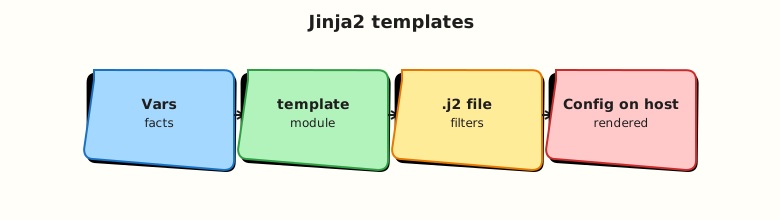
The control node evaluates Jinja2 against merged variables and facts; the template module writes the rendered file to the target path.
Theory
What it is
Jinja2 is a templating language embedded in Ansible. Templates use:
- Expressions: double-brace variable substitution and filter chains (for example
default,join) - Statements: if, for, and endfor blocks that control template logic
- Comments: hash-brace comments that are not rendered
The template module renders src (under templates/ in a role or playbook) to dest on the host. Use copy when no substitution is needed.
Why it matters
One template plus inventory variables replaces dozens of near-duplicate config files. Drift detection becomes automatic: re-run the playbook and Ansible reports changed when rendered content differs. Pairs naturally with roles and group_vars per environment.
How it works
- Ansible merges variables (same precedence as tasks).
- Jinja renderer loads the
.j2file from role/playbook template path. templatewrites todest; optionalbackup: truekeeps previous file.validatecan run a command (for examplenginx -t -c %s) before commit.
# {{ app_name | default('app') }} configuration
{% if enable_tls | default(false) %}
ssl_certificate={{ cert_path }}
{% else %}
# TLS disabled in this environment
{% endif %}
{% for upstream in upstreams | default([]) %}
upstream {{ upstream.name }} { server {{ upstream.host }}:{{ upstream.port }}; }
{% endfor %}
Key concepts and comparisons
| Filter / pattern | Purpose |
|---|---|
default('value') | Fallback when undefined |
join(',') | List to string |
to_json / to_yaml | Structured snippets |
trim / indent | Whitespace control |
| if / for blocks | Logic in template |
| Module | Use when |
|---|---|
template | File needs Jinja substitution |
copy | Static file from files/ |
lineinfile | Single line edit (prefer template for multi-line) |
Common pitfalls
- Undefined variables without
default— enableDEFAULT_UNDEFINED_VAR_BEHaviouror use| default. - Whitespace — dash trim markers on tag delimiters control newlines in tight configs.
- Invalid rendered YAML/JSON — test with
validateor offline render checks. - Secrets in templates — prefer Vault-encrypted vars; never commit plaintext keys.
- Looping Ansible tasks vs Jinja loops — use Jinja
forinside one file; Ansibleloopfor repeated tasks.
Hands-on Lab
Objective
Create templates/motd.j2 with filters, conditionals, and a loop; render it via playbook to /tmp/rebash-motd-rendered.txt; prove content with grep.
Prerequisites
- Ansible installed
- Write access under
$HOMEand/tmp
Lab environment
Runtime: localhost, connection: local.
Real-world scenario
Operations wants a login banner listing enabled services and environment name. The template is generated from inventory variables so staging and production banners differ without separate static files.
Step-by-step tasks
Task 1 – Template with filters, if, and for
Create playbooks/templates/motd.j2:
{# REBASH Academy MOTD template — Module 09 lab #}
================================================================================
  {{ site_name | default('REBASH Lab') }} — {{ env_name | default('development') | upper }}
  Host: {{ ansible_hostname | default(inventory_hostname) }}
================================================================================
{% if show_services | default(true) %}
Enabled services:
{% for svc in enabled_services | default([]) %}
  - {{ svc.name }} (port {{ svc.port | string }})
{% else %}
  - none configured
{% endfor %}
{% else %}
Services listing disabled by show_services=false
{% endif %}
Generated at render time — do not edit manually.
================================================================================
Task 2 – Playbook using template module
Create playbooks/render-motd.yml:
---
- name: Render MOTD template
  hosts: localhost
  connection: local
  gather_facts: true
  vars:
    site_name: "Platform Edge"
    env_name: staging
    show_services: true
    enabled_services:
      - name: api
        port: 8080
      - name: metrics
        port: 9090
  tasks:
    - name: Render motd to temp path
      ansible.builtin.template:
        src: motd.j2
        dest: /tmp/rebash-motd-rendered.txt
        mode: "0644"
      register: motd_render

    - name: Show render changed status
      ansible.builtin.debug:
        msg: "changed={{ motd_render.changed }}"
Run from lab root (Ansible resolves templates/ next to the playbook under playbooks/):
cd ~/rebash-ansible/module-09
ansible-playbook playbooks/render-motd.yml --syntax-check | tee syntax-check.txt
ansible-playbook playbooks/render-motd.yml | tee run-render.txt
test -f /tmp/rebash-motd-rendered.txt
grep -q 'STAGING' /tmp/rebash-motd-rendered.txt
grep -q 'api (port 8080)' /tmp/rebash-motd-rendered.txt
Expected output
File exists; contains STAGING and service lines; play recap success.
Task 3 – Toggle conditional branch
Create playbooks/render-motd-no-services.yml by copying the first playbook and setting show_services: false in vars (edit the file in your editor). Run:
cd ~/rebash-ansible/module-09
ansible-playbook playbooks/render-motd-no-services.yml | tee run-no-svc.txt
grep -q 'Services listing disabled' /tmp/rebash-motd-rendered.txt
Expected output
Rendered file contains Services listing disabled by show_services=false.
Task 4 – Idempotency check
cd ~/rebash-ansible/module-09
ansible-playbook playbooks/render-motd.yml | tee run-idempotent.txt
grep 'changed=' run-idempotent.txt | tail -1
Expected output
Second run reports changed=0 for template task if content unchanged.
Validation steps
- Template uses if blocks, for loops, and at least one filter (
default,upper,string) -
templatemodule renders to/tmp/rebash-motd-rendered.txt - Grep asserts prove conditional and loop output
- Syntax-check passes
- Can explain
templatevscopy
Common errors and fixes
| Error | Cause | Fix |
|---|---|---|
| Template not found | Wrong src path | Place motd.j2 in templates/; run from correct cwd or use role |
| Undefined variable error | Missing var, no default | Add the default filter with a fallback in the template |
| Extra blank lines in output | Jinja whitespace | Use dash trim markers on tag delimiters |
| Invalid file mode | YAML quoting | Quote mode "0644" |
changed every run | Timestamp in template | Remove volatile content for idempotency |
Challenge exercise
Add a validate command to the template task using /bin/true %s as a stand-in, then replace with grep -q 'Generated at render time' %s. Re-run and confirm validation passes.
Learning outcomes
- Authored a multi-feature Jinja2 template with conditionals and loops
- Deployed with
ansible.builtin.templateon localhost - Proved rendered content with file asserts
- Observed idempotent second run behaviour
Cleanup
Validation
- Lab completed under
~/rebash-ansible/module-09 - Can explain filters used in the template
- Verified rendered file content with grep
- Can describe one production failure (volatile template breaking idempotency)
Code Walkthrough
- Default everything optional — templates should render with minimal vars.
- Validate rendered configs — use module
validatefor nginx, sshd, systemd unit syntax. - Keep logic readable — complex Jinja belongs in vars prepared in tasks (
set_fact) if needed. - Mode and owner — set
mode,owner,groupexplicitly for config files. - Backup on risky paths —
backup: truefor production conf edits.
Security Considerations
- Never render secrets into world-readable files without intent (
mode: "0600"). - User-supplied template variables need validation — injection into nginx or sudoers is dangerous.
- Template diffs in logs (
-diff) may expose secrets — restrict verbosity in CI. - Prefer Vault variables for keys; reference in template, do not inline in Git.
- Review `` — they are not rendered but live in Git history.
Common Mistakes
Editing rendered files on servers
Manual edits get overwritten on next run. Fix: change template or vars; use config management ownership.
Huge Jinja programs in templates
Unmaintainable logic in .j2 files. Fix: precompute data structures in tasks.
Forgetting validate on syntax-sensitive configs
Bad config deployed then service fails. Fix: add validate with daemon test command.
Using template for binary files
Jinja is text-only. Fix: use copy with binary-safe transfer.
Best Practices
- Pin template behaviour with role defaults and documented variables.
- Use raw Jinja blocks inside templates only when literal double-brace output is needed.
- Test templates with molecule or localhost playbooks before fleet rollout.
- Keep line length readable; use
indentfilter for embedded blocks. - Store templates in roles under
templates/for reuse.
Troubleshooting
| Symptom | Likely cause | Fix |
|---|---|---|
| Empty file sections | Undefined loop list | default([]) and an else branch in the for loop |
| Template syntax error | Unclosed if block | Jinja lint or ansible-playbook syntax-check |
| Wrong host values | Facts not gathered | gather_facts: true |
| Permission denied on dest | Non-writable path | Use /tmp in lab or become/root where appropriate |
| Always changed | Non-idempotent content | Remove timestamps from template body |
Summary
Jinja2 templates let one file drive many environments through variables, filters, and control structures. The template module delivers rendered configs idempotently. Next, extend Ansible with community content via Collections and Galaxy.
Interview Questions
1. When do you use template instead of copy?
Reveal answer
Use template when the destination file must reflect variables, facts, or loops — config files that differ per host or env. Use copy for static assets unchanged across the fleet (binaries, static certs without substitution, fixed scripts).
2. How do you prevent undefined variable errors in templates?
Reveal answer
Apply the default filter with a fallback string, define vars in role defaults, or enable strict undefined behaviour in development to fail fast. Prefer defaults in role defaults/main.yml for documented tunables.
3. What is the difference between Ansible loop on a task and a Jinja for loop in a template?
Reveal answer
Ansible loop repeats task execution (multiple files, multiple packages). A Jinja for loop repeats text inside a single rendered file. Choose based on whether you need multiple resources or one file with repeated stanzas.
4. How can you validate a rendered config before activating it?
Reveal answer
Use the validate parameter on template with a command that accepts a path placeholder (%s), for example nginx -t -c %s or sshd -t -f %s. Ansible renders to a temp file, runs validate, then moves into place on success.
5. Why might a template report changed on every run?
Reveal answer
Non-deterministic content (timestamps, random IDs, unordered dict iteration in older Python) makes rendered output differ each time. Remove volatile fields or sort keys explicitly for stable output.
6. Explain the to_json filter use case.
Reveal answer
Embed structured data into JSON or YAML config fragments — for example app settings block, cloud-init write_files content, or API payload sections — with proper escaping handled by the filter.
7. Production: template deploys app config with secrets — how do you handle safely?
Reveal answer
Store secrets in Ansible Vault-encrypted vars; restrict file mode (0600); limit playbook log verbosity; avoid printing diffs in CI; rotate secrets via Vault rekey/variable update rather than editing rendered files on hosts.
Related Tutorials
- Ansible course index
- Previous: Ansible Roles
- Next: Collections and Galaxy
- Related: Helm Templates and Go Templating