Vault and Secrets
Overview
Automation without secret handling ends in credentials in Git, chat logs, and incident tickets. Ansible Vault encrypts sensitive files and inline strings so playbooks stay in version control while ciphertext protects keys, tokens, and passwords at rest. ansible-vault encrypt, vault-id, and --vault-password-file integrate with CI using short-lived credentials — never the same patterns as lab-only password files on developer laptops.
Rotation, least privilege, and separation of duties apply: Vault protects at rest; runtime still needs secure password delivery (CI secret, HashiCorp Vault lookup, cloud secret manager). This module teaches Vault mechanics and production habits without committing real secrets.
This is Tutorial 11 in Module 11: Secrets Management of the REBASH Academy Ansible for Cloud & DevOps Engineers series — written for DevOps, platform, and security-minded engineers. You will create plaintext secrets.yml, encrypt with Vault using lab password rebash-lab-vault, and run a playbook that consumes encrypted vars.
Prerequisites
- Collections and Galaxy (Module 10)
- Ansible Core 2.16+ with
ansible-vaultsubcommand - Git repository awareness — never commit
.vault_passor real secrets
Learning Objectives
By the end of this tutorial, you will be able to:
- Encrypt and decrypt files with
ansible-vault - Use
--vault-idand password files appropriately (lab vs production) - Structure encrypted group_vars or vars files for playbooks
- Run playbooks with
--ask-vault-passor--vault-password-file - Describe rotation habits when secrets change or staff leave
Architecture
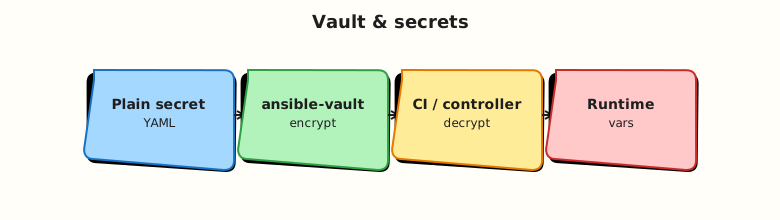
Vault encrypts YAML on disk; Ansible decrypts in memory on the control node during playbook parsing and task execution.
Theory
What it is
Ansible Vault applies symmetric encryption to whole files or embedded strings (!vault | blocks). Common commands:
ansible-vault create secrets.yml
ansible-vault encrypt secrets.yml
ansible-vault edit secrets.yml
ansible-vault view secrets.yml
ansible-vault decrypt secrets.yml
ansible-vault rekey secrets.yml
Vault ID labels encryption keys when using multiple passwords (--vault-id lab@prompt, prod@/path/to/file).
Playbooks load encrypted vars like normal YAML once the password is supplied.
Why it matters
Git history is forever. Plaintext db_password in a commit requires rotation even after deletion. Vault ciphertext allows peer review of structure without exposing values. Pairs with CI vault password from secret store and separate vault IDs per environment.
How it works
- Author vars in plaintext locally (never commit).
ansible-vault encryptreplaces file body with$ANSIBLE_VAULT;...envelope.- Commit ciphertext to Git.
- CI/job supplies password via
--vault-password-fileor--vault-id. - Ansible decrypts to memory for task modules (for example
mysql_user,copywith content).
Lab-only pattern (this tutorial):
- Password:
rebash-lab-vault - Password file:
.vault_passin lab workspace — add to.gitignore, never push
Key concepts and comparisons
| Approach | At-rest protection | Runtime delivery |
|---|---|---|
| Vault encrypted file | Yes (symmetric) | Vault password / ID |
| CI secret env var | No in Git if used correctly | Inject at job time |
| Cloud secret manager lookup | Secrets not in Git | IAM/API at runtime |
| Plaintext in group_vars | No | Avoid |
| Command | Use when |
|---|---|
encrypt | Existing plaintext file |
edit | Change values in place |
rekey | Rotate vault password |
view | Read without decrypt file to disk permanently |
Common pitfalls
- Committing
.vault_passor lab password files — instant credential leak. - One global vault password for all environments — prod and dev compromise together.
- Decrypting to plaintext on disk and forgetting to re-encrypt before commit.
- Logging
-vvvoutput that prints secret values from tasks. - Storing vault password in playbook vars — defeats purpose.
Hands-on Lab
Objective
Create group_vars/all/secrets.yml in plaintext, encrypt with ansible-vault using password rebash-lab-vault, document a gitignored .vault_pass, and run a playbook that prints non-sensitive proof without exposing the secret in logs.
Prerequisites
- Ansible installed
- Write access under
~/rebash-ansible/module-11
Lab environment
mkdir -p ~/rebash-ansible/module-11/{playbooks,group_vars/all,inventory}
cd ~/rebash-ansible/module-11
Add .vault_pass to a local .gitignore in the lab folder (do not commit):
Create .gitignore:
Runtime: localhost only.
Real-world scenario
Application DB credentials live in encrypted group_vars/all/secrets.yml. Deploy playbooks reference vault_db_user and vault_db_password without plaintext in Git. Operators rotate with ansible-vault rekey and update CI vault password.
Step-by-step tasks
Task 1 – Plaintext secrets file (lab values only)
Create group_vars/all/secrets.yml:
---
# LAB ONLY — encrypt before any commit to shared Git
vault_db_user: rebash_app
vault_db_password: lab-only-not-production
vault_api_token: rebash-lab-token-0000
app_label: rebash-module-11
Do not commit this file to the rebash-academy repository or any shared remote while plaintext.
Task 2 – Vault password file (lab only, gitignored)
Create .vault_pass:
Restrict permissions:
Task 3 – Encrypt secrets
cd ~/rebash-ansible/module-11
ansible-vault encrypt group_vars/all/secrets.yml --vault-password-file .vault_pass | tee encrypt-log.txt
head -1 group_vars/all/secrets.yml | tee vault-header.txt
grep -q 'ANSIBLE_VAULT' vault-header.txt
Expected output
First line of secrets.yml starts with $ANSIBLE_VAULT; file is ciphertext.
View without permanent decrypt:
cd ~/rebash-ansible/module-11
ansible-vault view group_vars/all/secrets.yml --vault-password-file .vault_pass | tee vault-view.txt
grep -q 'vault_db_user' vault-view.txt
grep -q 'lab-only-not-production' vault-view.txt
Expected output
View shows decrypted content in terminal only; file on disk stays encrypted.
Task 4 – Playbook using encrypted vars
Create inventory/localhost.yml:
Create ansible.cfg:
Create playbooks/use-secrets.yml:
---
- name: Use vault-encrypted group vars
  hosts: localhost
  gather_facts: false
  vars_files:
    - ../group_vars/all/secrets.yml
  tasks:
    - name: Prove vars loaded without printing secrets
      ansible.builtin.debug:
        msg: "App {{ app_label }} connects as user {{ vault_db_user }} (password hidden)"
      no_log: true

    - name: Write non-secret marker file
      ansible.builtin.copy:
        content: "configured-user={{ vault_db_user }}\n"
        dest: /tmp/rebash-vault-proof.txt
        mode: "0600"
Run with vault password file:
cd ~/rebash-ansible/module-11
ansible-playbook playbooks/use-secrets.yml --vault-password-file .vault_pass | tee run-vault.txt
grep -q 'PLAY RECAP' run-vault.txt
grep -q 'configured-user=rebash_app' /tmp/rebash-vault-proof.txt
grep -q 'lab-only-not-production' run-vault.txt && echo 'FAIL secret in log' && exit 1 || echo 'OK no password in stdout'
Expected output
Play succeeds; proof file contains username only; playbook stdout does not contain the password string.
Task 5 – Rekey demonstration (rotation habit)
cd ~/rebash-ansible/module-11
echo 'rebash-lab-vault-rotated' > .vault_pass.new
chmod 600 .vault_pass.new
ansible-vault rekey group_vars/all/secrets.yml --vault-password-file .vault_pass --new-vault-password-file .vault_pass.new | tee rekey.txt
mv .vault_pass.new .vault_pass
ansible-vault view group_vars/all/secrets.yml --vault-password-file .vault_pass | grep -q vault_db_user
Expected output
Rekey succeeds; view works with new password file.
Validation steps
-
secrets.ymlon disk is Vault ciphertext ($ANSIBLE_VAULT) -
.vault_passis gitignored and mode600 - Playbook runs with
--vault-password-file -
no_logtask avoids secret leakage (verify grep check) - Performed
rekeysuccessfully
Common errors and fixes
| Error | Cause | Fix |
|---|---|---|
Decryption failed | Wrong password or corrupt file | Verify .vault_pass; restore from backup |
Attempting to decrypt but no vault secrets found | Forgot vault flag | Add --vault-password-file or --ask-vault-pass |
| Secret appears in CI logs | Missing no_log: true | Set on tasks using sensitive vars |
| Plaintext committed | Encrypted after push | Rotate secret; git filter-repo; rekey |
vault-id mismatch | Multiple IDs configured | Match encrypt ID with runtime --vault-id |
Challenge exercise
Split secrets into group_vars/all/vault.yml (encrypted) and group_vars/all/main.yml (plaintext structure). Use inline encrypted var for vault_api_token via ansible-vault encrypt_string and reference in playbook.
Learning outcomes
- Encrypted group_vars with ansible-vault
- Used gitignored password file for lab only
- Ran playbook loading encrypted vars with proof file
- Practised rekey as rotation habit
Cleanup
rm -f /tmp/rebash-vault-proof.txt ~/rebash-ansible/module-11/.vault_pass.new
# Remove lab dir when finished; never push .vault_pass or plaintext secrets
Validation
- Completed lab under
~/rebash-ansible/module-11 - Ciphertext committed only if using a private lab fork — never real secrets
- Can explain vault-id vs single password file
- Knows to use
no_logon sensitive tasks
Code Walkthrough
- Encrypt early — never push plaintext secrets “just for a minute”.
- Separate IDs —
dev@vsprod@vault passwords limit blast radius. - no_log — on tasks that touch credentials; reduce
-vvvin CI. - rekey on rotation — when people leave or passwords rotate, rekey all encrypted files.
- Prefer lookup plugins — cloud secret managers for dynamic secrets in production.
Security Considerations
- Lab password
rebash-lab-vaultis public in docs — never reuse in any real system. - Add
.vault_pass,*.vault, and decrypt scripts to.gitignore. - Vault protects at rest only — memory and logs remain exposure points.
- Restrict who can run playbooks with prod vault password (RBAC on Automation Platform).
- Audit decrypted access; pair with external secret rotation schedules.
Common Mistakes
Committing .vault_pass
Equivalent to publishing the key. Fix: gitignore; use CI secret injection.
Same vault password for every environment
Dev leak compromises prod ciphertext. Fix: separate vault IDs and passwords.
Printing vars in debug without no_log
Secrets appear in AWX/CI output. Fix: no_log: true and structured redaction.
ansible-vault decrypt before edit and forget re-encrypt
Plaintext gets committed. Fix: use ansible-vault edit only.
Best Practices
- Encrypt entire vars files or use
encrypt_stringfor single values. - Document vault password delivery for operators (not in Git).
- Rotate with
rekeyand update CI secrets in same change window. - Combine Vault with dynamic lookups for short-lived cloud credentials.
- Scan Git history for accidental plaintext with gitleaks or similar.
Troubleshooting
| Symptom | Likely cause | Fix |
|---|---|---|
| Play cannot read var | File not in vars_files/path | Check group_vars layout and inventory |
| Wrong vault password | ID mismatch | List vault IDs used at encrypt time |
| Encrypted file in Git but play fails in AWX | Missing credential | Map vault credential in job template |
| Partial file plaintext | Mixed encrypt | Re-encrypt whole file |
| Variable still visible in logs | no_log not set | Add no_log; lower verbosity |
Summary
Ansible Vault keeps secrets out of plaintext Git while preserving playbook structure. Use vault IDs, secure password delivery, no_log, and regular rekeying. Next, apply collections to cloud APIs with safe stubs in Cloud Automation.
Interview Questions
1. What does Ansible Vault protect and what does it not protect?
Reveal answer
Vault encrypts files and strings at rest on disk and in Git. It does not protect secrets in memory on the control node, in careless debug output, or on target hosts after deployment. Runtime delivery and logging discipline remain essential.
2. How do you run a playbook against encrypted group_vars?
Reveal answer
Supply the vault password via --ask-vault-pass, --vault-password-file, or --vault-id label@source. Ansible decrypts during parsing. Ensure inventory path includes hosts that load those group_vars.
3. When would you use vault-id?
Reveal answer
Multiple environments or teams use different vault passwords. Labels (prod@file, dev@prompt) select the correct key when encrypting and running. Prevents using dev password against prod files accidentally if IDs are enforced.
4. How do you rotate a vault password?
Reveal answer
ansible-vault rekey on each encrypted file (or scripted loop), update CI/CD and operator password stores in the same change, verify playbooks, and revoke old password. Also rotate the underlying secret if exposure suspected.
5. Difference between encrypting a file and encrypt_string?
Reveal answer
encrypt file replaces entire YAML file with vault envelope. encrypt_string produces inline !vault blob embeddable in otherwise plaintext files — useful for one or two secrets among public vars.
6. Why use no_log on tasks?
Reveal answer
Ansible can print module arguments and return data to stdout/AWX logs. no_log: true suppresses task result logging for that task, reducing accidental credential exposure. Not a substitute for proper secret storage.
7. Production pattern: where should the vault password live in CI?
Reveal answer
CI secret store (GitHub Actions secret, GitLab masked variable, Vault KV) written to a short-lived file or env for the job only, referenced by --vault-password-file or --vault-id. Never in repository plaintext or fork-accessible vars.
Related Tutorials
- Ansible course index
- Previous: Collections and Galaxy
- Next: Cloud Automation
- Related: Terraform Security and Secrets