Installing Ansible and Configuration
Overview
Before you automate a fleet, your control node needs a pinned, reproducible Ansible install and a predictable configuration file (ansible.cfg). Different laptops default to different inventory paths and SSH settings — that is how “works on my machine” incidents start in CI.
This tutorial covers ansible-core versus the full ansible package, installation with pipx or pip, optional virtual environments, and how Ansible locates ansible.cfg. You will create project-level config that points at ./inventory, disable strict host key checking only for disposable labs, and prove versions with an evidence script.
This is Tutorial 2 in Module 2: Installation and Configuration of the REBASH Academy Ansible for Cloud & DevOps Engineers series — written for DevOps, Platform, Cloud, and SRE engineers who need consistent CLI behaviour across teammates and pipelines.
Prerequisites
- Introduction to Configuration Management and Ansible
- Linux — terminal,
PATH, file permissions - Python — pip and virtual environments (helpful)
- Python 3.10+ recommended on Ubuntu 22.04/24.04, macOS, or WSL2
Learning Objectives
By the end of this tutorial, you will be able to:
- Choose between ansible-core and the ansible bundle for your team
- Install Ansible with pipx or
python3 -m pip install --user - Explain
ansible.cfgsearch order and override withANSIBLE_CONFIG - Create project
ansible.cfgwith inventory path and lab-safe SSH defaults - Run
verify-ansible.shand captureansible --versionevidence
Architecture
Configuration flows from environment variables and config files into every CLI invocation — inventory path, roles path, callback plugins, and SSH behaviour.
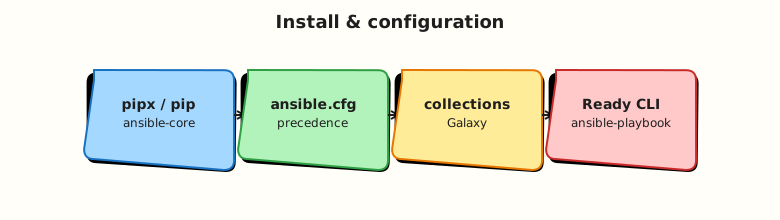
Theory
What it is
Ansible Core is the supported automation engine: ansible, ansible-playbook, ansible-galaxy, ansible-inventory, and the plugin framework. The ansible PyPI package includes ansible-core plus many pre-packaged collections.
Installation options on a control node:
| Method | Best for | Command |
|---|---|---|
| pipx | Isolated CLI on workstations | pipx install ansible-core |
| pip --user | CI agents, shared runners | python3 -m pip install --user ansible-core |
| venv | Project-pinned versions | python3 -m venv .venv && pip install ansible-core==2.18.* |
| OS packages | Distro-maintained paths | apt install ansible (may lag upstream — verify version) |
ansible.cfg is an INI-style file controlling defaults: which inventory file to load, whether to gather facts, SSH timeouts, retry files, and callback plugins.
Why it matters
Unpinned Ansible versions break CI when module arguments change. Missing ansible.cfg makes newcomers pass -i inventory.ini on every command and forget --check in production. Platform teams commit ansible.cfg per repo (or per execution environment image) so local runs match pipelines.
Production also separates lab settings (host_key_checking=False only on disposable networks) from production settings (strict host keys, short timeouts, profiling callbacks for audit).
How it works
Config file search order (first found wins unless ANSIBLE_CONFIG is set):
ANSIBLE_CONFIGenvironment variable (path to a file)./ansible.cfgin the current working directory~/.ansible.cfgin the user home directory/etc/ansible/ansible.cfgsystem-wide
When you cd ~/rebash-ansible/module-02, project ./ansible.cfg applies automatically.
Common [defaults] keys:
[defaults]
inventory = ./inventory
host_key_checking = False
retry_files_enabled = False
stdout_callback = yaml
interpreter_python = auto_silent
Verify install:
Key concepts and comparisons
| Package | Contents | When to use |
|---|---|---|
| ansible-core | Engine + minimal built-ins | Pin in production; add collections explicitly |
| ansible (bundle) | Core + many collections | Learning sandboxes; quick breadth |
| pipx | Isolated app venv per tool | Developer laptops — avoids polluting system Python |
| venv in repo | Exact version in .venv | CI jobs and team onboarding scripts |
| Setting | Lab | Production |
|---|---|---|
host_key_checking | False on throwaway VMs | True or known_hosts management |
inventory | ./inventory or ./inventories/lab | Separate prod inventory path with RBAC |
forks | Default (5) | Tune for network/API rate limits |
Common pitfalls
- Installing Ansible with system Python on Debian/Ubuntu without
--break-system-packagesawareness — prefer pipx or venv on modern distros. - Relying on
/etc/ansible/ansible.cfgon laptops — project config in Git is authoritative. - Committing
host_key_checking=Falseto production repos without comments — reviewers should flag it. - Forgetting to add
~/.local/bin(pip --user) or pipx paths toPATH.
Hands-on Lab
Objective
Install ansible-core, create project ansible.cfg and inventory, write verify-ansible.sh, and prove ansible --version and config defaults from ~/rebash-ansible/module-02.
Prerequisites
- Python 3.9+ and pip available
pipxoptional but recommended:python3 -m pip install --user pipx && pipx ensurepath
Lab environment
Workspace: ~/rebash-ansible/module-02
Real-world scenario
Your team onboarding doc requires every engineer to prove Ansible version and show which inventory file the CLI resolves — the same check the platform CI job runs on pull requests.
Step-by-step tasks
Task 1 – Install ansible-core
Choose one method and record evidence.
Option A — pipx (recommended on workstations):
Option B — pip user install:
python3 -m pip install --user ansible-core
python3 -m pip show ansible-core | tee ~/rebash-ansible/module-02/pip-show-ansible.txt
Verify CLI:
ansible --version | tee ~/rebash-ansible/module-02/ansible-version.txt
grep -qi 'ansible core' ~/rebash-ansible/module-02/ansible-version.txt
echo "install OK" | tee ~/rebash-ansible/module-02/install-ok.txt
Expected output
ansible-version.txt lists ansible core version (2.16+ or 2.18+); install-ok.txt contains install OK.
Task 2 – Create ansible.cfg and inventory
Create ansible.cfg:
[defaults]
inventory = ./inventory
host_key_checking = False
retry_files_enabled = False
interpreter_python = auto_silent
stdout_callback = default

[privilege_escalation]
become = False
Create inventory:
Confirm config resolution:
cd ~/rebash-ansible/module-02
ansible-config dump --only-changed | tee ansible-config-dump.txt
grep -q 'DEFAULT_HOST_KEY_CHECKING(/.*ansible.cfg)' ansible-config-dump.txt || \
  grep -q HOST_KEY_CHECKING ansible-config-dump.txt
ansible-inventory --list | tee inventory-from-cfg.json
python3 -c "
import json
with open('inventory-from-cfg.json') as f:
    inv = json.load(f)
assert 'localhost' in inv['_meta']['hostvars']
print('cfg inventory OK')
" | tee cfg-inventory-ok.txt
Expected output
cfg-inventory-ok.txt shows cfg inventory OK; config dump reflects project ansible.cfg.
Task 3 – Create deploy-config playbook and verify script
Create files/lab.conf:
Create deploy-config.yml:
---
- name: Deploy lab configuration after install
  hosts: local
  gather_facts: false
  vars:
    config_dest: "~/rebash-ansible/module-02/config/lab.conf"
  tasks:
    - name: Ensure config directory exists
      ansible.builtin.file:
        path: "{{ config_dest | dirname }}"
        state: directory
        mode: "0755"

    - name: Deploy lab configuration file
      ansible.builtin.copy:
        src: files/lab.conf
        dest: "{{ config_dest }}"
        mode: "0644"
Create verify-ansible.sh:
#!/usr/bin/env bash
set -euo pipefail
cd "$(dirname "$0")"
ansible --version | tee verify-version.txt
ansible-config dump --only-changed | head -20 | tee verify-config-head.txt
ansible-playbook deploy-config.yml --syntax-check
ansible-playbook deploy-config.yml | tee verify-deploy.txt
grep -q 'PLAY RECAP' verify-deploy.txt
test -f ~/rebash-ansible/module-02/config/lab.conf
grep -q 'lab=module-02' ~/rebash-ansible/module-02/config/lab.conf
ansible localhost -m ping | tee verify-ping.txt
grep -q '"ping": "pong"' verify-ping.txt
echo "verify-ansible.sh PASS" | tee verify-pass.txt
Run:
cd ~/rebash-ansible/module-02
chmod +x verify-ansible.sh
./verify-ansible.sh
grep -q 'verify-ansible.sh PASS' verify-pass.txt
cat ~/rebash-ansible/module-02/config/lab.conf | tee config-proof.txt
Expected output
verify-pass.txt contains verify-ansible.sh PASS; config/lab.conf exists with lab=module-02.
Validation steps
-
ansible --versionshows ansible-core version pinned in evidence -
./ansible.cfgsetsinventory = ./inventorywithout passing-imanually -
verify-ansible.shexits 0 and writesverify-pass.txt - You can explain config search order from memory
Common errors and fixes
| Error | Cause | Fix |
|---|---|---|
ansible: command not found after pip install | ~/.local/bin not on PATH | Add to shell profile; or use pipx ensurepath |
| Wrong inventory loaded | CWD not project dir; higher-precedence cfg | cd to project; check ansible-config dump |
Permission denied on verify script | Missing execute bit | chmod +x verify-ansible.sh |
| pip refuses system install (PEP 668) | Externally managed Python | Use pipx or python3 -m venv .venv |
Challenge exercise
Create show-config-source.sh that prints which file set DEFAULT_INVENTORY:
#!/usr/bin/env bash
set -euo pipefail
cd ~/rebash-ansible/module-02
ansible-config dump | grep DEFAULT_INVENTORY | tee config-inventory-source.txt
test -s config-inventory-source.txt
echo "config source captured"
Run and archive:
chmod +x ~/rebash-ansible/module-02/show-config-source.sh
~/rebash-ansible/module-02/show-config-source.sh | tee challenge-config.txt
Expected output
Line showing inventory setting and originating ansible.cfg path.
Learning outcomes
- Reproducible ansible-core install with version evidence
- Project-scoped
ansible.cfgmatching CI behaviour - Automated verify script for onboarding and pipelines
- Understanding of config precedence for debugging “wrong inventory” incidents
Cleanup
Keep ansible.cfg, inventory, and scripts for later modules. Remove transient evidence only:
cd ~/rebash-ansible/module-02
rm -f verify-version.txt verify-ping.txt verify-config-head.txt verify-pass.txt \
  ansible-config-dump.txt inventory-from-cfg.json cfg-inventory-ok.txt \
  config-inventory-source.txt challenge-config.txt
Validation
- Lab completed with
verify-ansible.sh PASS - Can explain pipx vs venv vs pip --user trade-offs
- Know where
ansible.cfgis loaded from for your project - Can describe why
host_key_checking=Falseis lab-only
Code Walkthrough
- Pin the engine — record
ansible --versionin CI artefacts. - Project cfg in Git —
./ansible.cfgtravels with playbooks. - Evidence scripts — shell wrappers make onboarding repeatable.
- auto_silent interpreter — avoids noisy Python discovery warnings on mixed distros.
- Do not global-disable security — scope relaxed SSH settings to lab inventory groups.
Security Considerations
- Prefer pipx or venv over sudo
pip installon shared control nodes. - Never commit private keys; use SSH agent or CI OIDC patterns for production.
host_key_checking=Falseexposes you to person-in-the-middle attacks — lab networks only.- Lock collection versions in
requirements.ymlwhen you add Galaxy content (later modules). - Restrict who can edit
ansible.cfgproduction forks — inventory path mistakes are outages.
Common Mistakes
Using system package Ansible without checking version
Distro packages may ship older Ansible with different module behaviour.
Fix: Run ansible --version; align with team standard or use pipx/ansible-core pin.
No ansible.cfg in the repository
Every command needs manual -i and flags; CI and laptop diverge.
Fix: Commit ./ansible.cfg with inventory path and documented overrides.
Installing as root with pip
Breaks PEP 668 distros and mixes packages with OS Python.
Fix: pipx, user install, or project venv.
Best Practices
- Document install method in repo
READMEwith exact ansible-core version. - Use
ansible-config dump --only-changedwhen debugging configuration. - Set
retry_files_enabled = Falseto avoid cluttering directories with.retryfiles. - Add
verify-ansible.shto CI before molecule or playbook jobs. - Use
ANSIBLE_CONFIGin CI only when testing alternate config files explicitly.
Troubleshooting
| Symptom | Likely cause | Fix |
|---|---|---|
| Different behaviour on CI vs laptop | Different versions or missing cfg | Compare ansible --version and ansible-config dump |
| Inventory empty | Wrong CWD | Run from directory containing ansible.cfg |
| Module not found after upgrade | Collection not installed | ansible-galaxy collection install namespace.name |
| Slow tab completion | Large inventory | Split inventories; use --limit in dev |
| pipx upgrade needed | Security patch release | pipx upgrade ansible-core |
Summary
Install ansible-core with pipx or pip, commit ansible.cfg so inventory and SSH defaults are predictable, and automate verification with a small shell script. Configuration search order explains most “wrong inventory” mysteries. Next, structure real inventories: Ansible Inventory.
Interview Questions
1. What is the difference between ansible-core and the ansible PyPI package?
Reveal answer
ansible-core is the minimal supported engine (CLI, plugins, core modules). The ansible package bundles ansible-core with many collections for broader out-of-the-box coverage. Production teams often standardise on ansible-core plus explicit collection pins to control size, supply chain, and upgrade testing.
2. Explain ansible.cfg search order.
Reveal answer
Ansible loads the first config found from: ANSIBLE_CONFIG env var → ./ansible.cfg in current directory → ~/.ansible.cfg → /etc/ansible/ansible.cfg. Project ./ansible.cfg in Git ensures teammates and CI share defaults when they run commands from the repo root. Override intentionally with ANSIBLE_CONFIG for tests.
3. Why do teams use pipx for Ansible on developer laptops?
Reveal answer
pipx installs CLI tools in isolated virtual environments and exposes binaries on PATH without modifying system Python. That avoids PEP 668 “externally managed environment” errors and reduces conflicts between project Python deps and Ansible’s deps. Upgrades are scoped: pipx upgrade ansible-core.
4. Is host_key_checking = False acceptable in production ansible.cfg?
Reveal answer
Generally no for production — it disables SSH host key verification and enables person-in-the-middle attacks. Acceptable only on disposable lab networks with documented risk. Production should use proper known_hosts management, certificates, or SSH certificates via vault tooling, and separate inventory repos with stricter settings.
5. How do you prove which inventory file Ansible is using?
Reveal answer
Run ansible-config dump | grep INVENTORY to see the resolved path and source file. Run ansible-inventory --list from the project directory to dump merged host vars. If results look wrong, check CWD, ANSIBLE_CONFIG, and whether a user ~/.ansible.cfg overrides the project.
6. When would you choose a project venv over pipx?
Reveal answer
CI pipelines and mono-repo automation often use python3 -m venv .venv with a pinned requirements.txt (ansible-core==X.Y.Z, collections). That guarantees identical versions per branch build. pipx suits individual workstations; venv suits reproducible pipeline agents and Makefile targets (source .venv/bin/activate && ansible-playbook …).
7. What does interpreter_python = auto_silent do?
Reveal answer
It tells Ansible to auto-discover Python on managed nodes without spamming warnings about interpreter discovery. Useful on heterogeneous distros where /usr/bin/python3 paths differ. You can still set ansible_python_interpreter per host in inventory when needed (e.g. FreeBSD, custom venvs).
8. A CI job fails with ansible: command not found but works locally. What do you check?
Reveal answer
Compare PATH in CI vs laptop — pip --user installs to ~/.local/bin. Verify install step ran (pip install ansible-core or pipx inject). Cache venv or pip wheels for speed but not at the expense of skipping install. Add ./verify-ansible.sh early in the pipeline to fail fast with ansible --version output archived as an artefact.
Related Tutorials
- Ansible course index
- Previous: Introduction to Configuration Management and Ansible
- Next: Ansible Inventory
- Python course index
- Linux package management