Conditionals and Loops
Overview
Real automation rarely runs the same task on every host in the same way. You skip steps when a service is already configured, iterate over a list of users, retry until a port opens, or mark a command as “changed” only when output matches a pattern. Ansible expresses these patterns with conditionals (when), loops (loop), retries (until with retries and delay), and result overrides (failed_when, changed_when).
Without these controls, playbooks become brittle: they fail on edge cases, report false changes that break idempotency checks, or hammer APIs until rate limits trigger. Platform teams use conditionals to gate tasks by environment, loops to roll out packages or firewall rules, and until for bootstrap scenarios where a dependency becomes ready after a delay.
This is Tutorial 7 in Module 7: Conditionals & Loops of the REBASH Academy Ansible for Cloud & DevOps Engineers series — written for DevOps engineers, cloud engineers, platform engineers, and Linux administrators. By the end, you will run a localhost playbook that combines loop + when and demonstrate until retries with observable evidence.
Prerequisites
- Variables and Facts (Module 6) — play structure, variables, registered results
- Ansible Core 2.16+ or 2.18+ installed on Ubuntu 22.04/24.04 or macOS
- Ability to run
ansible-playbookagainstlocalhostwithconnection: local
Learning Objectives
By the end of this tutorial, you will be able to:
- Skip or run tasks with
whenand combine conditions safely - Iterate lists and dictionaries with
loopand accessitem/ansible_loop - Retry tasks with
until,retries, anddelayuntil a condition is met - Override failure and change detection with
failed_whenandchanged_when - Explain when loops beat duplicated tasks and when retries beat manual re-runs
Architecture
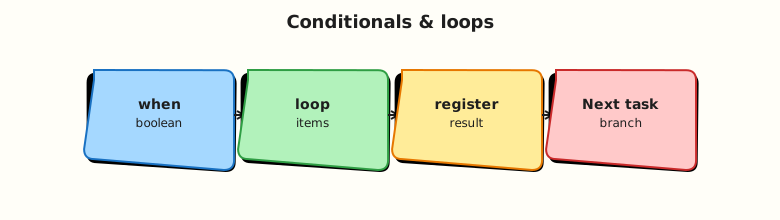
Conditionals and loops sit between the playbook engine and individual modules. The engine evaluates when before each task, expands loop into repeated task executions, and applies until / retry logic around module results.
Theory
What it is
when — a Jinja2 expression; if it evaluates to false, Ansible skips the task for that host.
loop — repeats the task for each element in a list (or each key/value for a dict using the dict2items filter in a loop). Replaces legacy with_items, with_dict, and similar plugins for new playbooks.
until — retry the task until the expression is true or retries is exhausted. Pair with retries (default 3) and delay (seconds between attempts, default 5).
failed_when — treat a task as failed when a Jinja2 expression is true, even if the module returned success.
changed_when — control whether Ansible reports changed for idempotency and handler notification.
Why it matters
Configuration management pipelines often gate tasks: run hardening only when ansible_os_family == "Debian", install agents only when a group variable says so, or retry API checks during cluster bootstrap. CI/CD systems that parse Ansible output rely on accurate changed counts — false positives trigger unnecessary downstream steps.
How it works
- Ansible renders
whenper host before executing the module. - For
loop, each iteration runs the module; results appear inresults(a list) when registered. untilre-runs the task; the registered variable from the last attempt is available asregister_name(andregister_name.attemptsshows try count).failed_when/changed_wheninspectregistervariables or module return keys (stdout,rc,failed, etc.).
- name: Example conditional loop
  ansible.builtin.debug:
    msg: "Deploying {{ item.name }}"
  loop:
    - { name: api, enabled: true }
    - { name: worker, enabled: false }
  when: item.enabled | bool
Key concepts and comparisons
| Mechanism | Use when | Avoid when |
|---|---|---|
when | OS family, env tag, feature flag | Duplicating entire plays for one flag |
loop | Same module, many items | Complex unrelated steps (use include_tasks) |
until | Wait for port, file, HTTP 200 | Long unbounded waits without retries cap |
failed_when | Script exits 0 but prints ERROR | Hiding real module failures without review |
changed_when | Command always exits 0 | Suppressing all change reporting blindly |
| Legacy | Modern replacement |
|---|---|
with_items | loop: |
with_dict | loop with the dict2items filter on a dict |
with_fileglob | loop with a fileglob lookup on a path pattern |
Common pitfalls
whenand loops:whenis evaluated per iteration; useitem.field, not undefined outer variables.- Empty loop: looping over
[]skips the task — confirm the list is populated. untilwithoutretries: default may be too low for slow services; set explicitretriesanddelay.changed_when: falseeverywhere: hides real drift; use only when the module cannot report change correctly.- Jinja type coercion:
"false"as a string is truthy; use| boolfor string flags.
Hands-on Lab
Objective
Build a localhost playbook that installs packages with loop + when, then demonstrates until retries against a simulated “not ready yet” command — with syntax-check and run evidence.
Prerequisites
- Ansible installed (
ansible --version) - Python 3 on the control node
- No root on remote hosts required (
connection: local)
Lab environment
Runtime: your laptop or practice VM as control node; all tasks use hosts: localhost and connection: local.
Real-world scenario
Your platform team rolls out optional monitoring agents per service. Some packages apply only when a service is marked enabled. A health-check script must succeed before marking deployment complete — you model that with until and bounded retries.
Step-by-step tasks
Task 1 – Playbook with loop and when
Create playbooks/conditionals-loops.yml:
---
- name: Conditionals and loops lab
  hosts: localhost
  connection: local
  gather_facts: true
  vars:
    services:
      - name: curl
        enabled: true
        state: present
      - name: jq
        enabled: true
        state: present
      - name: phantom-agent
        enabled: false
        state: present
  tasks:
    - name: Ensure enabled packages are present (Debian family only)
      ansible.builtin.apt:
        name: "{{ item.name }}"
        state: "{{ item.state }}"
      loop: "{{ services }}"
      when:
        - item.enabled | bool
        - ansible_os_family == "Debian"
      register: package_results

    - name: Show skipped vs changed summary
      ansible.builtin.debug:
        msg: "{{ item.item.name }} changed={{ item.changed }} skipped={{ item.skipped | default(false) }}"
      loop: "{{ package_results.results }}"
      when: package_results is defined
Syntax-check and run:
cd ~/rebash-ansible/module-07
ansible-playbook playbooks/conditionals-loops.yml --syntax-check | tee syntax-check.txt
ansible-playbook playbooks/conditionals-loops.yml | tee run-conditionals.txt
grep -q 'PLAY RECAP' run-conditionals.txt
grep -q 'phantom-agent' run-conditionals.txt || true
Expected output
Syntax check passes; recap shows ok= tasks; debug lines include phantom-agent with skipped=True (or task omitted from changed count).
Task 2 – Until retry demo script
Create files/wait-for-ready.sh:
#!/usr/bin/env bash
set -euo pipefail
COUNTER_FILE="${1:-/tmp/rebash-ready.counter}"
mkdir -p "$(dirname "$COUNTER_FILE")"
count=0
if [[ -f "$COUNTER_FILE" ]]; then
  count="$(cat "$COUNTER_FILE")"
fi
count=$((count + 1))
echo "$count" > "$COUNTER_FILE"
echo "attempt=$count"
if [[ "$count" -lt 3 ]]; then
  echo "STATUS=waiting"
  exit 1
fi
echo "STATUS=ready"
exit 0
Make it executable:
Task 3 – Playbook with until, retries, failed_when, changed_when
Create playbooks/until-retry.yml:
---
- name: Until and result overrides lab
  hosts: localhost
  connection: local
  gather_facts: false
  vars:
    ready_counter: /tmp/rebash-ready.counter
  tasks:
    - name: Wait until readiness script reports ready
      ansible.builtin.command:
        cmd: "{{ playbook_dir }}/../files/wait-for-ready.sh {{ ready_counter }}"
      register: ready_result
      until: ready_result.rc == 0
      retries: 5
      delay: 1
      changed_when: "'STATUS=ready' in ready_result.stdout"

    - name: Prove final attempt count
      ansible.builtin.debug:
        msg: "Attempts={{ ready_result.attempts }} stdout={{ ready_result.stdout }}"
      failed_when: ready_result.attempts < 3
Run and capture evidence:
cd ~/rebash-ansible/module-07
rm -f /tmp/rebash-ready.counter
ansible-playbook playbooks/until-retry.yml | tee run-until.txt
grep -q 'Attempts=3' run-until.txt
grep -q 'STATUS=ready' run-until.txt
Expected output
Play succeeds after three attempts; debug shows Attempts=3 and STATUS=ready.
Task 4 – Assert idempotency on second run
cd ~/rebash-ansible/module-07
ansible-playbook playbooks/until-retry.yml | tee run-until-idempotent.txt
grep -q 'changed=0' run-until-idempotent.txt || grep -q 'changed=1' run-until-idempotent.txt
Expected output
Second run completes immediately (attempt counter file already at ready state); playbook recap shows success.
Validation steps
-
ansible-playbook --syntax-checkpasses for both playbooks -
loop+whenskips disabled servicephantom-agent -
untilretries untilwait-for-ready.shexits 0 on attempt 3 -
changed_whenties change reporting toSTATUS=readyin stdout - You can explain difference between
retriesanduntil
Common errors and fixes
| Error | Cause | Fix |
|---|---|---|
'dict object' has no attribute 'skipped' | Accessing skip on non-loop register | Use the default filter on item.skipped when looping over results |
| Task never retries | until true on first run | Confirm script/command fails until condition met |
when skips entire loop unexpectedly | Wrong fact name or type | Debug with -e vars or ansible.builtin.debug: var= |
Jinja undefined variable in when | Typo in item key | Run with -vvv and inspect facts |
All iterations show changed | Module not idempotent | Add changed_when or use proper module args |
Challenge exercise
Create playbooks/challenge-failed-when.yml that runs grep NONEXISTENT /etc/hosts, registers output, uses failed_when: false and a separate task that fails when 'NONEXISTENT' not in grep_result.stdout. Prove with ansible-playbook exit code 0 then adjust to fail intentionally.
Learning outcomes
- Authored playbooks using
when,loop, anduntilon localhost - Demonstrated bounded retries with a real shell script
- Applied
changed_whenandfailed_whento control reporting - Validated behaviour with grep-based asserts on playbook output
Cleanup
Validation
- Completed lab under
~/rebash-ansible/module-07 - Can explain
whenvsloopvsuntilwithout reading notes - Used
ansible-playbook --syntax-checkbefore every run - Can describe one production failure mode (infinite retry, false changed)
Code Walkthrough
- Inspect first — use
--checkwhere modules support it; debug vars before addingwhen. - Small loops — keep loop bodies one module; extract complex flows to
include_tasks. - Cap retries — always set
retriesanddelaywithuntil; document expected wait time. - Register results — name registers clearly (
package_results,ready_result) forfailed_when. - Least surprise — avoid
failed_when: falsein production without a comment and review.
Security Considerations
- Do not embed secrets in
whenexpressions logged at high verbosity (-vvv). loopover user-supplied lists without validation can install unintended packages — whitelist names.untilwith shell modules can execute repeatedly — ensure commands are safe and idempotent.- Skipping security tasks via misconfigured
whenleaves hosts exposed — test conditionals in CI. - Review
failed_when: falsepatterns; they can hide compromise indicators in script output.
Common Mistakes
Using string 'false' in when
The string "false" is truthy in Jinja2. Fix: use booleans or | bool filter.
Unbounded until loops in production
Missing or excessive retries can hang pipelines or hammer endpoints. Fix: set explicit retries, delay, and alert on exhaustion.
Copy-pasting with_items from old examples
Legacy plugins still work but confuse readers. Fix: standardise on loop for new playbooks.
Ignoring loop result structure
Registered loop results live in .results list. Fix: iterate register.results in follow-up tasks.
Best Practices
- Prefer
loopover duplicate tasks; preferinclude_tasksover nested loops deeper than two levels. - Combine
whenconditions as YAML lists (AND logic); usewhen: cond1 or cond2sparingly with parentheses. - Set
retriesbased on measured startup time, not guesses. - Document why
changed_whenorfailed_whenoverrides exist inline in the playbook. - Test conditionals on a canary host group before fleet-wide rollout.
Troubleshooting
| Symptom | Likely cause | Fix |
|---|---|---|
| Task runs when it should skip | Wrong variable type or fact missing | debug var; use | default(false) |
| Loop runs zero times | Empty list or filtered upstream | Print services before loop |
| until exhausts retries | Condition never true | Increase retries/delay; fix script exit codes |
| Handler never fires | changed_when: false on notifying task | Adjust changed detection |
| Spurious failures on one OS | Missing when: ansible_os_family | Gate package modules per family |
Summary
Conditionals and loops turn static playbooks into adaptive automation: skip work with when, scale repetition with loop, and tolerate startup delay with until and retries. Result overrides fine-tune how Ansible reports success and change. Next, package reusable automation as Roles.
Interview Questions
1. When should you use loop instead of writing three separate tasks?
Reveal answer
Use loop when the same module and argument shape apply to many items (packages, users, firewall rules). Separate tasks are clearer when steps, modules, or error handling differ materially. Loops reduce copy-paste drift; separate tasks improve readability for unrelated operations.
2. How do retries, delay, and until interact?
Reveal answer
Ansible runs the task, evaluates until against the registered result, and if false, waits delay seconds and retries up to retries times. The last attempt’s register is kept, including attempts. Without until, retries applies to module failures rather than a custom condition.
3. Why might you set changed_when: false on a command task?
Reveal answer
Some commands always exit 0 but do not represent configuration drift (read-only checks). Marking them unchanged prevents false changed counts and accidental handler runs. Use sparingly and document — hiding real changes breaks audit trails.
4. What is the difference between failed_when and ignoring errors with ignore_errors: true?
Reveal answer
failed_when marks success/failure based on your expression while still recording the result; downstream when: not failed behaves predictably. ignore_errors: true continues the play but sets failed on the host, which can block later plays unless handled. Prefer explicit failed_when for controlled semantics.
5. How do you loop over a dictionary in modern Ansible?
Reveal answer
Loop over the dictionary with the dict2items filter and reference item.key and item.value. Legacy with_dict is deprecated for new content. For subelements, combine loop with subelements filter or structured lists.
6. A package task loops but skips every item on RHEL — what do you check first?
Reveal answer
Check when conditions tied to ansible_os_family or package module choice (apt vs dnf). Confirm facts are gathered (gather_facts: true) and group/host vars populate the loop list. Run with -vvv on one host to see evaluated when per iteration.
7. Production concern: a colleague uses until with a 300-second delay and 100 retries. What is the risk?
Reveal answer
A single task could block for hours, stalling CI/CD and masking upstream failures. Cap total wait time, add monitoring alerts on retry exhaustion, and fix root cause (service not starting) instead of infinite tolerance.
Related Tutorials
- Ansible course index
- Previous: Variables and Facts (Module 6)
- Next: Roles
- Related: Jinja2 Templates