Ansible Inventory
Overview
Inventory is Ansible’s map of the world: which hosts exist, how they are grouped, and what variables apply to them. Without disciplined inventory, you cannot safely --limit a canary deploy, pass environment-specific settings, or integrate dynamic sources from AWS, Azure, or Kubernetes.
This tutorial covers static inventory in INI and YAML formats, children groups, host_vars and group_vars directories, and an introduction to dynamic inventory plugins. The lab builds both formats, attaches variables, and captures ansible-inventory --list evidence — still using localhost and connection=local so no remote VM is required.
This is Tutorial 3 in Module 3: Inventory of the REBASH Academy Ansible for Cloud & DevOps Engineers series.
Prerequisites
- Installing Ansible and Configuration
- Linux — files, directories, YAML basics
- Git — inventory lives in version control
- Working ansible-core install from Module 2
Learning Objectives
By the end of this tutorial, you will be able to:
- Author static inventory in INI and YAML formats
- Model parent/child groups and host membership
- Place variables in
group_vars/andhost_vars/following Ansible conventions - Interpret
ansible-inventory --graphand--listoutput - Explain when dynamic inventory plugins replace static files
Architecture
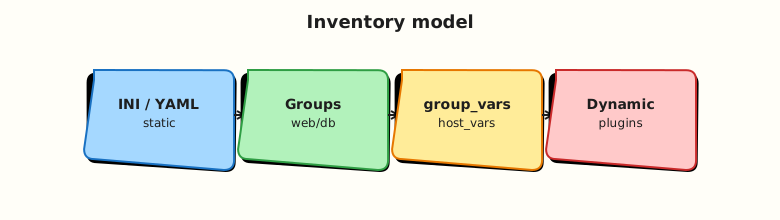
Inventory feeds every command and playbook. Variables merge from multiple sources before tasks run (full precedence in Module 6).
Theory
What it is
An inventory defines:
- Hosts — DNS names or IP addresses Ansible connects to
- Groups — logical buckets (
web,db,staging) - Variables — connection settings, app config, environment tier
Static inventory files live in Git. Dynamic inventory calls plugins/scripts that query APIs (EC2, Azure RM, kubectl) and build host lists at runtime.
INI format (classic):
YAML format (structured):
Why it matters
Inventory is the guardrail for blast radius. Production deploy scripts use --limit web:&production patterns; typos in group names cause wrong-host restarts. Platform teams align inventory groups with CMDB, cloud tags, or Terraform outputs. Variables in group_vars/web.yml keep DRY config instead of repeating ansible_user on every line.
Dynamic inventory prevents stale IP lists in cloud estates where VMs are ephemeral. Static inventory remains ideal for small fixed fleets, lab environments, and air-gapped networks.
How it works
Ansible loads inventory from -i flag, ansible.cfg inventory setting, or an inventory directory. Adjacent group_vars/<groupname>.yml and host_vars/<hostname>.yml files auto-attach variables.
Useful commands:
ansible-inventory --list          # JSON merged view
ansible-inventory --graph         # tree of groups
ansible-inventory --host localhost
ansible web -m ping --list-hosts  # who would be targeted
Dynamic inventory plugins (in ansible.cfg or -i):
# Example — not run in this lab
plugin: amazon.aws.aws_ec2
regions:
  - ap-south-1
keyed_groups:
  - key: tags.Environment
Plugins require installing the matching collection (ansible-galaxy collection install amazon.aws).
Key concepts and comparisons
| Format | Strength | Weakness |
|---|---|---|
| INI | Compact; familiar to ops | Nested groups less readable |
| YAML | Structured; aligns with playbooks | Verbose for huge fleets |
Directory (inventories/prod/) | Split envs cleanly | Requires cfg discipline |
| Dynamic plugin | Always current in cloud | Needs IAM/API creds; harder to offline debug |
| Variable location | Scope |
|---|---|
| Inline on host line | Single host (ansible_port=2222) |
host_vars/hostname.yml | One host, many keys |
group_vars/groupname.yml | All hosts in group |
all group vars | Every host |
Common pitfalls
- Duplicate hostnames in conflicting groups without understanding merge behaviour.
- Putting secrets in plain
group_vars— use Vault (later module). - Huge monolithic inventory files — split by environment directory.
- Forgetting
ansible_connection=localfor localhost in labs — leads to SSH errors. - Using inventory scripts (legacy) instead of inventory plugins for new work.
Hands-on Lab
Objective
Create INI and YAML inventories with group_vars and host_vars, deploy tier-specific config files with a playbook, fix a wrong host_vars filename, and prove merged variables with ansible-inventory and cat.
Prerequisites
- ansible-core from Module 2
- Python 3 for JSON validation
Lab environment
Workspace: ~/rebash-ansible/module-03
Copy or recreate minimal ansible.cfg from Module 2 (inventory path will vary per task).
Create ansible.cfg:
[defaults]
inventory = ./inventory.ini
host_key_checking = False
interpreter_python = auto_silent
Real-world scenario
You maintain three tiers — local lab hosts, web, and db — for a sample three-tier app. Operations wants both INI (for legacy tooling) and YAML (for new playbooks) plus documented group variables for environment and app_port.
Step-by-step tasks
Task 1 – INI inventory with groups and children
Create inventory.ini:
[local]
localhost ansible_connection=local

[web]
web1.lab.local ansible_connection=local

[db]
db1.lab.local ansible_connection=local

[lab:children]
local
web
db
Create group_vars/web.yml:
Create group_vars/db.yml:
Create host_vars/localhost.yml:
List and validate:
cd ~/rebash-ansible/module-03
ansible-inventory -i inventory.ini --graph | tee inventory-graph-ini.txt
ansible-inventory -i inventory.ini --list | tee inventory-list-ini.json
python3 -c "
import json
with open('inventory-list-ini.json') as f:
    inv = json.load(f)
hv = inv['_meta']['hostvars']['localhost']
assert hv.get('lab_role') == 'control-node'
assert hv.get('tier') is None or 'tier' not in hv or hv.get('tier') != 'web'
web = inv['_meta']['hostvars'].get('web1.lab.local', {})
assert web.get('app_port') == 8080
print('INI inventory merge OK')
" | tee ini-merge-ok.txt
Expected output
Graph shows lab with children; ini-merge-ok.txt contains INI inventory merge OK.
Task 2 – YAML inventory equivalent
Create inventory.yml:
all:
  children:
    local:
      hosts:
        localhost:
          ansible_connection: local
    web:
      hosts:
        web1.lab.local:
          ansible_connection: local
    db:
      hosts:
        db1.lab.local:
          ansible_connection: local
    lab:
      children:
        local:
        web:
        db:
Compare listings:
cd ~/rebash-ansible/module-03
ansible-inventory -i inventory.yml --list | tee inventory-list-yml.json
python3 -c "
import json
with open('inventory-list-yml.json') as f:
    inv = json.load(f)
hosts = set(inv.get('local', {}).get('hosts', [])) | set(inv.get('web', {}).get('hosts', []))
assert 'localhost' in inv['_meta']['hostvars']
assert 'web1.lab.local' in inv['_meta']['hostvars']
print('YAML inventory OK')
" | tee yml-inventory-ok.txt
Expected output
yml-inventory-ok.txt shows YAML inventory OK.
Task 3 – Deploy tier configs with playbook
Create ansible.cfg:
[defaults]
inventory = ./inventory.ini
host_key_checking = False
interpreter_python = auto_silent
Create deploy-tier-configs.yml:
---
- name: Deploy tier configuration files from inventory vars
  hosts: web:db:local
  gather_facts: false
  vars:
    tier_config_dir: "~/rebash-ansible/module-03/tier-configs"
  tasks:
    - name: Ensure tier config directory exists
      ansible.builtin.file:
        path: "{{ tier_config_dir }}"
        state: directory
        mode: "0755"

    - name: Write tier marker from group_vars
      ansible.builtin.copy:
        content: |
          hostname={{ inventory_hostname }}
          tier={{ tier | default('unknown') }}
          environment={{ environment }}
          app_port={{ app_port | default(db_port | default('n/a')) }}
        dest: "{{ tier_config_dir }}/{{ inventory_hostname }}.conf"
        mode: "0644"
      when: tier is defined or inventory_hostname == 'localhost'
Run against INI inventory:
cd ~/rebash-ansible/module-03
ansible-playbook deploy-tier-configs.yml --syntax-check | tee syntax-tier.txt
ansible-playbook deploy-tier-configs.yml | tee deploy-tier.txt
grep -q 'PLAY RECAP' deploy-tier.txt
test -f ~/rebash-ansible/module-03/tier-configs/web1.lab.local.conf
grep -q 'app_port=8080' ~/rebash-ansible/module-03/tier-configs/web1.lab.local.conf
grep -q 'lab_role=control-node' ~/rebash-ansible/module-03/tier-configs/localhost.conf || \
  grep -q 'hostname=localhost' ~/rebash-ansible/module-03/tier-configs/localhost.conf
echo "tier deploy OK" | tee tier-deploy-ok.txt
Expected output
Config files exist per host; web tier shows app_port=8080.
Task 4 – Fix wrong host_vars filename (failure moment)
Rename breaks host-specific vars — simulate the mistake:
cd ~/rebash-ansible/module-03
mv host_vars/localhost.yml host_vars/localhost.yml.bak
ansible-playbook deploy-tier-configs.yml --limit localhost | tee hostvars-miss.txt
mv host_vars/localhost.yml.bak host_vars/localhost.yml
ansible-playbook deploy-tier-configs.yml --limit localhost | tee hostvars-hit.txt
grep -q 'hostname=localhost' ~/rebash-ansible/module-03/tier-configs/localhost.conf
echo "host_vars fix OK" | tee hostvars-fix-ok.txt
Expected output
After restoring host_vars/localhost.yml, localhost config reflects host-specific vars again.
Task 5 – Inventory audit script
Create inventory-audit.sh:
#!/usr/bin/env bash
set -euo pipefail
cd ~/rebash-ansible/module-03
for inv in inventory.ini inventory.yml; do
  ansible-inventory -i "$inv" --list > "audit-${inv}.json"
  test -s "audit-${inv}.json"
done
ansible-inventory -i inventory.ini --host localhost | tee audit-localhost-vars.json
grep -q lab_role audit-localhost-vars.json
test -f tier-configs/web1.lab.local.conf
echo "inventory-audit PASS" | tee inventory-audit-pass.txt
Run:
chmod +x ~/rebash-ansible/module-03/inventory-audit.sh
~/rebash-ansible/module-03/inventory-audit.sh
Expected output
inventory-audit-pass.txt contains inventory-audit PASS.
Validation steps
- INI and YAML inventories both list
localhost,web1.lab.local,db1.lab.local -
group_vars/web.ymlsetsapp_port: 8080visible in merged JSON -
host_vars/localhost.ymlsetslab_roleon localhost -
ansible-inventory --graphshowslab:children
Common errors and fixes
| Error | Cause | Fix |
|---|---|---|
[WARNING]: Unable to parse | YAML syntax error | Validate YAML; check indentation |
Variables missing in --list | Wrong group_vars filename | File must match group name: group_vars/web.yml |
| Host not in expected group | Typo in INI header | Headers are [groupname] — no spaces |
host_vars ignored | Filename must match inventory name | Use localhost.yml for host localhost |
| Duplicate vars confusion | Host in multiple groups | Understand merge rules; check --host output |
Challenge exercise
Add group_vars/all.yml with managed_by: ansible, re-run deploy-tier-configs.yml, and confirm managed_by appears in every tier config file under tier-configs/.
cd ~/rebash-ansible/module-03
ansible-playbook deploy-tier-configs.yml
grep -l managed_by tier-configs/*.conf | wc -l | tee all-vars-count.txt
test "$(cat all-vars-count.txt)" -ge 3
echo "all group_vars visible in tier configs"
Expected output
At least three config files contain managed_by.
Learning outcomes
- Dual-format static inventory for migration scenarios
- Correct
group_vars/host_varslayout - Inventory audit script pattern for CI
- Foundation for dynamic plugins in advanced modules
Cleanup
cd ~/rebash-ansible/module-03
rm -rf ~/rebash-ansible/module-03/tier-configs
rm -f inventory-graph-ini.txt inventory-list-ini.json ini-merge-ok.txt \
  inventory-list-yml.json yml-inventory-ok.txt audit-*.json \
  audit-localhost-vars.json inventory-audit-pass.txt syntax-tier.txt \
  deploy-tier.txt tier-deploy-ok.txt hostvars-miss.txt hostvars-hit.txt \
  hostvars-fix-ok.txt all-vars-count.txt
Validation
- Completed inventory lab with audit script PASS
- Can draw group/children relationships for a three-tier app
- Used
ansible-inventory --listand--graph - Can explain static vs dynamic inventory trade-off
Code Walkthrough
- Name groups like roles —
web,db,canarymap to playhosts:lines. - Directory inventory —
inventories/prod/scales better than one giant file. - host_vars for exceptions — one-off ports or maintenance flags.
- JSON audit in CI —
ansible-inventory --listdiff catches accidental host drops. - Limit before production —
--list-hostsbefore--checkbefore apply.
Security Considerations
- Inventory reveals topology — restrict repo access; do not publish prod hostnames publicly.
- Never store passwords in inventory; use Vault or secret manager plugins.
- Dynamic inventory plugins need least-privilege IAM (read-only describe/list).
- Separate production inventory repos from lab with different CI credentials.
- Validate inventory changes in pull requests with automated graph/list diff.
Common Mistakes
Flat inventory without groups
Listing fifty hosts with no groups forces --limit by hostname lists.
Fix: Group by function and environment; use children groups.
Wrong group_vars filename
group_vars/webs.yml does not apply to group web.
Fix: Filename must match group name exactly.
Stale static inventory in cloud
Autoscaling replaces IPs hourly.
Fix: Adopt inventory plugins keyed on cloud tags.
Best Practices
- One inventory directory per environment (
inventories/staging,inventories/prod). - Use
all:varsorgroup_vars/all.ymlfor truly global settings sparingly. - Document
ansible_connection=localhosts separately from SSH production groups. - Run
ansible-inventory --graphin onboarding docs. - Pin dynamic plugin credentials to read-only roles with audit logging.
Troubleshooting
| Symptom | Likely cause | Fix |
|---|---|---|
Empty --list | Wrong -i path | Pass -i inventory.ini explicitly |
| Host unreachable only in one env | Missing bastion vars | Set ansible_host, ProxyJump in host_vars |
| Plugin inventory slow | Large cloud API pagination | Filter regions/tags in plugin config |
| Vars differ between INI and YAML | Different group membership | Compare --graph outputs side by side |
| Unexpected host in run | Pattern in hosts: too broad | Use --list-hosts; tighten patterns |
Summary
Inventory defines targets and variables — the foundation for every playbook and ad-hoc command. You built INI and YAML static inventories, applied group_vars and host_vars, and audited merged output with ansible-inventory --list. Next, run Ad-hoc Commands to execute modules without playbooks.
Interview Questions
1. What is Ansible inventory and why is it separate from playbooks?
Reveal answer
Inventory answers where automation runs and what variables apply to each host/group. Playbooks answer what tasks to execute. Separating them lets the same playbook run against staging or production by swapping -i inventories/staging vs prod, and lets dynamic sources refresh hosts without editing task logic.
2. Compare INI and YAML inventory formats.
Reveal answer
INI is compact and familiar ([group] headers, key=value host params). YAML is hierarchical — better for complex group trees and inline structured vars. Ansible merges both the same way once parsed. Teams often use YAML for new repos and keep INI during migrations. Both support :children groups (INI) or nested children: (YAML).
3. How do group_vars and host_vars files get applied?
Reveal answer
Ansible auto-loads group_vars/<groupname>.yml for variables scoped to that group, and host_vars/<hostname>.yml for a single host. Directory or file inventory can sit beside these folders. Host vars typically override group vars (full precedence in Module 6). Filenames must match inventory group/host names exactly.
4. When would you use dynamic inventory instead of static files?
Reveal answer
When hosts are ephemeral or autoscaling — cloud VMs, Kubernetes nodes, spot fleets — static IP lists rot quickly. Inventory plugins query APIs at runtime (AWS EC2, Azure RM, kubernetes.core.k8s) and build groups from tags/labels. Static inventory suits fixed lab servers, network devices with stable names, or air-gapped environments without API access.
5. How do you preview which hosts a command would affect?
Reveal answer
Use ansible web --list-hosts or ansible-playbook site.yml --list-hosts before running tasks. Combine with --limit for canaries (web1.example.com or web:&canary). In CI, fail if host count exceeds threshold — prevents mass prod runs from typos.
6. What is a children group in inventory?
Reveal answer
A children group contains other groups rather than hosts directly — e.g. [production:children] with web and db underneath. Lets you target production for shared vars or rolling updates while keeping functional web/db groups for role-specific playbooks.
7. A host shows wrong ansible_user at runtime. How do you debug?
Reveal answer
Run ansible-inventory --host hostname to see merged variables and their sources. Check inline inventory params, host_vars/, group_vars/, and later play vars. Compare ansible-config dump for defaults. Variable precedence issues are common — host-specific host_vars should win over group defaults when named correctly.
8. Why keep inventory in Git if dynamic inventory exists?
Reveal answer
Static portions (group layout, vars templates, plugin config YAML) still benefit from review and history even when hosts are discovered dynamically. Many teams commit inventories/prod/hosts.aws_ec2.yml plugin config and group_vars/ while IPs come from APIs. Git provides audit trail; dynamic source provides freshness.
Related Tutorials
- Ansible course index
- Previous: Installing Ansible and Configuration
- Next: Ansible Ad-hoc Commands
- Git — repository management
- Terraform — state fundamentals