Ansible Playbooks
Overview
Playbooks are Ansible’s durable automation documents — version-controlled YAML that describes plays (mapped to host groups) and tasks (module calls). They add handlers for notified restarts, tags for selective execution, and structure that ad-hoc commands lack.
This tutorial explains playbook anatomy, handler semantics, and tag strategies. The lab creates site.yml, runs ansible-playbook --syntax-check, executes against localhost, and demonstrates tag-limited runs — the pattern production pipelines use before wide rollout.
This is Tutorial 5 in Module 5: Playbooks of the REBASH Academy Ansible for Cloud & DevOps Engineers series.
Prerequisites
- Ansible Ad-hoc Commands
- Python file handling (YAML) — indentation and lists
- Git — playbooks live in pull requests
- Inventory and ansible.cfg from prior modules
Learning Objectives
By the end of this tutorial, you will be able to:
- Structure a playbook with
hosts,tasks,handlers, andvars - Explain when handlers run and why they are idempotent-friendly
- Use tags to run subsets of tasks in CI or canary deploys
- Validate with
ansible-playbook --syntax-checkbefore apply - Run playbooks with
connection=localfor lab and CI targets
Architecture
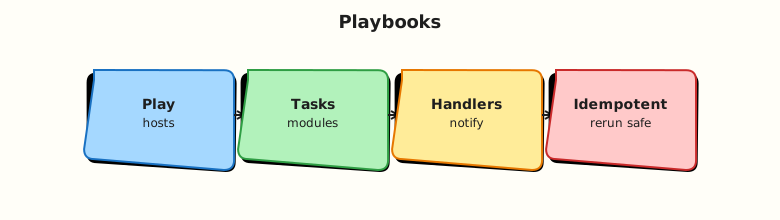
A playbook can contain multiple plays; each play runs top-to-bottom on its host pattern, then flushes handlers once at the end of the play.
Theory
What it is
Minimal playbook shape:
---
- name: Configure web tier
  hosts: web
  become: true
  tasks:
    - name: Ensure app directory exists
      ansible.builtin.file:
        path: /opt/myapp
        state: directory
        mode: "0755"
  handlers:
    - name: restart app
      ansible.builtin.debug:
        msg: handler would restart app here
Key elements:
| Element | Purpose |
|---|---|
hosts | Inventory pattern (web, local, all) |
gather_facts | Default true — runs setup module |
tasks | Ordered module calls |
handlers | Tasks run once when notified |
notify | Links task change to handler name |
tags | Label tasks for selective runs |
become | Privilege escalation for the play |
Handlers run only once at end of play if notified and only if a notifying task reported changed: true (unless force_handlers).
Why it matters
Playbooks are how teams pass code review, run Molecule tests, and integrate with CI. Tags let you run --tags deploy without re-running baseline. Handlers prevent restarting a service five times when five config tasks change. Syntax-check catches YAML and structural errors before SSH connections open.
How it works
Execution flow:
- Parse playbook YAML.
- For each play, resolve host list from inventory.
- Gather facts (unless disabled).
- Run tasks in order; track notifications.
- Flush handler queue once.
- Report recap (
ok,changed,failed,skipped).
Commands:
ansible-playbook site.yml --syntax-check
ansible-playbook site.yml --list-tasks
ansible-playbook site.yml --check
ansible-playbook site.yml --tags config
ansible-playbook site.yml --limit localhost
Use ansible.builtin.* fully qualified collection names (FQCN) for clarity and ansible-lint compliance.
Key concepts and comparisons
| Concept | Behaviour |
|---|---|
| Task | Runs every play unless skipped/tag filtered |
| Handler | Runs max once per play if notified after change |
| Tag | Filter with --tags / --skip-tags |
| Play | Scoped host set + vars + task list |
| Import/include | Reuse task files (advanced modules later) |
| check mode | Limitation |
|---|---|
--check | Dry-run; not all modules support it perfectly |
--diff | Show file diffs where supported |
Common pitfalls
- Handler never runs because notifying task returned
oknotchanged. - Duplicate handler names — last wins; notifications merge.
- Missing
---YAML document start — tolerated but recommended. hosts: allwithout--limitin lab — dangerous on real inventory.- Forgetting
notifyspelling must match handler name exactly.
Hands-on Lab
Objective
Create site.yml with config tasks, a notified handler, and tags; pass syntax-check; run full and tag-filtered applies on localhost.
Prerequisites
- Modules 1–4 complete
- Write access under
~/rebash-ansible/module-05
Lab environment
Workspace: ~/rebash-ansible/module-05
Create ansible.cfg:
[defaults]
inventory = ./inventory
host_key_checking = False
interpreter_python = auto_silent
Create inventory:
Create group_vars/local.yml:
Real-world scenario
You package a baseline playbook that creates app directories, drops a config file, notifies a “restart” handler when content changes, and tags baseline vs deploy tasks so CI can run deploy-only stages.
Step-by-step tasks
Task 1 – Create site.yml with handlers and tags
Create files/app.conf:
Create site.yml:
---
- name: Local lab application baseline
  hosts: local
  gather_facts: true
  vars:
    config_dest: "{{ app_root }}/app.conf"
  tasks:
    - name: Ensure application directory exists
      ansible.builtin.file:
        path: "{{ app_root }}"
        state: directory
        mode: "0755"
      tags:
        - baseline
        - always

    - name: Deploy application configuration
      ansible.builtin.copy:
        src: files/app.conf
        dest: "{{ config_dest }}"
        mode: "0644"
      notify: restart application
      tags:
        - deploy
        - config

    - name: Create marker file for deploy tag demo
      ansible.builtin.copy:
        content: "deployed_at={{ ansible_date_time.iso8601 }}\n"
        dest: "{{ app_root }}/deploy-marker.txt"
        mode: "0644"
      tags:
        - deploy

  handlers:
    - name: restart application
      ansible.builtin.debug:
        msg: "Handler fired — would restart {{ app_name }} after config change"
Syntax-check:
cd ~/rebash-ansible/module-05
ansible-playbook site.yml --syntax-check | tee syntax-check.txt
grep -qi 'playbook.*syntax ok' syntax-check.txt || grep -qi 'Syntax OK' syntax-check.txt || test ${PIPESTATUS[0]} -eq 0
echo "syntax OK" | tee syntax-ok.txt
Expected output
Syntax-check exits 0; syntax-ok.txt created.
Task 2 – List tasks and run full playbook
cd ~/rebash-ansible/module-05
ansible-playbook site.yml --list-tasks | tee list-tasks.txt
ansible-playbook site.yml | tee playbook-run1.txt
grep -q 'PLAY RECAP' playbook-run1.txt
grep -q 'restart application' playbook-run1.txt
test -f ~/rebash-ansible/module-05/app/app.conf
test -f ~/rebash-ansible/module-05/app/deploy-marker.txt
echo "run1 OK" | tee run1-ok.txt
Expected output
Handler debug message appears on first run (config changed); app files exist; run1-ok.txt shows run1 OK.
Task 3 – Tag-filtered second run (idempotency + handler silence)
cd ~/rebash-ansible/module-05
ansible-playbook site.yml --tags deploy | tee playbook-run2-tags.txt
ansible-playbook site.yml | tee playbook-run3-idempotent.txt
grep -q 'changed=0' playbook-run3-idempotent.txt || grep -q 'changed=0.*unreachable=0' playbook-run3-idempotent.txt
echo "tags and idempotency OK" | tee run3-ok.txt
Expected output
Third run shows zero or minimal changes; handler skipped when config unchanged.
Validation steps
-
--syntax-checkpasses -
--list-tasksshows tagged tasks - Handler runs on first config deploy
- Second full run is idempotent (no unnecessary handler)
-
--tags deployskips pure baseline if configured (verify skipped tasks in output)
Common errors and fixes
| Error | Cause | Fix |
|---|---|---|
ERROR! Syntax Error | YAML indent or tab characters | Spaces only; validate with syntax-check |
| Handler never runs | Task not changed | Modify src file; check notify name match |
template error undefined var | Missing var/fact | Define in group_vars or vars |
| Wrong host targeted | Pattern mismatch | Use --list-hosts; check inventory groups |
| MkDocs breaks on playbook docs | Unescaped Jinja in tutorial site | Wrap playbook fences in raw Jinja blocks in docs |
Challenge exercise
Add a verify-playbook.sh script:
#!/usr/bin/env bash
set -euo pipefail
cd ~/rebash-ansible/module-05
ansible-playbook site.yml --syntax-check
ansible-playbook site.yml --list-tags | tee list-tags.txt
grep -q baseline list-tags.txt
grep -q deploy list-tags.txt
ansible-playbook site.yml --tags baseline --check | tee check-baseline.txt
echo "verify-playbook PASS" | tee verify-playbook-pass.txt
Expected output
verify-playbook-pass.txt contains PASS; tags listed.
Learning outcomes
- Production-shaped playbook with FQCN modules
- Handler notification workflow understood
- Tag-based partial runs for CI stages
- Syntax-check gate before apply
Cleanup
cd ~/rebash-ansible/module-05
rm -rf ~/rebash-ansible/module-05/app
rm -f syntax-check.txt syntax-ok.txt list-tasks.txt playbook-run*.txt run*-ok.txt \
  list-tags.txt check-baseline.txt verify-playbook-pass.txt
Validation
-
site.ymlpasses syntax-check and runs on localhost - Can explain handler flush timing
- Used
--tagssuccessfully - Can describe playbook vs role (preview for later modules)
Code Walkthrough
- Syntax-check in CI — cheap gate before molecule or apply.
- FQCN modules —
ansible.builtin.copysurvives collection refactors. - Tags for stages — baseline vs deploy mirrors pipeline jobs.
- Handlers for restarts — one bounce after all config tasks.
- Facts in templates —
ansible_date_timeneedsgather_facts: true.
Security Considerations
- Playbooks often run with
become: true— scope sudo to required playbooks. - Do not embed secrets in
vars:— use Vault or lookup plugins later. - Review
copy/templatedest paths — avoid overwriting system files unintentionally. - Restrict who can push to playbook default branches — Ansible is arbitrary code execution on targets.
- Use
--checkon prod-like staging before production apply.
Common Mistakes
Handlers for every task
Notifying restart on non-service tasks causes confusion.
Fix: Notify only when service-relevant config changes.
Untagged critical tasks
--tags deploy skips security hardening accidentally.
Fix: Tag always on critical tasks or document required tag combos.
Monolithic 2000-line site.yml
Unmaintainable without roles.
Fix: Split by play; later modules introduce roles and imports.
Best Practices
- Start playbooks with
---and meaningfulnamekeys for operator logs. - Run
ansible-playbook --list-tasksin PR comments for reviewer clarity. - Use
changed_when/failed_whenwhen module defaults misreport (advanced). - Keep lab playbooks
hosts: localuntil SSH inventory is validated. - Add
verify-playbook.shto CI identically to Modules 2–4.
Troubleshooting
| Symptom | Likely cause | Fix |
|---|---|---|
ERROR! conflicting action statements | YAML merge error | One module per task list item |
| All tasks skipped | Tag filter too narrow | Run without tags or adjust --tags |
| Handler runs every time | Copy always changes | Set force: false; stable file content |
sudo password prompt | become without NOPASSWD | -K in lab only; fix sudoers for automation |
| Variable undefined | Wrong host group vars | hostvars[inventory_hostname] debug |
Summary
Playbooks bundle tasks, handlers, and tags into reviewable automation. You built site.yml, validated syntax, ran tagged executes, and observed handler idempotency on localhost. Next, deepen Variables and Facts — precedence, register, and debugging output.
Interview Questions
1. What is the structure of an Ansible playbook?
Reveal answer
A playbook is a YAML list of plays. Each play sets hosts, optional vars, become, gather_facts, a tasks list (module calls), and optional handlers. Tasks run in order on each host in the play. Multiple plays let you configure web then db tiers sequentially with different settings.
2. When do handlers run and how often?
Reveal answer
Handlers run once at the end of the play if any notifying task reported changed: true (unless force_handlers: true). Multiple notifies to the same handler dedupe to a single run. They are suited for service restarts after config changes — avoiding five restarts for five file updates.
3. Why did my handler not run?
Reveal answer
Common causes: notifying task returned ok (already converged) not changed; notify name typo vs handler name; task skipped by tags; handler section in wrong play; or play failed before handler flush. Fix: ensure task actually changes state, match names exactly, and check --list-tasks / verbose -v output.
4. How do Ansible tags help in CI/CD?
Reveal answer
Tags label tasks (baseline, deploy, molecule). Pipeline stages run ansible-playbook site.yml --tags deploy to skip lengthy baseline on frequent app deploys. Use always tag for tasks that must run unless explicitly skipped. Document tag contracts in README so operators do not partial-run into broken state.
5. What does ansible-playbook --syntax-check validate?
Reveal answer
It validates YAML parsing and playbook structure — hosts present, task format, module keys — without connecting to inventory hosts (no task execution). It catches many errors cheaply. It does not guarantee runtime success (missing vars, API failures, sudo issues). Follow with --check and molecule tests.
6. Compare gather_facts true vs false.
Reveal answer
gather_facts: true (default) runs the setup module to populate ansible_* facts (OS, IP, mounts). Needed for conditional tasks and Jinja templates using facts. false speeds up large runs when facts are unused or provided externally. Disable consciously — missing facts break templated tasks.
7. What is the difference between a play and a task?
Reveal answer
A play maps to a host pattern and contains configuration scope (vars, become, handlers). Tasks are individual module invocations within that play executed sequentially per host. One playbook → many plays → many tasks. Ad-hoc commands are equivalent to a single task without playbook structure.
8. How would you migrate ad-hoc commands into a playbook?
Reveal answer
Capture working ansible -m … -a … lines as tasks with the same module args using FQCN YAML form. Add name descriptions, tags, and notify where services restart. Put host pattern in hosts. Store in Git, add --syntax-check in CI, replace manual runs with ansible-playbook. Keep ad-hoc for emergencies only.
Related Tutorials
- Ansible course index
- Previous: Ansible Ad-hoc Commands
- Next: Ansible Variables and Facts
- GitOps fundamentals
- JSON and YAML with jq and yq