JSON and YAML with jq and yq
Overview
Cloud and DevOps tools speak JSON (JavaScript Object Notation) and YAML (YAML Ain’t Markup Language) everywhere: Kubernetes manifests, Terraform plan JSON, GitHub API responses, Ansible inventories, and app config files. Parsing them with grep is fragile. jq is the standard CLI for JSON. yq (the Mike Farah Go version is common) does similar work for YAML. In Bash you read a file, select fields, and assert values before a deploy continues.
This is Tutorial 14 in Module 14: JSON & YAML of the REBASH Academy Shell Scripting for DevOps Engineers series. It is written for Linux administrators, DevOps engineers, Site Reliability Engineering (SRE), and platform engineers. By the end, you will parse sample documents under ~/rebash-shell/lab14 with jq, and with yq when it is installed (with a safe fallback when it is not).
In production, a missing field should fail the script early. Pretty-printing secrets into CI logs causes leaks. Prefer jq/yq over homemade parsers, pin tool versions in CI images, and keep assertions next to the deploy step.
Prerequisites
- Networking Automation with Shell
- Bash 4.2+ on Linux
jqinstalled (sudo apt-get install -y jqon Ubuntu)- Optional:
yq(v4+) — the lab works with a fallback ifyqis missing
Learning Objectives
By the end of this tutorial, you will be able to:
- Explain when to use
jqversus line-oriented tools likegrep - Select and assert JSON fields with
jq - Parse YAML with
yqwhen available, or document a fallback path - Fail a script when a required field is missing or wrong
- Avoid printing secrets while debugging structured config
Architecture
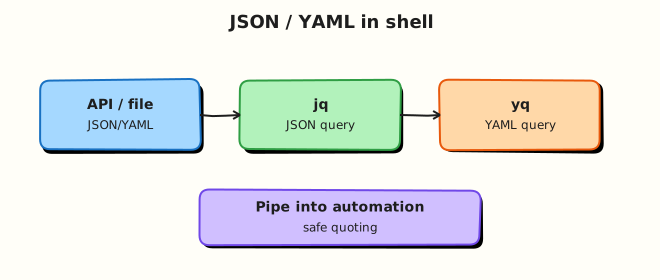
Scripts receive JSON/YAML from APIs or files, select fields with jq/yq, assert contracts, then continue automation or fail fast.
Theory
What it is
JSON is a structured text format with objects, arrays, strings, numbers, booleans, and null. YAML is indentation-based and often used for Kubernetes and Ansible; many YAML files map cleanly to JSON data models. jq reads JSON from a file or stdin and applies a filter (for example .name, .spec.replicas). yq applies similar expressions to YAML documents.
Why it matters
APIs and cluster tools return structured data. If your script greps for a word, a harmless log line can fake success. Field asserts catch wrong environments, missing images, or zero replicas before you roll out. Platform teams use the same pattern in CI: fetch → parse → assert → deploy.
How it works
- Validate JSON —
jq empty file.jsonorjq . file.json(fails on bad JSON). - Select —
jq -r '.key'raw string;jq '.list | length'for counts. - Assert — compare to expected values; exit non-zero on mismatch.
- YAML — with
yq eval/yq -r(syntax varies slightly by version); or convert carefully. - Fallback — if
yqis missing, convert a controlled sample with a small Python one-liner only when Python is available, or skip YAML asserts and recordyq=SKIP— do not invent YAML parsing in pure Bash.
name=$(jq -r '.service.name' config.json)
[[ "$name" == "payments" ]] || { echo "bad name: $name" >&2; exit 1; }
Key concepts and comparisons
| Tool | Best for | Notes |
|---|---|---|
jq | JSON APIs, kubectl -o json | Ubiquitous in CI images |
yq | Kubernetes/Ansible YAML | Confirm Mike Farah v4 vs older Python yq |
grep/sed | Simple logs | Fragile for nested structure |
Python json/yaml | Complex transforms | Heavier; good fallback in controlled images |
| Pattern | Prefer when | Avoid when |
|---|---|---|
jq -e / explicit test | CI gates | Ignoring exit codes |
-r for shell vars | Feeding next commands | Forgetting quotes around results |
Pin jq/yq versions | Shared pipelines | Assuming every laptop matches CI |
| Redact secrets | Debug logs | jq . on files with tokens |
Common pitfalls
- Using
grepfor nested JSON and matching the wrong line. - Forgetting
jqexits non-zero on invalid JSON — catch and explain it. - Mixing
yqv3 (Python) syntax with v4 (Go) syntax. - Pretty-printing whole secrets objects in CI logs.
- Unquoted
$(jq …)results that split on spaces.
Hands-on Lab
Objective
Create sample JSON and YAML, assert fields with jq, and parse YAML with yq when installed (or a documented fallback). Save evidence under ~/rebash-shell/lab14.
Prerequisites
jqrequiredyqoptional (v4 preferred); Python 3 optional for fallback
Lab environment
Workspace: ~/rebash-shell/lab14
mkdir -p ~/rebash-shell/lab14 && cd ~/rebash-shell/lab14
set -euo pipefail
command -v jq | tee jq-path.txt
jq --version | tee jq-version.txt
if command -v yq >/dev/null 2>&1; then yq --version | tee yq-version.txt; else echo 'yq=not-installed' | tee yq-version.txt; fi
Expected output
jq path and version recorded; yq-version.txt notes installed or not.
Real-world scenario
A deploy job receives an app descriptor as JSON and a small Kubernetes-style YAML snippet. Before rollout, the pipeline must prove service.name, service.port, and replicas match the change ticket. If yq is missing on a laptop, the lab still proves JSON asserts and records how YAML was handled.
Step-by-step tasks
Task 1 – Sample files and jq asserts
Create app.json:
{
  "service": {
    "name": "payments",
    "port": 8080,
    "env": "lab"
  },
  "replicas": 2,
  "image": "ghcr.io/example/payments:1.4.2"
}
Create app.yaml:
apiVersion: apps/v1
kind: Deployment
metadata:
  name: payments
  labels:
    app: payments
spec:
  replicas: 2
  template:
    spec:
      containers:
        - name: payments
          image: ghcr.io/example/payments:1.4.2
          ports:
            - containerPort: 8080
Run:
cd ~/rebash-shell/lab14
set -euo pipefail

jq empty app.json
name=$(jq -r '.service.name' app.json)
port=$(jq -r '.service.port' app.json)
replicas=$(jq -r '.replicas' app.json)
image=$(jq -r '.image' app.json)

{
  echo "json_name=${name}"
  echo "json_port=${port}"
  echo "json_replicas=${replicas}"
  echo "json_image=${image}"
} | tee jq-fields.txt

[[ "$name" == "payments" ]]
[[ "$port" == "8080" ]]
[[ "$replicas" == "2" ]]
[[ "$image" == "ghcr.io/example/payments:1.4.2" ]]
echo "jq_asserts=OK" | tee jq-asserts.txt
Expected output
jq-fields.txt lists the four fields; jq-asserts.txt says OK.
Task 2 – Negative assert (must fail)
cd ~/rebash-shell/lab14
set -euo pipefail

set +e
bad=$(jq -r '.service.name' app.json)
[[ "$bad" == "wrong-name" ]]
ec=$?
set -e
echo "negative_test_exit=$ec" | tee jq-negative.txt
test "$ec" -ne 0
Expected output
negative_test_exit is non-zero (assert correctly rejected the wrong name).
Task 3 – yq when installed, fallback otherwise
cd ~/rebash-shell/lab14
set -euo pipefail

parse_yaml() {
  if command -v yq >/dev/null 2>&1; then
    # Mike Farah yq v4 style; also works with many distro packages
    yq_name=$(yq -r '.metadata.name' app.yaml 2>/dev/null \
      || yq eval '.metadata.name' app.yaml -r)
    yq_replicas=$(yq -r '.spec.replicas' app.yaml 2>/dev/null \
      || yq eval '.spec.replicas' app.yaml -r)
    echo "yaml_tool=yq" | tee yaml-parse.txt
    echo "yaml_name=${yq_name}" | tee -a yaml-parse.txt
    echo "yaml_replicas=${yq_replicas}" | tee -a yaml-parse.txt
    [[ "$yq_name" == "payments" ]]
    [[ "$yq_replicas" == "2" ]]
    echo "yaml_asserts=OK" | tee yaml-asserts.txt
  elif command -v python3 >/dev/null 2>&1; then
    python3 - << 'PY' | tee yaml-parse.txt
import sys
try:
    import yaml
except ImportError:
    print("yaml_tool=skip")
    print("yaml_asserts=SKIP reason=no-yq-no-pyyaml")
    sys.exit(0)
with open("app.yaml", encoding="utf-8") as f:
    data = yaml.safe_load(f)
name = data["metadata"]["name"]
replicas = data["spec"]["replicas"]
print("yaml_tool=python3-pyyaml")
print(f"yaml_name={name}")
print(f"yaml_replicas={replicas}")
if name != "payments" or replicas != 2:
    sys.exit(1)
print("yaml_asserts=OK")
PY
    # Normalise assert file
    if grep -q 'yaml_asserts=OK' yaml-parse.txt; then
      echo "yaml_asserts=OK" | tee yaml-asserts.txt
    else
      echo "yaml_asserts=SKIP" | tee yaml-asserts.txt
    fi
  else
    echo "yaml_tool=skip" | tee yaml-parse.txt
    echo "yaml_asserts=SKIP reason=no-yq-no-python" | tee yaml-asserts.txt
  fi
}

parse_yaml
grep -Eq 'yaml_asserts=(OK|SKIP)' yaml-asserts.txt

tar -czf json-yaml-evidence.tgz \
  jq-path.txt jq-version.txt yq-version.txt \
  app.json app.yaml jq-fields.txt jq-asserts.txt jq-negative.txt \
  yaml-parse.txt yaml-asserts.txt
ls -l json-yaml-evidence.tgz | tee evidence-ls.txt
Expected output
YAML path is OK (via yq or PyYAML) or honest SKIP; archive exists.
Validation steps
-
jq empty app.jsonsucceeds - Field asserts pass for name, port, replicas, image
- Negative name assert fails as expected
-
yaml-asserts.txtisOKor documentedSKIP -
json-yaml-evidence.tgzexists under~/rebash-shell/lab14
Common errors and fixes
| Error | Cause | Fix |
|---|---|---|
jq: command not found | Not installed | sudo apt-get install -y jq |
yq syntax error | v3 vs v4 | Try yq eval '…' file -r or install mikefarah/yq |
null from jq | Wrong path | jq '.' file to explore; fix the filter |
| PyYAML missing | Fallback import fails | Install yq, or pip install pyyaml in a venv, or accept SKIP |
| Word-splitting | Unquoted $(jq …) | Always quote: "$name" |
Challenge exercise
Write assert-app.sh that takes a JSON file path as $1, asserts .replicas >= 1 and .service.port == 8080 using jq, and exits 0/1 accordingly. Prove with app.json (pass) and a tiny bad fixture bad.json with "replicas": 0 (fail). Keep both fixtures in the lab folder.
Learning outcomes
- Parsed and asserted JSON fields with
jq - Proved a negative assertion fails
- Parsed YAML with
yqor a documented fallback - Packed evidence for a change ticket
Cleanup
cd ~/rebash-shell/lab14
set -euo pipefail
# Keep samples/evidence if you want; otherwise:
# rm -f json-yaml-evidence.tgz *.txt bad.json assert-app.sh
# Optional: rm -f app.json app.yaml
Validation
- Lab finished under
~/rebash-shell/lab14/with evidence files - You can explain why
jqbeatsgrepfor nested JSON - You can assert required fields and fail CI on mismatch
- You know how to handle missing
yqhonestly
Code Walkthrough
In real pipelines, structured config checks usually follow this order:
- Validate parse — reject broken JSON/YAML early
- Select only needed fields — do not dump whole secret objects
- Assert contracts — name, port, replicas, image tag
- Fail non-zero — blockers for deploy jobs
- Pin tool versions — same
jq/yqin CI and docs
Bash stays the glue; jq/yq do the structure work.
Security Considerations
- Redact tokens, passwords, and private keys before logging
jqoutput - Prefer pulling secrets from a secret store, not from committed JSON
- Treat API JSON as untrusted until asserted
- Do not
curl \| jqsensitive admin APIs on shared screen shares without care - Keep write operations (
yq -i) behind review — easy to rewrite manifests wrongly
Common Mistakes
Grepping JSON for success
A word in a comment or message can fake a pass. Fix: jq field asserts with exit codes.
Assuming every image has yq
Laptops and slim CI images differ. Fix: install in the image, or skip with an explicit SKIP reason.
Dumping full documents in CI
Secrets leak into log archives. Fix: print only the fields you assert.
Unquoted jq results in Bash
Paths and names with spaces break. Fix: "$var" always.
Best Practices
- Check
jq empty/ parse before business asserts - Use
-rwhen feeding shell variables - Keep sample fixtures next to the script for unit-style checks
- Prefer mikefarah
yqv4 syntax in new docs and pin it - Combine with ShellCheck for the surrounding Bash
Troubleshooting
| Symptom | Likely cause | Fix |
|---|---|---|
parse error | Invalid JSON/YAML | Fix commas/indent; validate with jq/yq |
Cannot index | Wrong type at path | Inspect with jq '.' / yq '.' |
yq unexpected | Wrong major version | Check yq --version; align syntax |
| Assert always passes | Compared wrong variable | Tee fields before [[ ]] |
| CI-only failure | Tool missing in image | Install jq/yq in the CI image |
Summary
JSON and YAML are the data plane of cloud automation. Use jq to select and assert JSON fields; use yq for YAML when available, with an honest fallback when it is not. Fail early on contract mismatches, and keep secrets out of logs. Next, run scripts on a schedule in Scheduling — cron, at, and Timers.
Interview Questions
1. Why is jq safer than grep for checking a field in API JSON?
Reveal answer
grep matches text anywhere, including messages and unrelated keys. jq walks the structure and reads one field (for example .service.name). Invalid JSON fails the parse. That makes CI gates much more reliable.
2. What does jq -r do, and when do you want it?
Reveal answer
-r prints raw strings without JSON quotes. Use it when the value becomes a shell variable or a filename. Keep normal (non-raw) output when you need valid JSON for the next jq stage.
3. How do you fail a deploy script if .replicas is missing or zero?
Reveal answer
Read with jq -r '.replicas' (or jq -e '.replicas > 0'), then test in Bash or use jq’s exit status. Exit non-zero before any rollout command. Interviewers want a hard gate, not a warning-only log line.
4. What is a practical difference between common yq versions?
Reveal answer
The popular Mike Farah Go yq (v4) uses yq '.path' file / yq eval style filters similar to jq. Older Python yq wraps jq differently. Always check yq --version and pin the tool in CI so filters do not break.
5. How should a script behave if yq is not installed?
Reveal answer
Either install it in the platform image (preferred for YAML-heavy pipelines), or fail clearly / skip with an explicit reason when YAML checks are optional. Silent success without parsing YAML is the worst option.
6. How do you avoid leaking secrets when debugging jq in CI?
Reveal answer
Select only non-secret fields, mask values, and never archive full jq . dumps of credential objects. Prefer secret stores and short-lived tokens over committed JSON secrets.
7. When would you switch from Bash+jq to Python for config processing?
Reveal answer
Switch when transforms are multi-step, need YAML merge libraries, complex validation, or shared modules across tools. Keep Bash+jq for small asserts and glue. “Right-sized tooling” is a strong interview answer.
Related Tutorials
- Shell Scripting for DevOps Engineers – Overview
- Networking Automation with Shell (previous)
- Scheduling — cron, at, and Timers (next)
- Text Processing in Shell Scripts (related)
References
- jq manual — filters and invocation
- yq (mikefarah) documentation — YAML processing
- JSON RFC 8259 — JSON data interchange
- Track index: Shell Scripting for DevOps Engineers