Writing Your First Script
Overview
A command you type once in a terminal is not automation. A shell script is a text file that names an interpreter, runs a clear sequence of commands, accepts inputs, and returns an exit code so Continuous Integration (CI), cron, and monitoring know whether the job succeeded.
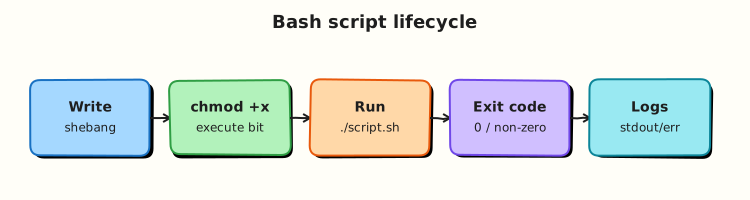
The first line is the shebang (for example #!/usr/bin/env bash). It tells the kernel which program should read the file when you run ./script.sh. You also need the execute permission (chmod +x). Without it, Linux returns Permission denied even if the script text is correct. You can still run bash script.sh without the execute bit — useful in debugging — but production jobs usually call an executable path with a shebang.
Every process ends with an integer exit status from 0 to 255. By convention 0 means success and any other value means failure. Callers such as GitHub Actions, systemd, and Ansible check that number. From this module onward, production scripts enable strict mode: set -euo pipefail. -e stops on failed commands, -u treats unset variables as errors, and pipefail fails a pipeline if any stage fails. Together they turn silent mistakes into loud, early failures.
This is Tutorial 2 in Module 2: Writing Your First Script of the REBASH Academy Shell Scripting for DevOps Engineers series. It is written for Linux administrators, DevOps engineers, Site Reliability Engineering (SRE), and platform engineers. By the end you will ship a small script with arguments, usage text, and a documented exit-code contract.
Prerequisites
- Shell Fundamentals — Bash vs sh and Execution
- A practice Ubuntu 22.04/24.04 environment with Bash
- Comfort creating files and running commands from Module 1
Learning Objectives
By the end of this tutorial, you will be able to:
- Write a script with a Bash shebang and make it executable with
chmod +x - Run a script as
./script.shand withbash script.sh, and explain the difference fromsource - Read positional arguments (
$1,$#) and print a usage message when input is missing - Return meaningful exit codes for success, usage errors, and runtime failures
- Enable
set -euo pipefailand prove that a failed command stops the script
Architecture
A script file is a contract between humans, schedulers, and tools. The shebang selects Bash; permissions allow execution; arguments and exit codes form the interface other automation consumes.
Theory
What it is
A shell script is a plain text file that:
- Starts with a shebang naming the interpreter
- Contains commands, comments, and (later) functions
- Ends with an exit status that callers can check
env finds bash on PATH. On fixed images, #!/bin/bash is also fine. Comments start with # and should explain why, not repeat what the next line already shows.
Why it matters
Ad-hoc history lines have no review trail, no stable exit status, and no safe place for teammates to improve the steps. CI needs a file in Git. Schedulers need a predictable interpreter. Strict mode prevents the common outage pattern: a command fails in the middle, the script continues, and a later step “succeeds” on bad data. A small, structured script is the unit of delivery for Linux admin glue work.
How it works
Make it runnable
chmod +x greet.sh
./greet.sh          # needs execute bit + shebang
bash greet.sh       # execute bit optional
Arguments — $0 is the script name, $1 is the first argument, $# is the count, "$@" is all arguments as separate words (quote it).
Exit codes — document a small set for teammates:
| Code | Meaning (example contract) |
|---|---|
| 0 | Success |
| 2 | Usage / bad arguments |
| 3 | Missing dependency or file |
| 4 | Runtime failure |
Strict mode (from this module onward):
-e— exit when a command fails (with a few careful exceptions aroundiftests)-u— error on unset variables-o pipefail— pipeline status is the first failed stage, not only the last command
Key concepts and comparisons
| Invocation | Effect |
|---|---|
./script.sh | New process; needs +x and a shebang |
bash script.sh | Explicit Bash; +x optional |
source script.sh | Runs in current shell — can mutate it |
| Without strict mode | With set -euo pipefail |
|---|---|
| Failed commands may be ignored | Script stops on failure |
| Typos in variable names expand empty | Unset variables abort the run |
false \| true can look successful | Pipeline fails if false failed |
Common pitfalls
- Omitting the shebang and relying on whoever typed
bashthis time. - Forgetting
chmod +xand blaming the wrong cause forPermission denied. - Using
sourcefor scheduled jobs soexitdamages the caller. - Returning only
0/1with no documented meaning for CI. - Enabling
-ebut testing failure only on the happy path.
Hands-on Lab
Objective
Build a small ops script under ~/rebash-shell/lab02 with shebang, execute bit, argument handling, exit codes, and a separate demo that proves strict mode stops on failure.
Prerequisites
- Ubuntu 22.04/24.04 with Bash
- Completed Module 1 lab folder ideas (no dependency on its files)
- No root required
Lab environment
Workspace: ~/rebash-shell/lab02
mkdir -p ~/rebash-shell/lab02 && cd ~/rebash-shell/lab02
set -euo pipefail
whoami | tee lab-user.txt
command -v bash | tee bash-path.txt
Expected output
lab-user.txt and bash-path.txt exist; shell is using set -euo pipefail for the lab session.
Real-world scenario
Your team needs a tiny host check script for CI: it must accept a hostname argument, refuse to run without it, print a clear usage message on stderr, and exit 2 for bad usage and 0 on success. You also need a demo that proves set -e actually stops a broken job.
Step-by-step tasks
Task 1 – Shebang, chmod, and a first successful run
Create hello.sh:
#!/usr/bin/env bash
set -euo pipefail

printf 'hello from %s\n' "$(hostname -s)" | tee hello.out
Run:
cd ~/rebash-shell/lab02
set -euo pipefail

chmod +x hello.sh
./hello.sh
test -s hello.out
head -n1 hello.sh | tee shebang.txt
grep -q 'env bash' shebang.txt
ls -l hello.sh | tee hello-perms.txt
grep -q 'x' <<< "$(stat -c '%A' hello.sh)"
Expected output
hello.out has a greeting; shebang.txt shows #!/usr/bin/env bash; hello.sh is executable.
Task 2 – Arguments, usage message, and exit codes
Create hostcheck.sh:
#!/usr/bin/env bash
set -euo pipefail

usage() {
  printf 'Usage: %s <hostname>\n' "$0" >&2
  exit 2
}

if [[ $# -lt 1 ]]; then
  usage
fi

target="$1"
printf 'checking host=%s\n' "$target"
printf 'ok host=%s\n' "$target" | tee "check-${target}.txt"
exit 0
Run:
cd ~/rebash-shell/lab02
set -euo pipefail

chmod +x hostcheck.sh

# Success path
./hostcheck.sh labhost
test -s check-labhost.txt
grep -q 'ok host=labhost' check-labhost.txt

# Missing argument must exit 2 and print usage to stderr
set +e
./hostcheck.sh >usage.stdout 2>usage.stderr
rc=$?
set -e
echo "usage_exit=$rc" | tee usage-exit.txt
test "$rc" -eq 2
grep -q 'Usage:' usage.stderr
test ! -s usage.stdout
Expected output
check-labhost.txt exists; usage_exit=2; usage.stderr contains Usage:.
Task 3 – Prove strict mode stops on failure
Create strict-demo.sh:
#!/usr/bin/env bash
set -euo pipefail

echo "step=1" | tee strict-steps.txt
false
echo "step=2-should-not-run" | tee -a strict-steps.txt
Create loose-demo.sh:
#!/bin/bash
echo "loose-step=1" | tee loose-steps.txt
false
echo "loose-step=2" | tee -a loose-steps.txt
Run:
cd ~/rebash-shell/lab02
set -euo pipefail

chmod +x strict-demo.sh

set +e
./strict-demo.sh >strict.stdout 2>strict.stderr
rc=$?
set -e
echo "strict_exit=$rc" | tee strict-exit.txt
test "$rc" -ne 0
grep -q 'step=1' strict-steps.txt
grep -q 'step=2-should-not-run' strict-steps.txt && exit 1 || true

# Contrast: without -e the second echo would run
chmod +x loose-demo.sh
set +e
./loose-demo.sh >/dev/null
set -e
grep -q 'loose-step=2' loose-steps.txt

tar -czf first-script-evidence.tgz \
  lab-user.txt bash-path.txt shebang.txt hello-perms.txt hello.out \
  check-labhost.txt usage-exit.txt usage.stderr \
  strict-exit.txt strict-steps.txt loose-steps.txt
ls -l first-script-evidence.tgz | tee evidence-ls.txt
Expected output
strict_exit is non-zero; strict-steps.txt has step 1 only; loose-steps.txt includes step 2; evidence archive exists.
Validation steps
-
hello.shruns via./hello.shand has a Bash shebang -
hostcheck.shexits0with an argument and2without one - Usage text goes to stderr, not stdout
- Strict demo stops before the second step
-
first-script-evidence.tgzexists under~/rebash-shell/lab02
Common errors and fixes
| Error | Cause | Fix |
|---|---|---|
Permission denied | No execute bit | chmod +x script.sh |
unbound variable | set -u and missing $1 | Check $# before reading $1 |
Usage exits 0 | Forgot exit 2 | Return a non-zero code after printing usage |
| Strict demo still prints step 2 | Shebang not Bash / no set -e | Confirm file content and re-run |
Challenge exercise
Extend hostcheck.sh into hostcheck-v2.sh that requires two arguments (hostname and env), validates that env is one of lab, staging, or prod, writes result.txt with host=... and env=..., exits 2 on bad usage, and exits 3 if env is invalid. Keep set -euo pipefail.
Learning outcomes
- Shipped an executable Bash script with a correct shebang
- Validated arguments and exit codes for CI-style callers
- Proved strict mode fail-fast behaviour with evidence
Cleanup
cd ~/rebash-shell/lab02
rm -f loose-demo.sh strict.stdout strict.stderr usage.stdout
# Keep hostcheck.sh and the evidence archive for review, or:
# rm -rf ~/rebash-shell/lab02
Validation
- Lab finished under
~/rebash-shell/lab02/with evidence files - You can explain shebang,
chmod +x, and exit-code contracts - You can explain each flag in
set -euo pipefail - You know when to use
./script.shversussource
Code Walkthrough
A production-oriented first script usually follows this shape:
- Shebang —
#!/usr/bin/env bash - Strict mode —
set -euo pipefailimmediately after - Usage / constants — fail closed on bad arguments
- Main work — small, linear steps with clear stderr messages
- Exit — explicit
exit 0or a documented non-zero code
Keep scripts short enough to review in one merge request. Later modules add quoting, streams, and functions; the skeleton stays the same.
Security Considerations
- Treat arguments and environment variables as untrusted until validated
- Never log secrets (tokens, passwords) in usage or debug output
- Prefer least privilege — do not require root for file-local checks
- Avoid
evalon user input - Store scripts in Git with code review; do not copy unknown scripts from chat into production hosts
Common Mistakes
Skipping chmod +x and the shebang
Permission denied or the wrong interpreter appears. Fix: set line 1 correctly and run chmod +x.
Checking arguments after expanding $1 under set -u
The script dies with unbound variable before usage text. Fix: test $# first, then assign target="$1".
Printing errors on stdout
CI parsers and pipes consume usage text as data. Fix: send diagnostics to stderr with >&2.
Omitting strict mode “until later”
Silent failures reach production first. Fix: enable set -euo pipefail from the first ops script.
Best Practices
- One purpose per script; compose later with functions
- Document exit codes in a short header comment
- Log progress to stderr; keep stdout for data when piping
- Pair every new script with one deliberate failure-path test
- Run ShellCheck in CI before merging automation
Troubleshooting
| Symptom | Likely cause | Fix |
|---|---|---|
Permission denied on ./script.sh | Not executable or no shebang exec | chmod +x; fix shebang; check mount noexec |
command not found on first line | Windows CRLF / bad shebang | Rewrite with Unix line endings |
| Script continues after failure | Missing set -e | Add strict mode; re-test with false |
unbound variable | set -u + missing arg/env | Validate inputs; provide defaults where safe |
| CI ignores failure | Always exit 0 or wrong step continue | Return non-zero; check CI set -e behaviour |
Summary
A real script needs a shebang, execute permission, clear arguments, and honest exit codes. Strict mode makes failures visible early. Practise the lab until the usage path and the strict-mode failure path feel as familiar as the happy path, then continue to Variables, Quoting, and Arithmetic.
Interview Questions
1. What does the shebang do, and what happens if it is missing when you run ./script.sh?
Reveal answer
The shebang is the first line (#!...) that tells the kernel which interpreter should execute the file. If it is missing or wrong, ./script.sh may fail or run under an unexpected interpreter. You can still run bash script.sh explicitly. Production jobs should include a correct shebang so schedulers do not depend on how a human typed the command.
2. Why do ops scripts use set -euo pipefail, and what does each part do?
Reveal answer
-e exits when a command fails, -u errors on unset variables, and pipefail makes a pipeline fail if any stage fails (not only the last command). Together they prevent silent continuation after errors — a common cause of bad deploys and false-green CI. Interviewers want this explanation plus an example of testing the failure path.
3. How should a script report bad usage, and which exit code would you choose?
Reveal answer
Print a short Usage line to stderr, then exit with a dedicated code such as 2 (common convention for misuse). Do not print usage on stdout if callers pipe the script. Document the code in a header comment so CI and teammates share the same contract.
4. What is the difference between ./script.sh, bash script.sh, and source script.sh?
Reveal answer
./script.sh starts a new process and needs execute permission plus a shebang. bash script.sh also starts a new Bash process but does not need +x. source script.sh runs in the current shell, so cd, exit, and variable changes affect the caller. Use source for libraries; use a child process for jobs.
5. A junior engineer’s script always exits 0 even when grep finds nothing. What might be wrong?
Reveal answer
They may ignore grep’s exit status, run with set +e, or end with an unconditional exit 0. Under strict mode, a failing grep should abort unless it is intentionally handled (if grep ...; then). Fix the contract: success means the check passed, not merely that the script file finished.
6. How do you prove in a ticket that strict mode works?
Reveal answer
Show a minimal script that prints step 1, runs false, and would print step 2 — then attach output proving step 2 never ran and the exit code is non-zero. Optionally contrast with a script that lacks -e where step 2 does run. That evidence is clearer than claiming “we enabled best practices”.
7. Why send diagnostics to stderr instead of stdout?
Reveal answer
stdout is often parsed by the next pipe stage or captured as data. stderr is for humans, logs, and CI error views. Usage messages and progress belong on stderr so they do not corrupt JSON, CSV, or host lists on stdout.
Related Tutorials
- Shell Scripting for DevOps Engineers – Overview
- Shell Fundamentals — Bash vs sh and Execution (previous)
- Variables, Quoting, and Arithmetic (next)
References
- GNU Bash manual — Invoking Bash
- GNU Bash manual — The Set Builtin
chmod(1)— Ubuntu man-pages- ShellCheck
- Track index: Shell Scripting for DevOps Engineers